When evaluating premium options for your storefront, the $360 price tag on the Pipeline Shopify theme naturally raises a crucial question: is it actually worth the investment? Built specifically for lifestyle, apparel, and luxury brands, Pipeline promises a modular, storytelling-first design that looks gorgeous.
But a beautiful aesthetic is only half the battle. To truly justify the cost, a theme needs to deliver fast load times, intuitive navigation for growing catalogs, and built-in conversion features that save you from relying on expensive third-party apps.
In this review, we are going beyond the standard feature lists to analyze real performance metrics, explore live store examples, and help you decide if Pipeline is the right foundation for your eCommerce business.
⚡Quick Verdict: The Pipeline Shopify Theme
- Price: $360 USD
- Overall Rating: 98% Positive (based on over 200 reviews on the official Shopify Theme Store)
- Best For: Luxury, apparel, and lifestyle brands with large catalogs that prioritize high-end aesthetics and visual storytelling.
- Our Verdict: An excellent, feature-rich investment that easily justifies its price tag by providing premium merchandising tools and reducing the need for paid third-party apps.
The best way to know if a design fits your brand is to experience it firsthand. You can start a free trial of Shopify and test the Pipeline theme with your own products, completely risk-free, before ever committing to a purchase.
- The Store at MAD: Using Parallax Scrolling for Brand Storytelling
- Sunbleached: Mastering Minimalist Design & Frictionless UX
- Alias Mae: Showcasing Products with Elegant Collection Pages
- Eberjey: Maximizing AOV with Visual Navigation and Smart Upsells
- Gym+Coffee: Boosting Conversions with Speed and Social Proof
What is the Pipeline Shopify Theme? A Quick Overview
Developed by the acclaimed Shopify theme partner Groupthought, Pipeline is a premium theme designed to give brands a clean, minimalist, and sophisticated online presence. It consistently ranks as a top choice on the Shopify Theme Store for businesses that want to showcase high-resolution photography and blend rich editorial content with commerce.
Unlike multi-purpose themes that try to be everything for everyone, Pipeline focuses on a specific niche: lifestyle and luxury brands that need an elegant, story-driven layout. Its design is heavily inspired by modern fashion lookbooks and minimalist art galleries, emphasizing modular layouts, clean lines, and an exceptional mobile-first user experience.
Think of it as the architectural foundation for a high-end boutique. The theme provides a beautiful structure that allows your products and brand story to take center stage without unnecessary clutter or distractions.
Performance & Speed Test: How Fast is the Pipeline Theme?
In eCommerce, speed isn’t just a feature—it’s a requirement. A slow-loading site can directly impact your conversion rates and SEO rankings. For a premium theme like Pipeline, which is designed for high-resolution visuals, performance is a critical question. Is it beautifully designed and fast?
To get real, unbiased data, we ran the official “Pahoa” preset demo store through Google’s PageSpeed Insights. It’s important to note that demo stores are often packed with uncompressed, high-resolution images to showcase a theme’s maximum potential, which can lead to lower scores than a live, optimized store.
Here are our findings:
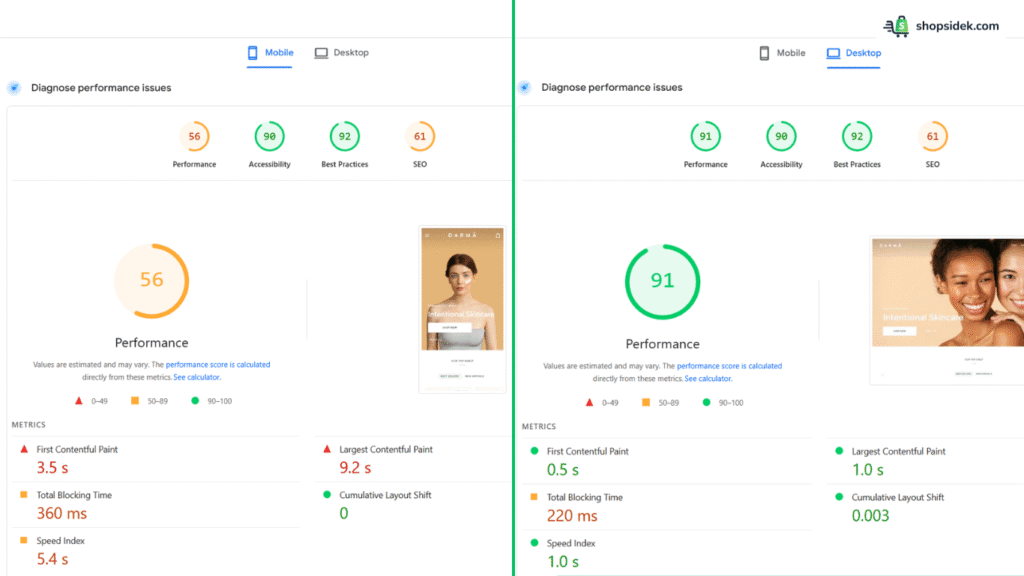
Mobile Performance:
- Overall Performance Score: 56
- Largest Contentful Paint (LCP): 9.2s
- Cumulative Layout Shift (CLS): 0
Desktop Performance:
- Overall Performance Score: 91
- Largest Contentful Paint (LCP): 1.0s
- Cumulative Layout Shift (CLS): 0.003
On desktop, Pipeline performs exceptionally well with a score of 91 and a rapid 1.0-second LCP. The mobile score of 56 and the slower LCP appear concerning at first glance, but this is almost certainly due to the large, unoptimized imagery used in the demo.
The most important metric here is the Cumulative Layout Shift (CLS), which is nearly perfect on both devices. This means the theme is incredibly stable as it loads, preventing frustrating layout jumps and providing a smooth user experience—a key factor for Core Web Vitals.
Independent theme auditor Rvere ranked Pipeline #30 for speed out of 83 popular themes. This indicates that its underlying code is well-built for performance. With standard image optimization practices, a live store running Pipeline can achieve excellent speed scores on both mobile and desktop.
🔧 Tools Worth Exploring for Store Optimization
- Tiny SEO Speed Image Optimizer – Improves site speed, compresses images, and fixes technical search issues.
- StoreSEO: AI SEO Blog & Image – Improves search visibility with AI-generated optimizations and schema support.
- SEO Manager – Helps manage metadata, broken links, and search snippet controls.
The 4 Pipeline Styles: Which Aesthetic Fits Your Brand?
When you install a new theme, staring at a blank canvas can be intimidating. Thankfully, the Groupthought team includes four distinct Pipeline theme styles (or presets). These presets act as a creative launchpad, allowing you to instantly apply a cohesive color palette, typography set, and layout structure to your storefront.
Before building your site from scratch, I highly recommend exploring the official Pipeline Shopify theme demo for each of these aesthetics to see which one best aligns with your brand’s visual identity.
Pipeline (Classic)
The flagship Pipeline preset offers a perfectly balanced, minimalist foundation that works beautifully for modern apparel and lifestyle brands. Its clean lines and ample whitespace allow your high-resolution product photography to command the screen without distraction.

Petra
Petra leans into a bolder, more editorial aesthetic with striking typography and highly structured content blocks. This style is an excellent choice for trend-forward fashion houses or streetwear brands that want to pair aggressive visual styling with rich storytelling.

Pahoa
Featuring a light, airy, and inviting design language, Pahoa feels immediately calming and organic. It is the ideal preset for wellness, skincare, or sustainable home goods brands looking to build trust through a soft, approachable aesthetic.

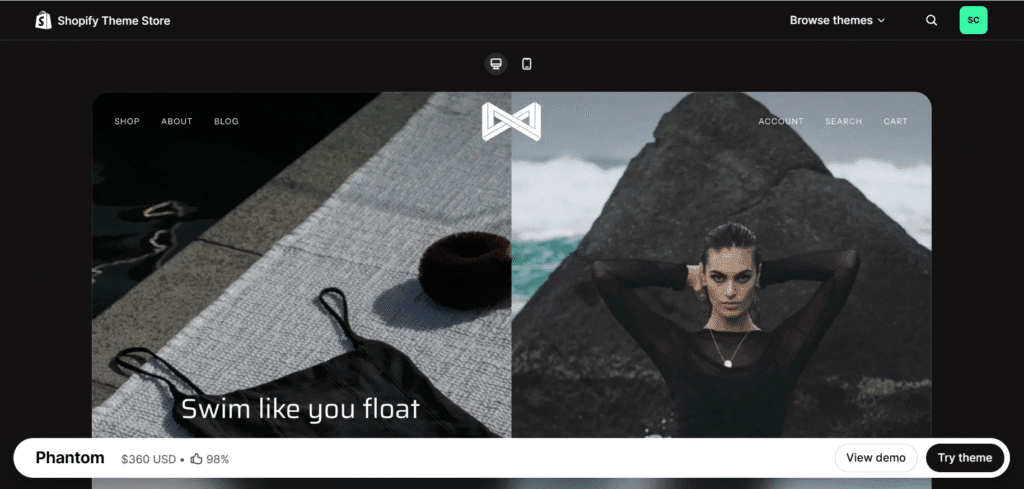
Phantom
Phantom delivers a sleek, sophisticated dark mode experience. By swapping bright backgrounds for deep, moody tones, it creates a high-end atmosphere perfectly suited for luxury electronics, automotive accessories, or edgy urban apparel.
Deep Dive: Pipeline’s 5 Standout Features (and How to Use Them)
A premium theme’s value isn’t just in its looks—it’s in the strategic tools baked into its code. The best Pipeline theme features are designed to improve user experience, drive conversions, and save you money on third-party apps. Here’s a breakdown of five standout features and how to leverage them for your store.
The Multi-Column Mega Menu for Large Catalogs
For stores with extensive product catalogs, a standard dropdown menu can quickly become a cluttered, overwhelming list. Pipeline’s multi-column mega menu solves this by transforming your navigation into a clean, organized visual guide. Instead of just listing links, you can group collections, feature new arrivals with images, and direct customers to key pages without them ever feeling lost.

How to Use It: Structure your menu logically to guide discovery. For an apparel brand, create columns for “Shop by Category” (Tops, Bottoms), “Shop by Collection” (Summer ’26), and even a promotional column with an image linking to your latest sale. This turns your navigation from a simple directory into a powerful merchandising tool.
Modular Homepage with Parallax Scrolling
Pipeline’s homepage is built on a modular, drag-and-drop system that empowers you to tell a compelling brand story. This is elevated by the parallax scrolling effect, where background images move slower than foreground content, creating a sense of depth and an immersive, high-end user experience that encourages visitors to keep exploring.

How to Use It: Think of your homepage as the first chapter of your brand’s story. Use the parallax hero section for a stunning, full-width lifestyle image. Follow it with modular blocks showcasing featured products, a video explaining your mission, and customer testimonials to build a narrative that flows seamlessly down the page.
Advanced Product Filtering and Sub-Collections
Nothing kills a sale faster than a customer who can’t find what they’re looking for. Pipeline’s advanced product filtering is a conversion-critical feature, especially for stores with large inventories. It allows shoppers to instantly refine collection pages by variables like size, color, price, and availability, creating the kind of smooth, frictionless shopping experience customers expect from a major retailer.

How to Use It: From my experience, the key is a meticulous product tagging strategy in your Shopify admin. By consistently tagging products (e.g., “color_blue,” “size_medium,” “material_cotton”), you empower the theme’s filter to work its magic. This helps customers quickly drill down from hundreds of products to the exact one they want, dramatically increasing your conversion rate.
Content-Rich Product Pages
Thanks to its full support for Shopify’s Online Store 2.0, Pipeline lets you treat every product page like a dedicated landing page. You can add, remove, and reorder a wide range of content sections—such as image galleries, collapsible tabs for FAQs, trust badges, and video blocks—to answer questions and overcome objections right at the point of purchase.
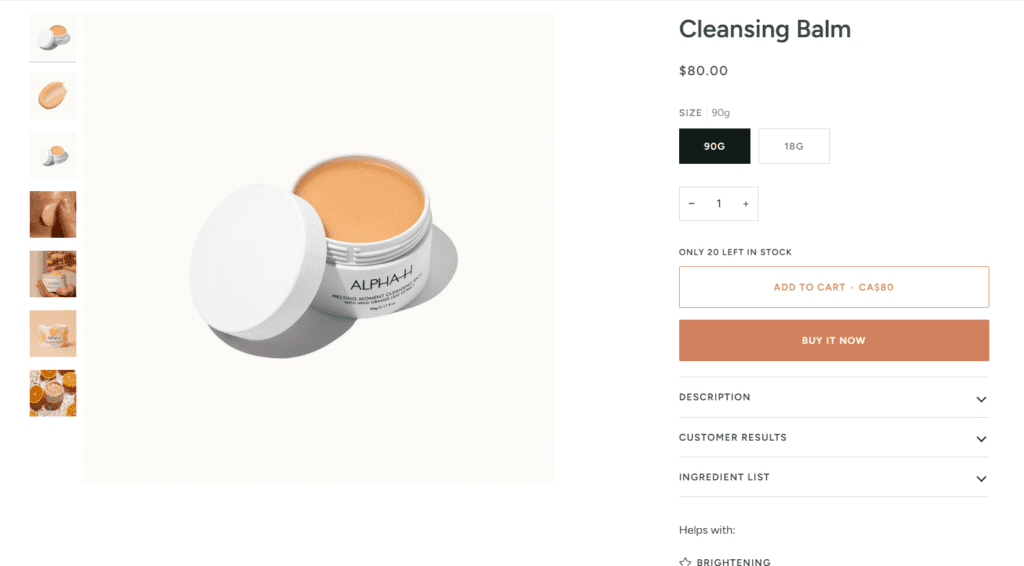
How to Use It: Go beyond a simple product description. Add a section with icons highlighting your value propositions (“Free Shipping,” “Sustainable Materials”). Don’t overlook the chance to use collapsible tabs to share sizing charts or care instructions. Embed a customer testimonial or a short video of the product in use to build trust and reduce purchase anxiety.
Built-in Marketing & Conversion Tools
Many essential marketing features require paid monthly apps that can slow down your site. Pipeline includes several of these tools natively, saving you money and protecting your store’s performance. Features like quick buy buttons, in-store pickup options, cross-selling sections, and promotional banners are all built directly into the theme.

How to Use It: Activate the “Quick Buy” option to allow customers to add items to their cart directly from collection pages. Use the site-wide announcement bar to promote a free shipping threshold. Configure the cross-selling feature to suggest complementary products in the cart, helping to increase your average order value without adding a single app.
Pipeline vs. The Competition: A Head-to-Head Comparison
No theme exists in a vacuum. When merchants search for a premium minimalist design, Pipeline is often evaluated against other top contenders like Impulse and Broadcast. While all three are excellent, feature-rich themes, they are designed with different strategic priorities in mind. Choosing the right one depends entirely on your business model and brand identity.
As a leading Pipeline theme alternative, Impulse is often praised for its powerful promotional features and merchandising flexibility, making it a favorite for high-volume stores. Broadcast, on the other hand, excels at integrating rich editorial content and blogs directly into the shopping experience.
To help you decide, here is my direct comparison of their core attributes based on the latest data.
| Feature | Pipeline | Impulse | Broadcast |
|---|---|---|---|
| Price | $360 USD | $400 USD | $420 USD |
| Performance Score | 91 / 100 (Desktop) | 82 / 100 (Desktop) | 82 / 100 (Desktop) |
| Best For | Luxury & lifestyle brands with a focus on visual storytelling. | High-volume stores that run frequent sales and promotions. | Content-heavy brands that use blogs and lookbooks to drive sales. |
| Mega Menu | Yes, multi-column with integrated product imagery. | Yes, with advanced layouts and promotional blocks. | Yes, with a focus on linking to editorial content. |
| Unique Feature | Immersive Storytelling: Best-in-class parallax scrolling and modular homepage blocks create a high-end, editorial feel. | Advanced Merchandising: Includes powerful tools like promotion tiles, sale banners, and sub-collection filtering. | Content Integration: Features like “Shop the Look” and enhanced blog layouts seamlessly blend content with commerce. |
The data makes the choice clearer. While Impulse offers more robust tools for flash sales and Broadcast is superior for heavy editorial content, Pipeline stands out as the best value. It is not only the most affordable option but also delivers significantly better desktop performance. It’s built for brands that sell a feeling first and a product second—without compromising on speed or price.
After comparing the options, it’s clear Pipeline excels for brands focused on premium design. See if it’s the right fit for you by trying the theme with an unlimited free trial.
5 Real Stores Using the Pipeline Theme (& What We Can Learn)
Looking at a demo store is helpful, but seeing a theme operating in the wild is the best way to understand its true potential. Here is how five highly successful Shopify brands are actively using the Pipeline Shopify theme to drive sales and elevate their digital storefronts.
The Store at MAD: Using Parallax Scrolling for Brand Storytelling
The official store for the Museum of Arts and Design uses Pipeline to masterfully segregate a diverse, eclectic catalog that goes far beyond simple accessories. Rather than a chaotic mix of items, they use the theme’s modular sections to create distinct visual “rooms.”

A full-width parallax banner introduces upcycled diamond jewelry, followed immediately by a curated grid. As you scroll further, new immersive hero images introduce distinct categories like timeless resin cubes, intricate beadwork, or artistic bonsai trees. This stacking strategy mimics the experience of walking through different gallery wings, allowing each unique art form to have its own dedicated storytelling moment.
Sunbleached: Mastering Minimalist Design & Frictionless UX
Sustainable swimwear brand Sunbleached leverages Pipeline to create a high-impact, retro-inspired aesthetic that doesn’t sacrifice usability. Their storefront opens with a massive, full-screen hero section that layers bold typography over vibrant lifestyle photography, immediately establishing the brand’s energetic vibe.

Critically, this minimalism extends to the buying experience. When a customer selects a size and clicks buy, the theme triggers a sleek, non-intrusive black notification bar at the very top of the viewport (confirming “Added to Cart“). Unlike aggressive pop-ups that block the product imagery, this subtle confirmation keeps the user immersed in the visual experience while ensuring a smooth, friction-free path to checkout.

Alias Mae: Showcasing Products with Elegant Collection Pages
Australian footwear brand Alias Mae demonstrates how to manage a variation-heavy catalog without clutter. They utilize Pipeline’s sidebar filtering (shown as a clean “Refine” menu) to let shoppers drill down not just by size, but by specific attributes like “Heel Height” (Low, Mid, High).

This functional utility is paired with a pristine, grid-based layout that prioritizes product visibility. By stripping away visual noise, the theme allows the subtle details of their footwear—such as the texture of “Crinkle Leather” or “Denim Suede”—to stand out, ensuring the shopping experience feels as premium as the product itself.
Eberjey: Maximizing AOV with Visual Navigation and Smart Upsells
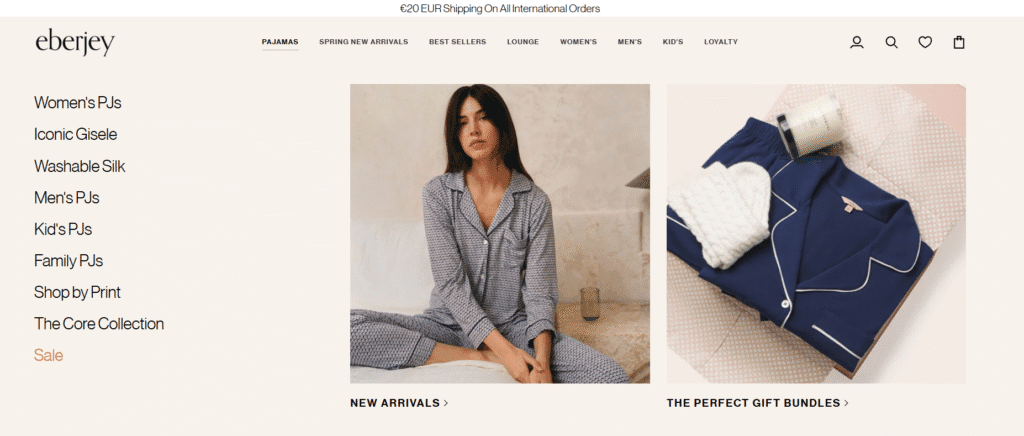
Luxury sleepwear brand Eberjey demonstrates how to scale a high-SKU store without overwhelming the customer. First, they master navigation using Pipeline’s visual mega menu. Instead of a boring text list, their dropdowns feature a clean category list on the left paired with two massive, shoppable images on the right (promoting “New Arrivals” and “Gift Bundles”). This turns the menu into a marketing asset that inspires immediate clicks.
Once on the product page, Eberjey aggressively targets Average Order Value (AOV) using the theme’s native “Bought Together” block. Because they sell matching pajama sets, they don’t leave the upsell to chance. Directly below the main product, they display the matching bottom with a “Quick View” button, allowing shoppers to add the complete set to their cart without ever leaving the page. This combination of inspiring navigation and frictionless cross-selling is a perfect playbook for increasing cart size.

Gym+Coffee: Boosting Conversions with Speed and Social Proof
Premium athleisure brand Gym+Coffee utilizes Pipeline to deliver a lightning-fast, high-converting mobile experience. They take full advantage of the theme’s built-in “Quick View” feature, allowing shoppers to select a size and add items—like their popular fleeces—to the cart directly from the collection grid without waiting for a new page to load.

To build immediate trust during this rapid interaction, they prominently integrate Judge.me star ratings (e.g., “806 Reviews”) directly beneath every product title. This powerful combination of frictionless purchasing and instant social proof is a proven playbook for scaling high-volume apparel brands.

The Honest Pros & Cons of Pipeline Shopify Theme
No Pipeline theme review would be complete without a transparent look at its limitations. While we highly recommend Pipeline for its polished aesthetic, it isn’t the perfect solution for every merchant.
💡Pro Tip: Using a dedicated Shopify theme matchmaker filter tool to input your specific needs can save you hours of research.
Below is an objective breakdown of the pros and cons based on our analysis and aggregated user feedback.
✅ The Pros
- Minimalist High-End Design: Delivers an immediate “luxury” feel with ample whitespace and elegant typography, perfect for fashion and lifestyle brands.
- Excellent Mobile Experience: The mobile interface is fast, intuitive, and designed to look like a native app, which is critical since 70%+ of traffic is mobile.
- Feature-Rich Toolkit: Includes powerful tools like “Quick Buy,” “In-Store Pickup,” and “Mega Menus”, saving you monthly fees on third-party apps.
- Superior Visual Storytelling: The modular homepage and parallax scrolling features allow you to build immersive brand narratives without touching code.
- Proven User Satisfaction: Boasts a 98% positive rating on the Shopify Theme Store and a perfect 5/5 score for “Value for Money” on the HeyCarson reviews platform.
❌ The Cons
- Higher Price Point: At $360 USD, it is a significant upfront investment compared to free themes or cheaper alternatives.
- Requires High-Quality Assets: Because the design relies heavily on photography, the theme can look flat or unprofessional if you don’t have high-resolution brand imagery.
- Steeper Learning Curve: Beginners without a clear brand vision may find the advanced customization options overwhelming initially.
- Complex Customizations: While the theme is flexible, achieving highly specific, non-standard layouts may still require hiring a Shopify developer.
Final Verdict: Is the Pipeline Shopify Theme Worth It in 2026?
After a comprehensive analysis of its speed, features, and real-world performance, our verdict is clear: the Pipeline Shopify theme is one of the best investments a lifestyle brand can make. While the $360 USD price tag is higher than average, you are paying for a polished, “app-like” user experience that usually costs thousands of dollars in custom development to achieve.
Overall Rating
9.0/10For generic dropshipping stores or businesses with low-quality imagery, this theme is overkill. However, for fashion, beauty, and home goods brands that rely on visual storytelling, Shopify themes pipeline offers an unrivaled foundation. The cost is quickly justified by the money you save on third-party apps—since features like the mega menu, advanced filtering, and lookbook modules are built right in.
If you want your store to look like a high-end boutique rather than a digital warehouse, Pipeline is the standard-bearer for 2026.
Ready to build your store with a world-class design?
Get started with Shopify today and install the Pipeline theme to bring your brand to life.

Just a heads-up: As a Shopify Media Partner, I may earn a small commission if you sign up. It won’t cost you anything, and it helps me continue providing free resources.
Pipeline Shopify Theme FAQs
What kind of support comes with the Pipeline theme?
Groupthought, the developer behind Pipeline, provides dedicated support for all license holders. Their support covers bug fixes, questions about theme settings, and general setup assistance.
They also maintain a comprehensive Shopify Pipeline theme documentation library that walks you through every feature. However, standard support does not cover extensive custom coding or third-party app integrations. For advanced customizations, you may need to hire a Shopify expert.
Is the Pipeline theme updated for Shopify OS 2.0?
Yes. Pipeline is fully optimized for Shopify’s Online Store 2.0 architecture. This means you get “sections everywhere” (allowing you to add dynamic sections to any page, not just the homepage), support for app blocks, and improved performance. This architecture gives you significantly more drag-and-drop control over your store’s layout without needing to touch the code.
Can I try the Pipeline Shopify theme before I buy it?
Absolutely. Shopify allows you to install the Pipeline theme as an “unpublished” theme for free. You can customize the design, upload your products, and test every feature in the backend for as long as you like. You will only be charged the $360 USD one-time fee when you decide to publish the theme to your live store.