
Affiliate Disclosure: I partner with Shopify as an official Media Partner. If you sign up using my link, I may receive a small commission at no extra cost to you. Thank you for supporting the content I create.
Free Shopify tool
Shopify Pricing Calculator
Compare Basic, Grow and Advanced on what you would really pay each month: the plan, card fees, other payment gateways, apps and theme.
Your store
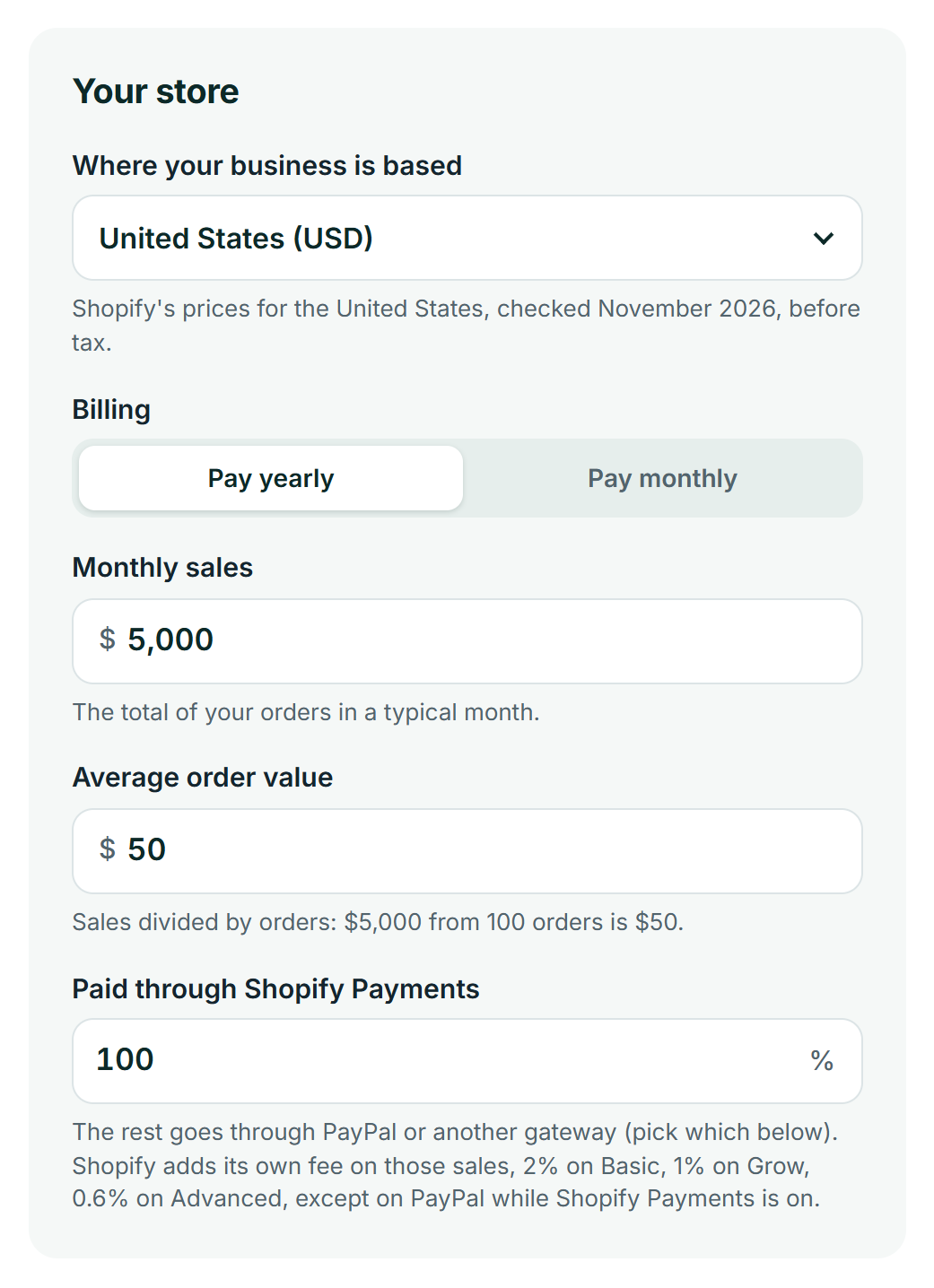
The total of your orders in a typical month.
Sales divided by orders: $5,000 from 100 orders is $50.
Other gateways, apps and theme
Other gateway rate
What PayPal or your other gateway charges per payment. Check its pricing page.
Reviews, email, upsells: everything billed monthly.
A paid theme is paid once. It counts here as one twelfth a month, over a year.
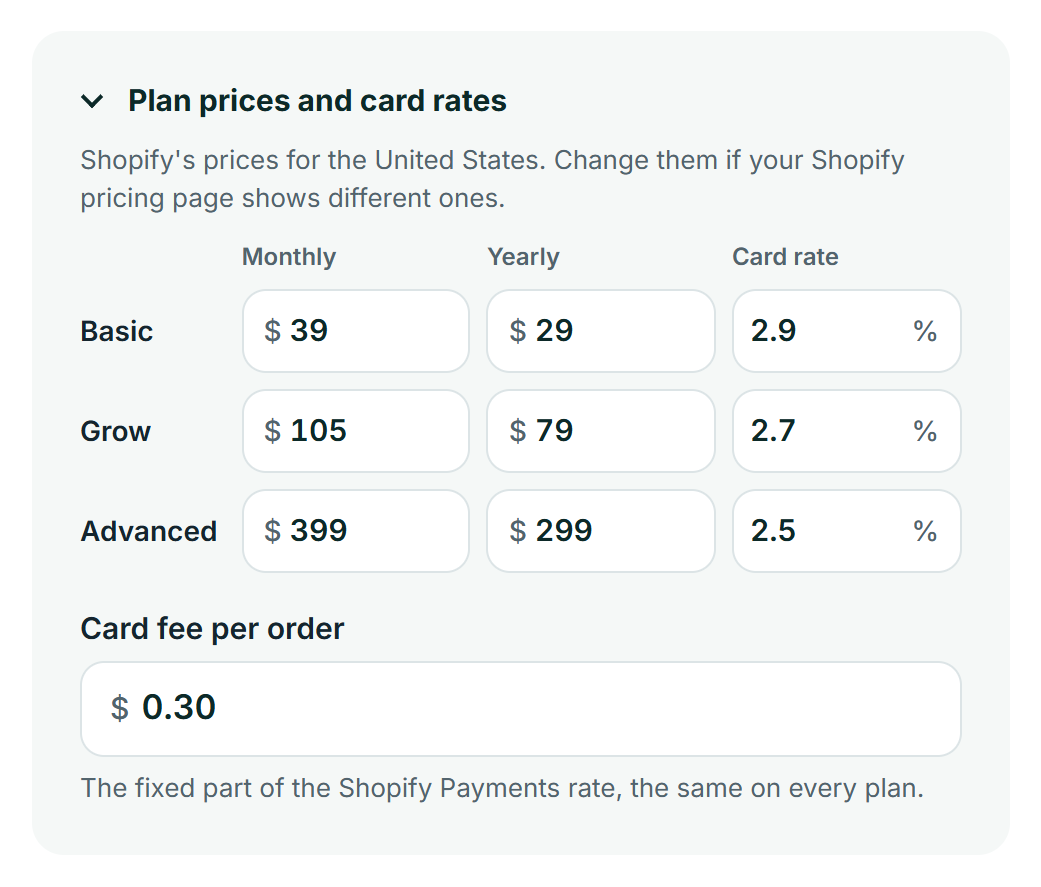
Plan prices and card rates
Basic
Grow
Advanced
The fixed part of the Shopify Payments rate, the same on every plan.
Your monthly cost
Every plan, side by side
| Plan | Plan price | Shopify Payments | Other gateways | Apps & theme | Total a month |
|---|---|---|---|---|---|
| BasicCheapest For solo founders | – | – | – | – | – |
| GrowCheapest Up to 5 staff accounts | – | – | – | – | – |
| AdvancedCheapest Up to 15 staff accounts and live 3rd-party shipping rates | – | – | – | – | – |

The Only Shopify Pricing Calculator You’ll Ever Need
Figuring out what you’ll actually pay for Shopify can feel tricky. Beyond the monthly plan price, there are transaction fees, payment processing rates, and other costs that determine your final bill. The simple sticker price doesn’t tell the whole story, and that uncertainty can make it hard to budget with confidence.
That’s why we built this all-in-one Shopify pricing calculator. It’s designed to not only give you a clear, honest estimate of your total cost of ownership but also to recommend the most money-saving plan for your specific needs.
Our calculator uses Shopify’s latest prices and card rates for the United States, Canada, the United Kingdom and Australia, lets you type in your own prices if you sell from somewhere else, and factors in crucial variables like your Average Order Value (AOV), your mix of payment gateways, and even a budget for essential apps. This gives you the most accurate and realistic monthly cost estimate possible, so you can choose the right plan and start your business on solid financial ground.
Curious to see how it all works? You can start a free Shopify trial now and follow along with our calculator—no credit card required.
Your Total Shopify Cost of Ownership Calculator
This interactive Shopify fee calculator is designed to give you a complete picture of your potential monthly costs.
Start by choosing where your business is based and whether you’ll pay yearly or monthly. Then enter your monthly sales, your Average Order Value (AOV) and how much of your sales go through Shopify Payments. Open Other gateways, apps and theme to add your PayPal or Stripe rate, your app budget and a paid theme. If Shopify shows you different prices, open Plan prices and card rates and type in the ones you see.
Understanding Your Results: A Full Breakdown of Shopify Fees (2026 Rates)
The number our Shopify pricing calculator provides is more than just an estimate; it’s a comprehensive breakdown of the three core costs of running a Shopify store. Here’s a clear explanation of each component so you can understand exactly where your money goes.
1. Your Monthly Subscription Fee (With New Annual Savings)
This is the fixed, recurring fee you pay for access to the Shopify platform. While you can pay month-to-month, choosing an annual plan offers significant savings of around 25%, making it a smart choice for long-term store owners.
The Shopify Basic plan provides everything you need to launch, while the Shopify Grow and Advanced Shopify plans offer lower fees and more advanced features as your business scales.
| Plan | Price (Billed Monthly) | Price (Billed Annually) |
| Basic | $39 / month | $29 / month |
| Grow | $105 / month | $79 / month |
| Advanced | $399 / month | $299 / month |
These are Shopify’s US prices, before tax. Shopify sets its prices by country, so you may see different numbers: in the UK, for example, Basic is £25 a month or £19 paid yearly, and in Canada it’s C$49 or C$37. Pick your country in the calculator and it fills in the right prices for you.
2. Transaction vs. Payment Fees: Why Your AOV is Crucial
From my experience, this is the most variable part of your monthly bill and a common point of confusion. Every time you make a sale, two potential fees can apply: a payment processing fee and a Shopify transaction fee.
A payment processing fee consists of two parts: a percentage rate (%) and a fixed fee (e.g., +30¢). That small fixed fee has a massive impact on your total costs, which is why your Average Order Value (AOV) is so important.
For example, consider two stores that both make $1,000 in revenue:
- Store A has a $100 AOV (10 orders). They pay the +30¢ fixed fee 10 times, totaling $3.
- Store B has a $10 AOV (100 orders). They pay the +30¢ fixed fee 100 times, totaling $30.
Store B pays ten times more in fixed fees for the exact same revenue. Our calculator accounts for this automatically to give you a precise estimate.
Shopify Payments Fees
If you use Shopify’s native gateway, Shopify Payments, you only pay a payment processing fee. The rates get lower as you upgrade your plan, which is a primary reason to level up as you grow.
- Basic Plan: 2.9% + 30¢ per online transaction
- Grow Plan: 2.7% + 30¢ per online transaction
- Advanced Plan: 2.5% + 30¢ per online transaction
These are the US rates for online card payments. They differ by country (in the UK, Basic is 2% + 25p), and international cards and American Express cost more.
Third-Party Gateways (PayPal, Stripe, etc.)
If you choose to use an external payment gateway like PayPal or Stripe, you will pay their processing fees plus an additional transaction fee to Shopify. This extra fee covers Shopify’s platform costs and is waived if you use Shopify Payments.
- Basic Plan: 2.0% additional fee
- Grow Plan: 1.0% additional fee
- Advanced Plan: 0.6% additional fee
One exception matters for a lot of stores: if Shopify Payments is your main provider, Shopify charges no fee of its own on PayPal orders. The 2%, 1% or 0.6% applies to other gateways such as Stripe or Authorize.net, and to every gateway, PayPal included, if you don’t use Shopify Payments at all. In the calculator, the sales you don’t put through Shopify Payments are counted at your gateway’s own rate, plus Shopify’s fee only when it applies: under Other gateways, apps and theme, say whether the rest goes through PayPal or Another gateway. The gateway rate starts at 2.9% + $0.30; change it to match what PayPal or Stripe charges you.
3. The “Hidden Costs”: Budgeting for Apps & Themes
Your Shopify plan provides the engine for your store, but apps and a theme provide the custom features and design. You can explore the real Shopify website cost in our complete budget breakdown. These are common and essential expenses that are not included in your monthly subscription.
My advice is most new stores should budget $25–$75 per month for essential apps covering things like email marketing, customer reviews, and shipping management. While Shopify’s free themes like Dawn are excellent, many businesses invest in a premium theme, which is typically a one-time cost of $200–$350.
If you want to see what successful stores in your niche are using, our Shopify theme and app detector is a powerful research tool.
Our calculator is unique because it lets you budget for these from day one. Enter your estimates as Apps per month and Theme (one-time) under Other gateways, apps and theme for a truly complete picture of your expenses. A one-time theme is spread over 12 months, so it shows up as a monthly cost in your first year.
When Should You Upgrade? A Data-Backed Guide (Based on 2026 Fees)
Choosing the right Shopify plan is about balancing monthly costs with long-term savings – a decision our Shopify pricing calculator is designed to simplify.
Upgrading isn’t just about unlocking new features; it’s a financial decision that should be based on your sales volume. Here are the specific, data-backed break-even points to know exactly when an upgrade will start saving you money.
The Break-Even Point: Basic vs. Grow Plan
The primary financial benefit of upgrading from Basic to Grow is the reduction in transaction fees. The Shopify Payments rate drops by 0.2% (from 2.9% to 2.7% in the US), but the most significant saving is the 1.0% reduction on Shopify’s fee for third-party gateways. Note that this fee doesn’t apply to PayPal when Shopify Payments is your main provider, so for a Shopify Payments + PayPal store only the card rate counts.
The Math: On an annual subscription, the price difference between the Grow plan ($79/month) and the Basic plan ($29/month) is $50 per month.
The Answer: To save more than that $50 price increase, you need to process at least $5,000 per month through a gateway other than PayPal. If all your sales go through Shopify Payments (or Shopify Payments plus PayPal), the 0.2% saving only covers the $50 from $25,000 per month. Most stores sit somewhere in between, so our calculator works out your exact break-even point from your own payment mix and shows it right under your result.
Strategic Note on AOV: Even if you don’t use third-party gateways, the upgrade can be worth it. I’ve found that for stores with a low AOV (e.g., under $20), the Grow plan’s professional reports are invaluable. They provide the detailed analytics needed to understand and optimize the behavior of a large customer base.
The Break-Even Point: Grow vs. Advanced Plan
The jump to the Advanced plan is more significant, but so are the potential savings at high volume. The main driver is another drop in transaction fees—this time, a 0.4% reduction for third-party gateways and a 0.2% reduction for Shopify Payments.
The Math: The annual price difference between the Advanced plan ($299/month) and the Grow plan ($79/month) is a substantial $220 per month.
The Answer: To justify the $220 monthly price jump, you need to be processing over $55,000 per month through a gateway other than PayPal, or over $110,000 per month if everything goes through Shopify Payments (PayPal orders count the same here, since Shopify charges no fee on them while Shopify Payments is on). At this scale, the lower Shopify Payments rate (2.5%) also contributes to significant savings on every transaction.
Strategic Note on AOV: High-volume stores also upgrade for a crucial feature: third-party calculated shipping rates. This automatically pulls real-time shipping quotes from carriers like USPS and UPS, which is essential for businesses with varied product weights or a high AOV. It ensures you never lose money by undercharging for shipping.
Is Shopify Plus Right For You?
Shopify Plus is an enterprise-level solution designed for high-volume merchants, typically those with annual revenue exceeding $1 million.
Pricing starts at around $2,300 per month and is variable based on sales volume. Plus offers unparalleled scalability, checkout customization (which is not available on other plans), dedicated B2B features, and advanced APIs for custom integrations. It’s the platform of choice for major brands like Allbirds, Gymshark, and Heinz.
Real-World Budgets: What 3 Sample Stores Actually Pay
Theory and formulas are helpful, but seeing the numbers in action makes it real. To show you how these costs come together, we’ve run three scenarios through our Shopify pricing calculator for typical stores at different stages of growth.
The Startup Store: A Handmade Jewelry Business
This new business sells unique, handmade items. With a focused product line, their order volume is still low, and they rely on a simple app for customer reviews to build social proof.
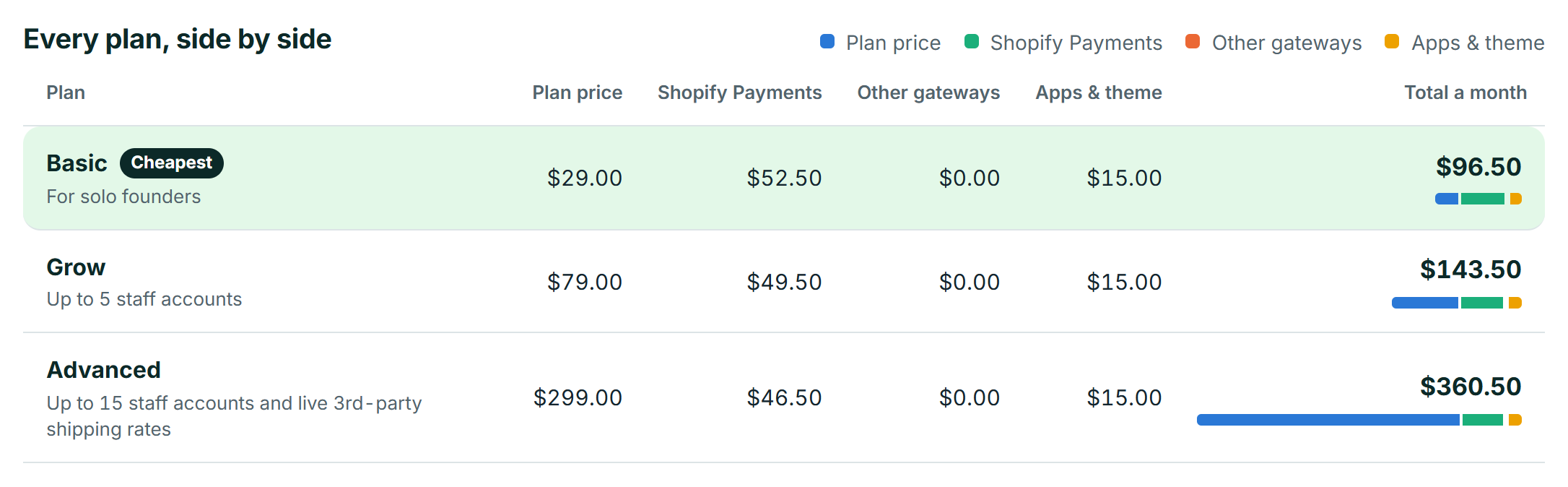
- Subscription Fee: $29
- Shopify Payments Fees: $52.50
- App Costs: $15
- Total Estimated Cost: ~$96.50 per month
Cost Breakdown:
- Subscription Fee: $19
- Shopify Payments Fees: $52.50
- App Costs: $15
- Total Estimated Cost: ~$86.50 per month
For a new store, the Basic plan is the perfect starting point. The costs are predictable and low, allowing the owner to invest profits back into marketing and inventory.
The Growing Business: A Home Decor Dropshipper
This store has found its niche and is seeing consistent sales. They’ve invested in a premium theme for a more professional look and use a handful of apps to manage marketing and operations.
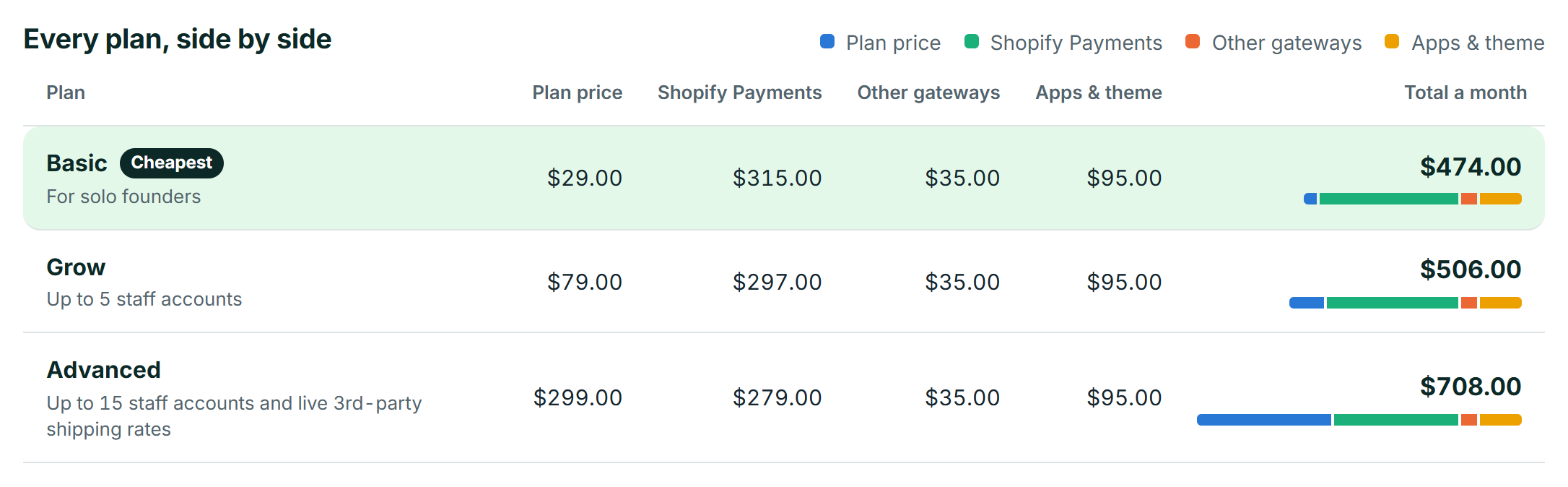
- Subscription Fee: $29
- Shopify Payments Fees: $315 (Calculated on $9,000 revenue)
- PayPal Fees: $35 (PayPal’s own 2.9% + 30¢; Shopify charges no fee on PayPal while Shopify Payments is on)
- Apps & Theme Costs: $95
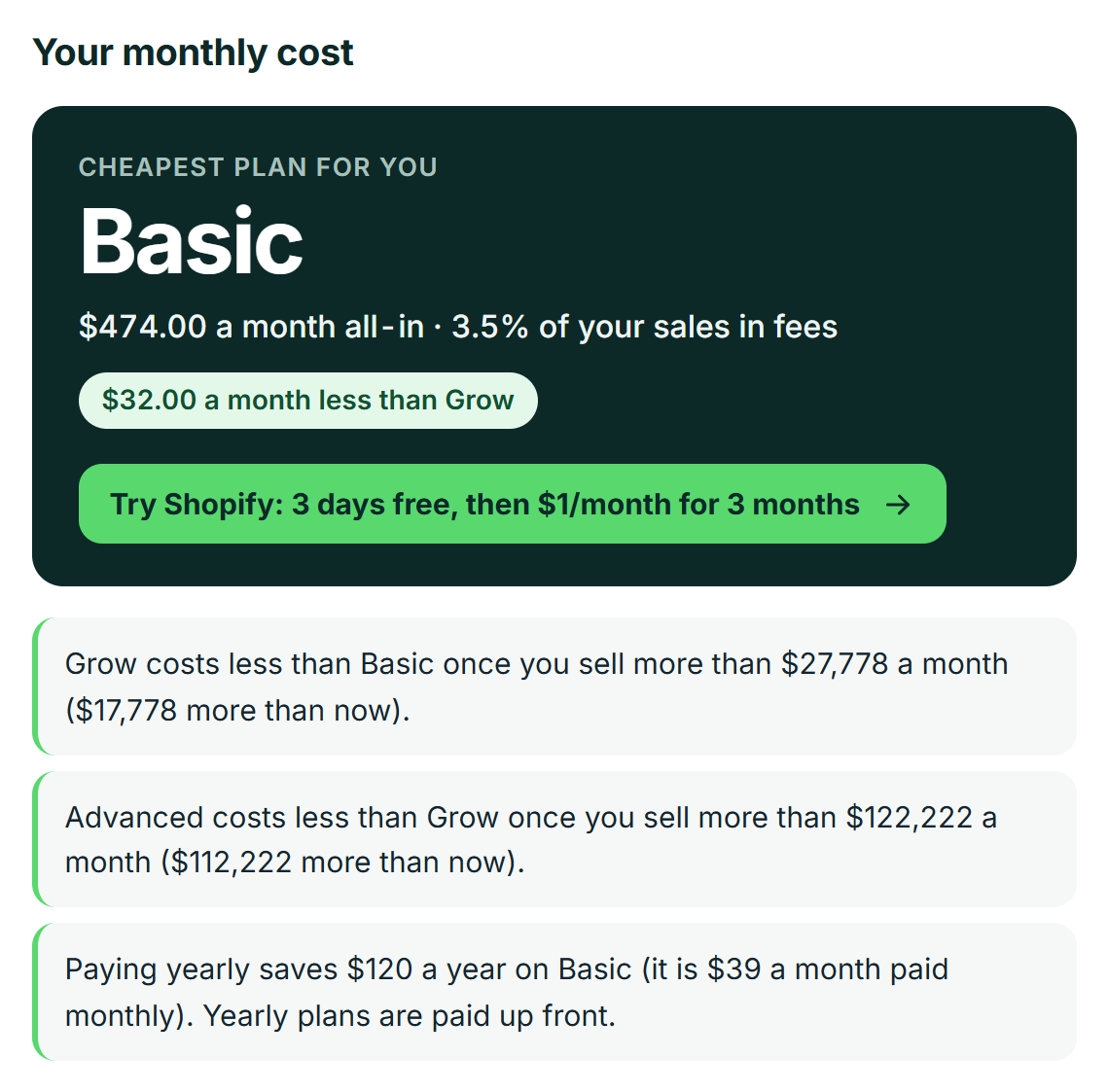
- Total Estimated Cost: ~$474 per month (on Grow: ~$506 per month)
Cost Breakdown:
- Subscription Fee: $49
- Shopify Payments Fees: $288 (Calculated on $9,000 revenue)
- Third-Party Gateway Fees: $45 (Includes Shopify’s 1.0% fee + PayPal’s fees)
- Apps & Theme Costs: $95
- Total Estimated Cost: ~$477 per month
You might expect a store at this stage to need Grow, but at US prices the numbers say not yet. On Grow, this store would pay about $506 a month: the lower card rate (2.7% vs 2.9%) saves $18, which doesn’t come close to the extra $50 for the plan, and because Shopify charges no fee of its own on PayPal while Shopify Payments is on, Grow’s lower third-party fee saves nothing here. With this payment mix, our calculator shows Grow starts paying for itself at about $27,778 in monthly sales, so upgrade earlier only if you need what Grow adds, such as more staff accounts. PayPal’s own fees still add $35 a month to the bill; if that 10% went through a gateway other than PayPal, Shopify’s 2% would add another $20 on Basic.
The Scaling Brand: An Apparel Store
This established apparel brand has high monthly revenue and a loyal customer base. They use a split payment mix to accommodate customers who prefer PayPal and invest in advanced apps for email marketing, loyalty programs, and inventory management.
- Monthly Revenue: $150,000
- Average Order Value (AOV): $80 (equals 1,875 orders/month)
- Plan: Advanced (Annual – $299/month)
- Payment Mix: 80% Shopify Payments ($120k) / 20% PayPal ($30k)
- Other Costs: $200/month for advanced apps
Cost Breakdown:
- Subscription Fee: $299
- Shopify Payments Fees: $3,450
- PayPal Fees: $982.50 (PayPal’s own 2.9% + 30¢; Shopify charges no fee on PayPal while Shopify Payments is on)
- App Costs: $200
- Total Estimated Cost: ~$4,931.50 per month
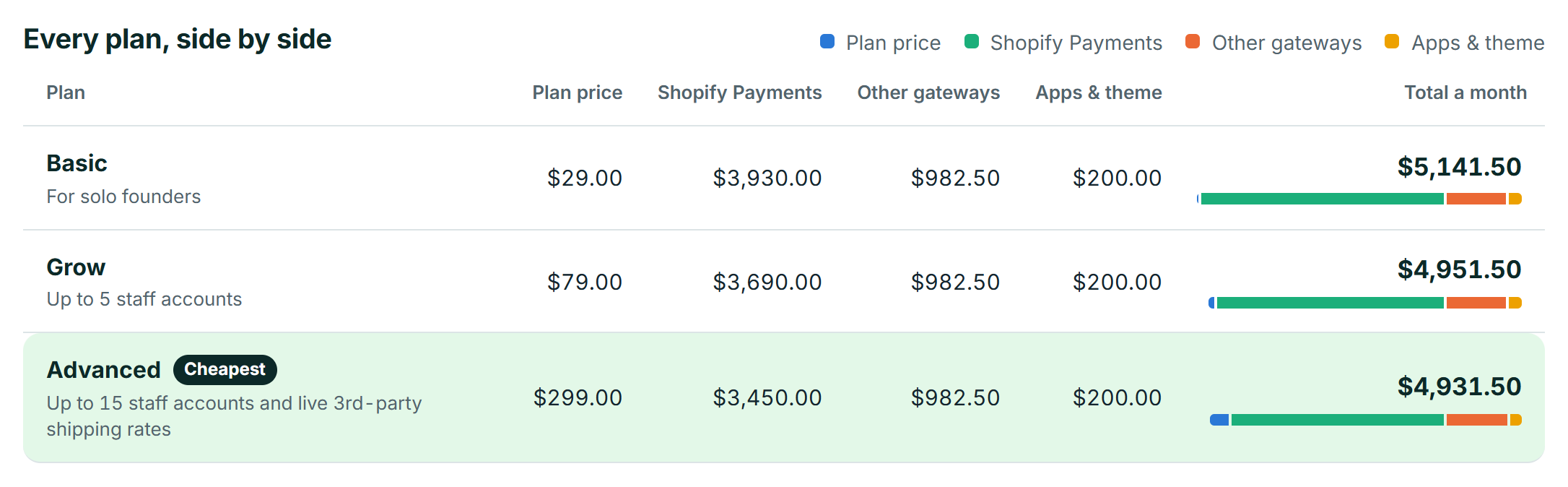
At this scale, the Advanced plan is the cheapest option, but only just: about $20 a month less than Grow and $210 less than Basic. All of that saving comes from the lower card rate (2.5% vs 2.7%), because Shopify charges no fee of its own on the PayPal share while Shopify Payments is on. With this payment mix, our calculator shows Advanced starts costing less than Grow at about $137,500 in monthly sales, so this store has only just crossed that line.
What really makes Advanced worth it here is what it adds: third-party calculated shipping rates and up to 15 staff accounts are critical for protecting profit margins on a high volume of orders. Had that 20% gone through a gateway other than PayPal, Shopify’s lower fee on Advanced (0.6% vs 1%) would have widened the gap to about $140 a month.
Your Next Step: From Calculation to Creation
Understanding your total cost of ownership is the first critical step, and now you have a clear, predictable budget. If you’re ready to turn that budget into a business, our complete founder’s playbook on how to start a Shopify business will guide you through every step from idea to launch.
Think of this cost not as an expense, but as an investment in a powerful platform that handles security, hosting, and payments, freeing you up to focus on what you do best: building your brand and selling your products.
You’ve done the research. You have the numbers. Now, it’s time to build. You have everything you need to make a confident decision. Click the link below to claim Shopify’s special offer—a 3-day free trial followed by your first 3 months for just $1/month—and start bringing your business to life today.
Frequently asked questions
What is the cheapest way to start on Shopify?
The most affordable way to begin is by taking advantage of Shopify’s promotional offer, which often lets you get your first three months for just $1 per month after the initial free trial. For the lowest long-term cost, the Basic plan billed annually at $29/month in the US is the cheapest option.
Is paying for Shopify annually worth it?
Absolutely. Paying for your Shopify plan annually saves you approximately 25% compared to paying month-to-month. For example, the Basic plan drops from $25 to just $19 per month, saving you $72 over the year. To me, it’s a significant saving for any business committed to running for at least a year.
How much does Shopify take from a $100 sale?
On the Basic plan using Shopify Payments, the fee for a $100 online sale would be $3.20. This is calculated as 2.9% of $100 ($2.90) plus the fixed $0.30 fee. This amount would be lower on the Grow or Advanced plans due to their better rates.
Is Shopify worth it for a small business?
Yes, it’s an ideal platform for small businesses. Shopify is an all-in-one solution that handles hosting, security, payment processing, and technical updates, allowing you to focus on building your brand and selling products. It’s designed to scale with you, providing the tools you need from your first sale to millions in revenue.
What is the Shopify "$1 for 3 months" deal?
This is a popular introductory offer for new merchants. After you complete your free trial, you can sign up for a plan and pay only $1 per month for your first three months. It’s designed to give new entrepreneurs a longer runway to build their store and make their first sales with minimal upfront cost.
Should I use Shopify Payments or PayPal?
For most store owners, using Shopify Payments is more cost-effective. When you use Shopify Payments, Shopify waives its separate transaction fee (which ranges from 0.6% to 2.0%). If you use a third-party gateway like PayPal, you have to pay PayPal’s processing fee plus Shopify’s transaction fee, effectively paying two fees on one order.
Is Shopify or Etsy better for beginners?
It depends on your goal. Etsy is a marketplace with a built-in audience, making it great for testing product ideas with minimal marketing. However, you have less control over branding and customer relationships. Shopify provides you with your own standalone business website. It requires you to generate your own traffic. But from what I’ve seen, it gives you complete control to build a long-term, scalable brand.
