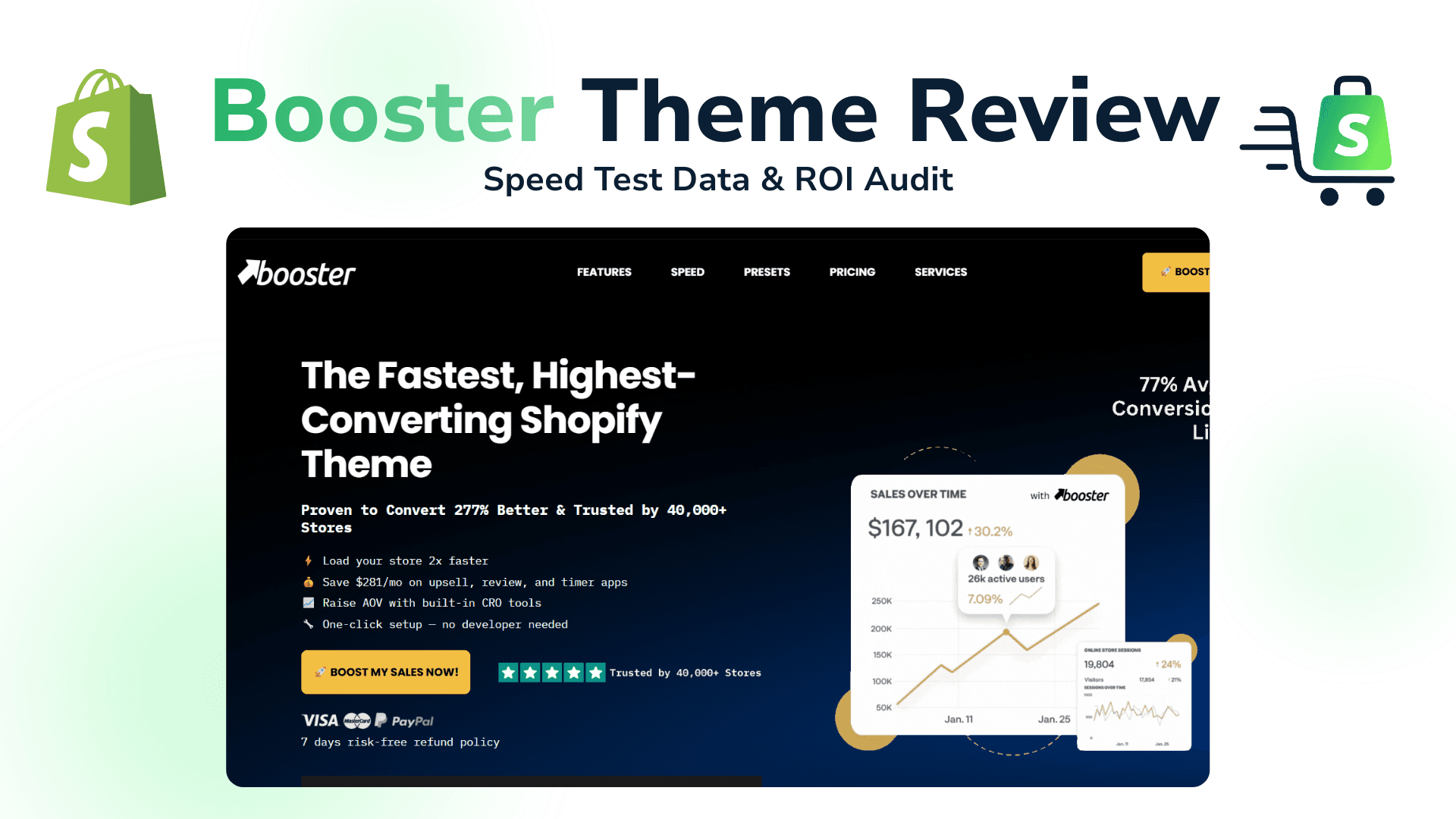
High monthly app fees and slow load times are silent killers for Shopify stores. Each dollar spent on a new feature is a drain on your profits, and every millisecond a customer waits is a potential lost sale. The Booster theme enters this high-stakes environment with a bold promise: to fix both problems at once.
It positions itself not just as a design template, but as a complete marketing toolkit disguised as a theme, packed with features designed to replace an entire folder of expensive apps.
But does the Booster Shopify theme deliver on its promise?
Unlike other reviews that rely on outdated scores or vague claims, this is a live audit conducted in 2026. We ran our performance tests directly on the official Booster Theme live demo store. This means our data reflects exactly what a new customer gets, giving you the most accurate and transparent verdict on whether Booster is the right investment for your business.
Before diving into the theme features, you need a platform to build on. You can currently claim Shopify’s exclusive $1 to set up your store and test these conversion strategies risk-free.
What is the Booster Shopify Theme? (Beyond the Hype)
At its core, the Booster Shopify Theme is an integrated toolset designed to solve the “app bloat” problem. It’s built on a single, compelling idea: what if all the essential marketing and conversion-focused tools you need were built directly into your theme’s code, eliminating the need for dozens of slow, expensive, and often conflicting third-party apps?
Booster claims to replace over $5,100 per year in app fees by providing native features for everything from in-cart upsells and countdown timers to currency conversion and GDPR compliance. By centralizing these tools, the theme aims to deliver faster load times and a more seamless customer experience, turning your store into a dedicated conversion machine rather than a collection of disjointed plugins.
But, from my experience, it’s not a one-size-fits-all solution. Its aggressive focus on direct-response marketing makes it a perfect fit for some business models and less ideal for others.
| 👍Booster Theme is a Perfect Fit For… | 👎Booster Theme is Not For… |
|---|---|
| Dropshippers & One-Product Stores that rely on urgency and social proof tools to convert cold traffic quickly. | Luxury & Story-Driven Brands that require a minimalist, editorial design aesthetic over prominent sales features. |
| Direct-Response Marketers who run paid ads (e.g., from Meta or TikTok) and need landing pages optimized for immediate action. | Stores with Highly Complex Catalogs needing sophisticated, multi-layered filtering and search capabilities beyond what’s built-in. |
| Beginners & Solopreneurs who want an “all-in-one” package to save money and avoid the technical headache of managing multiple apps. | Established Brands with Custom Needs that already have a fine-tuned app stack or require unique, developer-built functionalities. |
💡If you’re still unsure if Booster matches your brand’s personality, you can use our find the perfect theme for your specific niche tool to compare it against other top-rated options.
2026 Performance Test: Is Booster Actually Fast? (Live Results)
A theme packed with features is useless if it’s slow. Marketing claims of “lightning speed” are common, so we put Booster to the test with a fresh audit to see how it performs under real-world conditions.
Test Subject: The official Booster Theme demo store
Test Date: March 4, 2026
Tools: Google PageSpeed Insights & GTmetrix
Our goal was to measure the theme’s performance “out of the box,” reflecting the experience a new customer would have. The results were impressive.
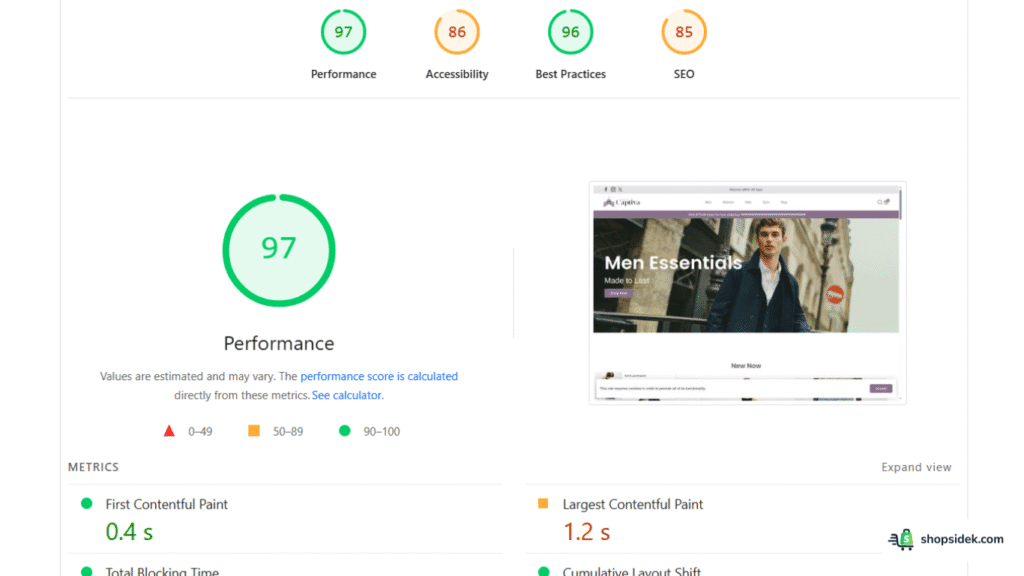
Result 1: Desktop Performance (Google Lighthouse)
- Score: 97 / 100
On desktop, the Booster theme is exceptionally fast. A score of 97 is in the top tier of performance, delivering a near-instant loading experience that keeps visitors engaged and helps with search engine rankings. For users browsing on laptops or desktops, your store will feel professional and snappy.
Result 2: Mobile Performance (Google Lighthouse)
- Score: 78 / 100
To me, a mobile score of 78 is a strong, realistic result for a theme loaded with dynamic conversion features. While it’s not a perfect 90+, it’s important to be transparent: achieving a 90+ score on a live e-commerce store with numerous interactive elements is incredibly rare.
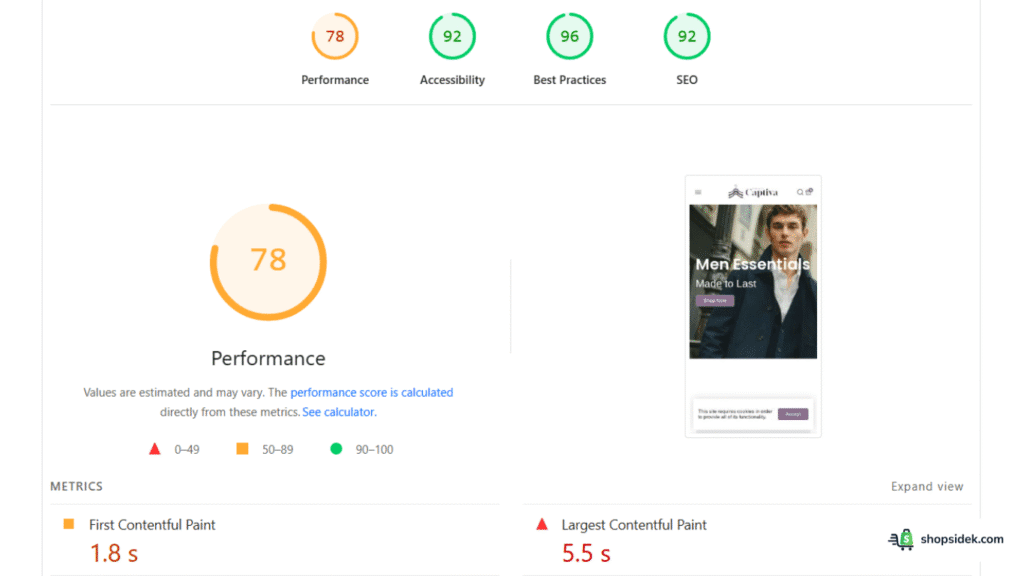
This score comfortably lands in Google’s “Good” range and, most critically, passes all Core Web Vitals. With over 70% of Shopify traffic coming from mobile devices, this is the metric that matters most. A 78 ensures a smooth, penalty-free experience for the majority of your customers without sacrificing the tools that drive sales.
🔧 Tools Worth Exploring for Store Optimization
- Tiny SEO Speed Image Optimizer – Improves site speed, compresses images, and fixes technical search issues.
- StoreSEO: AI SEO Blog & Image – Improves search visibility with AI-generated optimizations and schema support.
- SEO Manager – Helps manage metadata, broken links, and search snippet controls.
Result 3: GTmetrix Grade
- Grade: A
- Performance: 98% | Structure: 98%
- Largest Contentful Paint (LCP): 954ms
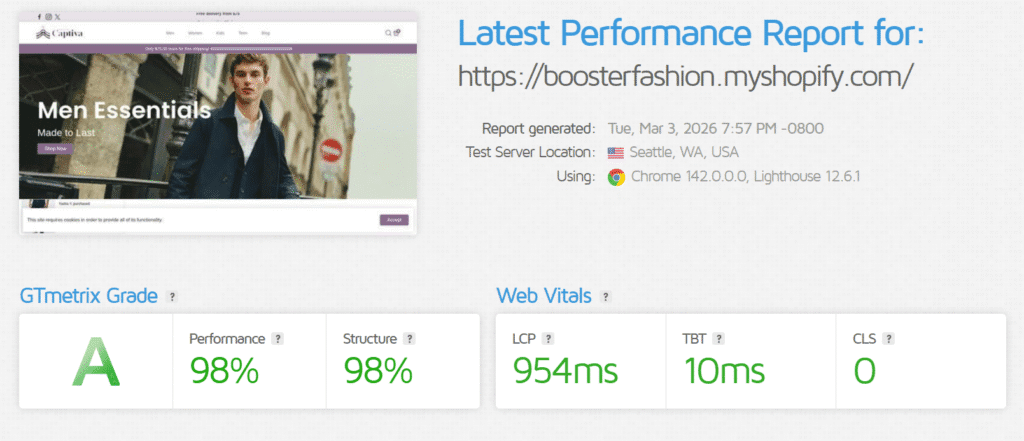
GTmetrix, another leading performance tool, awarded the Booster demo an “A” grade. The key metric here is the Largest Contentful Paint (LCP) of just 954 milliseconds. This means the main content of the page becomes visible in under one second—well below Google’s “golden rule” of 2.5 seconds. This is a clear indicator that the theme feels fast to actual users.
The Verdict: Based on our 2026 data, the Booster theme Shopify is verifiably fast. It comfortably passes Google’s Core Web Vitals on both mobile and desktop, ensuring you won’t be penalized for performance issues. The theme successfully delivers a rich feature set without the speed degradation typically caused by a pile of third-party apps.
💡While these scores are excellent, you can see how Booster stacks up against the other fastest Shopify themes on the market in our latest speed benchmark report.
Booster Shopify Theme in Action: Real-World Store Examples
Performance data is crucial, but the ultimate test of a theme is how it looks and functions on real, independent business websites. Many powerful themes are criticized for looking “generic”. We analyzed several stores actively using the Booster Shopify theme to see how it performs in the wild.
The results show that with strong branding and customization, Booster can power a wide range of professional, high-converting storefronts.
1. Froothie: The Premium & Trustworthy Brand
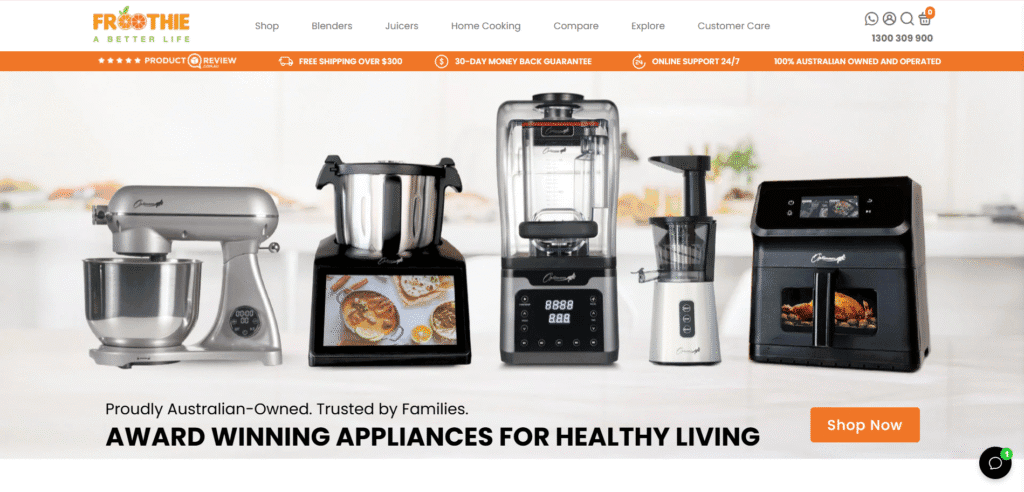
Froothie, an award-winning appliance brand, demonstrates how Booster can be customized for a clean, premium look. Their homepage is professional and trustworthy, immediately dispelling the notion that the theme is only for dropshippers.
What they do well:
- Clean Navigation: They use a clear mega menu to help customers easily find product categories like blenders, juicers, and home cooking appliances.
- Trust-Building Banner: Notice the prominent bar below the menu highlighting key trust signals: product reviews, free shipping, a 30-day money-back guarantee, and 24/7 online support. This is a classic Booster feature used to build credibility from the moment a visitor lands on the site.
2. The Pepper Pantry: The Engaging Niche Store
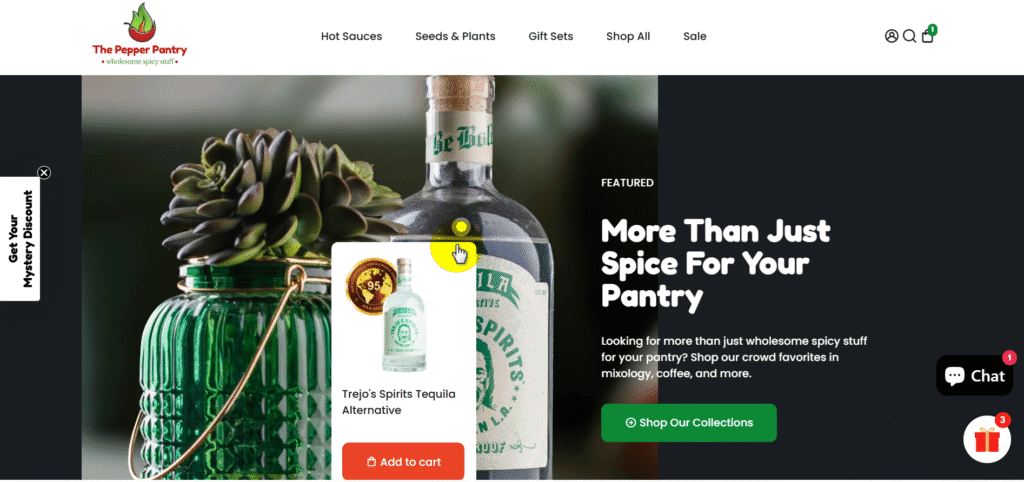
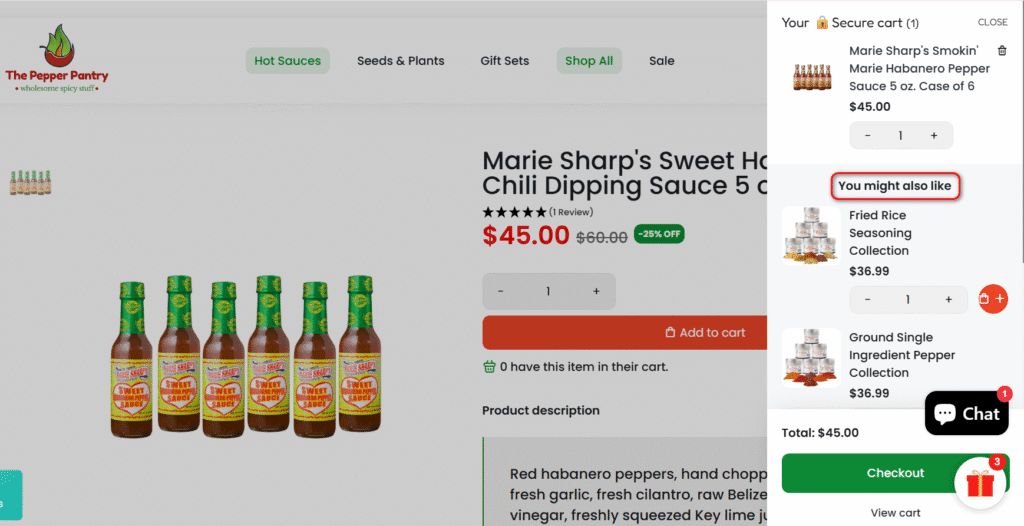
The Pepper Pantry, a wholesaler of spicy goods, uses Booster’s features to create an engaging and interactive shopping experience. Their site effectively combines rich visuals with powerful conversion tools.
What they do well:
- Shoppable Imagery: The homepage uses high-quality photography with interactive “Add to Cart” buttons, similar to a Lookbook feature, allowing customers to shop directly from lifestyle images.
- In-Cart Upsell: Once an item is added, the slide-out cart immediately presents a “You might also like” section. This is Booster’s native cross-selling feature in action, designed to increase Average Order Value (AOV) without needing a separate app.
3. Conners Clinic: The Conversion-Focused Health Store
The Conners Clinic shop is a masterclass in using Booster’s built-in marketing toolkit to drive sales. Their product pages are layered with features that build urgency and social proof.
What they do well:
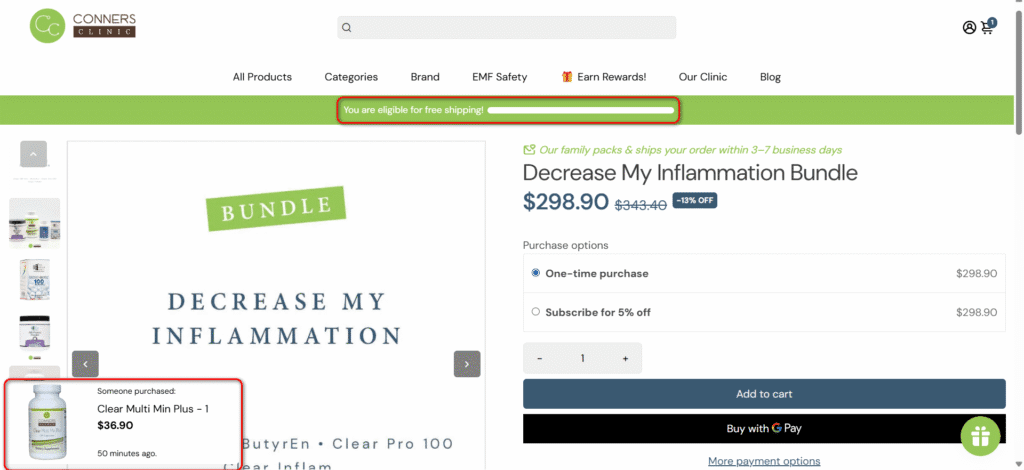
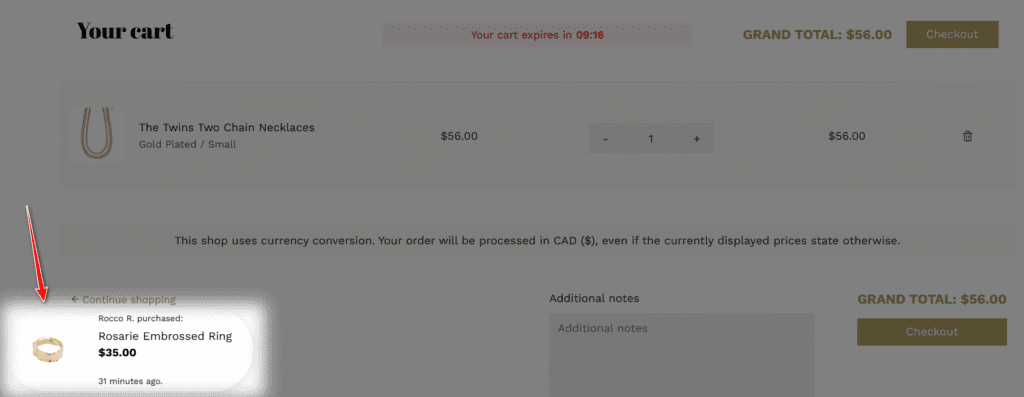
- Live Sales Notifications: A small pop-up appears in the corner showing what other customers have recently purchased, creating social proof and FOMO (Fear Of Missing Out).
- Free Shipping Goal Bar: A dynamic bar at the top of the page shows customers they have qualified for free shipping, gamifying the experience and reinforcing the value of their purchase.
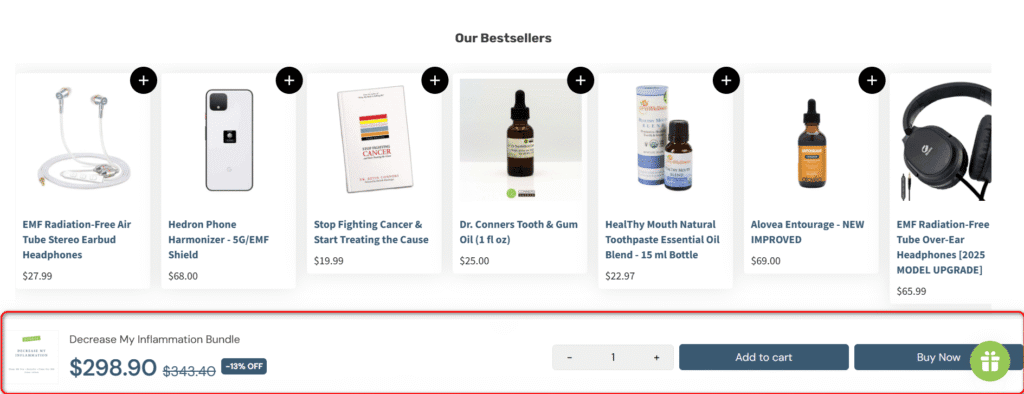
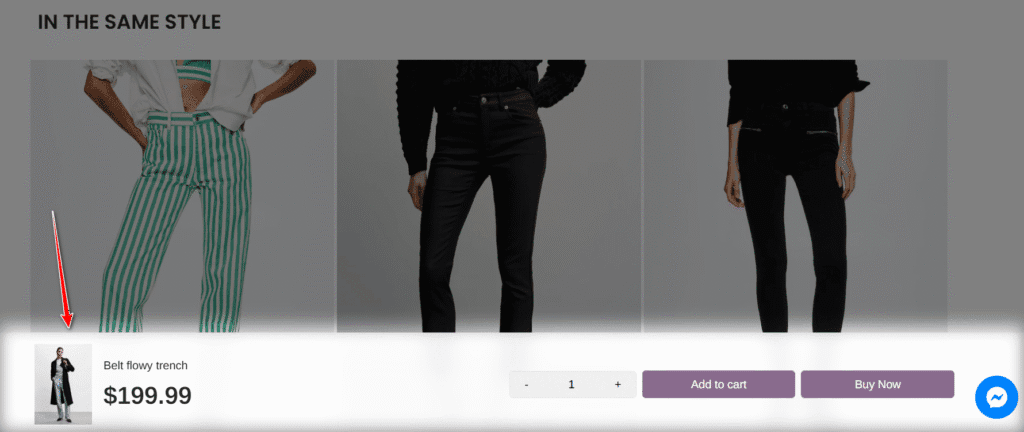
- Sticky Add-to-Cart: As you scroll down the product page, a “sticky” bar appears at the bottom, ensuring the “Add to Cart” and “Buy Now” buttons are always visible and accessible, reducing friction and maximizing conversion opportunities.
Top 10 “Money-Making” Features That Replace Paid Apps
The true value of Shopify Booster theme lies in its extensive suite of built-in conversion tools. These aren’t just minor additions; each one is designed to replace a popular—and often costly—third-party Shopify app. Here’s a breakdown of the ten most impactful features and the savings they offer.
1. In-Cart Upsell & Cross-Sell
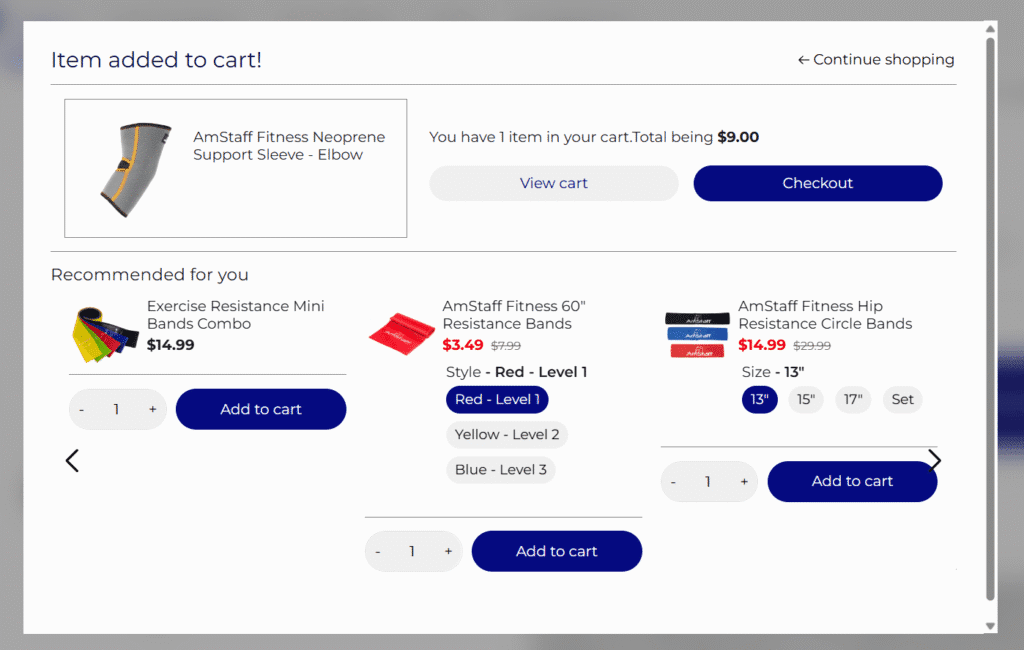
This feature lets you present complementary products or upgrades directly within the slide-out cart, right after a customer adds an item. It’s a powerful way to increase your Average Order Value (AOV) by catching shoppers when their intent to buy is highest.
- Replaces Apps Like: ReConvert, AfterSell
- Typical Monthly Savings: ~$15
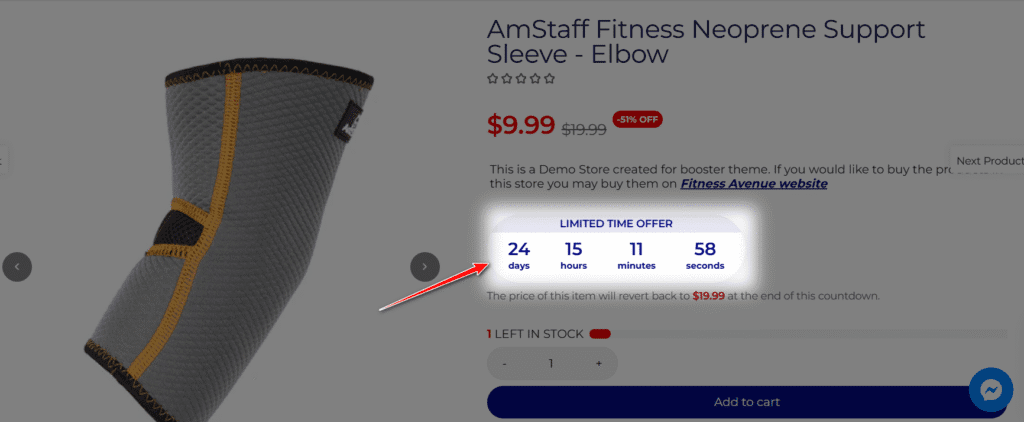
2. Promotion Countdown Timer
You can place a customizable countdown timer on product pages to signal the end of a sale or special offer. This classic marketing tactic creates a powerful sense of urgency and scarcity, motivating hesitant buyers to make a decision immediately.
- Replaces Apps Like: Hurrify, Ultimate Scarcity Pro
- Typical Monthly Savings: ~$12
3. Live Sales Notifications
These small pop-ups display recent purchases made by other customers (e.g., “Someone in New York just bought…”). This feature provides powerful social proof, builds trust, and creates a sense of FOMO (Fear Of Missing Out), reassuring new visitors that your store is active and popular.
- Replaces Apps Like: Fomo, ProveSource
- Typical Monthly Savings: ~$9
4. Sticky Add-to-Cart Bar
When a user scrolls down a product page past the main “Add to Cart” button, a persistent bar appears at the bottom of the screen. This keeps the primary call-to-action in sight at all times, reducing friction and making it effortless for customers to buy the moment they are convinced.
- Replaces Apps Like: Sticky Add To Cart BOOSTER PRO
- Typical Monthly Savings: ~$9
5. Geo-Targeted Currency Converter
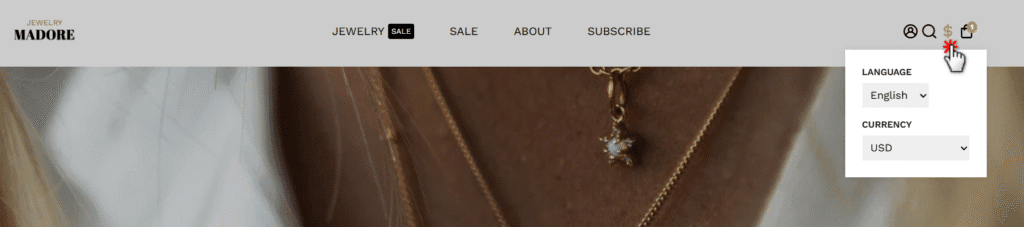
Booster automatically detects a visitor’s location and displays product prices in their local currency. This simple feature dramatically improves the shopping experience for international customers, reducing confusion and preventing cart abandonment at the final checkout stage.
- Replaces Apps Like: BEST Currency Converter
- Typical Monthly Savings: ~$10
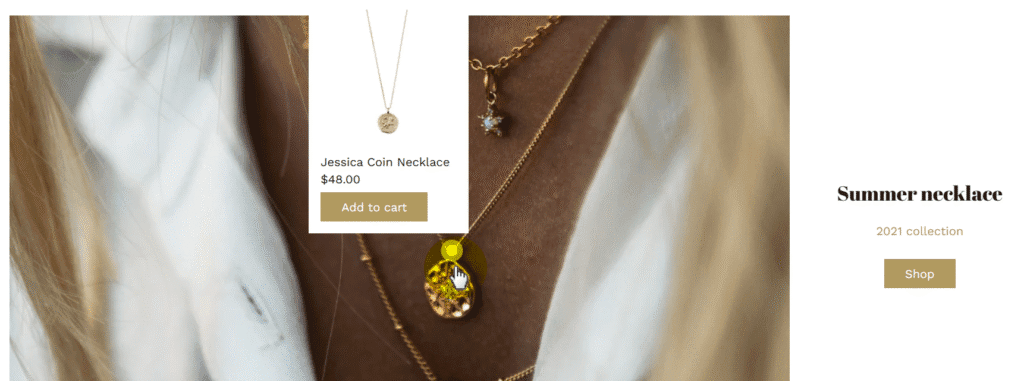
6. Lookbook Shoppable Images
Perfect for fashion, home decor, and lifestyle brands, the Lookbook feature lets you tag products within your high-quality lifestyle photos. Customers can click on tagged items in an image to shop directly, creating a rich, Instagram-style experience that drives product discovery.
- Replaces Apps Like: Lookbook, Shop The Look
- Typical Monthly Savings: ~$12
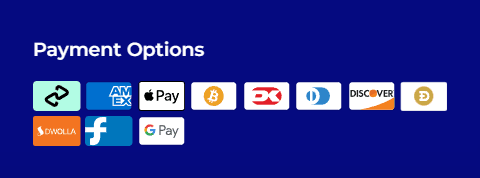
7. Dynamic Direct-to-Checkout Buttons
In addition to the standard “Add to Cart” button, Booster includes dynamic checkout options like Shop Pay, PayPal, and G Pay. These express payment buttons allow customers to bypass the cart and head directly to checkout, speeding up the purchase process for returning shoppers.
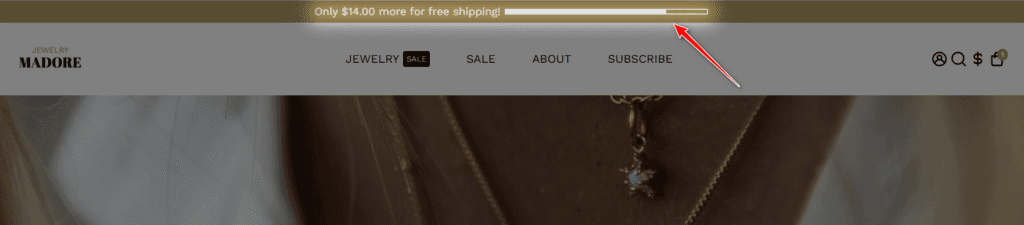
8. Free Shipping Goal Bar
This interactive bar at the top of the page shows customers how close they are to qualifying for free shipping (e.g., “You’re only $15 away from free shipping!”). It gamifies the shopping experience and effectively encourages customers to add more items to their cart to meet the threshold.
- Replaces Apps Like: Free Shipping Bar
- Typical Monthly Savings: ~$5
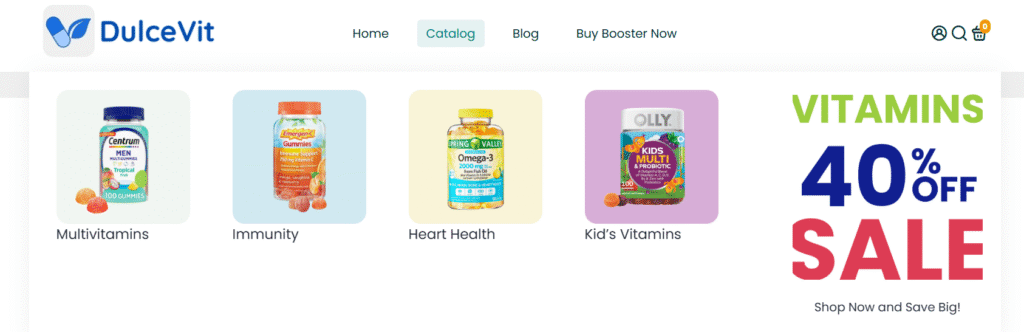
9. Smart Megamenu
For stores with extensive product catalogs, a megamenu is essential. Booster allows you to create large, multi-column dropdown menus that can feature images, promotions, and collections. This vastly improves site navigation and helps customers find what they’re looking for faster.
- Replaces Apps Like: Buddha Mega Menu
- Typical Monthly Savings: ~$14
10. GDPR Cookie Consent Bar
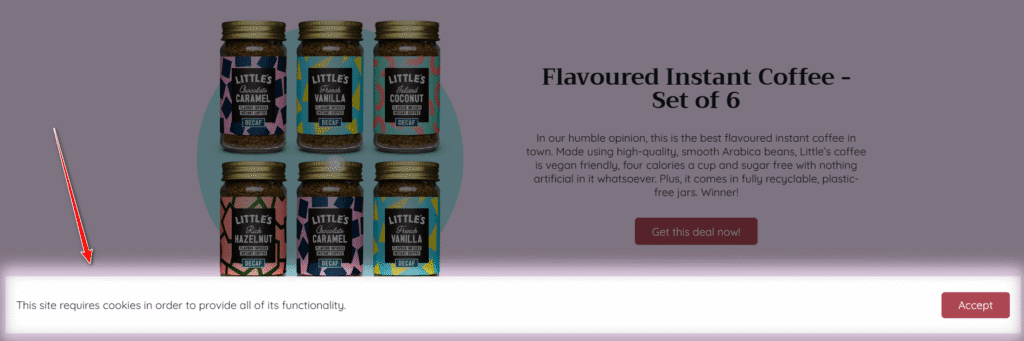
To comply with privacy laws like GDPR, you need to inform European visitors about your use of cookies. Booster includes a customizable cookie consent bar as a native feature, helping you build trust and meet legal requirements without needing yet another plugin.
- Replaces Apps Like: Ultimate GDPR EU Cookie Banner
- Typical Monthly Savings: ~$9
💡 Inspired by these brands? You don’t need a massive budget to launch a store that looks this professional. Sign up for Shopify and start building your own high-converting storefront today.
Booster Theme Pricing vs. The “App Tax”: A Real Cost Breakdown
To understand the value of the Booster theme, you have to look beyond its sticker price and analyze the “App Tax”—the hidden, recurring fees you pay for essential marketing tools. While the theme has a higher upfront cost, it’s an investment designed to save you money every single month.
As of early 2026, Booster offers two primary licensing options with one crucial difference:
- Yearly License: $199 per year, which includes continuous tech support.
- Lifetime License: $299 as a one-time payment, which includes only one year of tech support.
Now, let’s compare that investment to the cost of building a similar marketing stack with individual third-party apps.
| Feature | Typical Monthly App Cost | Booster Theme Cost |
|---|---|---|
| In-Cart Upsell & Cross-Sell | ~$15 / month | Included |
| Promotion Countdown Timer | ~$12 / month | Included |
| Smart Megamenu | ~$14 / month | Included |
| Geo-Targeted Currency Converter | ~$10 / month | Included |
| Live Sales Notifications | ~$9 / month | Included |
| Sticky Add-to-Cart Bar | ~$9 / month | Included |
| GDPR Cookie Consent Bar | ~$9 / month | Included |
| Free Shipping Goal Bar | ~$5 / month | Included |
| Total Monthly “App Tax” | ~$83 / month | $0 |
| Total Annual “App Tax” | ~$996 / year | $0 |
The math is compelling. By replacing just eight common marketing apps, you could save nearly $1,000 per year.
This makes the $299 Lifetime license an incredible long-term asset; it pays for itself in less than four months and then continues to save you money indefinitely. What I always tell clients is that the choice depends on their needs. The Yearly license offers the peace of mind of ongoing support, while the Lifetime license provides the best financial ROI for users comfortable managing their store after the first year.
The math is clear: Booster can save you hundreds, if not thousands, per year.
Want to see exactly how eliminating the “App Tax” impacts your bottom line? Plug your current revenue and monthly app spend into our free Shopify Total Cost of Ownership Calculator to reveal your true monthly cost of ownership.
The Downsides: What Real User Reviews Reveal
No software is perfect, and while the marketing materials highlight the speed and savings, user reviews paint a more nuanced picture. To give you a complete and honest audit, we analyzed verified feedback from Trustpilot and user communities to identify the three most common frustrations store owners face with the Booster Theme.
The Complicated Update Process
The most significant technical complaint involves how the theme handles updates. Unlike themes purchased directly from the official Shopify Theme Store, which often update automatically with a single click, Booster operates effectively as an external software package.
Users frequently report that updating to a new version requires downloading the latest file and manually reinstalling it. While this ensures your custom code isn’t overwritten without your permission, it can be a cumbersome process, often taking 30 minutes or more to migrate your settings.
- The Fix: If you decide to use Booster, I recommend keeping a detailed log of any custom code changes you make. This makes migrating to a newer version much faster.
Support Can Be Hit-or-Miss
Customer support is a polarizing topic in user reviews. On platforms like Trustpilot, the feedback is a mix of five-star praise and frustration.
Many users describe the support team as “outstanding” and “fast,” particularly when helping with minor CSS tweaks or setup issues.
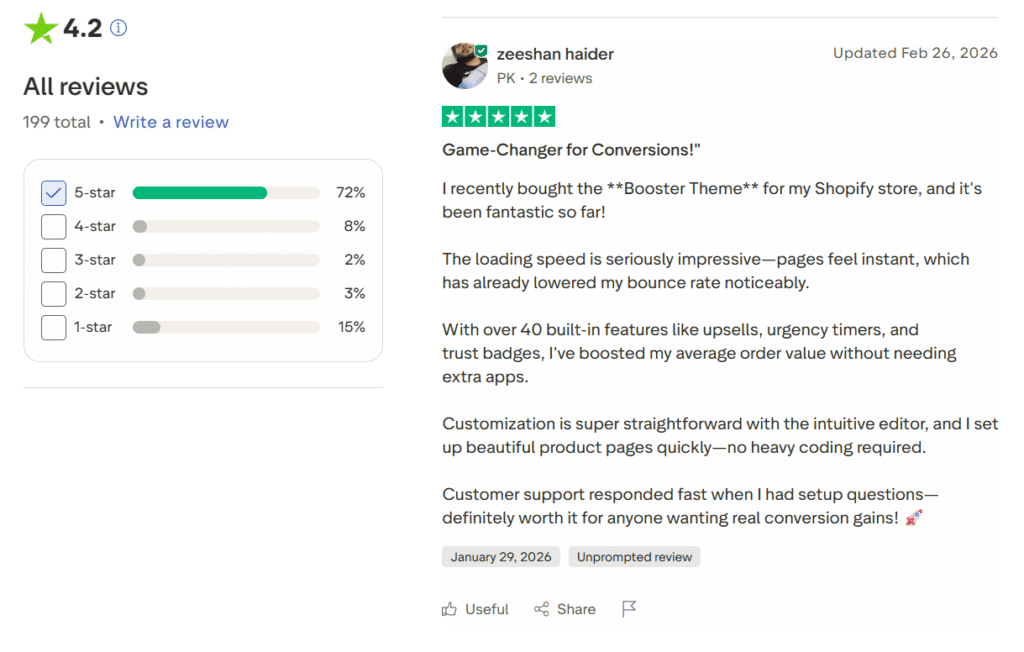
However, a noticeable segment of reviews cites slow response times or “canned” answers that don’t fully resolve complex bugs.
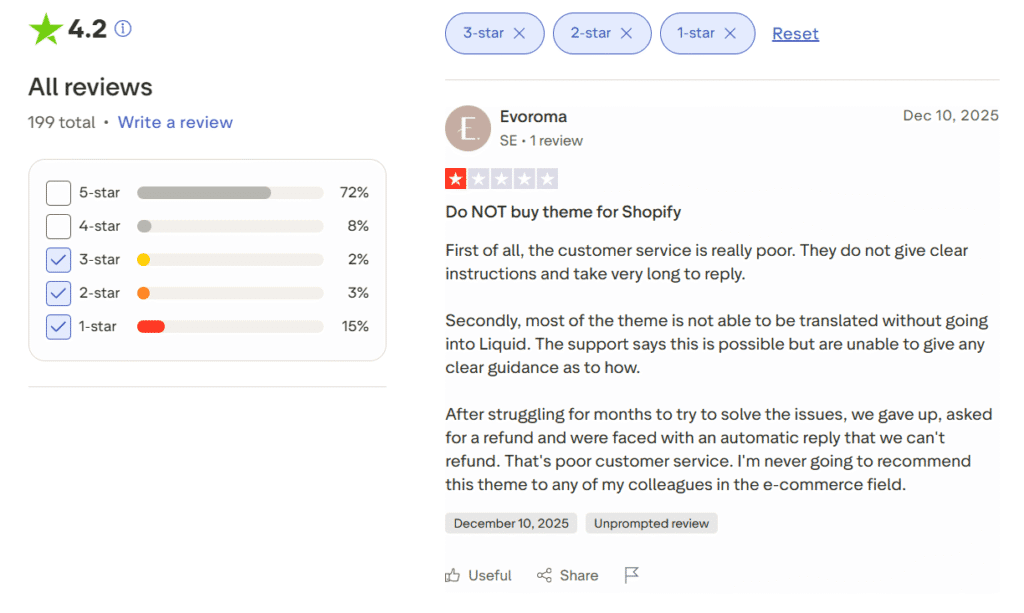
It is also worth noting the distinction in the pricing model: the Yearly license ensures priority support as long as you subscribe, whereas the Lifetime license only includes one year of technical support. If you plan to keep the theme for years without paying again, you will eventually be on your own for troubleshooting.
The Risk of a “Generic” Look
Because Booster is one of the most popular themes for dropshipping and direct-response marketing, there is a risk of “oversaturation.” If you simply install the default layout and change the logo, your store may look identical to thousands of other low-effort dropshipping sites.
Critics often point out that the out-of-the-box aesthetic prioritizes function over form. While this is great for conversion, it can feel “cheap” if not properly styled.
- The Fix: Do not use the default settings. Take advantage of the 70+ included presets and invest time in high-quality photography and branding (like the Froothie example earlier) to ensure your store looks like a legitimate brand, not just another generic template.
💡If your brand requires a more high-end, editorial feel that justifies a higher price tag, you might want to compare this with Impulse Shopify theme, which focuses heavily on luxury aesthetics.
Booster vs. Debutify: Which Conversion Theme is Better?
If you are researching high-converting Shopify themes, you have almost certainly come across Debutify. It is the single biggest competitor to Booster, and both themes promise the same thing: a “Swiss Army Knife” of conversion tools that replaces external apps.
However, the choice between them isn’t just about features—it’s about financial philosophy.
Booster is a product you buy once; Debutify is a SaaS (Software as a Service) you rent monthly.
Here is the head-to-head comparison to help you decide:
| Feature | Booster Theme | Debutify |
|---|---|---|
| Pricing Model | One-Time ($299 Lifetime) or Yearly ($199) | Monthly Subscription ($0 to $60+/mo) |
| Free Version | No (Paid only) | Yes (Limited to basic features) |
| Feature Access | All Included (No tiers) | Tiered (Must pay for “Pro” or “Enterprise” to unlock all widgets) |
| Long-Term Cost (3 Years) | $299 Total (Lifetime License) | $1,200+ Total (Assuming “Professional” plan at $35/mo) |
| Ideal User | Store owners who want to stop paying monthly fees | Beginners with $0 budget who want to start for free |
The Verdict
Choose Debutify if: You are just starting out with absolutely no budget. The Free plan allows you to launch a clean store immediately. However, be aware that the best “money-making” features (like the 65+ Pro-exclusive widgets) are locked behind the “Professional” or “Enterprise” plans. Even at their discounted rates (e.g., ~$35/mo), the costs add up quickly.
Choose Booster if: You are ready to invest in your business. While the upfront cost is higher ($299), you own the license forever with all features unlocked immediately.
- The Math: To get a comparable feature set on Debutify (the “Professional” plan), you would pay roughly $427 per year (even with a 60% discount).
- The Savings: By choosing the Booster Lifetime license, you break even in roughly 8 months. Over a 3-year period, Booster is mathematically the cheaper option by nearly $1,000, making it the superior choice for ROI.
Final Verdict: Is The Booster Theme Worth Your Investment?
After putting the Booster Shopify Theme through a rigorous 2026 audit, the verdict is clear. If your primary goal is to build a high-converting store without bleeding money on monthly app subscriptions, this theme is absolutely worth the investment.
Overall Rating
9.1/10The data speaks for itself. In our live tests, Booster delivered a 97/100 Desktop score and a solid 78/100 Mobile score, passing Google’s Core Web Vitals comfortably. More importantly, it replaces a stack of apps that would typically cost you over $1,000 per year.
It is not without its flaws. The manual update process is outdated compared to the Shopify Theme Store, and you must customize the presets to avoid a “generic” dropshipping look. However, these are manageable trade-offs for the performance and savings you gain.
Our Recommendation:
For dropshippers, single-product stores, and direct-response brands, the $299 Lifetime License is the most cost-effective choice on the market. It effectively pays for itself in under four months by eliminating your “App Tax.”
We recommend you purchase the license to lock in the ROI, install it on your store, and test it rigorously. Booster offers a 14-day money-back guarantee, giving you two full weeks to verify the speed and conversion features risk-free.

Note: I’m a Shopify Media Partner, which means I might earn a small commission if you sign up through my link. It doesn’t cost you anything extra and helps keep this blog running.
FAQs About Booster Shopify Theme
Is the Shopify Theme Booster free?
No, Booster is a premium Shopify theme. Unlike subscription-based apps that charge you monthly, the Lifetime License ($299) is a one-time payment.
Warning: Searching for a Boost Shopify theme free download will not lead to a legitimate version of this theme. “Null” or “cracked” versions found on forums often contain malware that can steal customer credit card data or break your store’s functionality. I always suggest you invest in the official license to ensure security and receive updates.
Does the Booster theme for Shopify have a free trial?
There is no traditional “try before you buy” trial period where you can install it for free. Instead, Booster offers a 14-day money-back guarantee (as stated on their official pricing page). This allows you to purchase the license, install it, and test the features risk-free for a week. If it doesn’t meet your needs, you can request a full refund within that window.
What happens after my 1 year of support ends?
If you purchase the Lifetime License, you own the theme forever and will continue to receive all future theme updates (including new features and bug fixes) at no extra cost. However, direct access to the technical support team via email or chat is only included for the first 12 months. After that year, you can rely on their extensive help documentation or choose to extend your support plan for a fee.
Is the Booster Theme good for SEO?
Yes. Our live 2026 audit confirmed that the theme is highly optimized for search engines. It achieved a Desktop Performance score of 97/100 and a GTmetrix Grade A. The theme uses clean code, automatic image optimization (lazy loading), and semantic HTML structure, all of which are critical ranking factors that help Google index your store faster.
Can I use one license on multiple Shopify stores?
No. Each license key is valid for one Shopify store URL only. If you run multiple dropshipping stores or different brand domains, you will need to purchase a separate license for each one to receive updates and support.
Does it work with Shopify 2.0?
Yes, the current version of the Booster Theme is fully compatible with Shopify OS 2.0. This means it supports “Sections Everywhere,” allowing you to drag and drop elements on product pages, collection pages, and blog posts—not just the homepage—without needing to touch any code.