
Choosing your Shopify theme is one of the most critical decisions you’ll make for your brand. As the platform’s official free option, the Dawn Shopify theme is the starting point for millions of stores, but that leads to the big question: is it powerful enough to build a serious business on, or will you regret a ‘free’ choice later?
In this ultimate guide, we provide the answer. We’ll cover a data-driven review, a step-by-step customization tutorial, and inspiring real-world examples to give you the clarity and confidence you need to launch and grow.
Is Dawn the Best Free Theme for You? A Quick Verdict
For most entrepreneurs starting their journey, the answer is a confident yes. The Shopify Dawn theme is a powerful, flexible, and fast foundation for a new online store. While no theme is perfect for everyone, Dawn provides an incredible amount of value right out of the box.
Here’s a quick summary to help you decide:
| Price | Free, Forever |
|---|---|
| Performance | Excellent. Up to 35% faster than legacy themes like Debut, giving you a head start on Core Web Vitals. |
| Best For | New Merchants, bootstrappers, and visually-driven brands (like apparel or home decor) who need a clean, professional canvas for their products. |
| Shopify Rating | 36% Positive. This score often reflects user requests for niche features, not a judgment on the theme’s solid core performance and reliability. |
| The Verdict | The best starting point. Dawn’s combination of speed, modern design, and unmatched flexibility makes it the top free choice for launching a successful store. |
What is the Dawn Shopify Theme? The Official Foundation of Modern Shopify Stores
Shopify Dawn isn’t just another theme; it’s the official blueprint for the modern Shopify experience. Introduced as the successor to the long-standing Debut theme, Dawn was built from the ground up to be the flagship for Online Store 2.0 (OS 2.0), Shopify’s powerful and flexible theme architecture.
💡If you are currently running your store on Debut or another legacy layout, it is crucial to know how to switch your Shopify theme safely to ensure your settings and data remain intact during the move to OS 2.0.
But what does OS 2.0 actually mean for you? It means unprecedented freedom. Previously, full-page customization was mostly limited to the homepage. With Dawn, you can now add, remove, and rearrange sections and content blocks on every page of your store—from product pages to blog posts—all through an intuitive drag-and-drop editor, no code required.
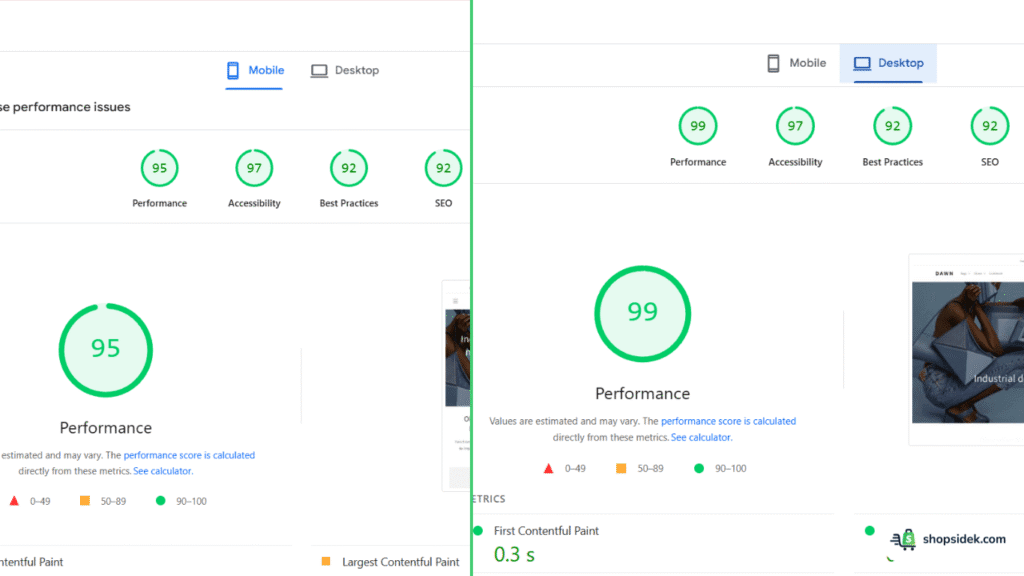
At its core, Dawn is built on three key principles: First is speed, designed to be exceptionally lightweight for top-tier performance and better search engine rankings.
Second is a mobile-first approach, ensuring a flawless shopping experience on any device.
Finally, it champions flexibility through minimalism. Dawn acts as a clean, elegant canvas that puts your products and brand story front and center, giving you the power to create a unique look without being overwhelmed.
I always suggest thinking of Dawn as the reliable, high-performance foundation on which you can build a beautiful and successful online store.
🔧 Tools Worth Exploring for Store Optimization
- Tiny SEO Speed Image Optimizer – Improves site speed, compresses images, and fixes technical search issues.
- StoreSEO: AI SEO Blog & Image – Improves search visibility with AI-generated optimizations and schema support.
- SEO Manager – Helps manage metadata, broken links, and search snippet controls.
The best way to see what Dawn can do is to experience it firsthand. You can start a free Shopify trial and install Dawn in under two minutes, with no commitment.
The Dawn Theme Review: A Data-Driven Look at Pros and Cons
Dawn is a powerful tool, but understanding its strengths and limitations is key to making an informed decision. We’ve analyzed performance data, user reviews, and hundreds of live stores to give you a clear, balanced picture.
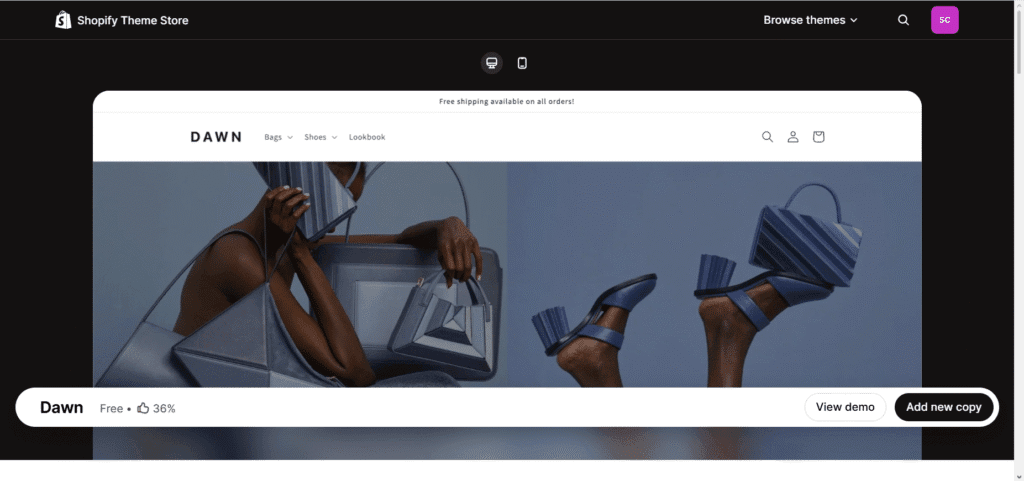
The Pros: Where Dawn Truly Shines
Blazing Fast Performance: Speed is a critical factor for both user experience and SEO. Dawn was built with a “performance-first” mindset, making it up to 35% faster than Shopify’s previous generation of themes, like Debut. This lightweight code helps you achieve excellent scores on Google’s Core Web Vitals, ensuring your site loads quickly and keeps shoppers engaged.
Unmatched Flexibility with OS 2.0: This is Dawn’s biggest advantage. With Online Store 2.0, you can use drag-and-drop “sections” on every page—not just the homepage. For beginners, this is a game-changer. You can easily add customer testimonials to product pages, create unique layouts for your “About Us” page, and customize your blog posts without ever touching a line of code.
Clean, Minimalist Design: Dawn provides the perfect canvas for your brand. Its minimalist aesthetic and focus on clean lines and generous white space ensure your product photography is the star of the show. Instead of fighting with a busy, opinionated design, you get a beautiful, professional foundation that you can shape to match your brand’s unique style.
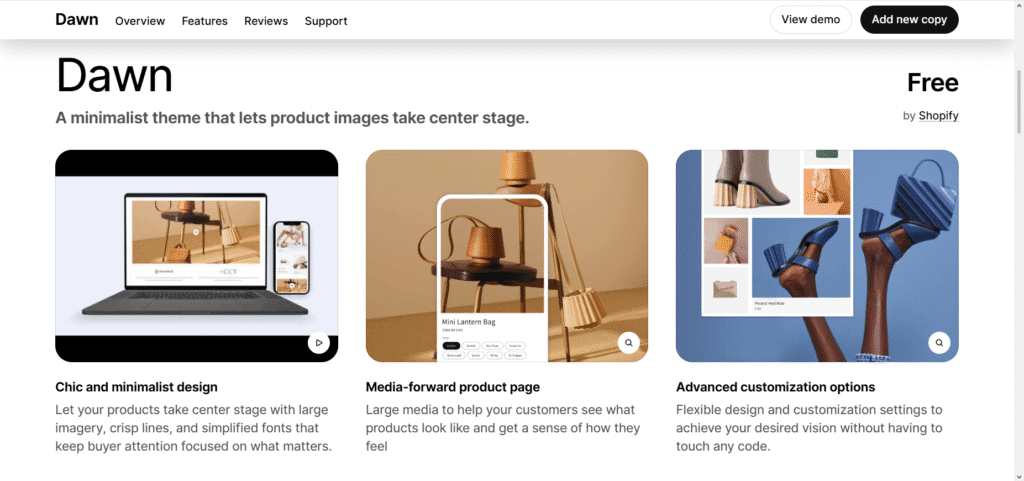
Completely Free, Forever: For new businesses where every dollar counts, this is a massive benefit. Dawn isn’t a “freemium” product with hidden costs or a limited-time trial. It’s a fully-featured, professional theme that is—and always will be—completely free to use, including future updates.
The Cons: What the 36% Positive Rating Really Means
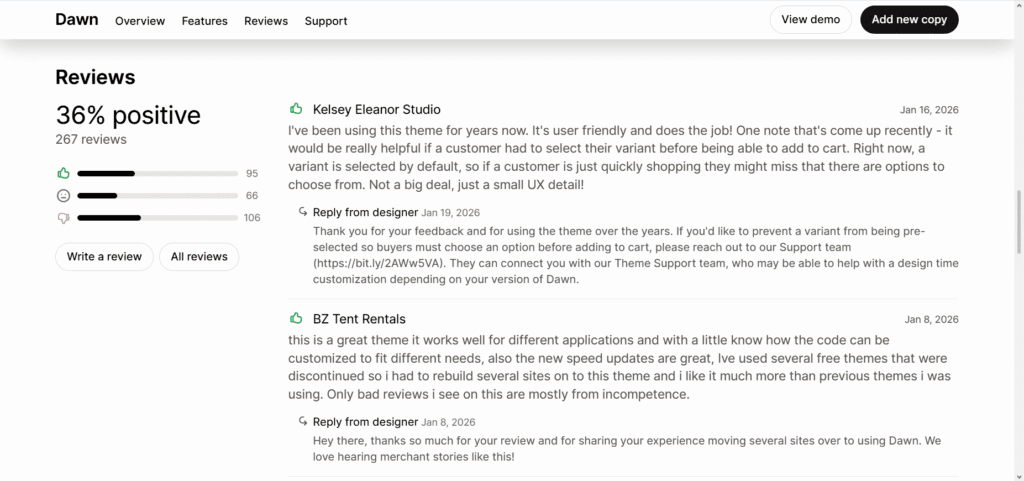
The low positive rating on the Shopify Theme Store can be alarming, but it requires context. Most negative reviews come from merchants needing highly specific, advanced features not included by default. Here’s what that means for you.
Limited Built-in Features: To keep the theme fast and lightweight, Dawn focuses on the essentials. You won’t find complex features like advanced collection filtering, in-cart upsells, or countdown timers built-in. As your store grows, you will likely need to add Shopify Apps to get this advanced functionality, which can come with their own subscription costs.
🚀 Recommended Apps for Upsells & Conversions
- Vitals: Reviews, Bundles & 40+ – Combines multiple conversion tools into one setup to reduce app overload. (10% monthly discount + 40-day free trial)
- Kaching CartDrawer Cart Upsell – Boosts cart value with upsells, urgency elements, and cart customization. (20% discount with code SSK20)
Potential for a “Cookie-Cutter” Look: As Shopify’s default theme, millions of stores start with Dawn. If you don’t customize it, your store can look generic. To truly stand out, you must invest time in personalization, using your own branding, high-quality images, and the customization options we’ll cover later in this guide.
Limited Customization Support: While Shopify provides direct support for Dawn, it only covers small theme tweaks and troubleshooting. More advanced customizations or technical issues aren’t included, meaning merchants often need to rely on community forums, documentation, or hire a Shopify Expert for deeper changes.
Strategic Customization: A Step-by-Step Tutorial to a High-Converting Store
Knowing what Dawn can do is one thing; knowing how to use its features to drive sales is another. This tutorial goes beyond the basics to show you how to customize your store with a clear, strategic purpose behind every choice.
Part 1: Building a Homepage That Builds Trust & Drives Clicks
Your homepage is your digital storefront. It needs to build trust, communicate your brand’s value, and guide visitors toward your products in seconds.
Here’s a summary guide video for Part 1, ideal if you prefer video to images.
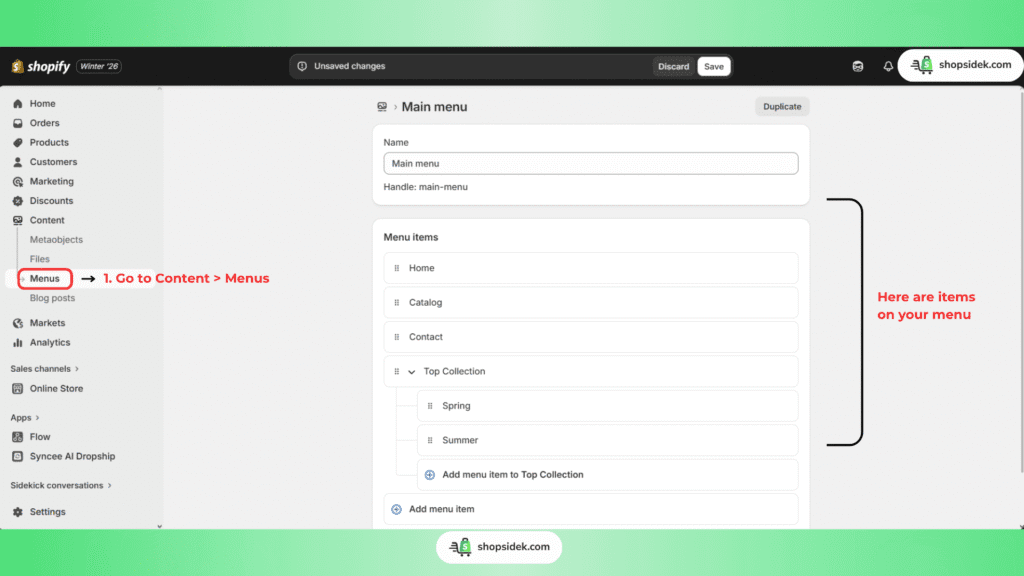
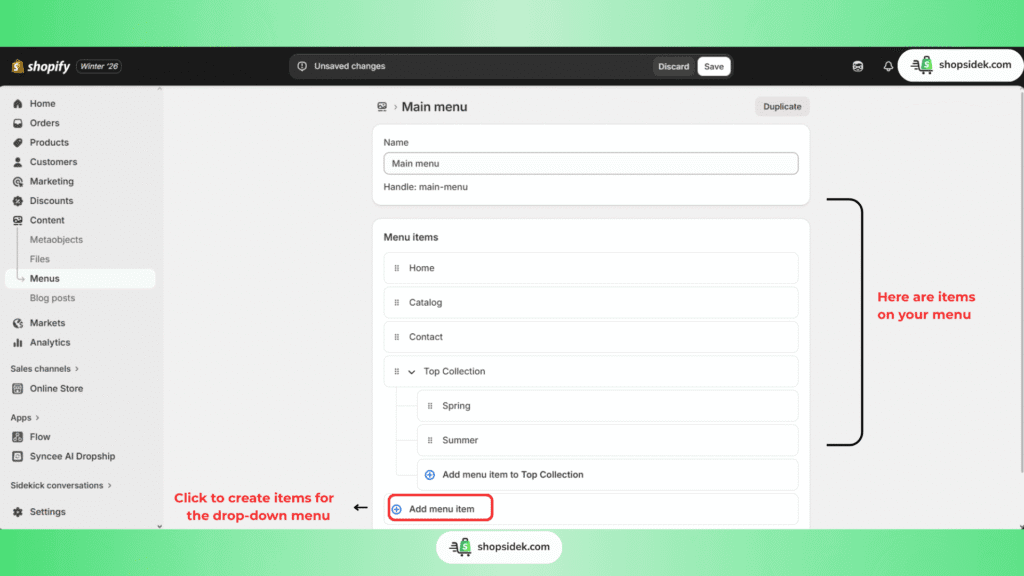
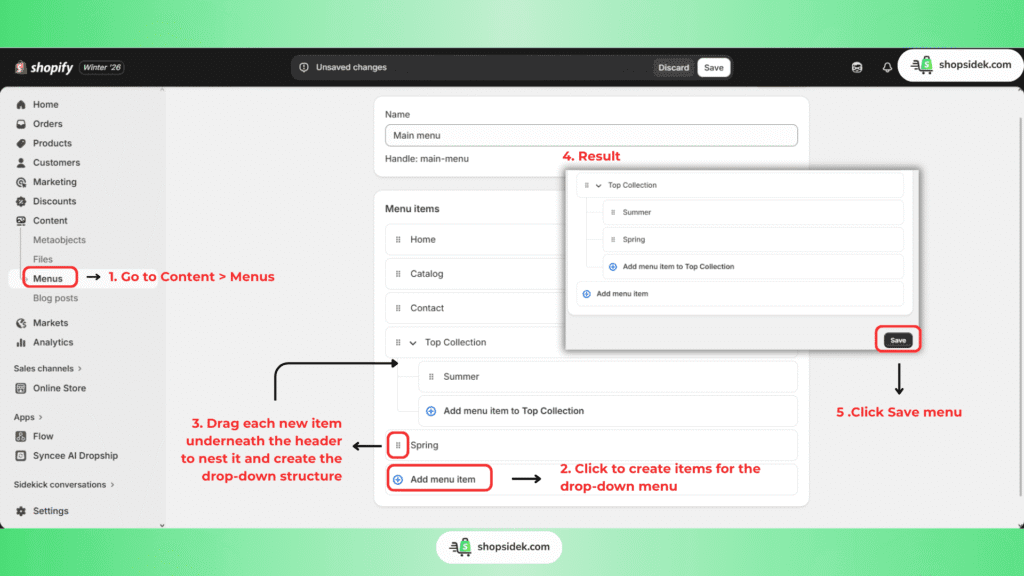
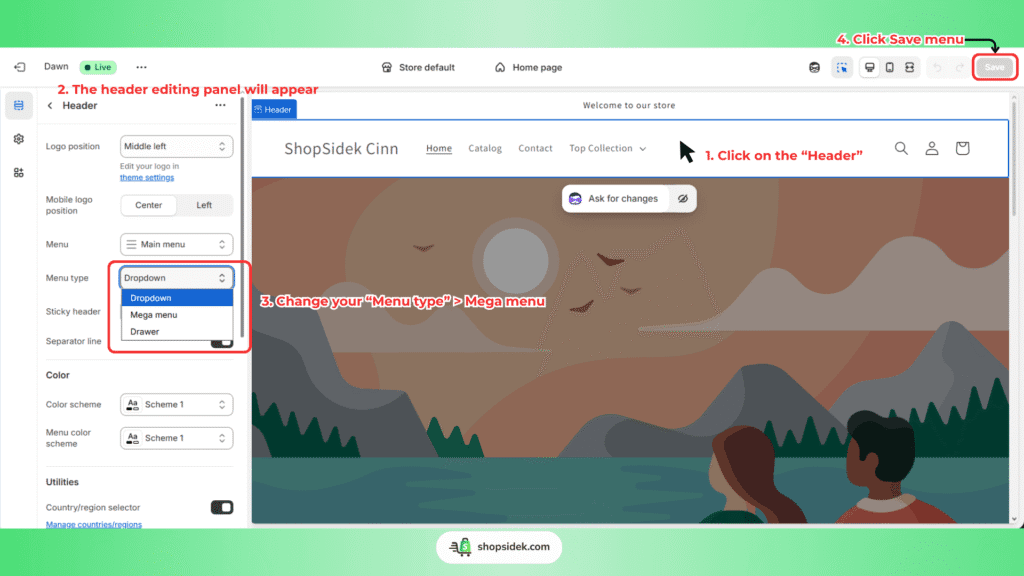
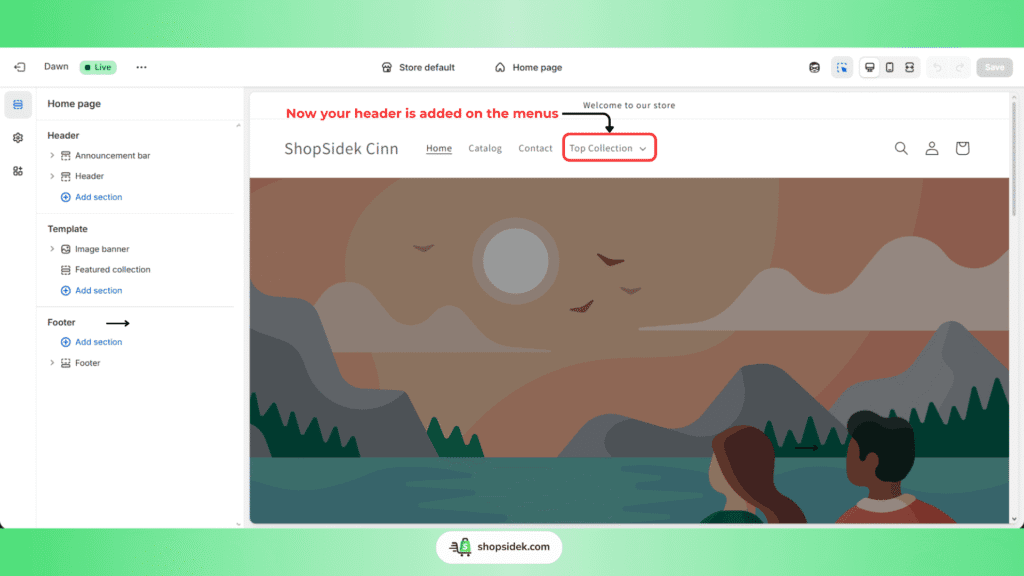
First, focus on your Header. This is your primary navigation tool. Add your logo and set up a clean, simple menu. If you have many product categories, use Dawn’s built-in “Mega menu” to organize them neatly, helping customers find what they need without getting overwhelmed.
Here is instruction to build “Mega menu”
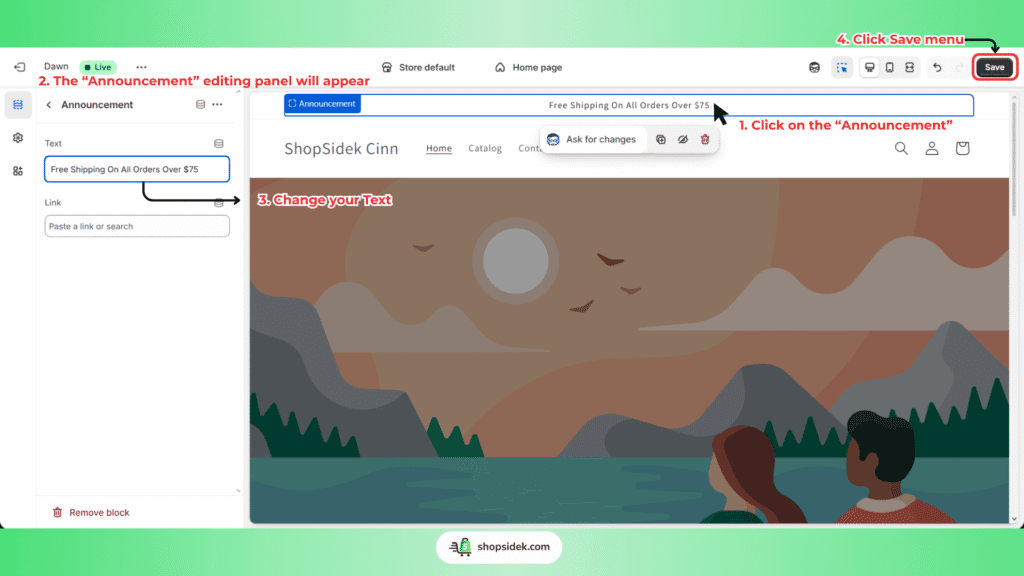
Next, enable the Announcement Bar. Don’t just use it for informational messages like “Welcome to our store.” Treat it as a conversion driver. Announce your most compelling offer, like “Free Shipping On All Orders Over $75” or “New Spring Collection – Shop Now.” This immediately tells every visitor a key reason to buy from you.
Here is how to change the “Announcement“
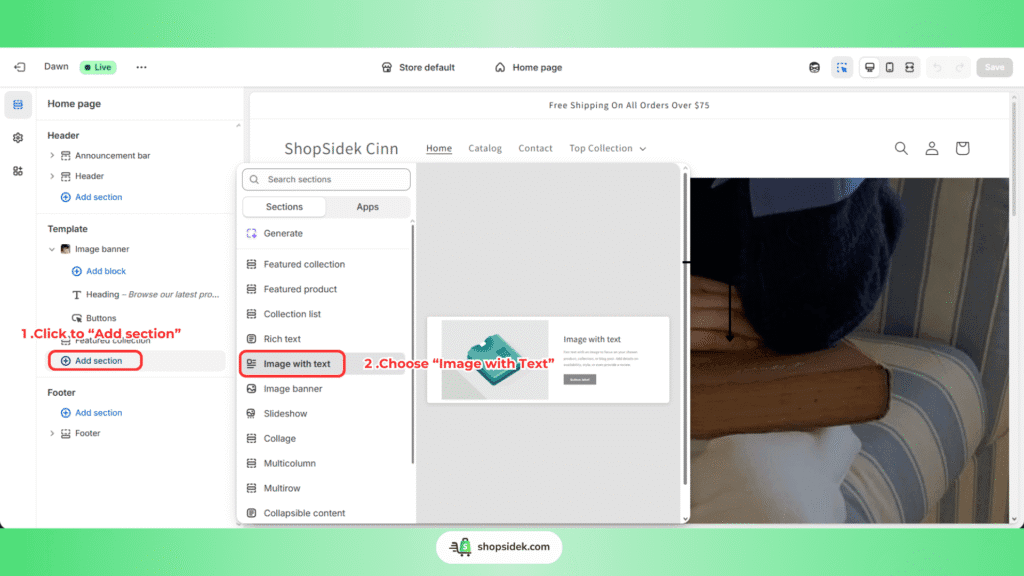
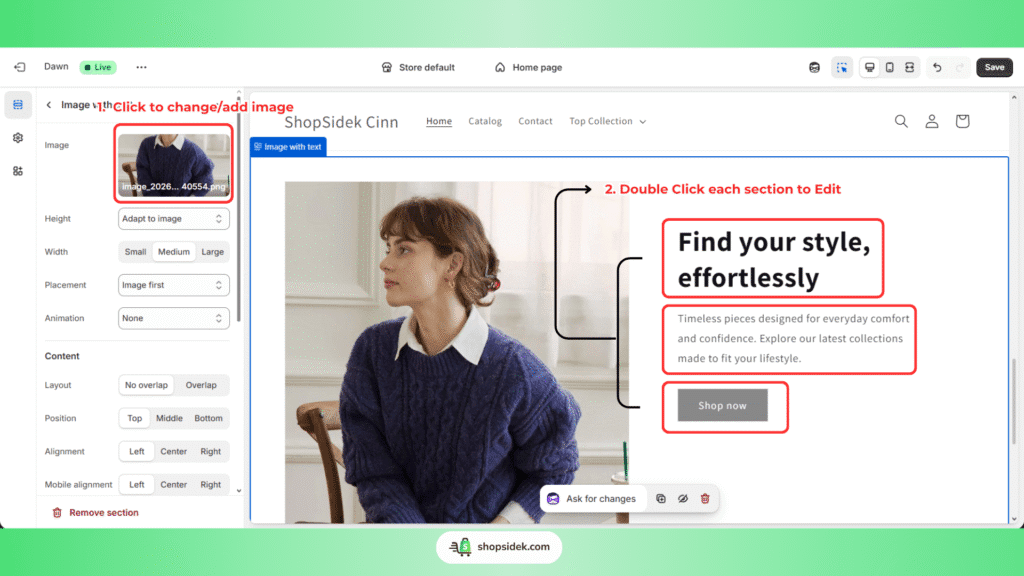
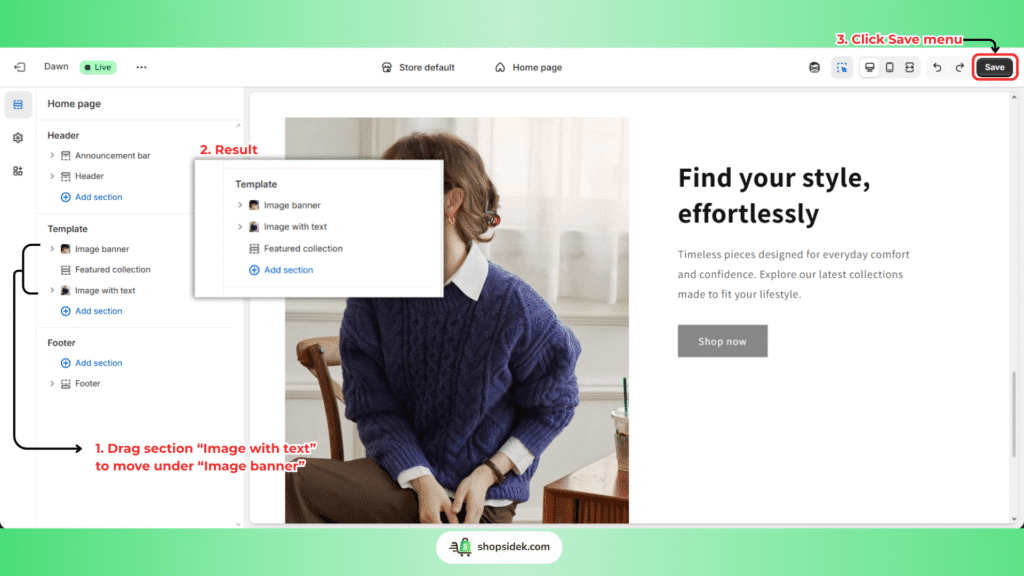
Finally, add an “Image with text” section right below your main banner. This is your chance to tell your brand story. Pair a high-quality lifestyle image with a compelling headline that clearly states your value proposition. Use the text block to briefly explain what makes you different, and ensure the button has a clear call-to-action like “Shop Bestsellers.”
Here how to add the “Image with text“
Part 2: Designing a Product Page That Sells
A great product page does more than just show a product—it answers questions, overcomes objections, and builds the confidence a customer needs to click “Add to Cart.” Dawn gives you powerful tools to do this.
This is a compiled walkthrough video for Part 2
Start by using the “Multimedia collage” section.
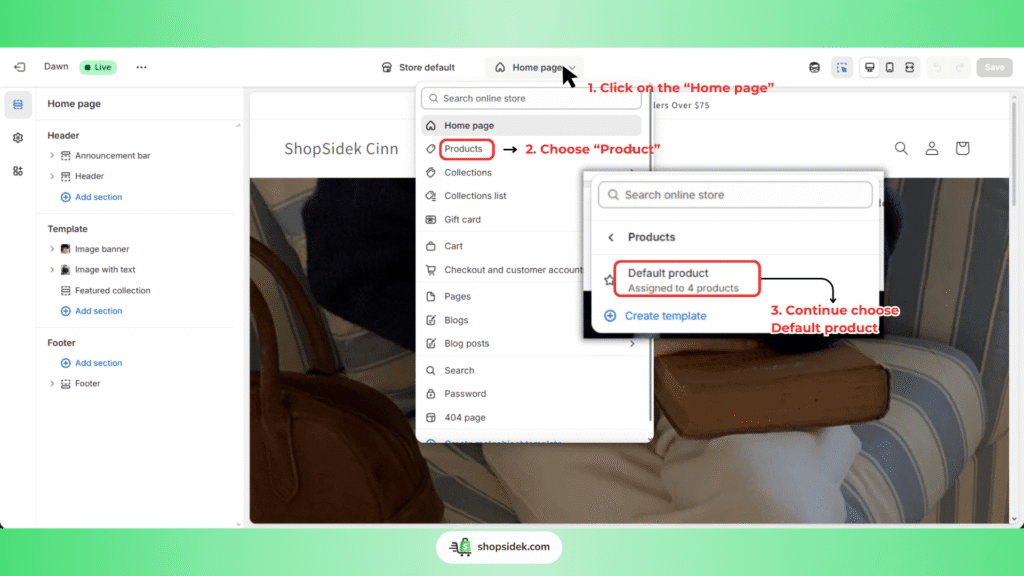
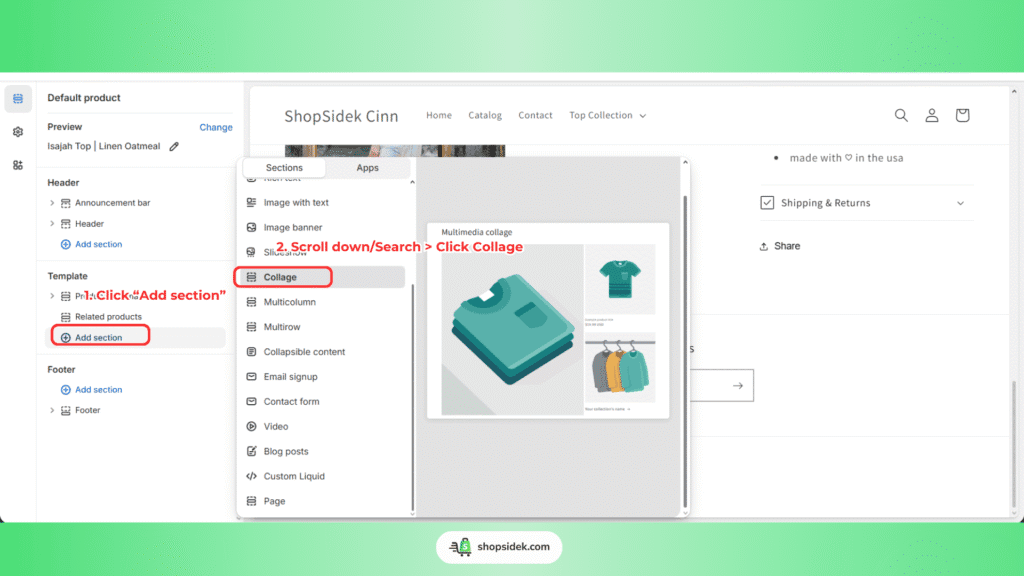
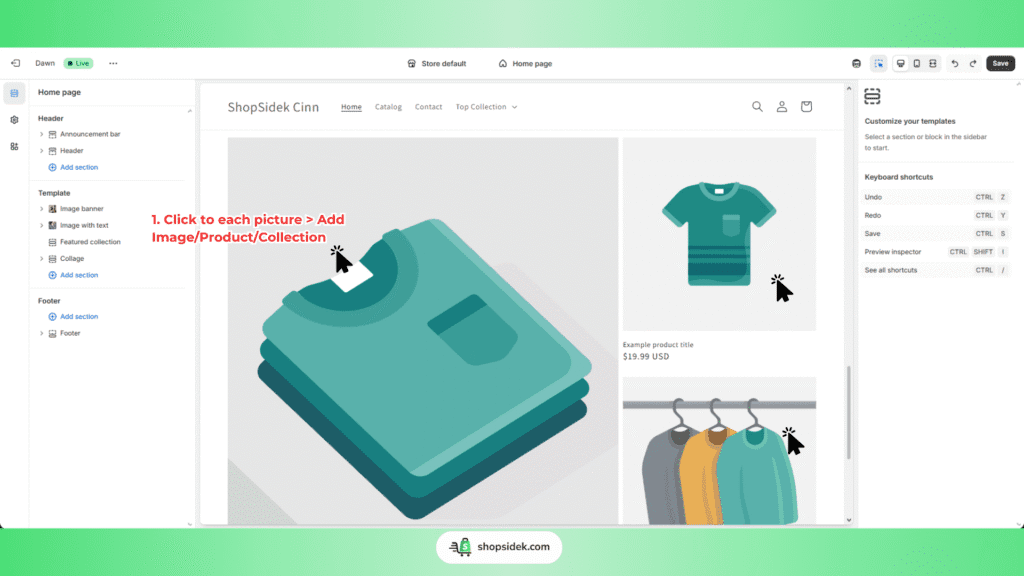
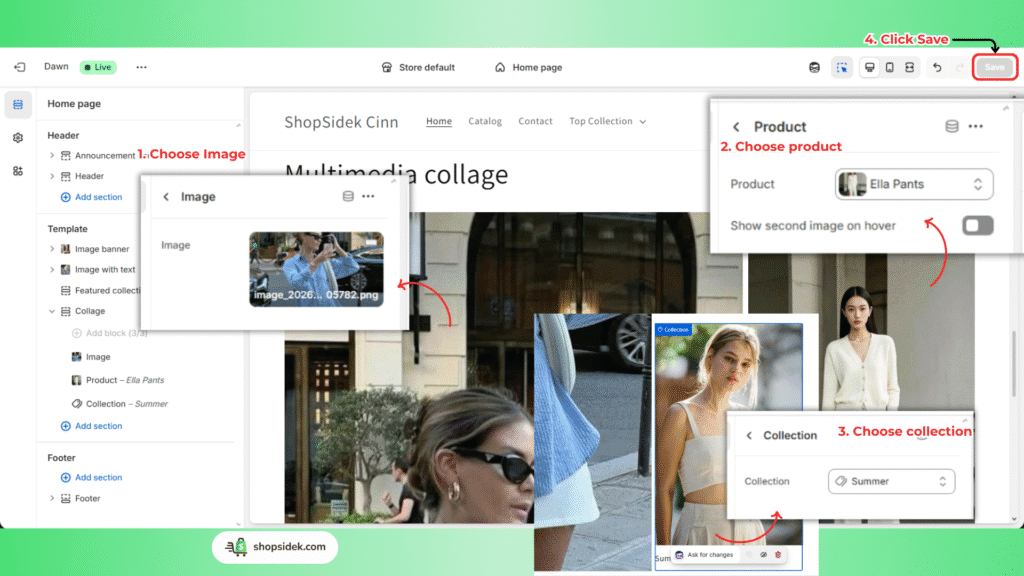
Don’t just upload a gallery of static product photos. Include lifestyle shots showing the product in use, a close-up of the material or texture, and even a short video. This helps customers visualize the product in their own lives and demonstrates quality far better than text alone. According to our report, personalized product recommendations and rich media can significantly lift revenue.
Next, add the “Collapsible content” section to keep your page clean while providing critical information. Use these drop-down tabs for details like:
- Sizing charts or dimensions
- Shipping and return policies
- Materials, ingredients, or specifications
- Frequently Asked Questions (FAQs)
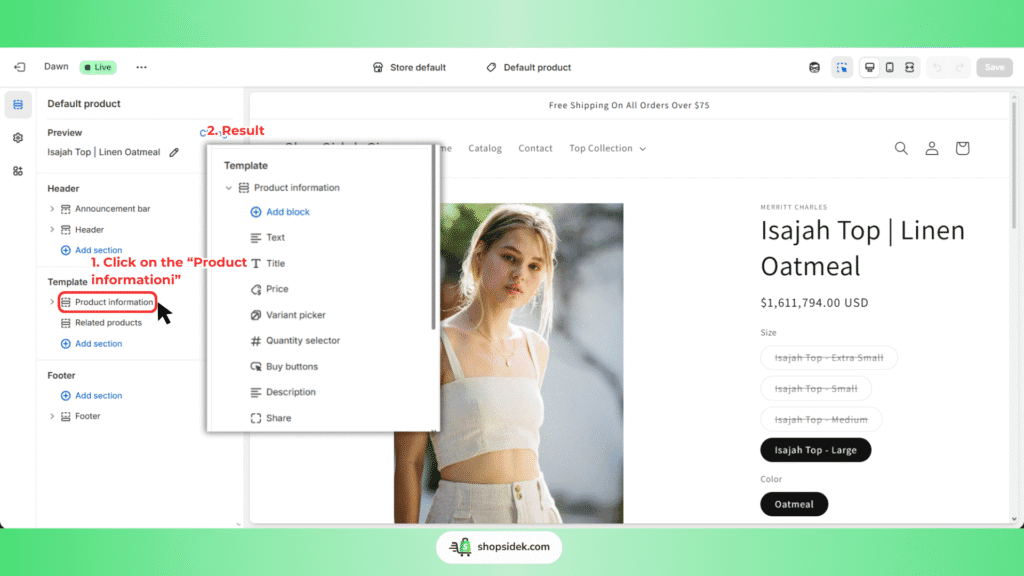
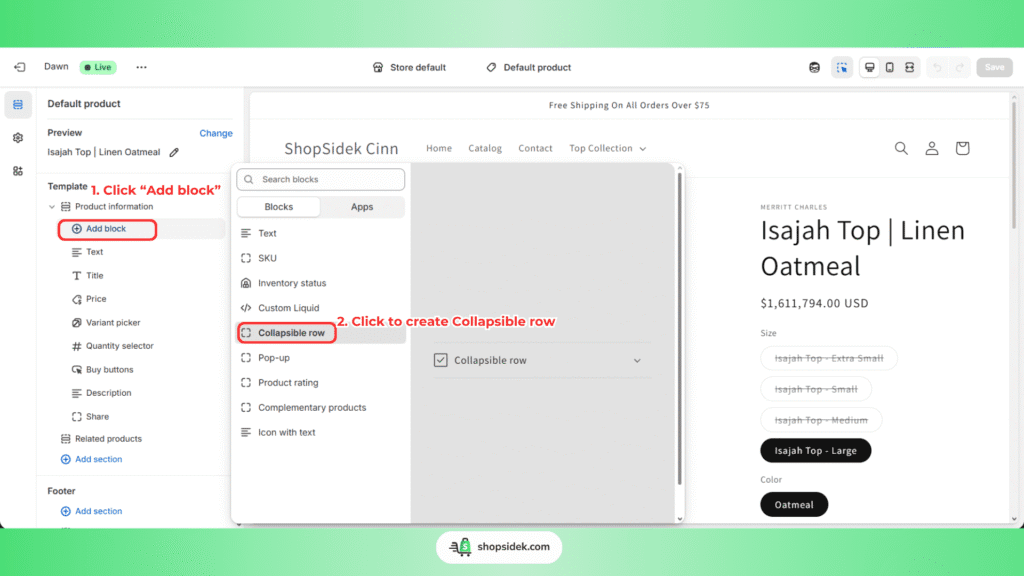
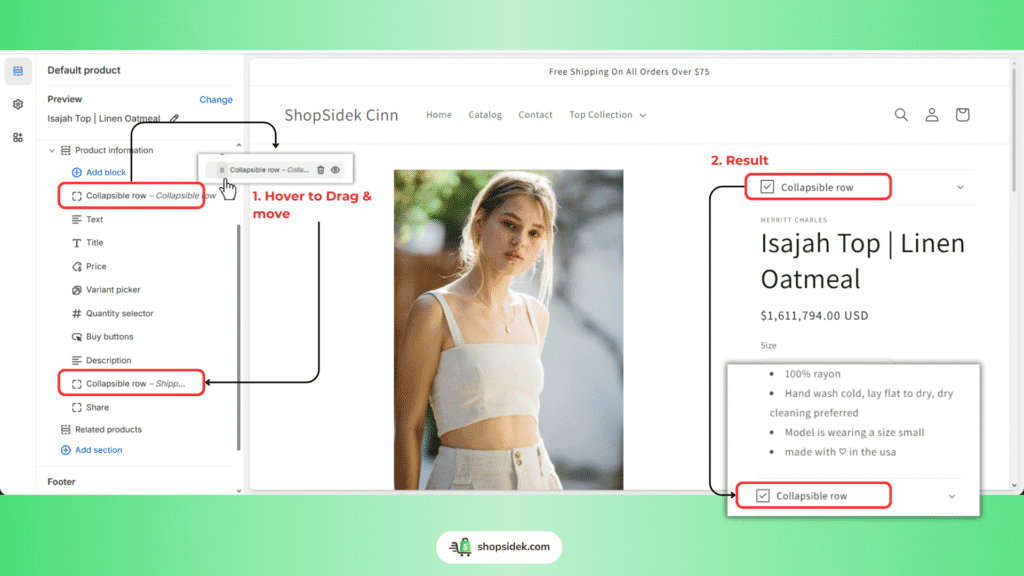
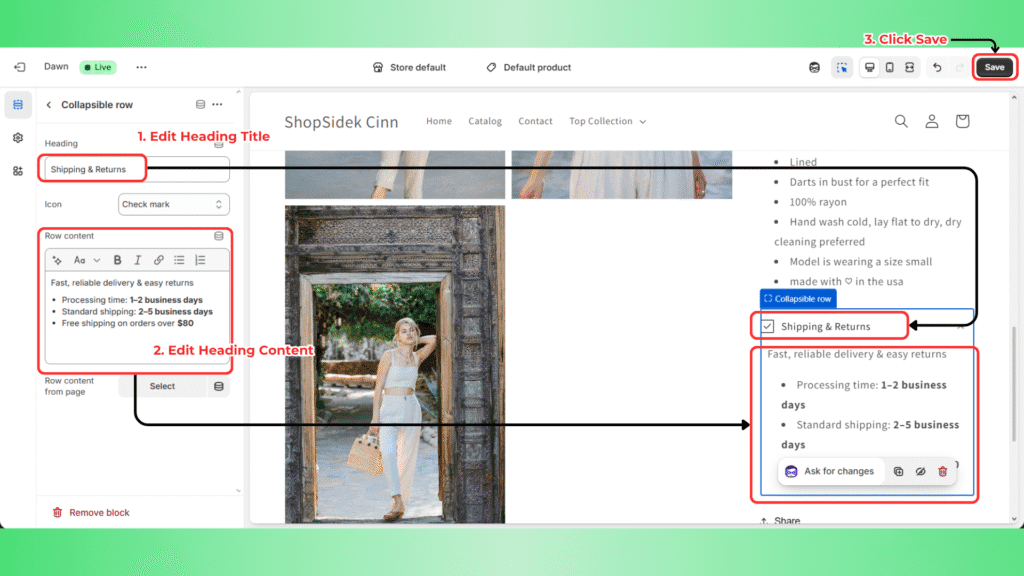
By organizing this information neatly, you reduce clutter and make it easy for customers to find answers. A shopper who can quickly find your return policy is far more likely to feel secure in their purchase.
Now that you see how easy it is to build a professional product page, it’s your turn. Launch your free Shopify trial and follow these steps with your own products.
Part 3: Leveraging Metafields to Add Unique Product Details
Have you ever wanted to add a specific, reusable piece of information—like “Care Instructions” or “Materials”—to your product pages without having to manually type it into the description every time? That’s where Metafields come in. Think of them as custom data fields for your products.
This is a consolidated video covering all guidance in Part 3.
Here’s a simple, no-code way to use them:
Step 1: From your Shopify Admin, go to Settings > Metafields and metaobjects.
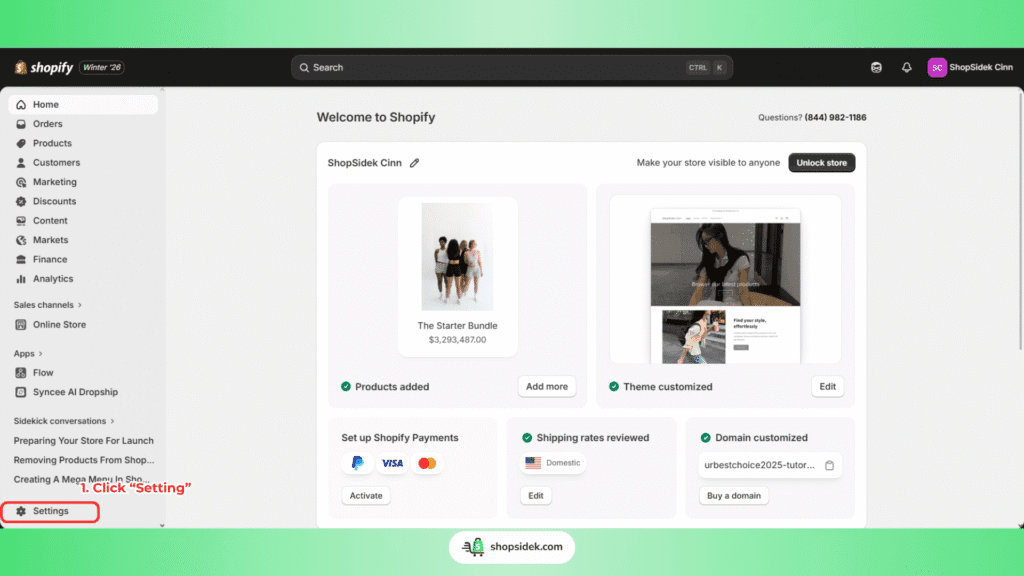
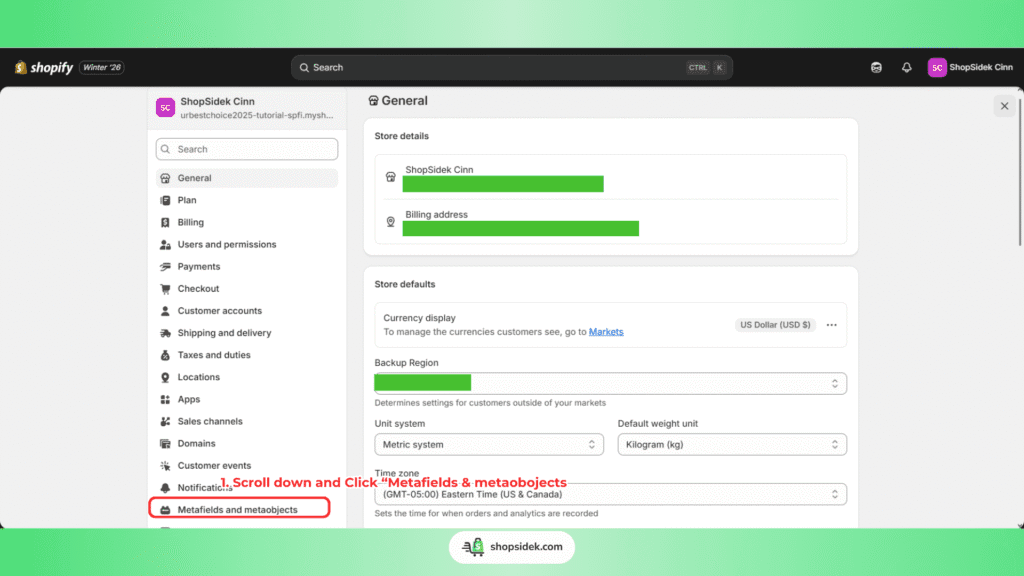
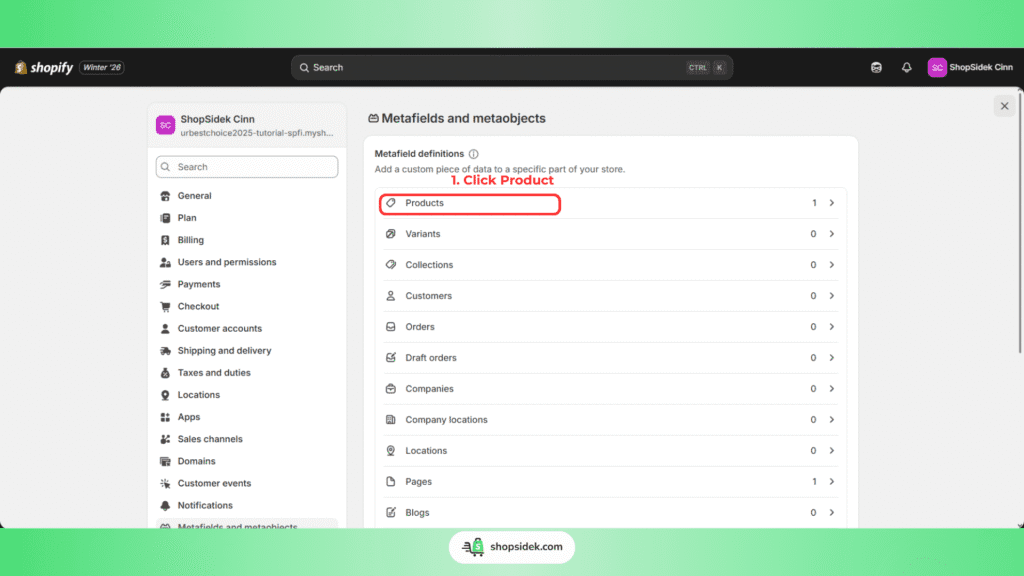
Step 2: Click on Products, then Add definition.
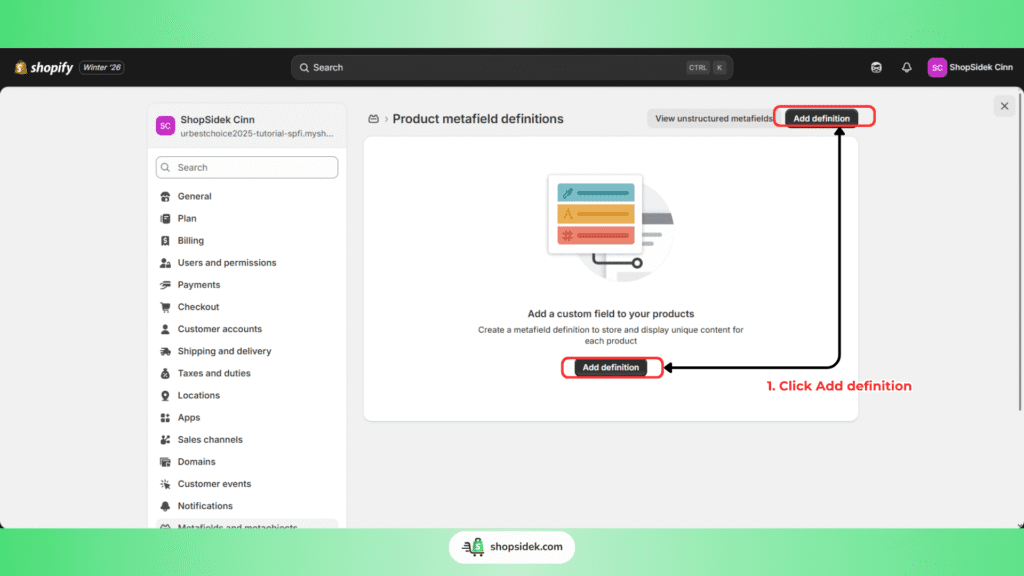
Step 3: Name your metafield (e.g., “Care Instructions”) and select the content type (e.g., “Multi-line text”). Click Save.
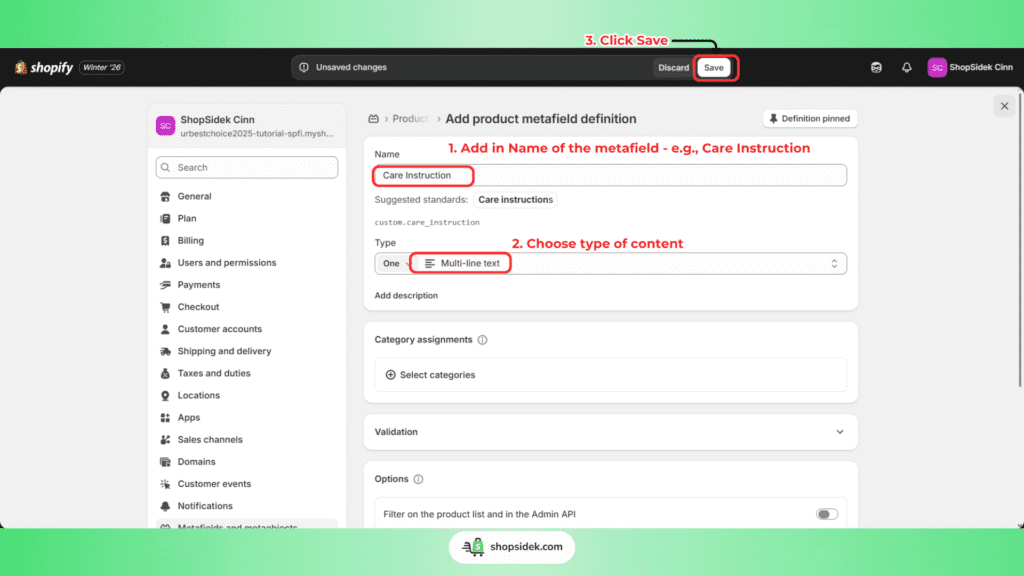
Step 4: Now, navigate to any product in your admin. Scroll to the bottom, and you’ll see your new “Care Instructions” field. Fill it out.
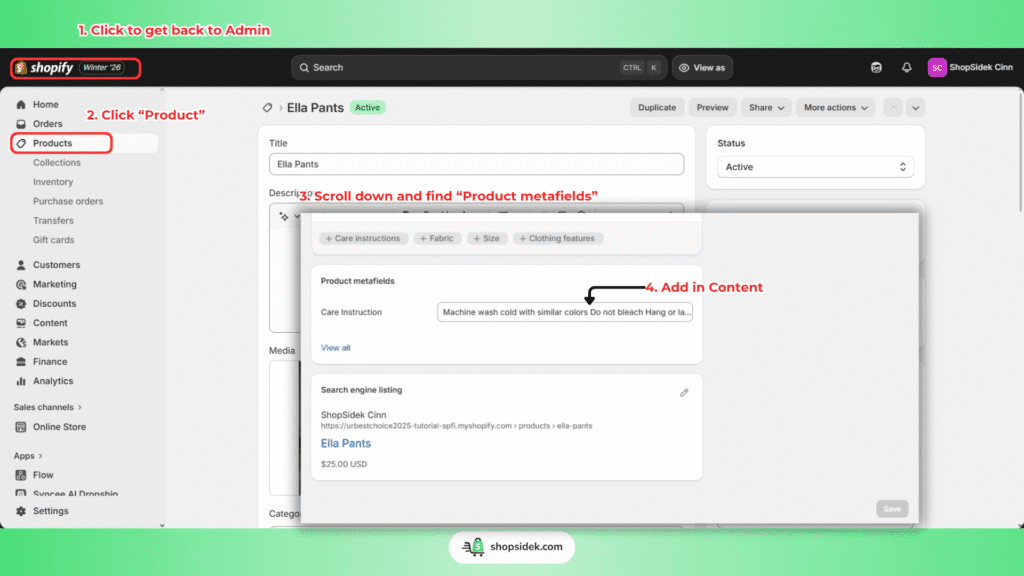
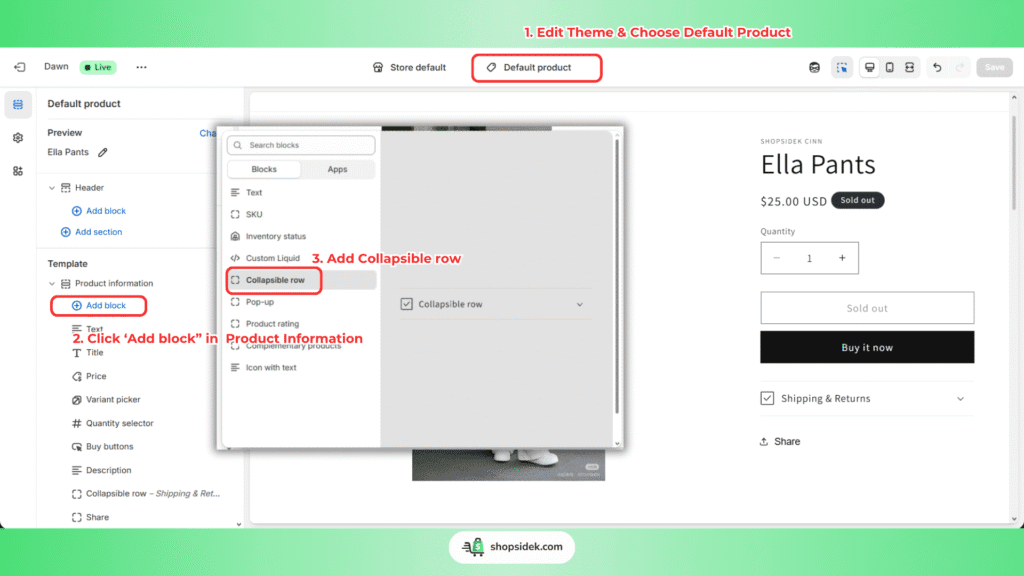
Step 5: Finally, go to the theme customizer (Online Store > Edit Theme) and open your default product page template.
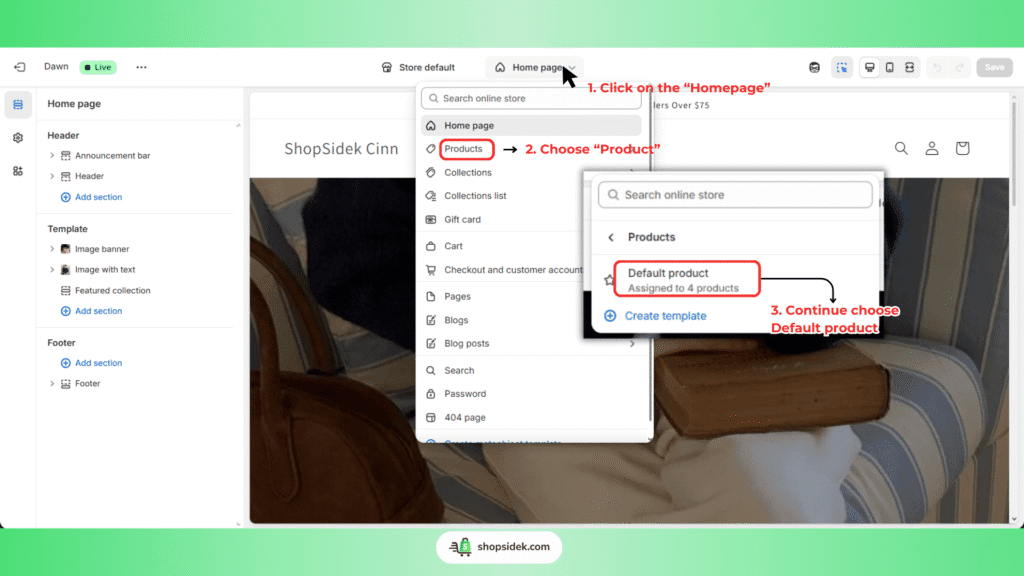
Step 6: Click Add block in the “Product information” section and choose the Text/Collapsible row block.
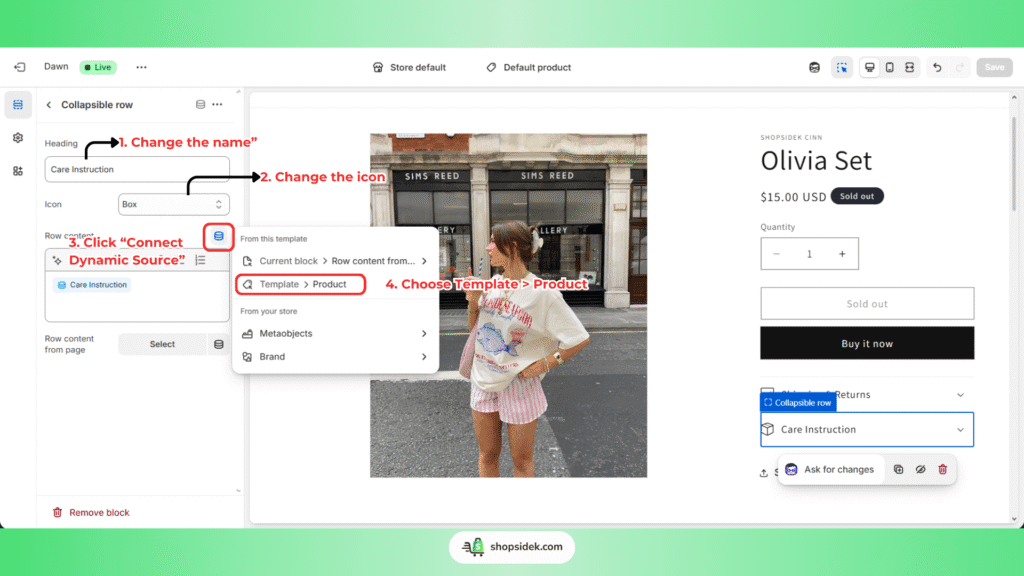
Step 7: Change the name & the icon accordingly. Next, click the “Connect dynamic source” icon on the top right of the text block settings and Choose Template > Product.
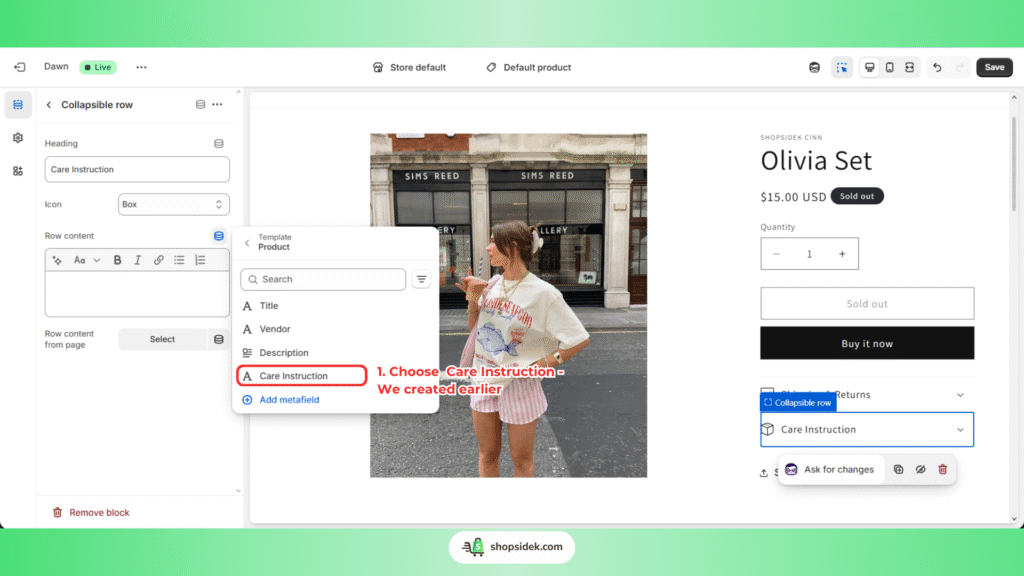
Step 8: Select the “Care Instructions” metafield from the Product template you created.
Step 9: Drag to move the Text/Collapsible row to your desired place. And check the Result > Save.
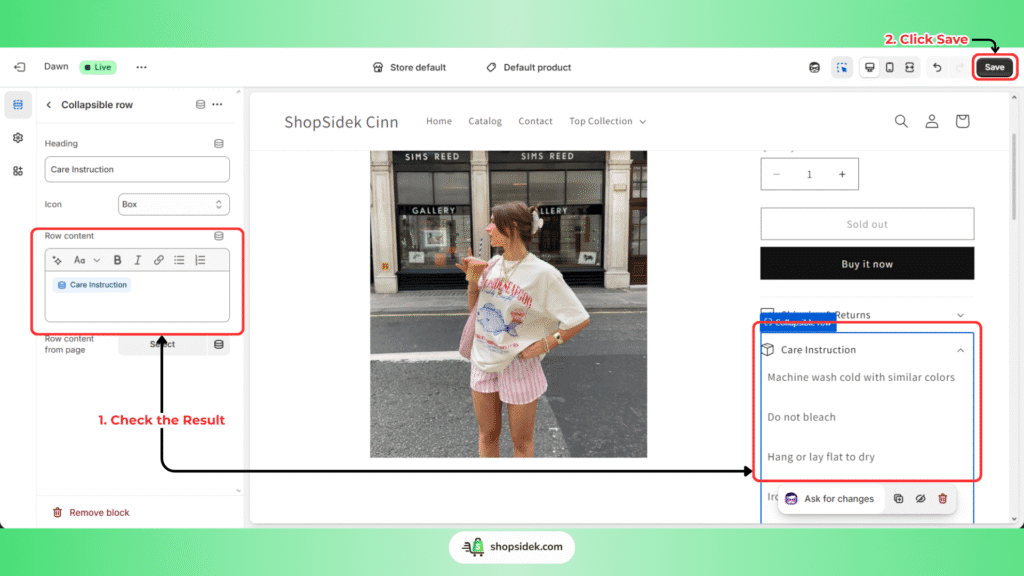
Step 10: Click to the “Care Instruction” to Edit value (or the description) for each product. Do not forget to save your progress after the edit.
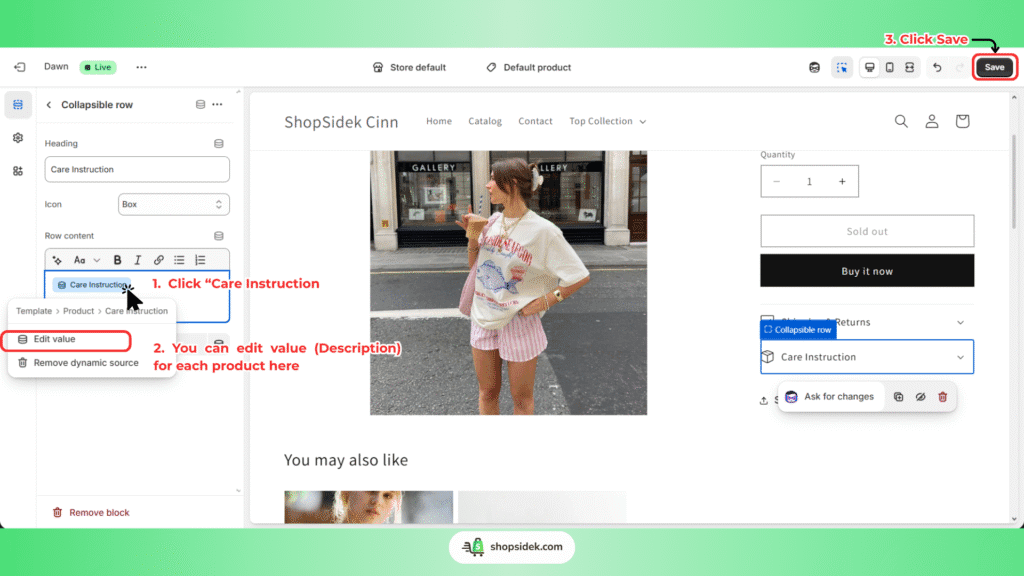
That’s it! The care instructions will now automatically appear on the product page. This information is now a structured part of your store’s data, making your site more professional and saving you countless hours. You can use this for anything from “Estimated delivery time” to “Country of Origin.”
Real-World Inspiration: 4 Verified Dawn Theme Examples, Analyzed
Theory is helpful, but seeing what’s possible is what truly inspires. These four successful Shopify stores all use the Dawn theme as their foundation. Instead of just showing you a screenshot, we’ve analyzed the key strategic lesson you can learn from each one to apply to your own store.
Example 1: Runner Athletics – Mastering Simplicity and Strong Visuals
Runner Athletics is a perfect example of Dawn’s minimalist philosophy in action. The store uses a clean layout with bold, full-bleed images that immediately capture the energy of their brand.
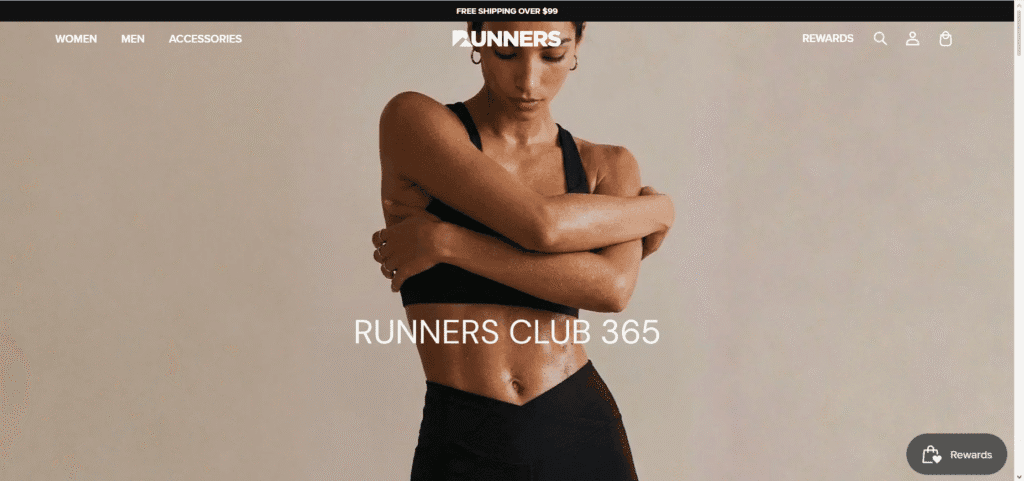
There are no distracting gimmicks or complex animations; the focus is entirely on high-quality product photography. By allowing the crisp, professional images to be the hero, they create a powerful and confident brand presence. This approach is ideal for apparel, home goods, and any brand that relies on strong visuals.
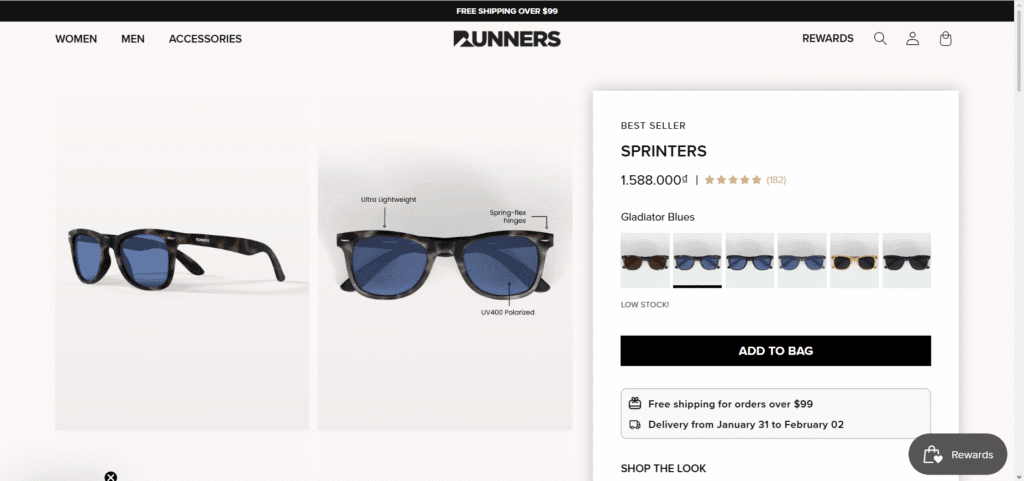
Key Takeaway: You don’t need a complex design if you have great product photography. Let your products do the talking.
Example 2: MD Complete – Building Credibility and Trust in a Health Niche
Selling health or skincare products requires a high level of trust, and MD Complete uses Dawn’s clean structure to build it effectively. The site presents scientific information, customer testimonials, and product benefits in clear, easy-to-digest sections.
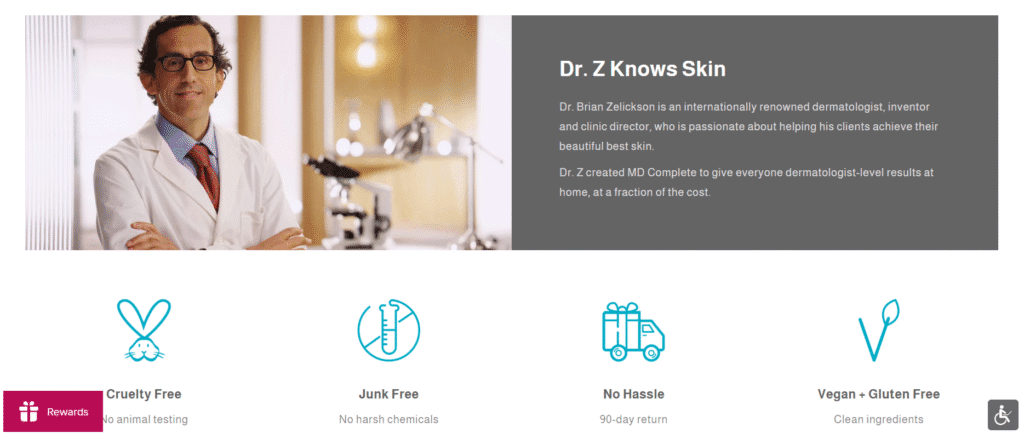
On their product pages, they masterfully use the “Collapsible content” feature to organize detailed ingredient lists, usage instructions, and FAQs. This keeps the layout uncluttered and allows customers to find the information they need, building credibility and reducing purchase anxiety.
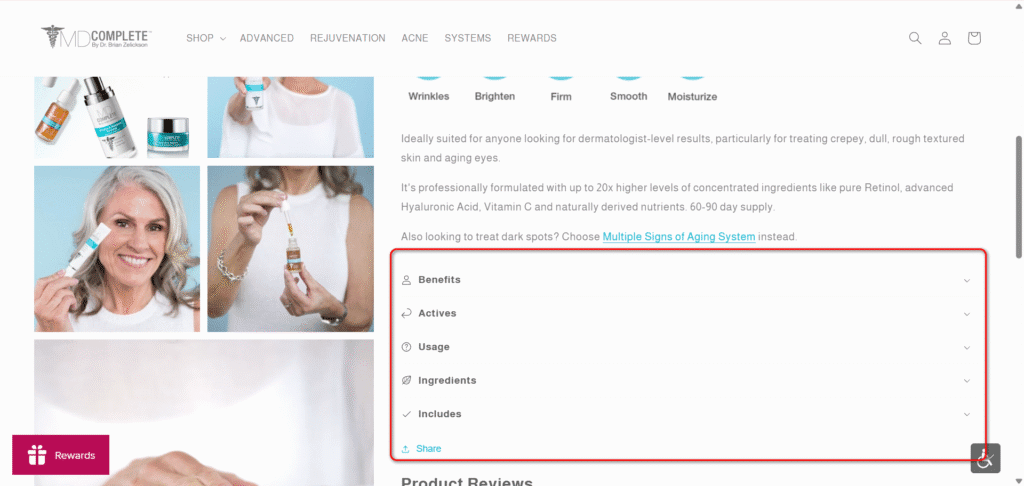
Key Takeaway: The way I see it, a simple theme can build immense trust if the content is clear, well-organized, and answers customer questions directly.
Example 3: Olivine Atelier – Crafting an Elegant, Boutique Vibe
Dawn can be elevated to feel high-end and luxurious, as demonstrated by the boutique fragrance shop Olivine Atelier. They achieve this sophisticated aesthetic by focusing on two key elements: elegant typography and generous white space.
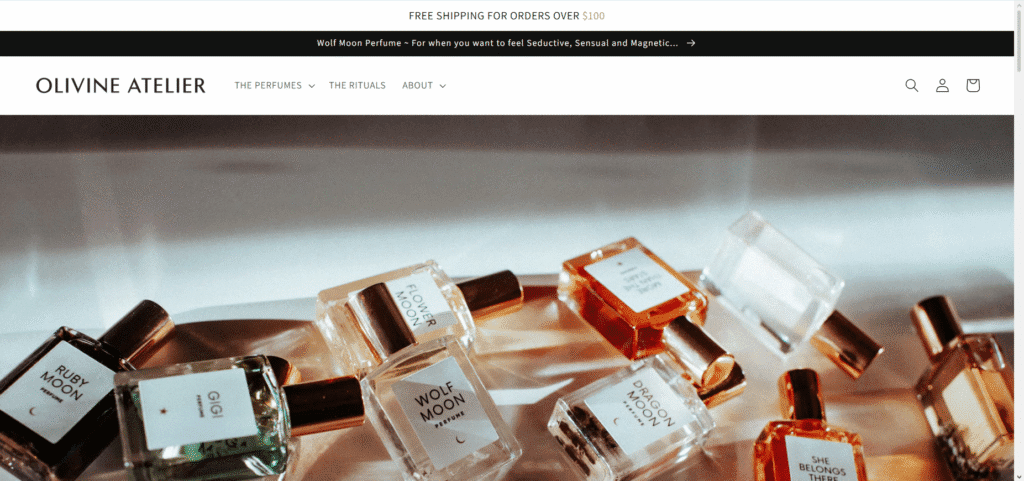
The soft, professional photography is given room to breathe, creating a calm, premium browsing experience. This proves that you don’t need a premium theme to create a premium feel. Careful attention to fonts, spacing, and image quality can completely transform Dawn’s look.
💡While Dawn handles this well, if you want a built-in luxury aesthetic, you may also want to check out our Prestige theme review for a dedicated high-end alternative.
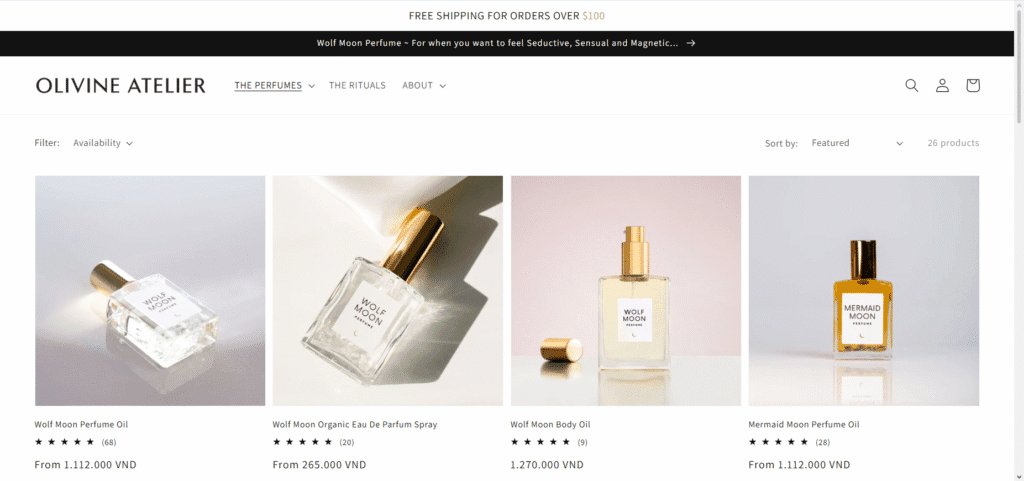
Key Takeaway: You can achieve a high-end, elegant look by focusing on great typography and giving your content room to breathe.
Example 4: Wood Wood Toys – Organizing a Large Catalog for Easy Browsing
If you think Dawn is only for small inventories, Wood Wood Toys proves otherwise. This toy store has hundreds of products across numerous categories, a challenge for any theme. They effectively use Dawn’s built-in Mega Menu in the header to create a clear, multi-column navigation system that lets shoppers see all categories at a glance.
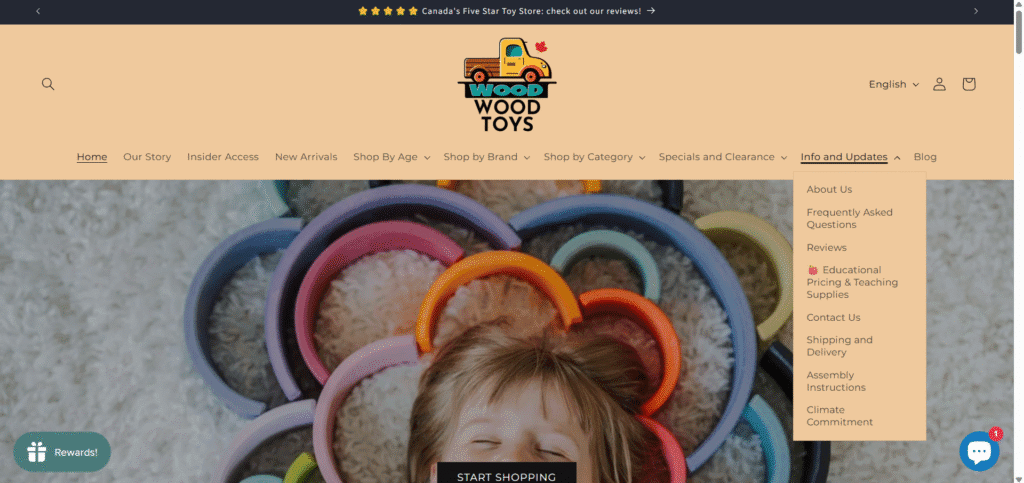
Furthermore, they leverage the theme’s default filtering and sorting options on collection pages, allowing customers to easily narrow down their search by age, brand, or price.
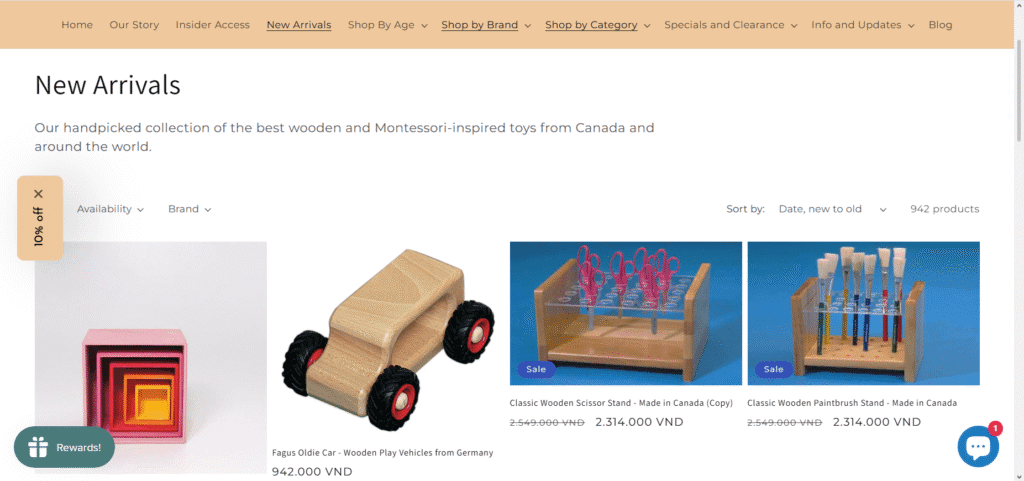
Key Takeaway: Dawn is powerful enough to handle larger inventories if you strategically use its built-in navigation and filtering features from the start.
Dawn vs. Other Free Shopify Themes: A Head-to-Head Comparison
While Dawn is the default, Shopify offers several other excellent free themes built on the same modern architecture. They all share the benefits of Online Store 2.0, including great speed and flexibility. The best choice for you comes down to the specific aesthetic and brand story you want to tell. Based on performance testing and feature analysis, here is how they stack up.
| Theme Name | Best For (Business Type) | Key Differentiator & Vibe |
|---|---|---|
| Dawn | Virtually any business; especially apparel, home goods, and stores that want a clean starting point. | The Ultimate Blank Canvas. It is a high-performance and ultra-flexible theme that puts your product photography first. Its design is neutral, letting your brand’s visuals define the personality. |
| Sense | Health & Beauty, Skincare, or brands with a calming, friendly aesthetic. | Soft & Energetic. Features subtle gradients, curved elements, and enhanced testimonial sections. It feels more vibrant and approachable, perfect for creating a gentle, positive feeling. |
| Craft | Artisans, home decor, makers, and businesses that value storytelling. | Authentic & Elegant. Emphasizes craftsmanship with spacious layouts, elegant typography, and dedicated sections for telling your brand’s story. |
| Refresh | Activewear, modern wellness products, or brands with a bold, confident voice. | Bold & Striking. Makes a statement with sharp lines, assertive typography, and a modern, defined structure. It’s designed to be eye-catching and ideal for projecting confidence and energy. |
Recommendation: What I usually tell clients is, if you are unsure, start with Dawn. Its versatility makes it the safest and most adaptable choice. However, if your brand identity strongly aligns with the specific vibes of Sense (calm), Craft (story-driven), or Refresh (bold), choosing one of them can give you a design head start.
💡Still can’t decide? Use our Shopify theme matchmaker to find the perfect fit based on your specific industry and catalog size.
The Final Verdict: Should You Build Your Business on the Dawn Theme?
After a thorough review, the answer is a resounding yes. The Shopify Dawn theme is an outstanding choice for building a serious, successful online business. It masterfully combines elite performance, incredible design flexibility through Online Store 2.0, and the unbeatable price of zero.
For new merchants, drop shippers, and creators testing an idea, Dawn is the undisputed best starting point. It provides a professional, high-converting foundation that can grow with your brand, empowering you to invest your resources in what truly matters: your products and your customers.
Ready to build a fast, beautiful, and conversion-focused online store for free? Dawn has everything you need to get started.
Click 👇 claim your free Shopify trial and launch your business today.

Note: I’m a Shopify Media Partner, which means I might earn a small commission if you sign up through my link. It doesn’t cost you anything extra and helps keep this blog running.
FAQs About Dawn Theme Shopify
Is the Shopify Dawn theme really free?
Yes, the Dawn theme is 100% free to install and use on any Shopify plan. There are no hidden fees or trials for the theme itself. The only costs you’ll incur are for your standard Shopify subscription and any paid third-party apps you choose to install.
To get a quick and accurate cost estimate, explore The Only Shopify Pricing Calculator You’ll Ever Need.
How fast is Dawn theme Shopify?
Dawn is one of the fastest themes available. As Shopify’s flagship Online Store 2.0 theme, it was built specifically for performance. It is significantly faster—up to 35% faster—than older themes like Debut, which is a major benefit for both user experience and SEO.
Is Dawn a good choice for beginners?
Yes, it’s the best choice for beginners. Its drag-and-drop editor is incredibly intuitive, the settings are clearly labeled, and it provides all the essential features you need to launch a professional store without feeling overwhelmed by complex options.
Can I change fonts and colors in the Dawn theme?
Absolutely. You have full control over your store’s typography and color schemes directly within the theme editor, no code needed. You can select from hundreds of included fonts and set your brand colors to apply across the entire site for a consistent look.
Is the Dawn theme good for SEO?
Yes, the Dawn Shopify theme provides a very strong foundation for SEO. It is mobile-first, loads quickly, and uses modern, clean code that search engines can easily crawl. These technical SEO advantages give your store a head start in ranking on Google.