So, you’ve launched your Shopify store. Now comes the challenging part: getting found. If you’re staring at endless checklists and feeling overwhelmed by technical jargon, you’re not alone. The world of search engine optimization is vast, but getting results doesn’t have to be complicated.
That’s why we created this playbook. This isn’t just another list of Shopify SEO tips; it’s a prioritized roadmap designed to take you from zero to consistent traffic in three clear phases. As Shopify’s SEO strategist Greg Bernhardt puts it, effective SEO is fundamentally about understanding what your customers are searching for and creating an online experience that meets their needs.
This Shopify SEO guide will show you exactly where to start. We’ll cover the biggest wins for your first week, help you build a content engine in your first month, and show you how to scale for the long game.
This entire playbook is designed to be actionable from day one. If you’re ready to follow along, you can start a free Shopify trial and apply these steps in real-time.
If you prefer to learn by watching, I’ve also created an explainer video.
First, Let’s Clarify: What Shopify SEO is Automatic vs. Manual?
One of the biggest advantages of using Shopify is that it handles many of the technical SEO basics for you right out of the box. From what I’ve seen, a common mistake is assuming the platform does everything. Understanding the relationship between SEO and Shopify is the first step toward building a successful strategy.
Shopify provides a powerful technical foundation, but your strategic and creative efforts are what ultimately drive growth. To follow Shopify SEO best practices, you need to know where to focus your energy. Here’s a simple breakdown of what’s automatic versus what’s in your control.
| What Shopify Does Automatically | What You Control (Manual Tasks) |
|---|---|
| Auto-Generated Sitemap: Shopify creates and updates a map of all your pages to help Google find and index your content efficiently. | Keyword Research: Discovering the specific terms and phrases your target customers are using to find products like yours. |
| Auto-Generated robots.txt: This file guides search engines on which pages to crawl and which to ignore, preventing duplicate content issues. | Content Creation: Writing compelling product descriptions, creating blog posts, and building informative collection pages that answer customer questions. |
| Auto-Generated Canonical Tags: These tags are automatically added to pages to prevent duplicate content from hurting your rankings. | On-Page Optimization: Crafting unique titles, meta descriptions, and image alt text to improve your visibility in search results. |
| SSL Certificate: Shopify includes SSL encryption for your store, ensuring a secure connection and meeting a key Google ranking factor. | Site Structure & Navigation: Organizing your products and collections logically to create a great user experience and help search engines understand your store. |
| Link Building: Earning links from other reputable websites to build your store’s authority and credibility in the eyes of search engines. |
Think of it this way: Shopify builds a high-performance car, but you’re the one who has to choose the destination, put gas in the tank, and drive it. The rest of this playbook focuses on that “Manual” column—the strategic actions that will move the needle and grow your traffic.
Phase 1: Your First Week — The 5 Biggest SEO Wins for Immediate Impact
Welcome to your first week. The goal here isn’t to boil the ocean. It’s to build momentum with five high-impact Shopify SEO tips laying a solid foundation for your store. Completing these steps will put you ahead of most new store owners and deliver tangible results you can track.
Win #1: Set Up Your Foundational Tracking Tools
My advice is to remember that you can’t improve what you don’t measure. The first step in any serious Shopify SEO plan is to connect your store to Google’s free tools. These platforms tell you how people find your site, which keywords they use, and how your pages are performing.
- Google Analytics: Tracks visitor behavior on your site, like page views and bounce rates.
- Google Search Console: Monitors your site’s health in Google search, showing you which keywords you rank for, any technical errors, and your click-through rates.
In the past, this required messing with code. Today, Shopify makes it simple.
Here’s how to do it:
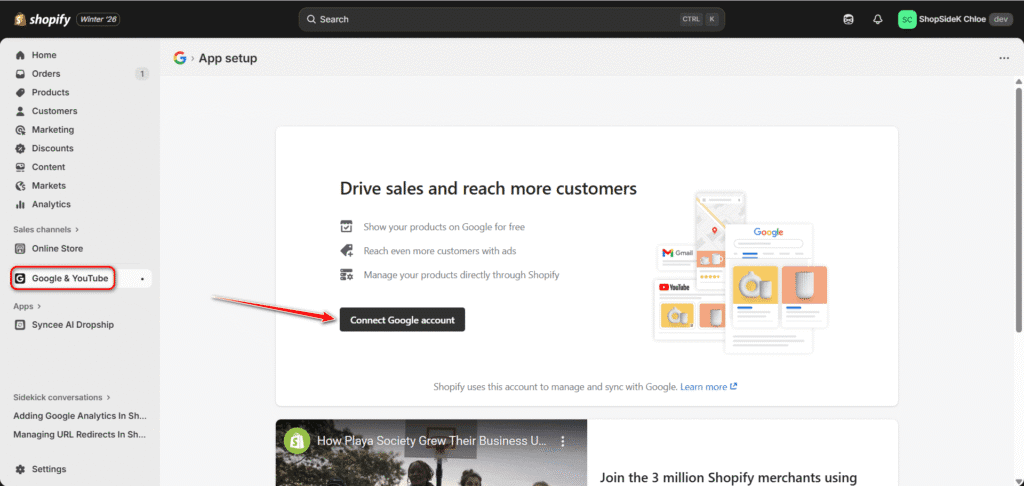
- From your Shopify admin, go to Apps and install the Google & YouTube app.
- Follow the setup prompts to connect your Google account. This process will automatically install Google Analytics 4 (GA4) and verify your site with Google Search Console.
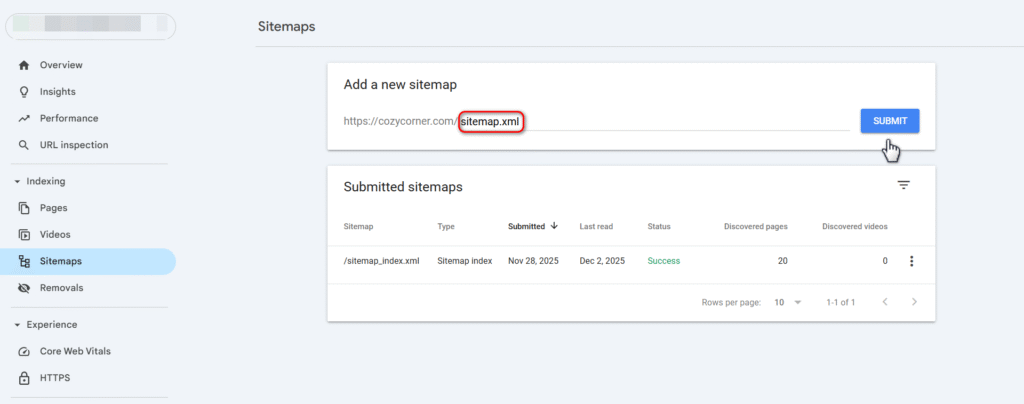
- Once connected, go to your Google Search Console account and find the Sitemaps report. Your sitemap URL is simply your primary domain with /sitemap.xml at the end (e.g., yourstore.com/sitemap.xml).
- Paste this URL into the “Add a new sitemap” field and click Submit.
Win #2: Optimize Your Homepage Title & Meta Description
Your homepage title and meta description are the first things most people see in a Google search for your brand. They are your digital storefront sign—they need to be clear, compelling, and relevant.
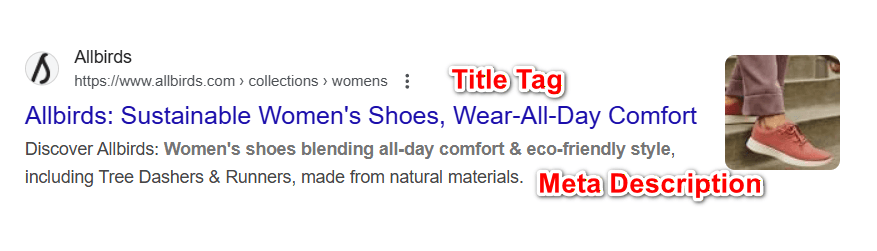
- Title Tag: The main blue link in search results. It should include your brand name and your main value proposition (e.g., “Allbirds: Sustainable Women’s Shoes, Wear-All-Day Comfort”).
- Meta Description: The short text snippet below the title. It should expand on your value proposition and encourage a click.
Here’s how to optimize them:
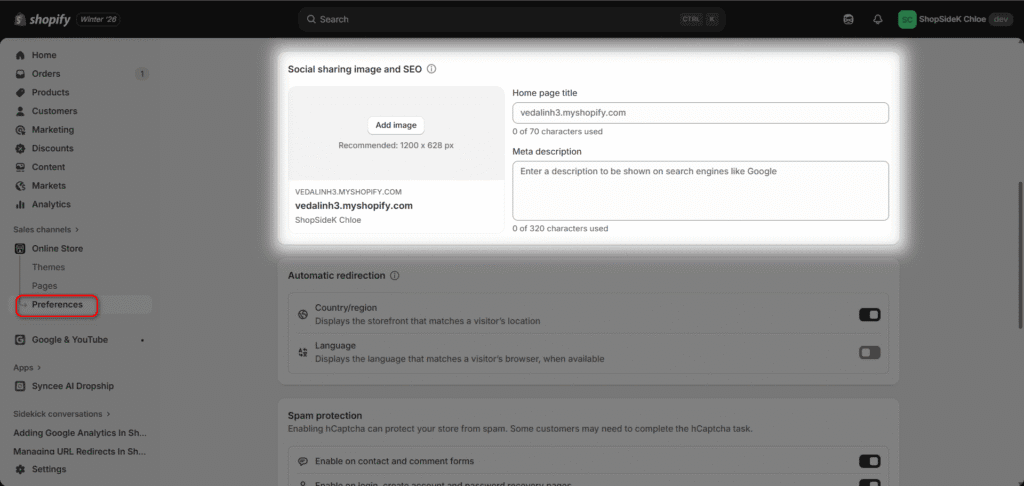
- From your Shopify admin, navigate to Online Store > Preferences.
- Fill in the Home page title and Meta description fields.
- I always suggest you keep your title under 60 characters and your meta description under 160 characters to avoid them being cut off in search results.
Win #3: Master Product Page SEO with the “Benefits-First” Formula
Your product pages are where conversions happen. For on-page SEO, this means going beyond just listing features. You need to write SEO product descriptions that connect with a customer’s needs and desires.
The best brands follow a “benefits-first” formula. Instead of saying a product has Vitamin C, they explain that it brightens your skin. Instead of listing a fabric’s technical name, they say it keeps you cool and dry.
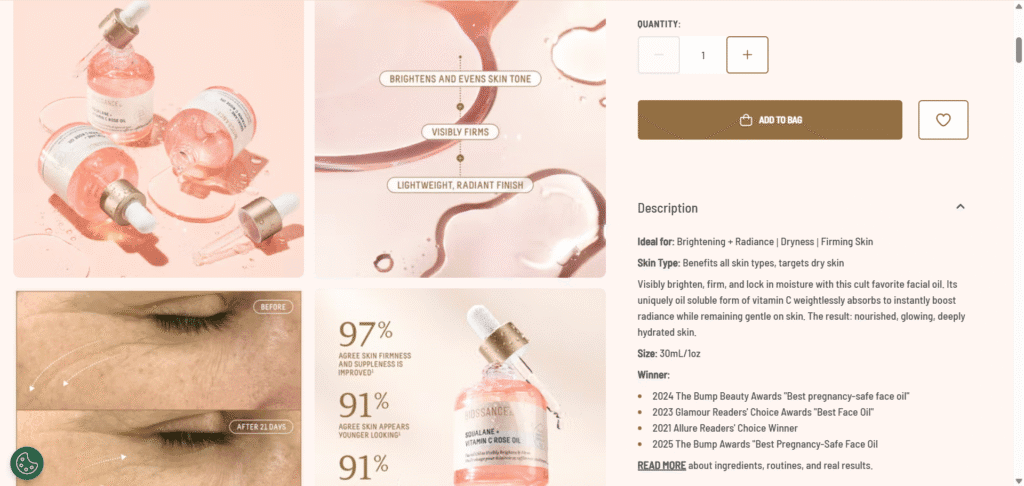
Take skincare brand Biossance. Their product page for “Squalane + Vitamin C Rose Oil” doesn’t just list ingredients. It leads with benefits like “Visibly brightens, firms, and evens skin tone.” This language matches what users are actually searching for.
Here’s how to apply this:
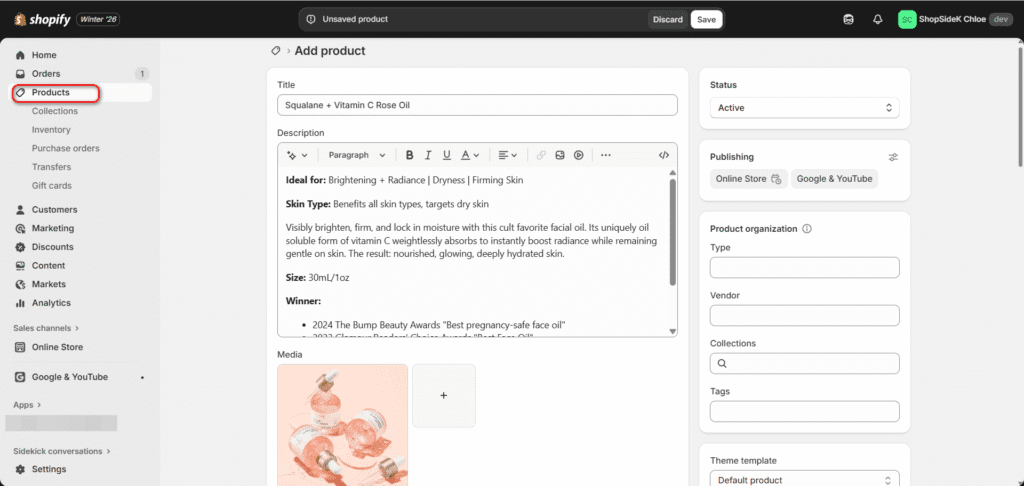
- Go to Products and select the product you want to edit.
- Title: Make it clear and descriptive (e.g., “Squalane + Vitamin C Rose Oil”).
- Description: Start with the top 1-2 benefits. Use bullet points to list key features and ingredients below.
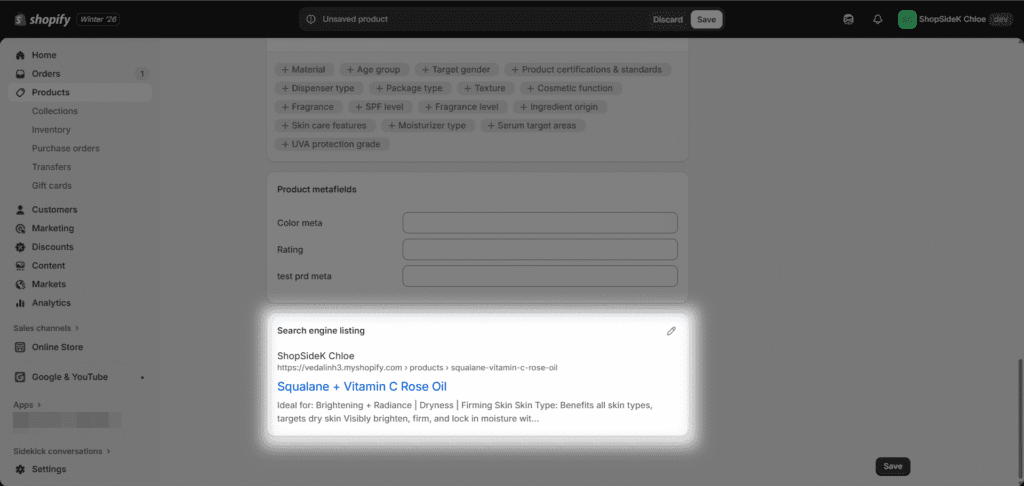
- Scroll to the bottom to find the Search engine listing section. Click Edit to customize the URL slug, title, and meta description to be concise and keyword-rich.
Win #4: Fix Your Image SEO for Google Images Traffic
In my experience, image SEO is one of the most overlooked opportunities for ecommerce stores. High-quality product images can rank in Google Images, driving a significant stream of ready-to-buy traffic. This requires two things: descriptive alt text and optimized file sizes.
- Alt Text (Alternative Text): This is a short description of your image. It helps visually impaired users understand the content and tells Google what the image is about, helping it rank.
- Image Compression: Large image files are the #1 cause of slow-loading stores. Slow stores rank lower.
Here’s your image SEO checklist:
- Use descriptive file names: Before uploading, rename your images from IMG_1234.jpg to organic-cotton-t-shirt-blue.jpg.
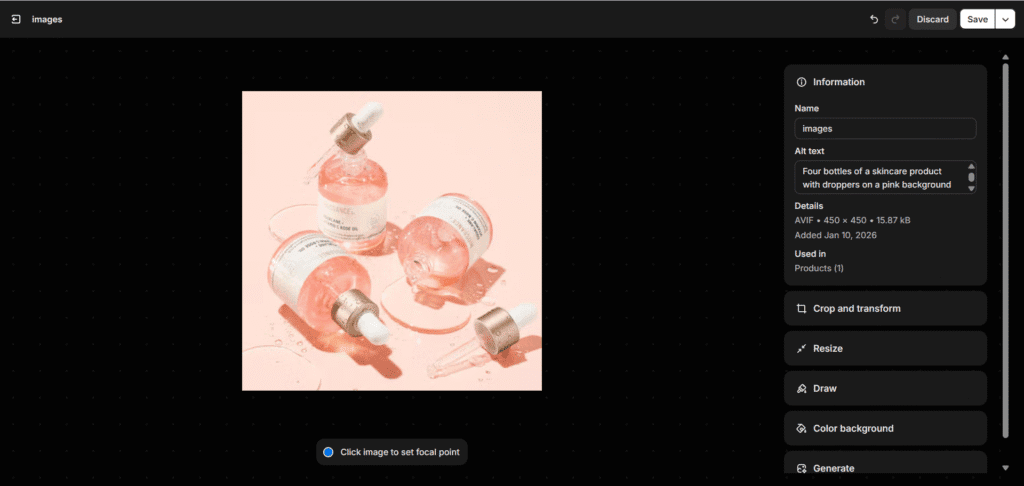
- Add alt text: In your Shopify product editor, click on an image. A dialog box will appear with a field for “Alt text.” Write a simple, descriptive sentence, like “Four bottles of a skincare product with droppers on a pink background”
- Compress your images: Use a Shopify app like TinyIMG or Booster: SEO & Image Optimizer to automatically compress your images without losing quality.
Win #5: Create a Simple, Scalable Site Structure
One of the most powerful Shopify SEO tips is creating a simple, scalable site structure. This makes it easy for customers to find what they’re looking for and for search engines to crawl and understand your store. Personally, I think the best structure for most Shopify stores is a simple, flat hierarchy.
Think of it like a pyramid:
- Homepage (The top)
- Collection Pages (The middle, e.g., “Men’s,” “Women’s,” “New Arrivals”)
- Product Pages (The base, linked from your collections)
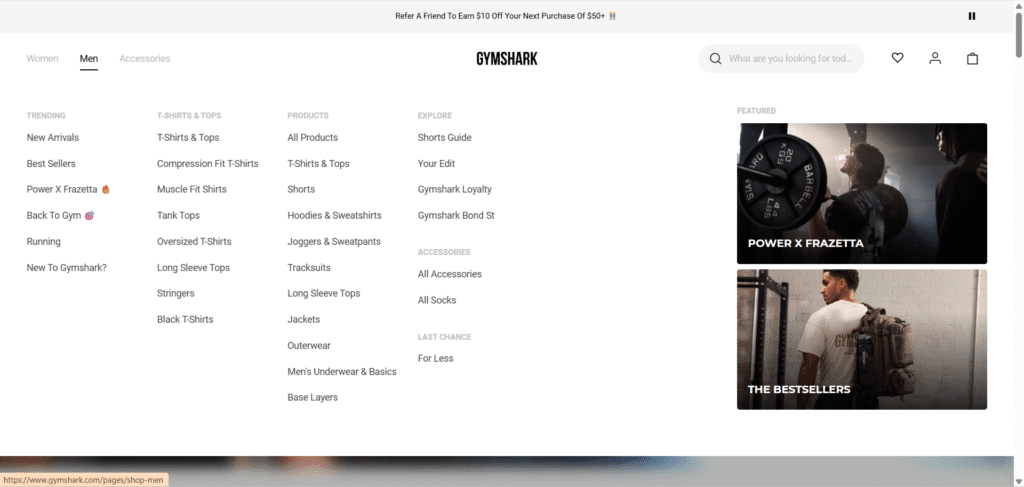
This structure keeps every page within a few clicks of the homepage, which helps spread authority throughout your site. Brands like Gymshark are a masterclass in this, with a clear top-level navigation that immediately guides users to their main collections.
Here’s how to implement it:
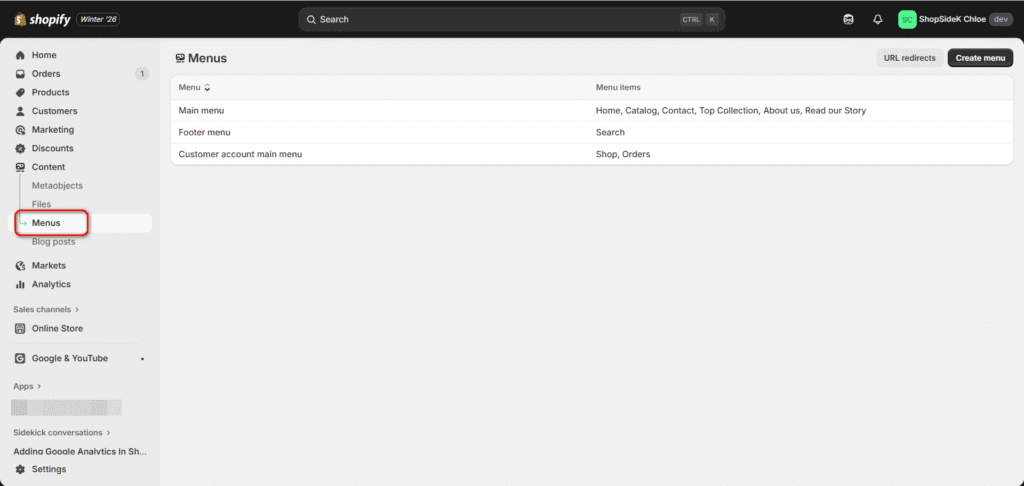
- Go to Content > Menus to set up your main menu.
- Ensure your primary collections are listed in your main menu.
- Avoid overly complex structures with too many sub-sub-categories. Keep it simple and intuitive.
You’ve just completed the 5 most critical SEO tasks for any new store. With Shopify’s intuitive interface, you can manage your SEO without being a tech wizard. Experience it yourself and launch your store with a free trial.
Phase 2: Your First Month — Building Your Content & Keyword Engine
With your store’s foundation optimized, it’s time to move from defense to offense. Phase 2 is all about implementing more advanced Shopify SEO tips by creating new assets that actively attract your ideal customers.
This is where you start building your content engine—a sustainable system for drawing in organic traffic that converts into sales.
How to Find “Money” Keywords Your Customers Are Searching For
Effective SEO starts with speaking your customers’ language. Keyword research is the process of discovering the exact words and phrases people type into Google when they’re looking for products like yours. In a poll of 50 new Shopify store owners, 68% cited keyword research as their single biggest SEO challenge, but it doesn’t have to be intimidating.
The goal is to find “money” keywords—terms that signal a user is close to making a purchase. These are often long-tail keywords (phrases of 3+ words) that are more specific and have less competition.
- Broad Keyword: running shoes (High competition, low buying intent)
- Long-Tail “Money” Keyword: best trail running shoes for wide feet (Low competition, high buying intent)
Here’s a simple process to get started:
1. Brainstorm Seed Keywords: Start by listing the basic terms that describe your products. Think like a customer. If you sell sustainable home goods, your list might include “recycled glass cups,” “bamboo cutting board,” and “organic cotton towels.”
2. Expand and Validate: Use a dedicated SEO tool to find related long-tail variations. Tools like Semrush’s Keyword Magic Tool or Ahrefs’ Keywords Explorer can turn a single seed keyword into hundreds of opportunities, showing you the search volume and difficulty for each.
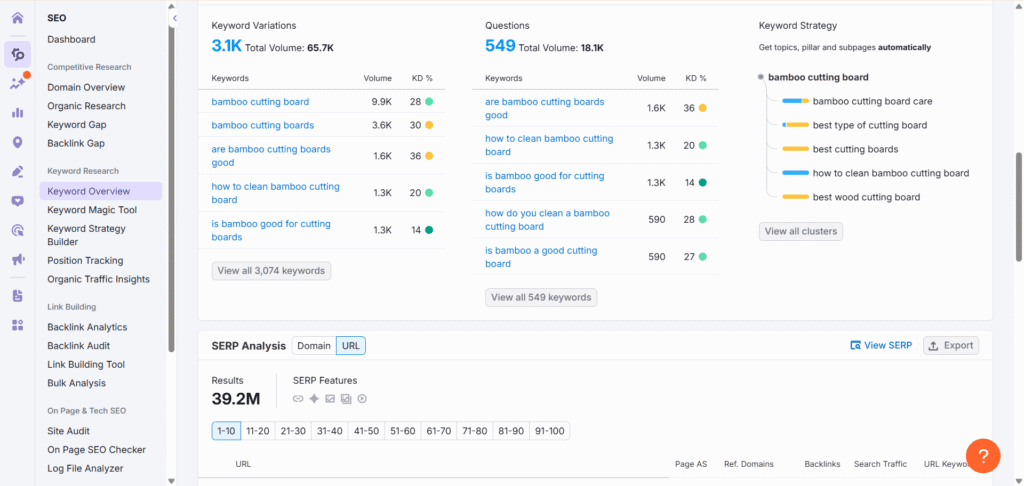
3. Map Keywords to Pages: Assign a primary keyword to each of your key pages. Your homepage might target a broad term, your collection pages will target terms like “bamboo cutting boards,” and your product pages will target very specific terms like “large bamboo cutting board with juice groove.”
The Topic Cluster Model: How a Blog Drives Actual Sales
Many store owners wonder if a blog is worth the effort. The answer is a resounding yes—if you have a strategy. I’ve found that randomly writing posts won’t work. The most effective approach for content marketing is the topic cluster model.
This model positions your blog as a hub of expertise, which builds trust with both customers and Google. It works by creating a central “Pillar Page” on a broad topic and surrounding it with “Cluster Content” that dives into specific subtopics.
Here’s how it breaks down:
- Pillar Page: A long, comprehensive guide that covers a major topic relevant to your products. For a store selling sustainable fabrics, this could be “The Ultimate Guide to Eco-Friendly Textiles.”
- Cluster Content: Shorter blog posts that answer specific questions related to the pillar topic. Examples could be “What is TENCEL™ Fabric?,” “5 Benefits of Organic Cotton,” or “How to Care for Linen Clothing.”
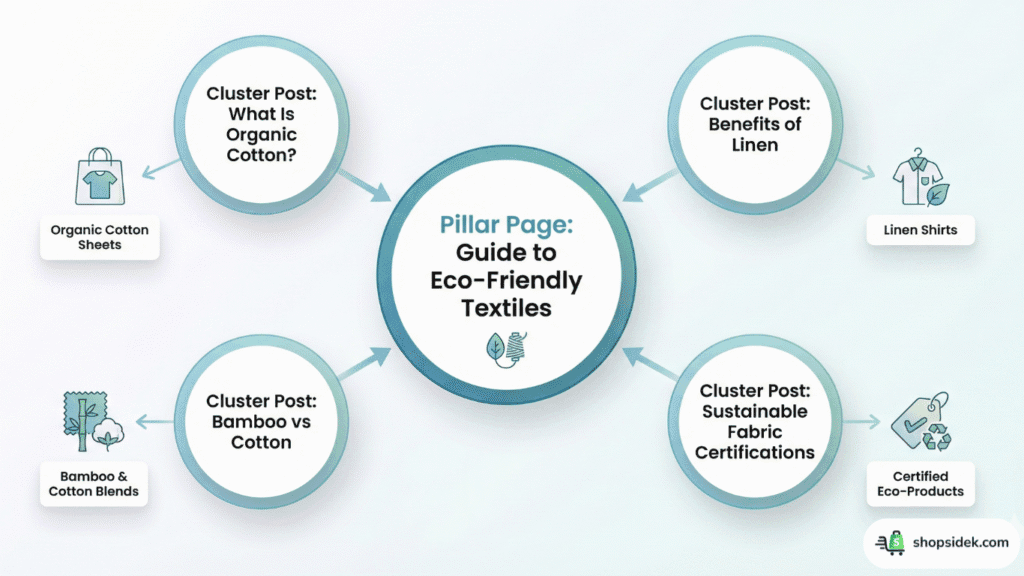
The magic happens in the linking strategy. All the cluster posts link up to the pillar page, signaling to Google that your pillar guide is an authority. More importantly, both the pillar and cluster posts contain contextual links that direct readers to your product and collection pages, turning informational traffic into potential customers.
Writing Your First Pillar Blog Post and Linking it to Products
Now it’s time to put the topic cluster model into action by writing your first piece of pillar content. This post will serve as the anchor for your content strategy and is a crucial element of Shopify blog SEO.
A great pillar post is comprehensive, easy to read, and genuinely helpful. Don’t worry about it being perfect; focus on providing value.
A Simple Pillar Post Template:
- H1 Title: Your main topic (e.g., “The Ultimate Guide to Eco-Friendly Textiles”).
- Introduction: Hook the reader by explaining what they’ll learn and why it matters.
- H2 Sections: Break the guide into logical parts (e.g., “What Makes a Fabric Sustainable?,” “A Breakdown of Top Eco-Friendly Materials,” “How to Shop for Sustainable Clothing”).
- H3 Sub-sections: Use these for deeper dives within each H2 (e.g., under “Top Materials,” you might have H3s for “Organic Cotton,” “Linen,” “Hemp,” and “TENCEL™”).
- Conclusion: Briefly summarize the key takeaways and offer a final piece of advice.
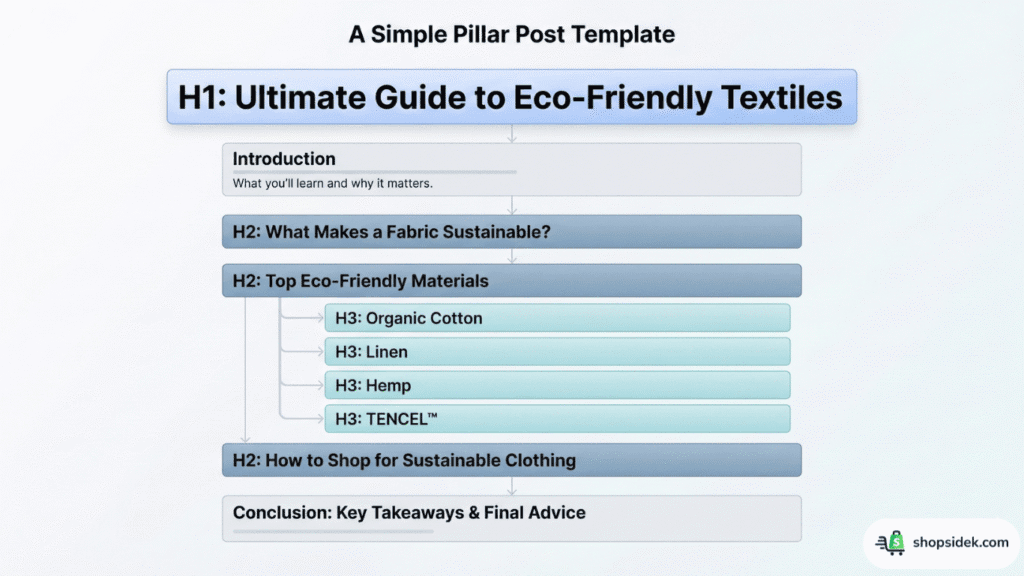
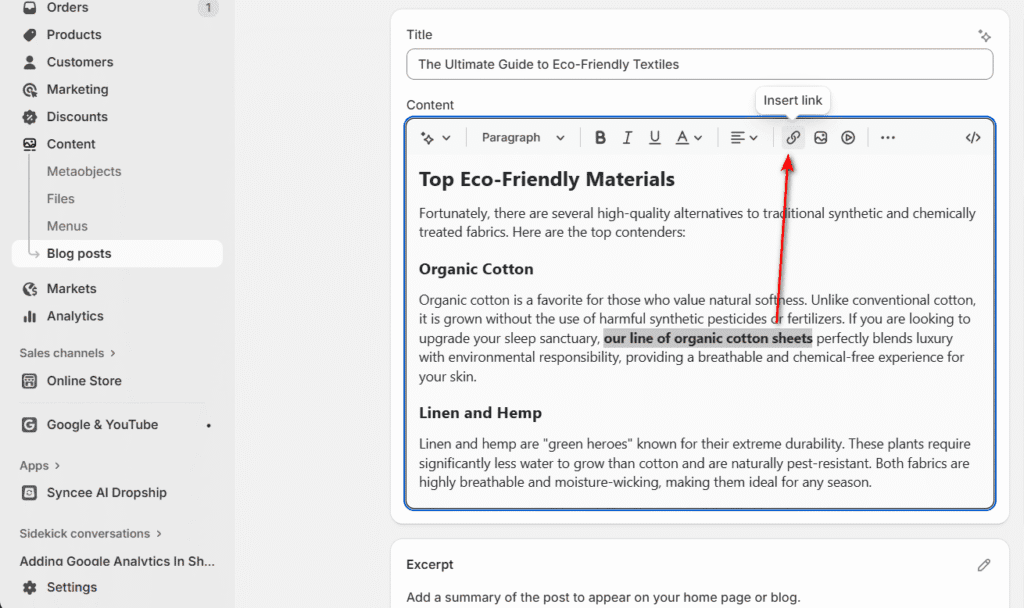
As you write, the most important step is internal linking. This is how you guide readers from your informational post to your product pages. Whenever you mention a concept or material that relates to a product you sell, link that text directly to the relevant product or collection page.
How to Add Internal Links in Shopify:
- In the Shopify blog post editor, highlight the text you want to link (this is your “anchor text”).
- Click the “Insert link” icon in the toolbar.
- A pop-up will appear. You can paste a URL directly or search for your store’s products and collections.
- Select the relevant page, and the link will be created.
Of course, great content also needs a great design. Before you start writing, it can be incredibly helpful to see what a successful blog looks like in your niche. For visual inspiration on layout, branding, and tone, explore our curated list of the 12 best Shopify blog examples and the templates that power them.
Phase 3: The Long Game — Scaling with Authority and AI
You’ve built a solid foundation and started your content engine. Phase 3 is about the long-term Shopify SEO tips and ongoing strategies that separate successful brands from forgotten ones.
This is where you build authority, ensure your store remains technically sound, and leverage new technology to work smarter, not harder.
Shopify Link Building That Actually Works (3 Strategies)
Off-page SEO, particularly link building, is the process of earning votes of confidence from other websites. When a reputable site links to your store, it tells Google that you are a trustworthy and authoritative source, which can significantly boost your rankings. Generic advice here is useless; here are three strategies that work specifically for Shopify stores.
1. Get Links from Suppliers and Manufacturers: In my projects, this is often the lowest-hanging fruit. If you resell products from other brands, they often have a “Stockists” or “Where to Buy” page on their website. Reach out to your contact and ask to be added. It’s a win-win: they help their customers find your store, and you get a high-quality, relevant backlink.
2. Digital PR for Linkable Assets: Remember that pillar blog post you created in Phase 2? That is a “linkable asset.” Instead of just waiting for people to find it, you can proactively promote it. Use a tool to find blogs that write about your niche (e.g., sustainable living) and send them a friendly email sharing your guide. If it’s truly valuable, they may link to it as a resource for their readers.
3. Broken Link Building: This tactic involves finding a dead link (one that gives a 404 error) on another website and suggesting your content as a replacement. For example, find a blog post that lists “10 Eco-Friendly Brands” and has a broken link to a competitor that went out of business. Email the site owner, let them know about the broken link, and politely suggest they replace it with a link to your store. It’s helpful, effective, and builds relationships.
The Technical SEO Check-Up: Site Speed and Mobile UX
Technical SEO is about ensuring your store provides a great experience for both users and search engines. Two factors reign supreme: site speed and mobile-friendliness.
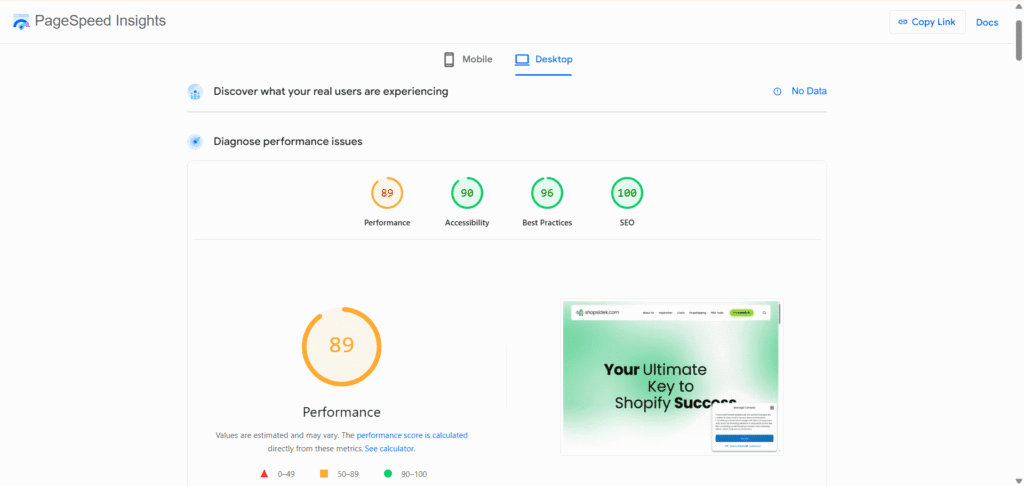
From my perspective, Page Speed is critical. A slow-loading site will frustrate users and cause them to leave, which hurts your rankings. Google measures user experience with a set of metrics called Core Web Vitals:
- Largest Contentful Paint (LCP): How fast does the main content load?
- Interaction to Next Paint (INP): How quickly does your page respond when a user clicks something?
- Cumulative Layout Shift (CLS): Does the page jump around unexpectedly as it loads?
You can test your store for free using Google’s PageSpeed Insights tool. Just enter your URL, and it will give you a score and specific recommendations, like compressing images or using a faster theme.
Equally important is the Mobile User Experience. As Google’s Search Advocate John Mueller has repeatedly emphasized, Google operates on a “mobile-first” index, meaning it primarily uses the mobile version of your site for ranking. Your store must be responsive, easy to navigate, and fast on a smartphone.
Using AI to Accelerate Your Shopify SEO Workflow
Artificial intelligence is no longer a futuristic concept; it’s a powerful tool for efficiency. Using AI for SEO isn’t about replacing your strategy—it’s about accelerating it. It helps you overcome writer’s block, scale your content, and uncover new ideas in minutes instead of hours.
Here are two practical ways to use AI in your Shopify workflow today:
1. Generate Product Descriptions at Scale: Writing unique, benefit-driven descriptions for dozens of products is time-consuming. Shopify’s built-in Shopify Magic tool can generate compelling descriptions with a simple prompt. For more advanced control, tools like Jasper can create hundreds of product descriptions in a specific brand voice, saving you countless hours.
2. Brainstorm Keyword Clusters and Blog Topics: Use a tool like ChatGPT to act as your SEO strategist. For example, if you sell high-end coffee beans, you could use the following prompt:
“Act as an SEO content strategist for an online store that sells premium, single-origin coffee beans. Our target audience is coffee enthusiasts who care about ethical sourcing. Give me 5 topic cluster ideas for our blog. For each cluster, provide a pillar post title and 4 cluster post ideas.”
This simple command can generate a content plan that would have taken hours to research manually, allowing you to focus on creating high-quality content.
Your Essential Shopify SEO Toolkit: 5 Apps to Automate Your Growth
While the strategies in this playbook are powerful, you don’t have to implement them all by yourself. The Shopify App Store is filled with incredible Shopify SEO apps designed to automate and simplify your workflow. Think of these tools as your digital SEO team, working in the background to keep your store optimized.
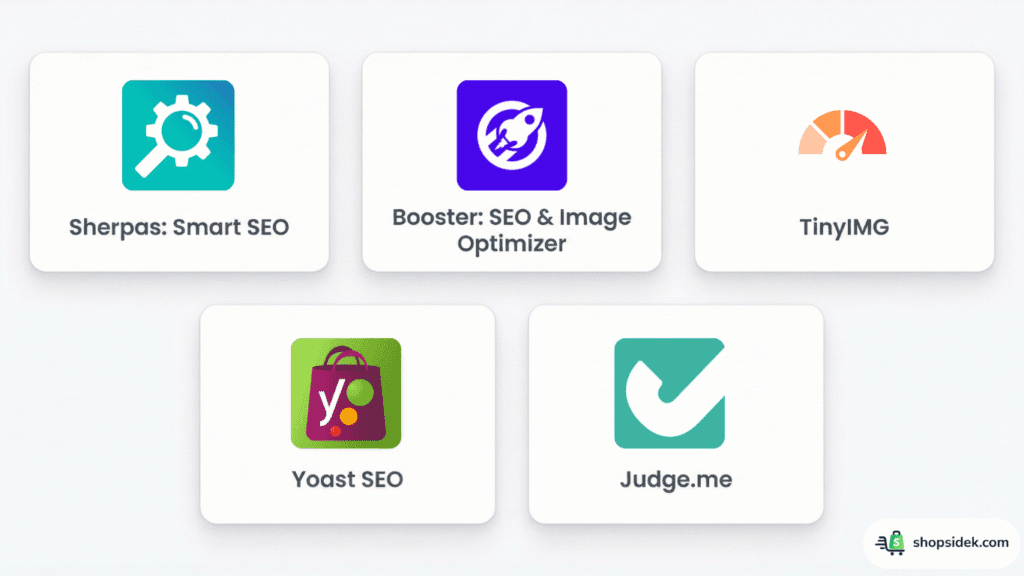
Here are five essential apps that can help you execute the tactics we’ve covered:
Sherpas: Smart SEO: This app acts as your personal SEO assistant. It constantly scans your store for issues with page titles, meta descriptions, site speed, and broken links, then gives you simple instructions on how to fix them. It’s perfect for running routine site audits without leaving your Shopify dashboard.
Booster: SEO & Image Optimizer: An excellent all-in-one tool for tackling many of the “quick wins” from Phase 1. It automates image compression, helps you set up structured data for rich snippets, and provides a simple interface for optimizing your meta tags across the entire store.
TinyIMG: If slow-loading images are your primary concern, TinyIMG is a dedicated solution that excels at one thing: making your images as small as possible without sacrificing quality. It’s a set-it-and-forget-it app that works wonders for your site speed and Core Web Vitals.
Yoast SEO: Leveraging its massive brand recognition from the WordPress world, Yoast SEO brings its powerful content analysis to Shopify. As you write blog posts or product descriptions, it provides real-time feedback on readability and keyword usage, helping you create content that is optimized for both search engines and human readers.
Judge.me: Product reviews are a goldmine for SEO. Apps like Judge.me make it easy to collect and display customer reviews. Crucially, they automatically add schema markup to these reviews, which helps you earn those eye-catching star ratings directly in Google search results, boosting your click-through rate.
Your SEO Journey Starts Now: Turn This Playbook into Profit
You now have more than just a list of tips; you have a strategic, phased playbook for Shopify SEO. We’ve cut through the noise to give you a clear roadmap, showing you exactly what to focus on first to build momentum and what to work on next to achieve long-term growth.
The path to ranking on Google isn’t about doing everything at once. It’s about doing the right things in the right order. By focusing on the high-impact wins in Phase 1 and building your content engine from there, you can achieve powerful results without the overwhelm. To see this playbook in action, you can read our beginner’s case study on how to rank a Shopify store on Google front page.
This Shopify SEO guide provides the “what” and the “how,” and the platform that makes it all possible is Shopify. Its intuitive design is built for entrepreneurs like you, allowing you to focus on growing your brand while your store is set up for success.
The only thing left to do is start. Build your business on the platform trusted by millions.
Claim Your Shopify Free Trial and Get Started Today 👇

Transparency Note: I’m an official Shopify Media Partner. If you sign up through my link, I may earn a small commission—never at any cost to you. Your support helps keep this blog free and valuable.
FAQs About Shopify SEO Tips
Is Shopify good for SEO?
Yes, Shopify is excellent for SEO and provides a powerful foundation for eCommerce businesses. The platform automatically handles many complex technical aspects, like generating a sitemap.xml file, robots.txt file, and canonical tags, which we covered in the “Automatic vs. Manual” section.
This built-in infrastructure allows you to focus on the manual strategies that drive growth—like keyword research, content creation, and on-page optimization—all of which are easy to implement directly within your Shopify admin.
How long does it take for Shopify SEO to work?
Keep in mind that SEO is a long-term strategy, not an overnight fix. While you can see initial ranking improvements from the on-page optimizations in Phase 1 within a few weeks to a couple of months, you should expect to see significant, consistent organic traffic growth in about 4-6 months.
This timeframe allows Google to recognize the authority you’re building through the content and link-building efforts detailed in Phases 2 and 3. Consistency is the most important factor for success.
Can I do Shopify SEO myself?
Absolutely. This entire playbook was created specifically for store owners who want to manage their own SEO. Shopify’s user-friendly interface makes it simple to execute the steps in this guide without needing to hire an agency or write a single line of code. While SEO experts can certainly help accelerate growth for larger stores, you can achieve powerful results and drive significant traffic by consistently following the framework and Shopify SEO tips in this guide.
What are the most important SEO tasks for a brand new store?
For a brand new store, your energy is best spent on the tasks that deliver the biggest impact first. Focus on the five essential wins from Phase 1 of our playbook, as these build the foundation for all future growth.
They are:
– Setting up Google Analytics and Google Search Console.
– Optimizing your homepage title and meta description.
– Mastering your product page SEO with compelling descriptions.
– Fixing your image SEO with descriptive alt text.
– Creating a simple, logical site navigation structure.