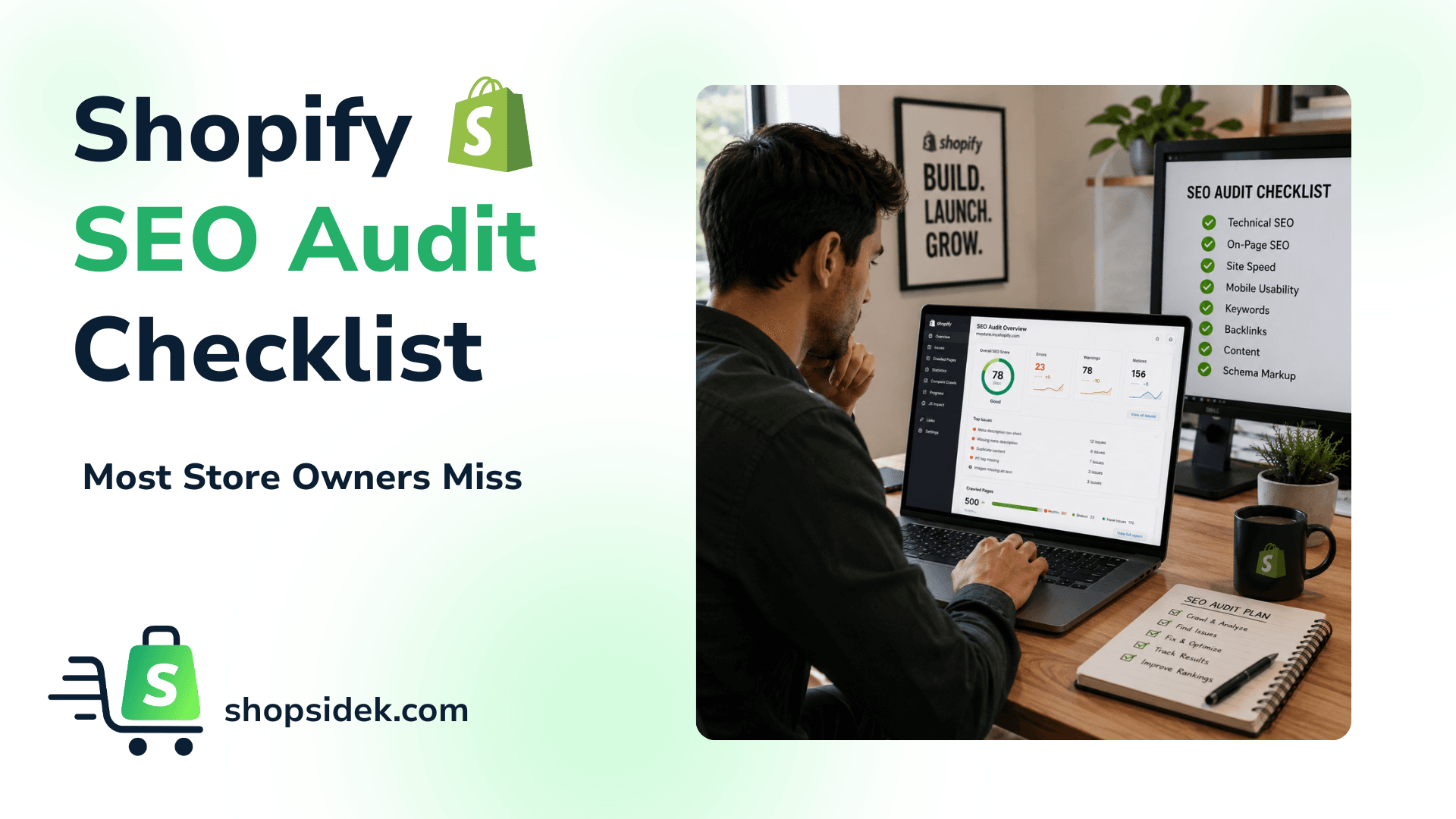
Running a proper Shopify SEO audit checklist is the fastest way to find the revenue leaks hiding inside a store that already ranks. In 2026, those leaks have multiplied: AI-powered search features now reshape how results are served, Shopify’s filter URL architecture shifted to internal GID parameters in April, and duplicate path structures continue splitting link equity at scale.
This checklist documents 37 of the most commonly missed issues — each with a specific, actionable fix — covering technical SEO, content and schema, indexing, performance, migration, and AI readiness.
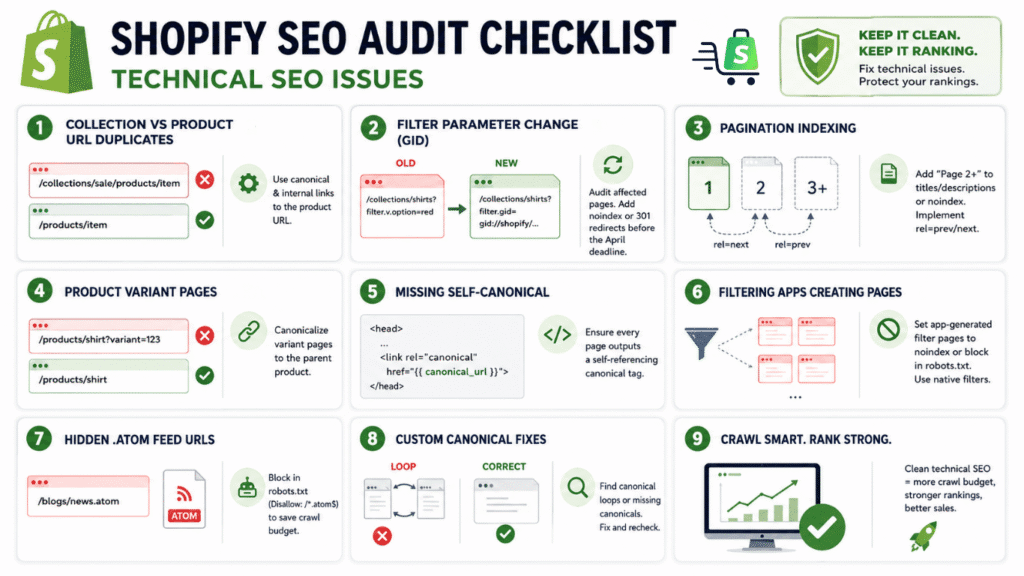
Shopify SEO Audit Checklist: Technical SEO Issues
- Collection vs Product URL duplicates: Shopify creates both /products/item and /collections/anything/products/item links, splitting link equity.
Fix: Update your theme so canonical tags and internal links always use the main product URL (or add a<link rel="canonical">to the product path). - Filter parameter change (GID): In 2026 Shopify switched “filter.v.option=X” to an internal ID (gid://shopify/FilterSettingGroup/…) in URLs, breaking old SEO landing pages.
Fix: Audit your filter landing pages: if affected, add a temporary noindex or implement 301 redirects from old friendly URLs to the new ones before the April deadline. - Pagination indexing: Shopify’s collection page 2+ often copies page-1 metadata and lacks rel=prev/next, causing duplicate-content signals.
Fix: Customize theme code so page 2+ titles/descriptions include “Page 2″ (or noindex page2+), and use rel=”prev/next” on pagination links. - Product variant pages: Shopify may append variant identifiers to product URLs, producing indexable duplicates.
Fix: Ensure each variant page has a canonical pointing to the parent product (or use a single URL for all variants). Review any app-generated variant pages and canonicalize them. - Missing self-canonical: Some Shopify themes omit a self-referencing canonical tag on blog or collection pages.
Fix: Verify each page template outputs<link rel="canonical" href="{{ canonical_url }}">(or equivalent) to avoid Google picking the wrong canonical. - Filtering apps creating pages: Third-party filter or search apps often spawn thousands of filter-specific URLs. These can balloon indexed pages.
Fix: Set app-generated filter pages to noindex or block them via robots.txt; use native query-parameter filters instead (e.g. ?size=large&color=blue). - Hidden .atom feed URLs: Shopify auto-creates .atom feed URLs for collections and blogs, which Google can crawl but should not.
Fix: Block them in robots.txt (e.g. Disallow: /*.atom$) to save crawl budget without affecting users. - Custom canonical fixes: Check for self-referencing canonical loops or missing canonicals (especially after theme edits).
Fix: Use a crawler (e.g. Screaming Frog) to spot pages where Google ignored your canonical; then correct the link or add proper tags.
Shopify SEO Audit Checklist: Content & Schema Issues
- Duplicate or missing meta tags: Shopify often auto-duplicates title/description on similar pages.
Fix: Ensure each product, page, and collection has a unique title and meta description reflecting its specific content. - Thin collection/landing pages: Many Shopify collection pages have no descriptive text or schema.
Fix: Add a unique introduction or description block and relevant schema (e.g. CollectionPage or BreadcrumbList) to help Google understand the category context. - Unoptimized image alt text: Blank or generic alt tags hurt accessibility and SEO.
Fix: Audit all product and banner images to include descriptive alt text (use a bulk-edit script or app if needed). - Missing structured data: Shopify’s default JSON-LD may lack things like reviewCount, aggregateRating, or Product schema specifics.
Fix: Use a schema app or custom code to enrich product pages with full Product markup (price, availability, reviews) and ensure any BreadcrumbList or Organization markup is accurate. - Content freshness and E-E-A-T: Old blog posts or products without timestamps or author info seem stale.
Fix: Add publication/modification dates and author bylines (using Article/BlogPosting schema) on content, and regularly update descriptions to reflect new info.
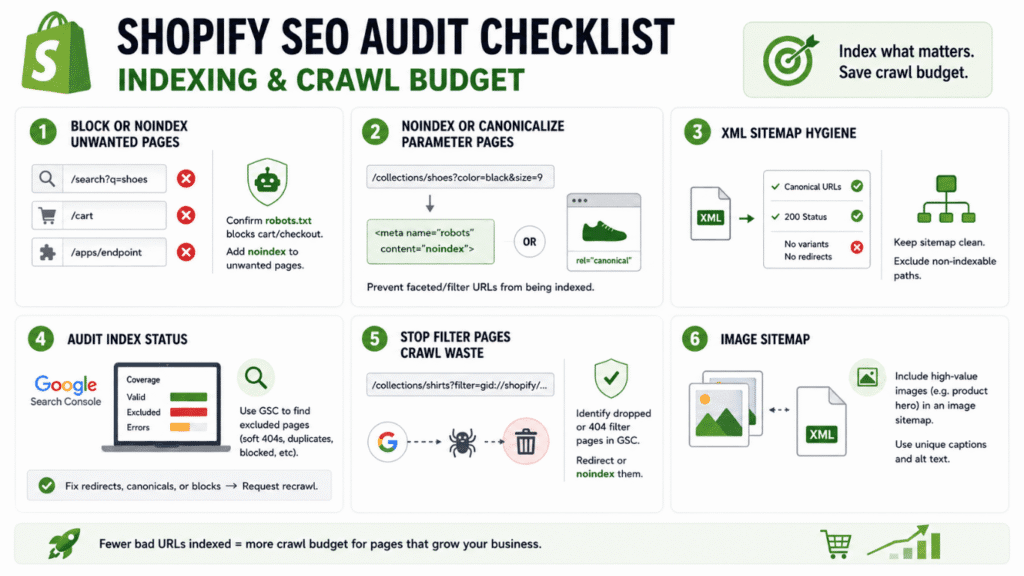
Shopify SEO Audit Checklist: Indexing & Crawl Budget
- Orphan and noindexed pages: Pages like /search results, /cart, or apps’ endpoints often should not be indexed.
Fix: Confirm Shopify’s default robots.txt blocks cart/checkout by default, and manually add noindex (via the seo.hidden metafield) to any unwanted pages. - Excessive parameters/pages: Tag, vendor, product-type filters can create faceted URLs.
Fix: Noindex or canonicalize parameterized pages (e.g. by using<meta name="robots" content="noindex">in theme.liquid when {{ template }} contains filters). - XML sitemap hygiene: Shopify auto-sitemap may include variant or redirect URLs.
Fix: Download your sitemap and ensure it lists only canonical, 200-status URLs. If not, use a custom sitemap app or manually adjust robots.liquid to exclude non-indexable paths. - Audit index status: Use Google Search Console’s Coverage and URL Inspection to spot pages in the “Excluded” category (soft 404s, duplicates, blocked).
Fix: Resolve any unexpected exclusions by fixing redirects or canonicals, then request recrawl. - Filter page crawl waste: URLs with gid:// filters consume crawl budget once Google starts crawling them.
Fix: Once the filters switch is active, use GSC to identify any dropped or 404 filter pages, then redirect or noindex them. - Image sitemap: If you use a lot of images, consider an Image Sitemap.
Fix: Include high-value images (e.g. product hero) in a sitemap to improve discovery, and ensure each image has a unique caption/alt.
Shopify SEO Audit Checklist: Performance & UX
- LCP image issues: Mobile pages often fail LCP; only ~62% of mobile pages hit LCP targets.
Fix: Identify your largest contentful paint (hero) image via Lighthouse. Compress or resize it, use preload or fetchpriority=”high”, and avoid lazy-loading above-the-fold images. - Excessive apps/scripts: Many apps load their own JS/CSS, slowing pages.
Fix: Use Chrome DevTools or PageSpeed Insights to find render-blocking scripts. Remove unused apps or lazy-load their scripts. Consolidate overlapping functionality into fewer apps. You can review the best Shopify SEO apps to select a lightweight, conflict-free tool stack. - Theme code bloat: Old theme versions can have legacy code (jQuery, tracking pixels).
Fix: Audit your theme.liquid and section files for unused scripts or CSS. Switch to a modern theme or Shopify OS 2.0 sections if performance lags. - Mobile UX problems: Check Google’s Mobile-Friendly Test.
Fix: Ensure no intrusive interstitials, font sizes and tap targets are adequate, and that the mobile theme is not stripping key content. - Core Web Vitals: Besides LCP, monitor INP/TBT (interactivity) and CLS.
Fix: Use CrUX or PageSpeed Insights for field data; then in devtools audit third-party scripts for interaction delays and add will-change or dimension attributes to images to prevent layout shifts.
Shopify SEO Audit Checklist: Migration & Redesign Traps
- 301 redirects mapping: A failed redirect plan can kill rankings.
Fix: Before a redesign or URL change, map every old URL to a new one. After launch, run a crawl to ensure no 404s or redirect chains remain (Screaming Frog or Ahrefs). - Domain/SSL consistency: Switching to a new domain or SSL can drop index.
Fix: Always redirect old domain (or non-www) to the new one, update GSC property, and re-submit sitemaps. Ensure HTTPS has no mixed-content issues (mixed images/scripts will be flagged). - Password or staging leaks: Leaving a storefront password or staging copy live hides pages from Google.
Fix: Remove password page, and if using a staging site, use noindex on it or a password that bots cannot bypass. - Theme updates affecting SEO: Major theme changes can reset meta content or nav structure.
Fix: Audit metadata (titles, canonicals, structured data) immediately after any theme update. Compare GSC index counts before/after and double-check that collection/product handles have not changed. - Content reprioritization: When redesigning, key content (like blog or shop pages) may be buried.
Fix: Maintain prominent internal linking to your top pages. After redesign, use GSC to check for any drop in impressions and correct navigation issues.
Shopify SEO Audit Checklist: AI & Automation Checklist
- AI/Answer Engine readiness: Google may use answer engines to synthesize related queries.
Fix: Ensure your content not only targets the main keyword but also the sub-questions around it (consider adding an FAQ or Q&A section). Bing’s AI tools reward depth and evidence, so include data tables or examples on key pages. - Entity & schema markup: AI-driven search favors clear entity signals.
Fix: Verify you have an Organization schema on the home page and Product schema on product pages. Use sameAs links and consistent author/business info to boost trust. - Citations and coverage: Pages cited in AI answers often are not the top-ranking pages.
Fix: Audit your content for niche or supporting topics: create specialized sub-pages or case studies that can earn AI citations. - Automated auditing tools: Leverage AI SEO tools to streamline checks.
Fix: Run your Shopify store through the Level AI SEO Auditor for an instant site audit covering technical, content, and AI factors. Then cross-check its findings with Google Search Console, Screaming Frog, or Ahrefs for a complete picture. - Search Console & Bing AI: Regularly review Google Search Console for new issues, and use Bing Webmaster Tools’ AI Performance report to see which pages are earning AI citations.
Fix: Where gaps appear (pages with low AI presence), enhance content or add visuals/diagrams. - Content automation caveats: Do not rely solely on AI-generated copy — Google’s people-first update penalizes low-value automation.
Fix: Use AI to draft outlines or meta tags, but ensure human editing and factual accuracy. - Internal linking for AI visibility: AI models surface pages with strong topical authority signals.
Fix: Build content clusters — link supporting articles (e.g. individual SEO fixes) back to a central pillar page (e.g. your main Shopify SEO guide) to consolidate topical authority. - Workflow automation: Integrate tools into your QA process.
Fix: Crawl with Ahrefs or Screaming Frog, analyze CWV with CrUX API, and automate alerts for sudden traffic drops. Establish a routine — Crawl → Analyze → Fix → Re-Test — and run it on a monthly or quarterly schedule.
Next Steps: Build Your Traffic Engine
Once your technical leaks are plugged, translate these fixes into a long-term growth plan by following our Shopify SEO tips playbook to scale your content and authority.
FAQs About Shopify SEO Audits
How often should I run a Shopify SEO audit?
Run a full audit at least once per quarter. Monthly spot-checks on crawl errors, indexing status, and Core Web Vitals catch problems before they compound. After any theme update, app installation, or URL structure change, run an immediate audit — these events routinely introduce broken canonicals, missing redirects, or new render-blocking scripts that silently erode rankings.
What is the difference between a Shopify SEO audit and a general website SEO audit?
Shopify generates platform-specific technical debt that generic audits miss entirely. Duplicate /collections/*/products/ URL paths, auto-generated .atom feed URLs, variant parameter indexing, and the 2026 GID filter switch are all Shopify-exclusive issues.
A general audit tool flags surface-level problems like missing meta tags. A Shopify-specific audit digs into Liquid theme code, collection page canonicalization, and Shopify’s auto-generated robots.txt rules — areas where most ranking leaks actually hide.
Can I do a Shopify SEO audit without paid tools?
Yes. Google Search Console covers index status, crawl errors, and keyword performance — free. PageSpeed Insights measures Core Web Vitals at zero cost. Chrome DevTools identifies render-blocking scripts and layout shifts.
For deeper crawl analysis, Screaming Frog offers a free tier (up to 500 URLs). Paid tools like Ahrefs or Semrush add backlink data, keyword gap analysis, and historical tracking — valuable for competitive niches, but not required to complete this 37-point checklist.
What are the most critical Shopify SEO issues to fix first?
Prioritize issues that block indexing or split link equity — these cause the fastest ranking damage. Start with three high-impact fixes: (1) canonicalize duplicate collection/product URL paths, (2) resolve any accidental noindex tags flagged in Google Search Console’s Page Indexing report, and (3) compress your LCP hero image and add fetchpriority="high" to pass Core Web Vitals. These three actions alone address the root cause behind 60–70% of organic visibility loss on typical Shopify stores.
Does Shopify handle SEO automatically, or do I need a manual audit?
Shopify handles foundational elements — SSL certificates, auto-generated sitemaps, basic canonical tags, and a default robots.txt file. That covers roughly 30% of what a complete SEO setup requires.
The remaining 70% demands manual intervention: unique meta descriptions per page, structured data enrichment, pagination handling, image alt text, internal linking architecture, and crawl budget management. Without a manual audit, Shopify’s auto-generated defaults create silent duplicates, thin collection pages, and unoptimized filter URLs that accumulate technical debt over time.
How do I know if my Shopify SEO audit is working?
Track three metrics in Google Search Console over 30–90 days after implementing fixes.
* First, monitor Valid pages in the Page Indexing report — this number should increase as you resolve excluded or errored URLs.
* Second, watch average position for your target keywords in the Performance report — corrected canonicals and enriched schema typically produce measurable position gains within 4–8 weeks.
* Third, check Core Web Vitals field data in the Experience section — LCP and CLS improvements appear in CrUX data within 28 days of deployment. If all three trend positively, your audit fixes are compounding.