⚡ ShopSideK Verdict
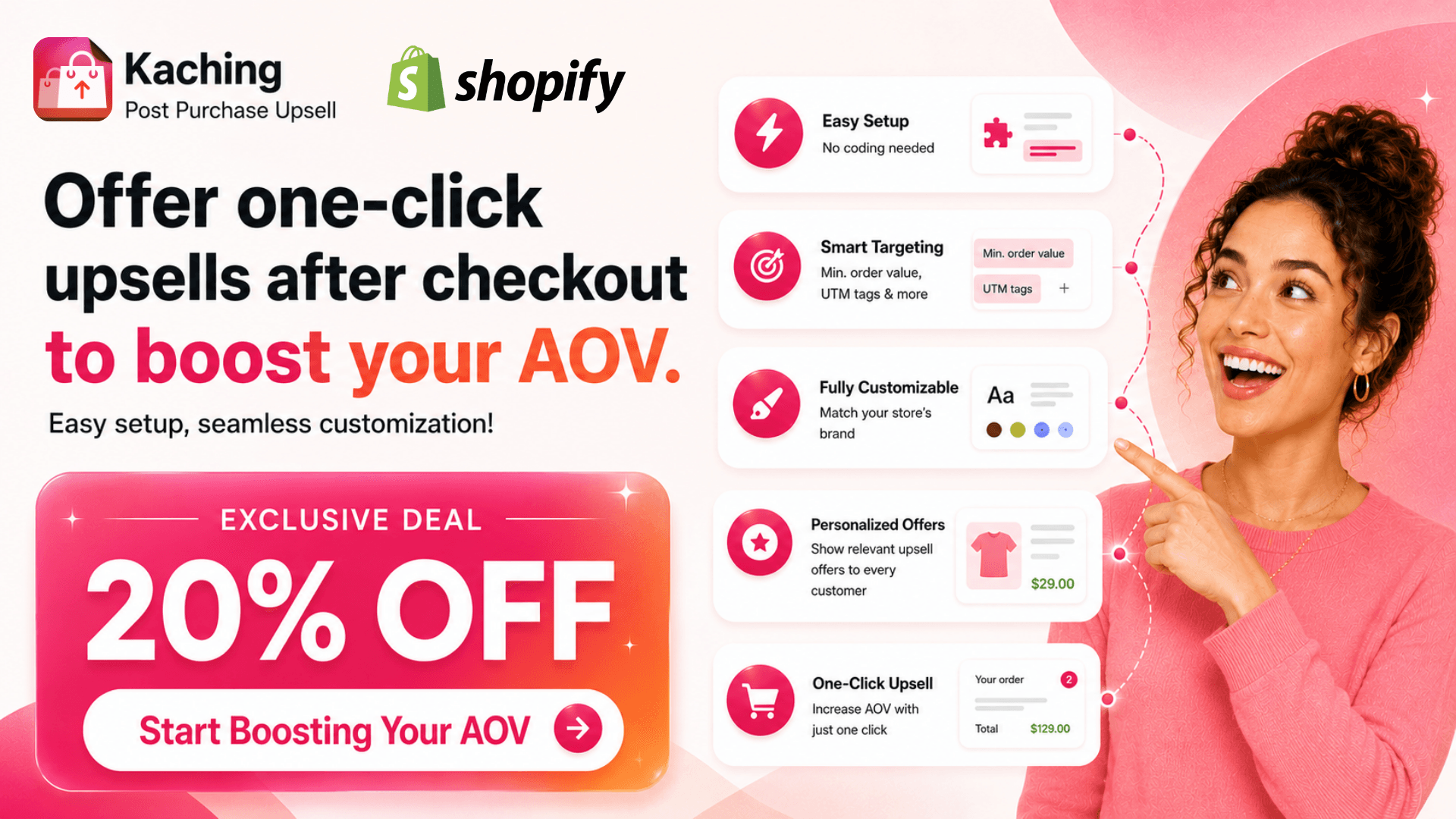
Is Kaching Cart Drawer worth it? Yes. It is a premium slide cart drawer that replaces standard checkout layouts — featuring built-in free shipping progress bars, countdown urgency timers, sticky buy buttons, and shipping protection toggles with zero transaction fees. Rated 5.0 stars across 970 verified reviews.
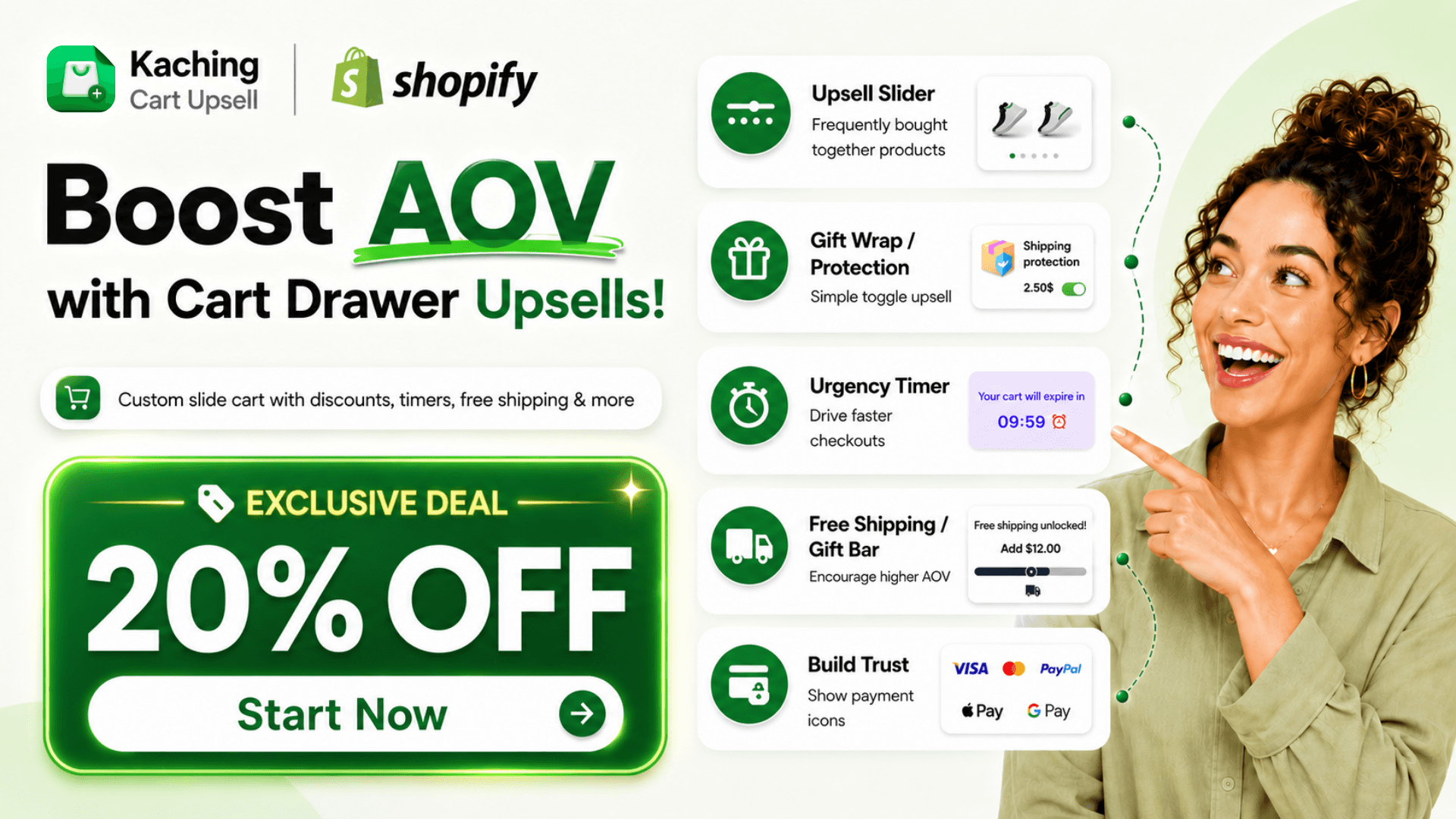
Dynamic free shipping / free gift milestones and cart reservation countdown timers. These gamified visual cues create healthy buying urgency and boost AOV.
Paid plans scale based on order-volume limits. If your store consistently processes over 500 monthly transactions, flat-rate cart drawer apps might be cheaper.
👉 Remember to enter discount code SSK20
Getting traffic to your online store is expensive. From what I’ve seen, if buyers add items to their cart but face a cold, static checkout process, they often abandon their purchase.
A customized slide-out cart drawer solves this by keeping customers on the page while they review their items. This drawer acts as a visual canvas where you can naturally offer last-minute additions, much like the impulse-buy displays at a grocery checkout line.
By presenting these tailored recommendations and progress rewards right before checkout, you directly boost your Average Order Value (AOV). With Kaching Cart Upsell, you can build this high-converting experience without writing code.
| Metric / Detail | Quick Specs & Offers |
|---|---|
| App Name | Kaching CartDrawer Cart Upsell |
| Shopify Rating | 5.0 ★ (970 verified reviews) |
| Developer | Kaching Bundles & Upsells |
| Core Features | Slide-out cart drawer, urgency timers, free shipping/gift progress bars, product upsell carousels, shipping protection toggles, and payment trust badges |
| Pricing | Free for development stores. Paid plans start at $9.99/mo (includes 14-day free trial) |
| Exclusive Deal | 20% OFF for the first 3 months with code SSK20 |
- Step 1: Install Kaching CartDrawer from Shopify App Store
- Step 2: Customize Your Drawer Style and Upsell Rules
- Step 3: Deactivate Conflicting Default Theme Drawers
- Step 4: Toggle On the Kaching Theme App Embed Extension
- Step 5: Enable and Customize Your Floating Sticky Cart Button
- Step 6: Sync Add-To-Cart Events to Your Klaviyo Email Flows
What is Kaching Cart Upsell App & How Does It Work?
Many standard Shopify themes come with basic carts that simply list products and point buyers directly to the checkout page. While this functional setup works, it misses a massive opportunity to maximize your checkout conversion rate.
Kaching CartDrawer Cart Upsell App replaces these outdated layouts with a highly interactive, animated slide cart. When a buyer clicks “Add to Cart,” the drawer slides out smoothly from the edge of the screen, keeping them on your product page while subtly guiding them to buy more.
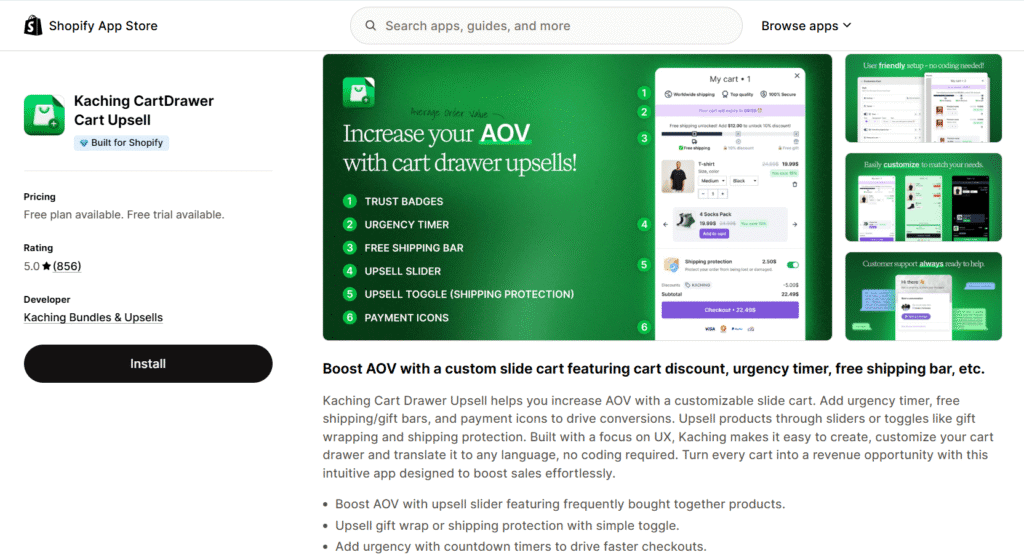
This setup functions as an automated, high-performing Shopify in cart upsell system. Instead of annoying buyers with intrusive pop-ups, Kaching integrates promotional offers, gift milestones, and trust badges directly into the cart interface.
By presenting these offers right when purchase intent is highest, you elevate your AOV without adding friction to the customer journey. It streamlines the path to purchase, reducing abandoned checkouts and saving sales that might otherwise be lost.
Crucial Features: Countdown Timers, Free Shipping Progress Bars, and Trust Badges
Kaching is packed with visual, conversion-boosting widgets designed to trigger natural buying behavior:
- Free Shipping and Free Gifts Bar: A dynamic progress bar that shows buyers exactly how much more they need to spend to unlock free shipping or a free gift. This gamified milestone encourages them to add extra items to their cart.
- Countdown Urgency Timer: A visible countdown clock that warns buyers their cart reservation is expiring. This creates a healthy sense of urgency, prompting them to check out immediately.
- Upsell Slide Carousel and Toggle: A clean product slider that showcases matching accessories or complementary items. Buyers can instantly add these upsells with a single click, using a simple toggle switch.
- Floating Sticky Cart Button: A persistent, custom-styled floating button that remains visible as customers scroll down your product pages. It allows buyers to instantly open their cart drawer and complete their purchases from anywhere on the page.
- Shipping Protection: A toggled add-on at the bottom of the cart that lets buyers purchase shipping insurance, protecting their order while adding pure profit to your bottom line.
- Payment Icons and Trust Badges: Prominent security seals that assure buyers their transaction is secure, helping to eliminate any last-minute buyer hesitation.
Universal Compatibility: Page Builders and Theme Integration
Technical conflicts are a major headache for online store owners. Fortunately, Kaching is engineered on the modern Shopify Online Store 2.0 theme engine, which means it operates through official App Embeds.
This architecture guarantees excellent app compatibility. It ensures the drawer slides open perfectly without breaking your site’s existing layout or slowing down page speeds.
Whether you build your storefront using page builders like PageFly or custom CSS/HTML, Kaching integrates seamlessly. You do not need developer resources or complex code injections to make it look native to your brand.
Kaching Pricing Structure: Finding the Right Tier for Your Store
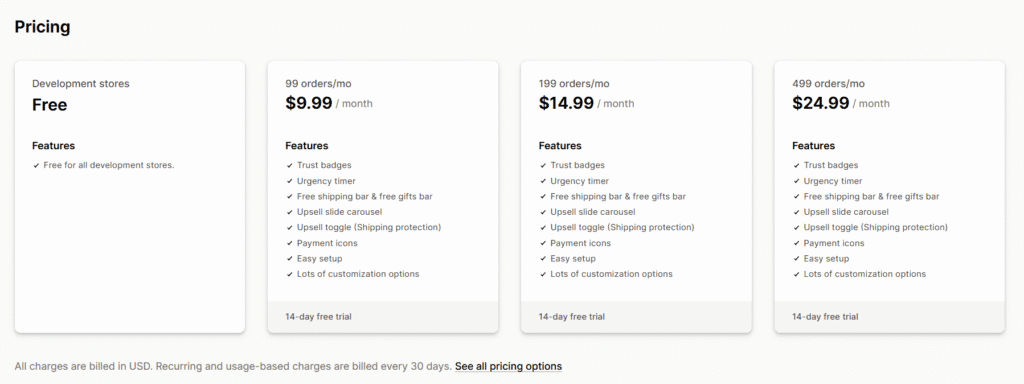
Understanding your monthly app cost is critical when launching or scaling a brand. Unlike apps that charge high upfront fees regardless of your traffic, Kaching CartDrawer Cart Upsell pricing model scales directly with your store’s transaction volume.
Every plan includes a 14-day free trial, giving you plenty of time to set up your cart, style it to match your brand, and measure its impact on your average order value. If you are still in the building phase, you can take advantage of the free development store pricing to design and test your cart layouts before going live.
Once your store is live, your monthly cost is determined by your actual order volume. Below is a breakdown of Kaching’s billing tiers to help you choose the right fit for your business stage:
| Plan Tier | Monthly Price | Monthly Order Limit | Features Included |
|---|---|---|---|
| Development Stores | Free | Unlimited (Non-production) | All features, styling customization, and app integration tests. |
| 99 orders/mo | $9.99/mo | Up to 99 orders/month | Urgency timer, shipping progress bar, upsell carousels, trust badges. |
| 199 orders/mo | $14.99/mo | Up to 199 orders/month | All core features + support for scaling order volumes. |
| 499 orders/mo | $24.99/mo | Up to 499 orders/month | All core features + highest level volume allowance. |
This volume-based approach is incredibly budget-conscious for beginners. If your store processes fewer than 100 orders a month, you pay a flat $9.99, which easily pays for itself with just one or two successful in-cart upsells. As your checkout volume grows, your subscription naturally adjusts to support your scaling order volumes.
Exclusive Deal: How to Get 20% OFF Kaching for 3 Months
We have partnered with the development team at Kaching to offer a special deal for our audience. If you want to maximize your store’s AOV while keeping your monthly software overhead low, you can secure an exclusive discount today.
🎁 Special Promotion for ShopSideK Readers
Get an exclusive 20% discount on your first 3 months of Kaching Cart Upsell. To unlock this deal, click through our partner registration link and install the app to start your risk-free 14-day free trial.
After installing the app, head over to your Kaching dashboard’s billing settings and enter the promo code SSK20. This will instantly lower your monthly subscription costs for your first three active billing cycles once your trial period concludes.
Real-World Examples: Three Live Stores Driving Massive Sales with Kaching
Seeing is believing when it comes to conversion software. Analyzing active Shopify store configurations provides live store proof of how brands use these specific features to drive conversions across different e-commerce niche examples.
Case Study 1: Nordicalm’s Sleep Kit Cross-Sell Funnel
Sleep and wellness brand Nordicalm utilizes a highly persuasive cross-sell funnel to maximize their cart value. When visitors explore Nordicalm’s sleep-wellness store layout, the brand actively pairs complementary sleep aids.
Their main offer features the nordicalm™ Nasal Strips for Sleep at $22.99, down from the original price of $29.99. Once added to the cart, the slide drawer immediately presents a Cotton Mouth Tape upsell priced at $14.99, saving buyers 50% off the original $29.99 price. This cross-sell is paired with the targeted headline: “Complete your sleep kit – eliminate mouth breathing.”
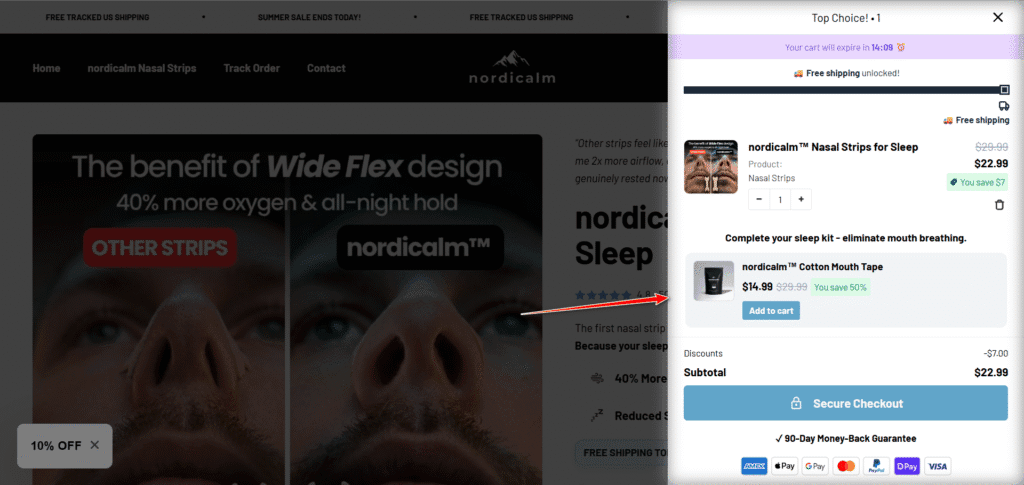
To push buyers to complete their checkout, Nordicalm activates several visual urgency triggers inside the drawer. A purple cart expiration banner alerts users with the message “Your cart will expire in 14:09 ⌛” alongside a fully unlocked free shipping progress bar. The checkout section is reinforced with a bright green “✓ 90-Day Money-Back Guarantee” trust badge and custom secure payment icons to remove buying friction.
Case Study 2: Armplify’s Summer Confidence Body Compression Upsells
Activewear and fitness accessory brand Armplify relies on high-impact visuals to capture attention. When users visit Armplify’s fitness and compression sleeve store, they encounter a highly optimized upselling interface.
The storefront pushes their core product, the Single Armplify Sleeve, for $59.99, down from its original price of $87.99. As soon as the customer clicks “Add to Cart,” the drawer reveals a targeted 2X Armplify Thigh Trimmers upsell. This recommendation is priced at $39.99 (originally $69.99, representing a 43% savings) and is styled with the compelling copy: “Don’t Forget Your Thighs…”
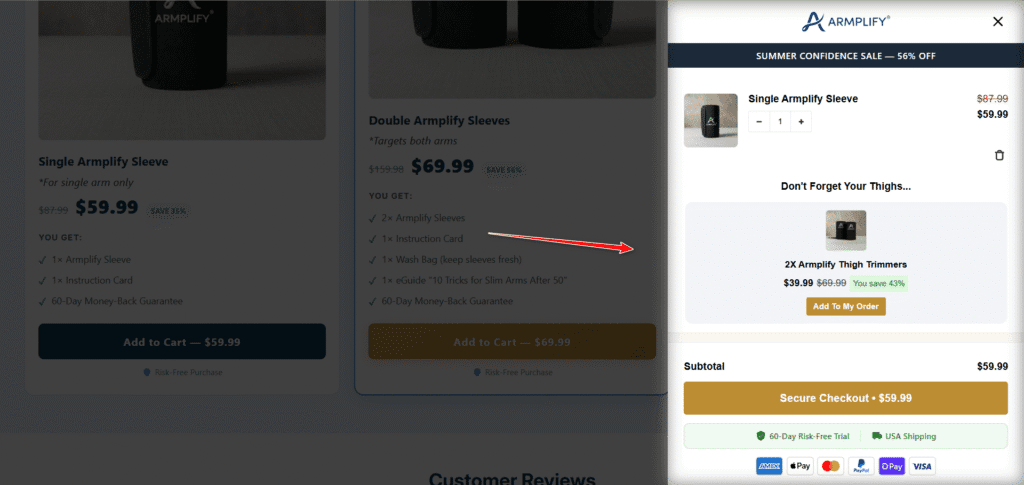
Armplify wraps this offer in high-contrast styling to drive clicks. The cart features a dark blue summer sale announcement bar reading “SUMMER CONFIDENCE SALE — 56% OFF” to emphasize immediate value. The cart is rounded out by a gold-branded secure checkout button and dual green trust badges stating “✓ 60-Day Risk-Free Trial” and “✓ USA Shipping.”
Case Study 3: Belo’s Bio-Fermented Sea Moss Multi-Variant & Automatic Free Gifts
Nutritional supplement brand Belo demonstrates how to use Kaching for complex, multi-variant products and automated customer rewards. On Belo’s customized sea moss supplement cart, the brand caters to health-conscious buyers looking for bundled value.
The main featured offer is their Starter Pack, priced at 1.220.400đ after a 40% discount, which contains two Sea Moss On the Go 15-Packs. To delight customers and increase conversion rates, Belo uses an automatic free gift reward. When a buyer adds the Starter Pack to their cart, a 5 x Sachet Gift Pack is automatically added as a FREE bonus.
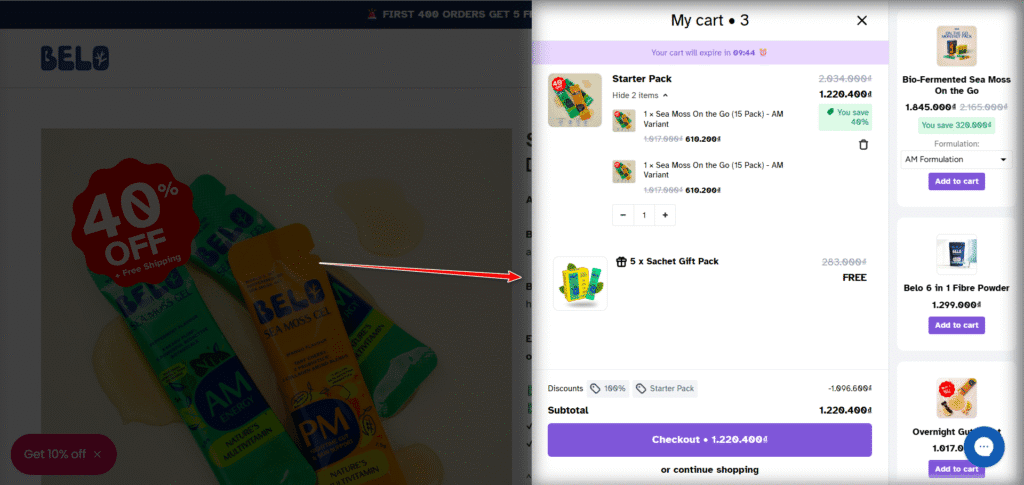
Belo also utilizes a right-side sidebar carousel inside the cart drawer to display secondary cross-sells. Buyers can browse and select options like the Bio-Fermented Sea Moss On the Go (1.845.000đ) using built-in variant dropdowns, alongside Belo 6 in 1 Fibre Powder and Overnight Gut Support. The entire cart is localized with a Vietnamese Dong (đ) currency display, a purple countdown timer, and a clean purple secure checkout button.
Step-by-Step Playbook: How to Install and Enable Kaching on Your Shopify Store
Setting up a high-converting Shopify cart upsell system does not require hiring an expensive developer. By following this simple playbook, you can configure your cart settings to maximize AOV in under ten minutes.
Step 1: Install Kaching CartDrawer from Shopify App Store
To begin your setup, download Kaching Cart Drawer from Shopify App Store. ShopSideK readers can use promo code SSK20 during installation to get an exclusive 20% off for your first 3 months. Click our official Kaching installation link to launch your 14-day free trial and start building your custom cart today.
Step 2: Customize Your Drawer Style and Upsell Rules
Once inside the app dashboard, head to the designer panel to style your drawer. You can match the colors and fonts directly to your brand. From here, configure your gamified free shipping progress bar, add visual countdown timers to build urgency, choose secure trust icons, and set up your upsell carousel rules to recommend complementary items.
Step 3: Deactivate Conflicting Default Theme Drawers
To ensure perfect cart drawer compatibility, you must prevent your default theme cart from opening at the same time. Open your Shopify theme editor and navigate to your theme settings. Locate the cart option and change the checkout behavior from a drawer or AJAX cart to a standard page-redirect model, allowing Kaching to handle all drawer actions.
Step 4: Toggle On the Kaching Theme App Embed Extension
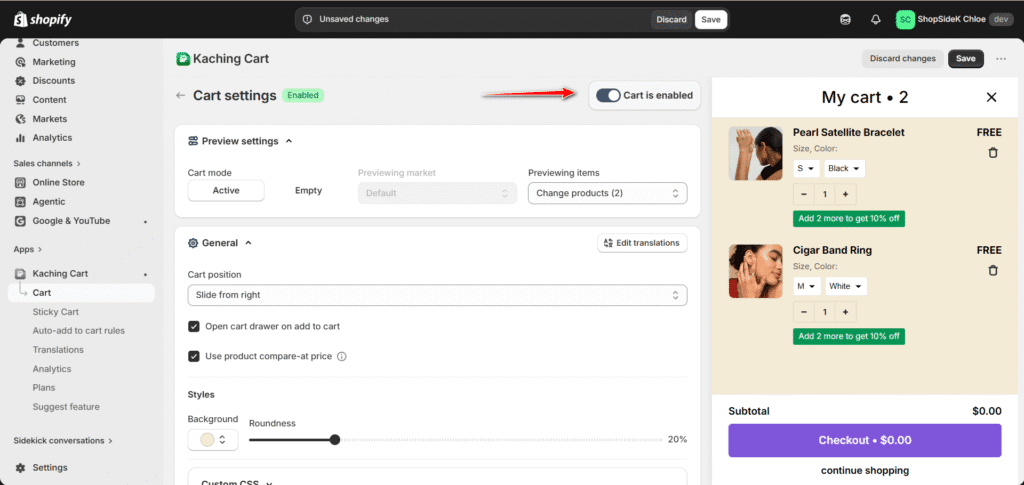
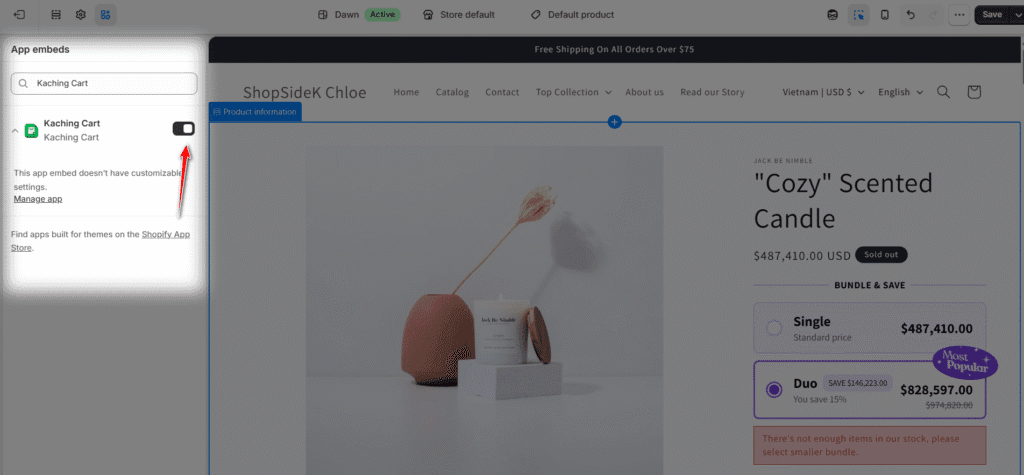
Next, you need to tell Shopify to display the new cart. Open your Shopify Theme Customizer and click on the App Embeds tab on the far-left menu panel. Find the Kaching Cart extension and click the enable toggle switch to active, then save your changes to push the cart drawer live.
Step 5: Enable and Customize Your Floating Sticky Cart Button
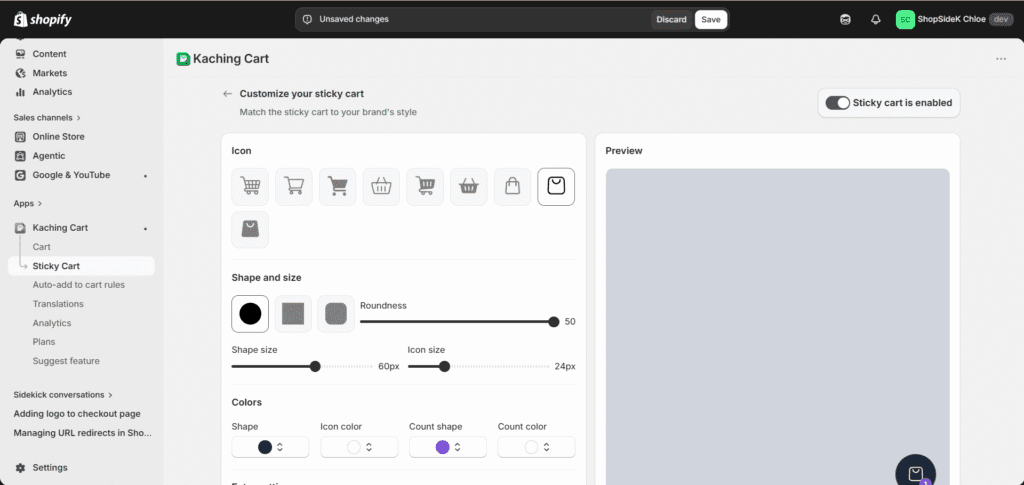
To capture sales from buyers scrolling through long, modern landing pages, you need to make the checkout path as frictionless as possible. Navigate to the Sticky Cart menu in your Kaching admin dashboard and click the Sticky cart is enabled toggle to active.
From this panel, you can customize the icon style, select your button’s shape (circle, square, or rounded), and adjust the roundness slider. You can also fine-tune the scale—such as setting a 60px shape size with a 24px icon size—and modify background, icon, and product-count badge colors to match your brand’s unique style perfectly.
Step 6: Sync Add-To-Cart Events to Your Klaviyo Email Flows
To recover lost sales, complete your setup with a Klaviyo abandoned cart integration. Kaching passes custom checkout actions directly to your email marketing system. By mapping these add-to-cart triggers and custom events, you can send highly targeted abandoned cart flows that capture recovered revenue on autopilot.
The AOV Math: Order-Volume Billing vs. Flat-Rate Subscription Plans
When building your e-commerce tech stack, managing your monthly app overhead is key to maintaining healthy profit margins. Selecting the right cart app requires understanding different billing models, particularly the difference between volume-based tiers vs. flat subscriptions.
To help you choose the most cost-effective option for your business scale, let’s look at the math. We will compare Kaching’s tiered pricing with Amp Slide Cart’s flat $49.99/mo plan across different growth stages:
- Low Volume (50 orders/month): Kaching’s starter plan costs $9.99/mo, while Amp costs $49.99/mo. Kaching saves you $40.00/mo, making it the highly cost-effective choice for brand-new stores.
- Moderate Volume (300 orders/month): Kaching’s 499-order tier costs $24.99/mo, while Amp remains at $49.99/mo. Kaching still saves you $25.00/mo.
- High Volume (800 orders/month): Kaching’s price scales past its $24.99/mo tier, while Amp remains flat at $49.99/mo. At this stage, flat subscriptions become highly competitive.
A critical factor to consider is the transaction fee comparison. Some alternative cart apps take a 1% to 2% commission cut on all upsell revenue generated through their widgets.
Fortunately, both Kaching and Amp reject this commission model, opting instead for predictable monthly pricing. This ensures that as your team successfully boosts your AOV, you keep 100% of the extra profit rather than paying high transactional penalties.
For a new Shopify store, Kaching is the clear winner to minimize startup risk and test conversion widgets on a budget. Once your brand consistently scales beyond 500 monthly transactions, transitioning to a flat-rate tool like Amp can help keep your recurring expenses stable and predictable.
Head-to-Head Battle: Kaching vs. Ego vs. Amp Slide Cart
Choosing a Shopify cart upsell app depends entirely on your store’s technical needs and current order volume. While many tools look similar on the surface, their core architectures, pricing models, and customization depths differ significantly.
💡If you want to see how these options stack up against a wider variety of tools on the market, check out our comprehensive guide on Top 10 Upsell Apps for Shopify.
Kaching CartDrawer vs. Ego Cart Drawer: Free Limitations and Advanced Analytics
Ego Cart Drawer Cart Upsell is a popular alternative that appeals to merchants seeking advanced promotional features. The biggest differentiator is that the Ego Cart Drawer offers a limited free tier, whereas Kaching is paid-only once your store is live.
However, Ego’s advanced pricing tiers range from its Basic plan ($12.99/mo) to its Pro plan ($39.99/mo), with higher rates applied if you run a Shopify Plus store. For that premium, Ego includes helpful features like native Abandoned Cart Analytics and complex BOGO deals.
By contrast, Kaching maintains an impressive 5.0 ★ rating across over 970 verified reviews, while Ego holds a 4.9 ★ rating with 536 reviews. Kaching chooses to skip complex reporting in favor of a clean, lightweight user experience, robust multi-language translation features, and highly affordable starting tiers.
Kaching CartDrawer vs. Amp Slide Cart: Developer-First Coding vs. No-Code Simplicity
If your shop requires complete design control, the comparison shifts to Amp Slide Cart Upsell Drawer. Amp is a premium, developer-first tool trusted by massive global brands like GFUEL, Dr. Bronner’s, and DISSH.
Through its Growth Plan ($49.99/mo), Amp grants technical teams full access to custom CSS/HTML/JSX customizations. This allows you to write custom scripts and style your cart to look like a completely bespoke, proprietary checkout solution.
If you do not have developer resources, however, Amp’s code-heavy environment can feel overwhelming and unnecessary. Kaching offers a much simpler alternative by focusing on no-code simplicity. Its intuitive visual editor lets you build a beautiful, high-converting cart using a drag-and-drop interface starting at just $9.99/mo.
👉 Ready to increase your store’s average order value from day one? Install Kaching Cart Drawer today and use code SSK20 at checkout to save 20% on your first three months.
Conclusion: Is Kaching Cart Upsell the Right App to Grow Your Store?
Boosting your e-commerce AOV doesn’t require a massive marketing budget or complex site redesigns. Sometimes, the most impactful conversion optimization strategy is simply making it easier for customers to buy more of what they already want.
Kaching cart upsell app excels at doing exactly that. It replaces standard, uninspiring checkout screens with a highly engaging, interactive slide cart that builds trust, handles product cross-sells, and motivates buyers to hit higher spending milestones.
With its affordable, order-volume billing tiers and an active 5.0-star rating from hundreds of successful stores, Kaching is one of the safest investments you can make to grow your store’s bottom line.
FAQs About Kaching Cart Upsell Drawer
How do I hide custom cart upsell products from my standard collections?
You do not want exclusive upsell items—like custom free gifts or shipping protection add-ons—cluttering your storefront catalog. To keep them hidden, create an automated collection in your Shopify admin that automatically excludes products tagged with a specific label, such as upsell-only.
This keeps your main collection pages clean while allowing the app to display these products directly inside the slide cart.
What should I do if the Kaching Cart Drawer does not open?
If the cart drawer does not slide open, it is almost always caused by a layout conflict with your default Shopify theme. To resolve this, open your Shopify Theme Customizer, head to the App Embeds tab on the left-side menu, and ensure the Kaching theme extension is toggled to active.
Additionally, check your main theme settings to disable any native AJAX cart drawers or slide-out cart layouts.
Does Kaching Cart Drawer charge transaction or commission fees?
No. Unlike some checkout apps that take a 1% to 2% cut of your upsell revenue, Kaching Cart Upsell relies entirely on flat-rate, order-based monthly subscriptions. This means you are never penalized for scaling, and your team keeps 100% of the extra revenue generated by your cart widgets.
Can I translate the cart text for international customers?
Yes. Kaching features a built-in translation panel that allows you to customize every word of copy inside the drawer. You can manually edit the text for countdown timers, shipping progress bars, and checkout buttons to match your store’s native language or support multi-currency regions.
Is Kaching compatible with store builders?
Absolutely. Because Kaching is built on Shopify’s Online Store 2.0 theme framework, it integrates as an independent App Embed rather than modifying your core theme code. It works perfectly alongside popular design platforms like PageFly or Section Store without slowing down your site speed.