Last updated: October 30, 2026. Both demos are free to open and click through; you don’t need an account.
The question a tech accessory page has to answer first is not “why this brand” but “will it work with what I already own”. A power bank buyer is looking at the back of their phone; a desk mat buyer is looking at their desk, their mouse settings and the cable already running to their computer. The two Shopify examples below put that answer on the page before the price asks for anything: one with a compatibility table built around the back of the phone, the other with a desk you fill in piece by piece. Both then sell more than one unit without a deeper discount.
The pages:
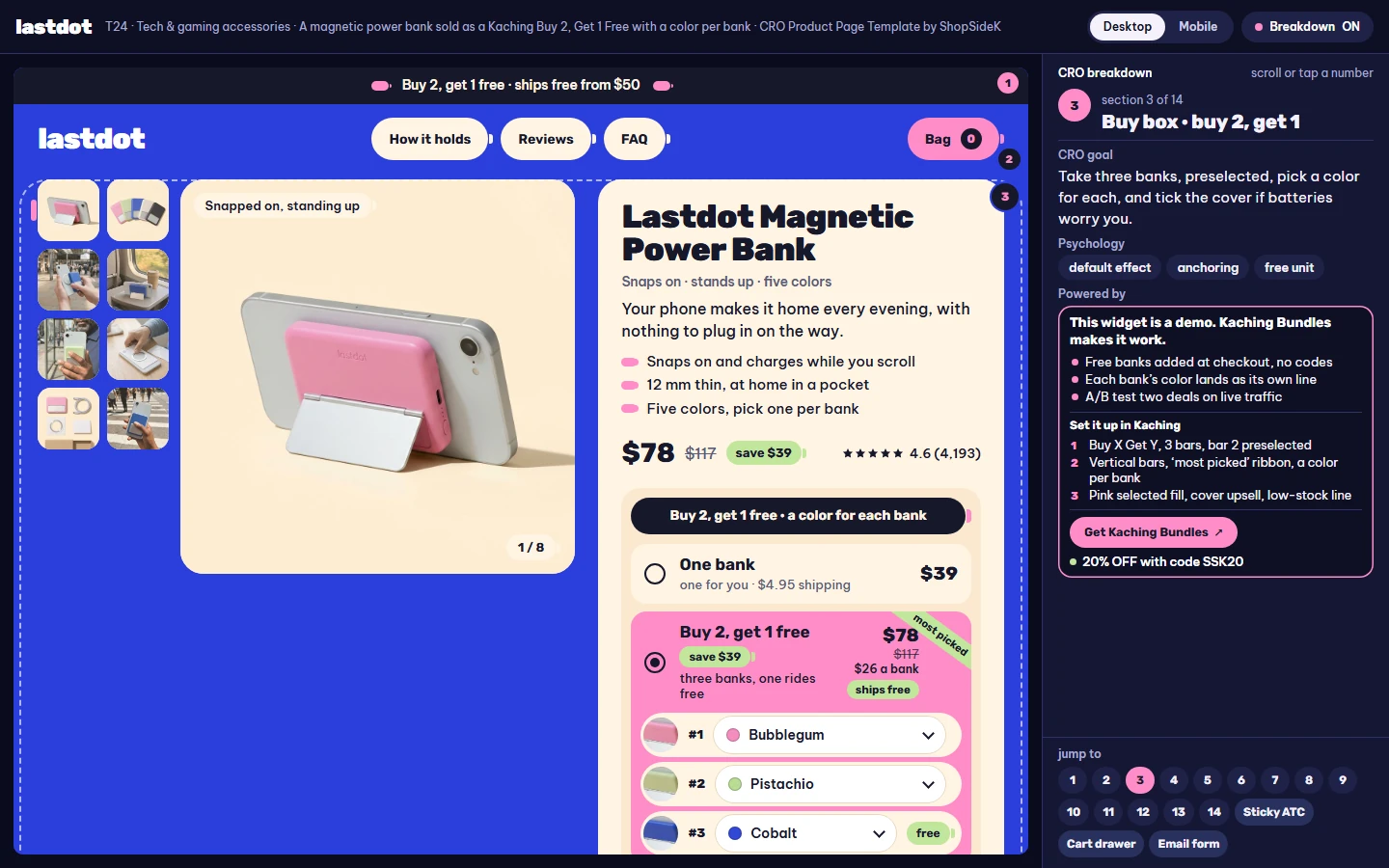
- Lastdot, a magnetic power bank sold as “Buy 2, get 1 free”, with a color for every bank.
- Halfdark, an RGB light-edge desk mat sold as a mix & match setup, shown here in its everyday version.
Key takeaways: 7 rules for a tech accessories product page
- Answer “will it work with mine?” before the reviews. A table of what is on the back of the phone, or a calculator for the desk, removes the reason most tech buyers leave to check elsewhere.
- Print the number buyers look up elsewhere. Watt-hours for a flight, centimeters for a desk, watts for a charge: give the figure they would otherwise search for in another tab.
- Describe the hardware, don’t borrow a brand. “Phones with a magnetic back” is a fact you can stand behind; “MagSafe”, “Qi2” and phone model names belong to someone else and come with rules.
- Sell the household or the setup, not a steeper cut. Three power banks for three bags, or the one desk piece a buyer is missing, raises the order without lowering the price of each unit again.
- Give every unit its own choice. A color for each bank, a swap for each desk piece: the free unit picks too, and each one lands in the cart as its own line.
- Put the part people fear inside the warranty. Name the battery or the light strip, with a number a buyer can check, and say what happens when it fails.
- Show one scarcity cue, and only from real stock. A single low-stock line fed by inventory, and no timer that holds a price nobody was going to change.
The two examples at a glance
| Lastdot (power bank) | Halfdark, everyday version (desk mat) | |
|---|---|---|
| Product | 5,000 mAh (19.25 Wh) magnetic power bank, 12 mm thin, 118 g, five colors | 90 × 40 cm desk mat with a light strip sewn inside the edge, 12 light modes |
| Kaching offer type | Buy X Get Y: 1 bank, buy 2 get 1 free, buy 3 get 2 free | Bundle Upsell (mix & match): the mat plus 0, 1 or 2 setup pieces |
| Prices | $39 · $78 · $117 | $45 · $76.50 · $96.75 |
| Crossed-out price | Every bank at $39 ($117, $195) | The pieces’ own prices added up ($90, $129) |
| Per-unit line | $26 a bank, $23.40 a bank | A discount on each item: 15% or 25% |
| Choice per unit | A color for every bank, free ones included | A Change button on every added piece |
| Gift | Free 1 m braided cable once the cart reaches $100 | Free Coil Cable on the top bar; free Cable Kit from $65 in the cart |
| Compatibility tool | A table: what’s on the back of your phone | A DPI calculator and a cable-route picker |
| Guarantee | 30 days, used is fine; 2 years with the battery included | 90 nights; 2 years on the light edge, button and cable |
| Live example | Lastdot template (T24) | Halfdark template, everyday (T07) |
Example 1: Lastdot, a power bank page that sells one bank per bag
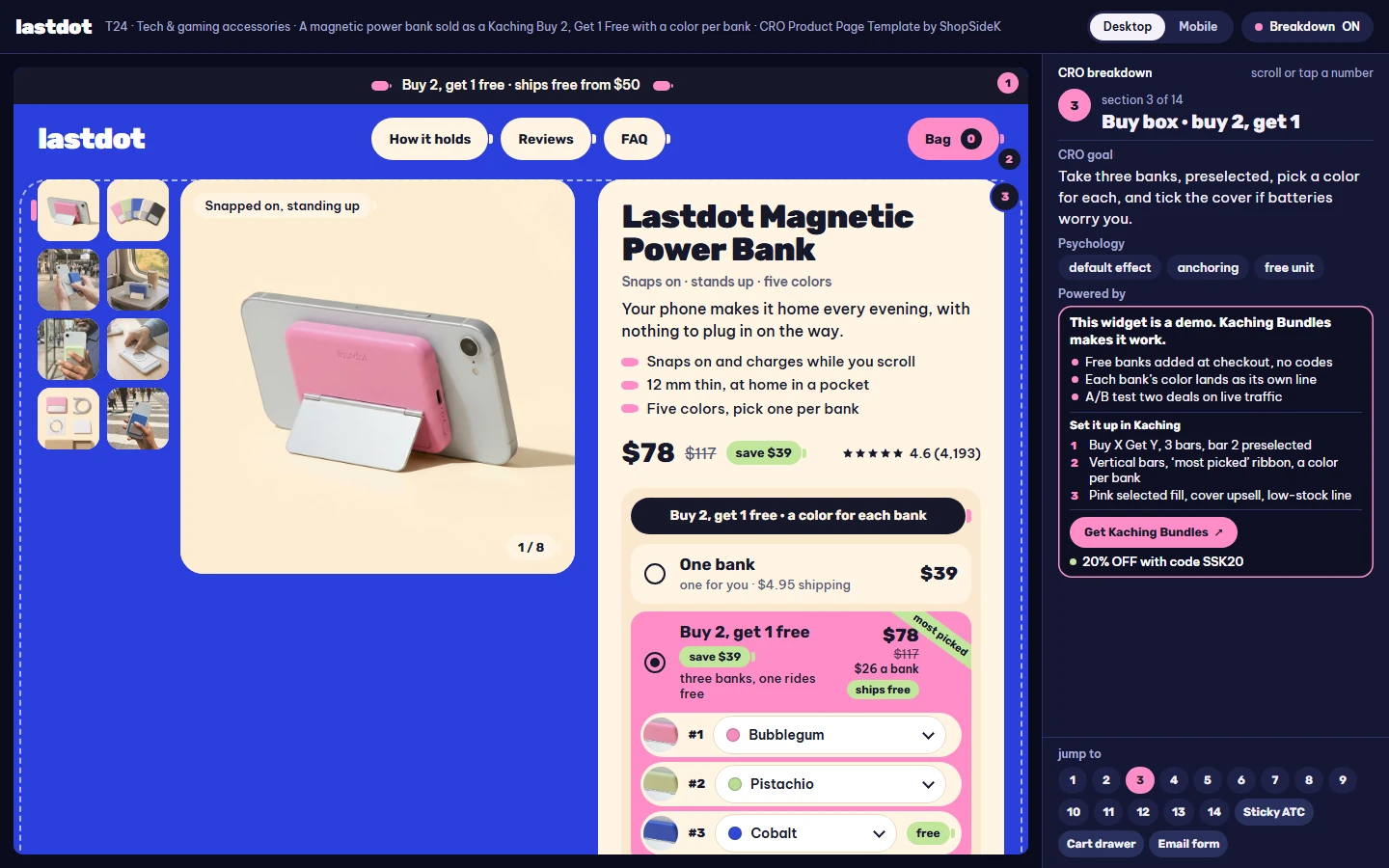
Lastdot sells a slim power bank that snaps onto a phone with a magnetic back or a magnetic case and charges it through the back at up to 7.5 W. Its pitch is not capacity. It is that a household needs more than one: one per phone, one that lives in the bag, one in the car. So the bundle is built on free units, and every unit gets its own color.
The offer: buy 2, get 1 free, with a color per bank
| Bar | Banks | Price | Crossed-out price | Per bank | Shipping |
|---|---|---|---|---|---|
| One bank | 1 | $39 | none | $39 | $4.95 |
| Buy 2, get 1 free (preselected) | 3 | $78 | $117 | $26 | free |
| Buy 3, get 2 free | 5 | $117 | $195 | $23.40 | free |
The price of a single bank never moves, which keeps the crossed-out numbers honest: $117 is three banks at the $39 anyone pays for one. The selected bar opens one row per bank with its own color dropdown (Bubblegum, Pistachio, Cobalt, Chalk, Licorice), and the free rows carry a small “free” tag but pick a color like the rest. A single $5 add-on, “Two more years of cover”, sits under the bars on every option, unticked, and stretches the warranty to four years for the whole order.
The bar also shows one scarcity line, “318 left from this batch”. In the demo that number is fixed text; on a live store it should come from real inventory, or not appear at all.
The sections that answer “will it work with mine?”
- What’s on the back decides. A plain six-row table: a bare magnetic back or a magnetic case holds as is; a thin case without magnets (under about 3 mm) or a phone with no magnets holds with the ring sticker in the box; a thick or rugged case, a wallet case or a stick-on grip has to come off, or the phone charges by cable. Under it sits the fridge-magnet check: if a fridge magnet sticks to the back of your case, the bank will.
- The ring, placed. Four steps for a phone without magnets: wipe it, lay the alignment card over the lens, press the ring for thirty seconds, then give it an hour before snapping the bank on.
- Six things on the back. Tap a number on the bank’s photo to read what each part does: the ring of magnets, the charging coil, a warmth sensor that slows the charge when the phone heats up, the stand’s hinge, the 20 W USB-C port with pass-through, and four charge dots that each stand for a quarter.
- Quarter turns. The fold-out stand shown four ways by dragging a ring: upright on a kitchen counter, sideways on a train tray, at eye level for a call, folded flat in a hand.
- The outlet crouch. A before and after you drag between: a traveler sitting on an airport floor next to the only outlet, then the same traveler in a seat with the bank on the phone.
- Reviews with the setup attached. Every review shows the reviewer’s phone back, case, color and months of use, and the carousel keeps a 3-star review about slower charging through a thick case.
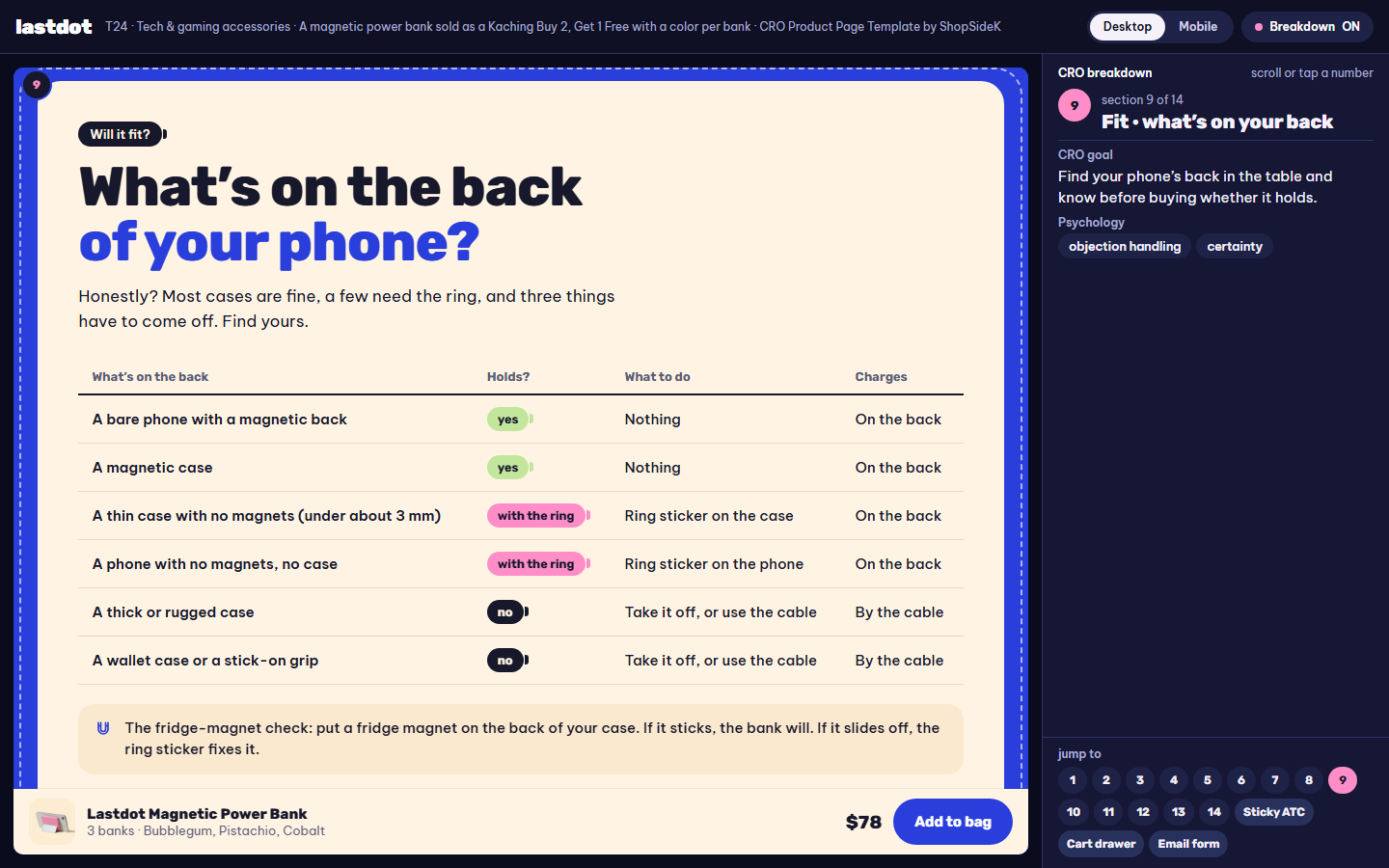
The FAQ opens with safety, not speed: warm is normal while charging, the sensor slows it, keep it out of a hot car and off a pillow, and stop using it if it ever swells.
The cart: from $78 to $102, then a free cable
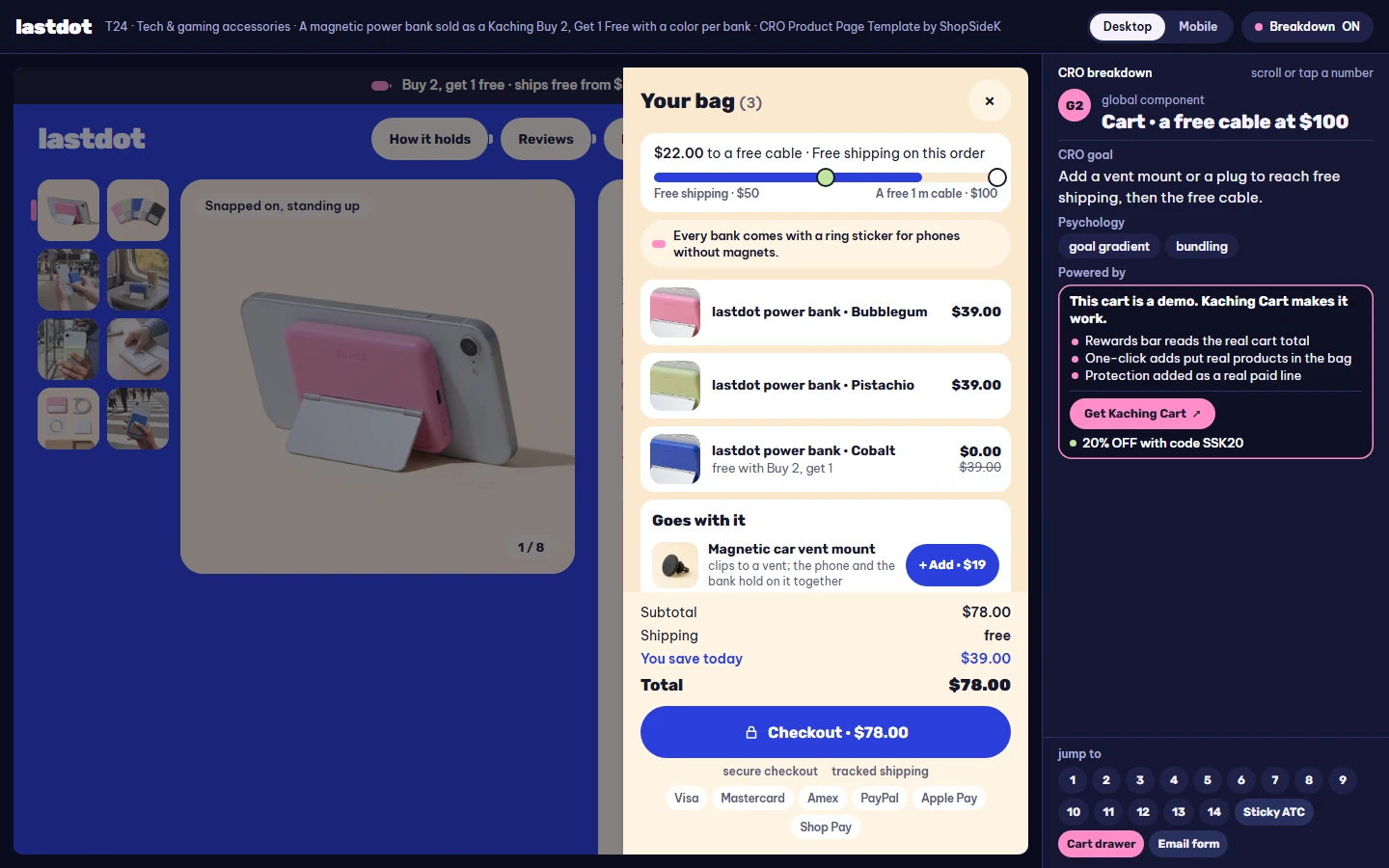
The preselected bundle already ships free (from $50), and the cart’s reward bar points at a second milestone: a free 1 m braided cable ($12 value) at $100. The “goes with it” list holds three add-ons, a magnetic car vent mount ($19), a 20 W USB-C wall plug ($15) and two extra ring stickers ($6), and a line under the bar reminds shoppers that every bank comes with a ring sticker. Ticking the $5 cover and adding the vent mount takes the order from $78 to $102, and the cable lands in the cart as a free line.
One thing not to copy
The “Not delivered” section is a text thread that ends on a grey bubble: a message home that never left a dead phone. It works because that moment is the exact problem a power bank solves. For a product whose failure is an inconvenience rather than a missed message, the same format reads as a guilt trip.
Rebuild the offer in Kaching
- A Buy X Get Y deal with three bars: buy 1, buy 2 get 1 free, buy 3 get 2 free; bar 2 preselected.
- Vertical bars, a “most picked” ribbon, and a color dropdown for each bank, free ones included.
- One Add Upsell for the extra cover, unticked, plus a per-bank price line and a savings line.
The per-unit color picker uses Kaching’s option to let customers choose a different variant for each item (Kaching help: customize your bundle variant dropdowns). For when a free unit beats a percent off, see Shopify BOGO economics.
Example 2: Halfdark, a desk mat page that sells the setup piece by piece
Halfdark sells a 90 × 40 cm gaming mat with its light strip stitched 2 mm under the cloth, one inline button and a single cable. Most buyers already own part of a desk setup, so the bundle starts from the mat and lets them add only what is missing: light bars, a monitor light or a headset stand. The everyday version is the page that runs most of the year, with no sale layer on top.
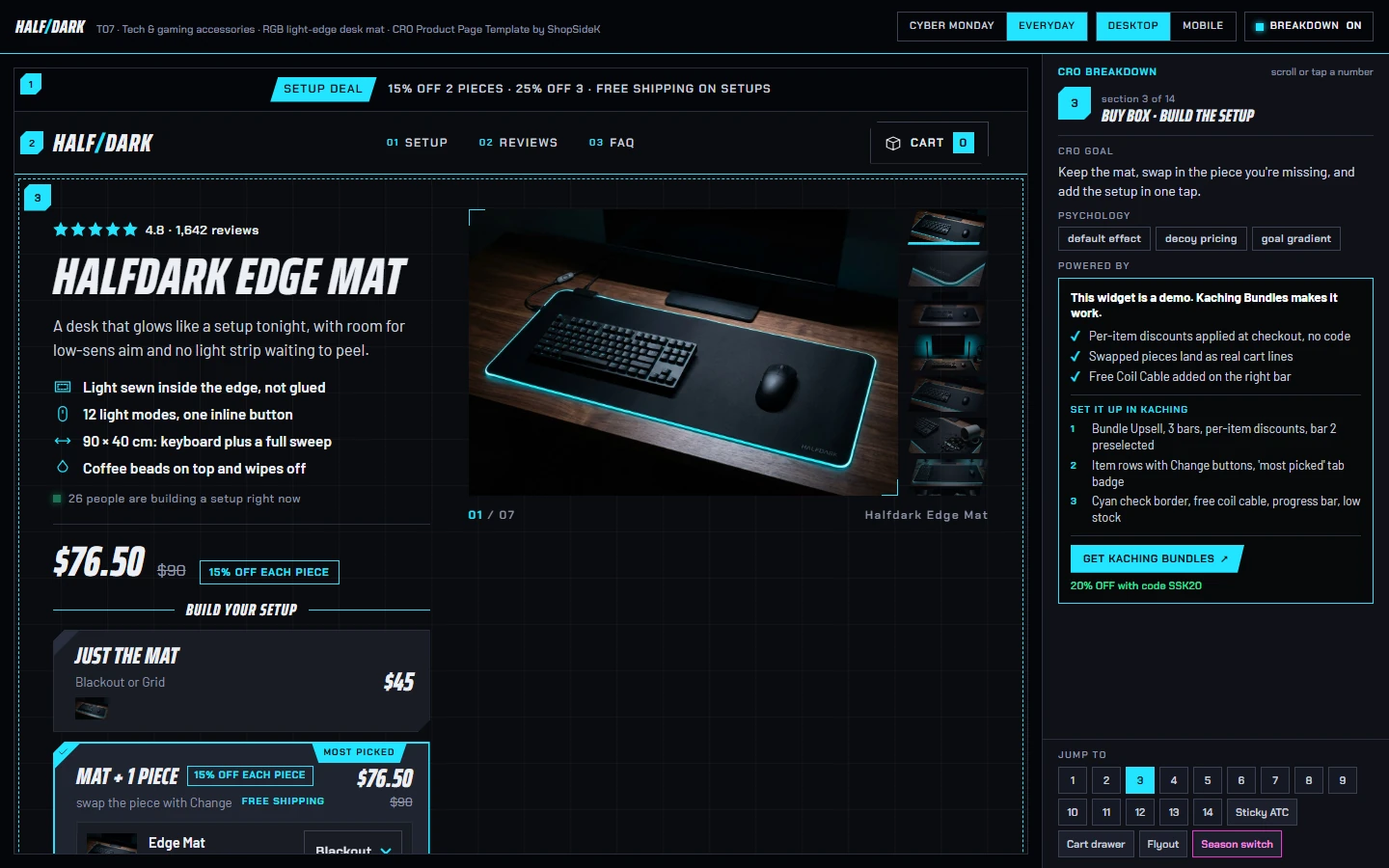
The offer: the mat, then the pieces you’re missing
| Bar | What’s in it | Price | Crossed-out price | Saving shown |
|---|---|---|---|---|
| Just the mat | Edge Mat | $45 | none | none |
| Mat + 1 piece (preselected) | Edge Mat + Light Bars | $76.50 (15% off each item) | $90 | You save $13.50 |
| Mat + 2 pieces | Edge Mat + Light Bars + Monitor Light, free Coil Cable | $96.75 (25% off each item) | $129 | You save $32.25 |
Every added piece has a Change button that swaps it in place for another one (Light Bars $45, Monitor Light $39, Headset Stand $35), and the price follows the swap: the mat with the Headset Stand instead comes to $68.00. A three-segment progress line under the bars names the next step, for example “Add 1 more piece → 25% off each item + a free Coil Cable”. The free Coil Cable ($15 value) is shown on its own band and is never added into the saving line. A low-stock line, “only 23 Edge Mats left in this batch”, is the page’s one scarcity cue; like Lastdot’s, it is fixed demo text standing in for a real stock count.
The sections that answer “will it fit my desk?”
- Nine months of wrists. Three light edges side by side after nine months: a strip glued on top that lifts at the corner, a strip stitched over that frays, and the one sewn inside the edge that stays flat. The comparison sells the construction without naming a competitor.
- One cable, wherever the computer sits. The shopper picks where the computer is, and the page draws one 1.8 m braided cable from the mat’s corner to it, with the button landing in thumb range and a corner port taking a wireless dongle. “0 apps” is part of the headline.
- Room to swing. Type your DPI and in-game sensitivity, and the page draws a full 180-degree turn against the 54 cm of mouse lane beside the keyboard.
- The loadout. Equip the pieces you’re missing on a drawn desk and watch each one light a new part of it; one button sends that choice to the bundle above.
- Press it. One inline button on the cable cycles the modes, dims them or turns the room dark, so nobody has to install another app.
Reviews can be filtered by how the reviewer plays, so a low-sensitivity player reads other low-sensitivity players first.
The cart: open it with the gift already in
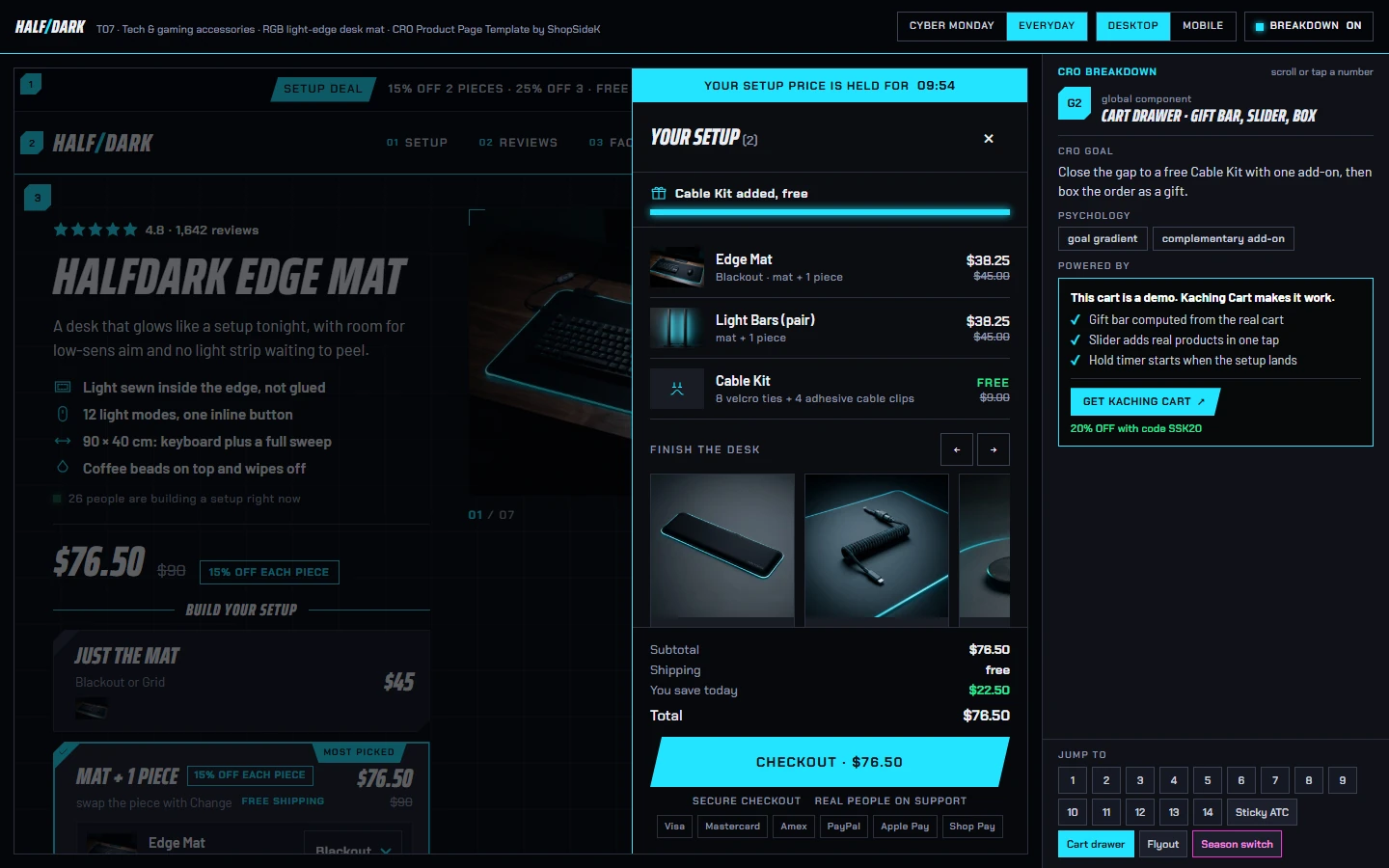
The cart has a free-gift bar that adds a Cable Kit (velcro ties and adhesive clips, $9 value) from $65. The preselected bundle is $76.50, so the first time the drawer opens the kit is already there, and free shipping (a store setting from $60) is already covered. A slider offers a Wrist Rest ($19), the Coil Cable ($15, hidden whenever the bar already gives it) and a Mouse Bungee ($15), with a gift box as a $5 option. Adding the Wrist Rest takes the order from $76.50 to $95.50.
One thing not to copy
The top of the drawer reads “Your setup price is held for 10:00”, with a countdown. On this page nothing happens to the price when the clock runs out, so the line is urgency without a reason. The demo keeps it to show the slot a cart can use; on a live store, hold a price only if it really changes, and otherwise use that line for something true, such as the free gift already added.
Rebuild the offer in Kaching
- A Bundle Upsell deal with three bars: the mat alone, the mat + 1 piece, the mat + 2 pieces; a discount on each item; bar 2 preselected.
- Item rows with a Change button, a progress line under the bars, a “most picked” badge.
- A free Coil Cable on the top bar, a savings line, and one low-stock line fed by real inventory.
Bundle Upsell is the Kaching deal type that groups different products with a discount on each item (Kaching help: bundle types). For when mix & match beats a fixed set, see fixed vs mix and match bundles on Shopify.
What a power bank page should state: watt-hours, flight rules and names you can’t borrow
Electronics pages carry facts other people check, and two kinds matter most for a power bank: the energy figure airlines use, and the brand names you are allowed to write next to your product. This is general information, not legal advice.
State watt-hours, not only mAh
Capacity in mAh only tells half the story, because energy depends on voltage too. Watt-hours are the voltage times the amp-hours: Lastdot’s 5,000 mAh at a nominal 3.85 V is 5 Ah × 3.85 V = 19.25 Wh, and the page prints both figures. Watt-hours are also the unit US air transport rules use. Under 49 CFR 175.10(a)(18), spare lithium batteries such as power banks may travel in carry-on baggage only, never in checked bags; a lithium-ion battery up to 100 Wh needs no airline approval, while one above 100 Wh and up to 160 Wh needs the operator’s approval, with no more than two such spares per person (49 CFR 175.10, Cornell LII). Airlines can add their own limits, so the safe phrasing on a page is the watt-hour number plus “carry-on only, check your airline”. Lastdot’s FAQ answers the flying question in exactly that shape.
Describe compatibility without borrowing a trademark
- Apple’s names. “MagSafe” and “iPhone” are Apple trademarks (Apple trademark list). Apple’s guidelines let third parties use an Apple word mark only in a referential phrase such as “compatible with” or “for use with”, only when the product really is compatible, never as part of the product name, and less prominently than your own name (Apple: guidelines for using Apple trademarks).
- The Qi logo. The Wireless Power Consortium licenses the Qi symbol to its members, and only for products that appear in its Qi Certified Product Database (WPC: trademark licenses).
- What Lastdot does instead. The demo names no standard, certification mark or phone maker. It describes the hardware (“a magnetic back”, “a magnetic case”, “a thin case with no magnets”) and gives the shopper a test they can run at home with a fridge magnet. If your product is certified, say so plainly and link the listing; if it isn’t, describing the hardware is the safer default.
Name the battery in the warranty
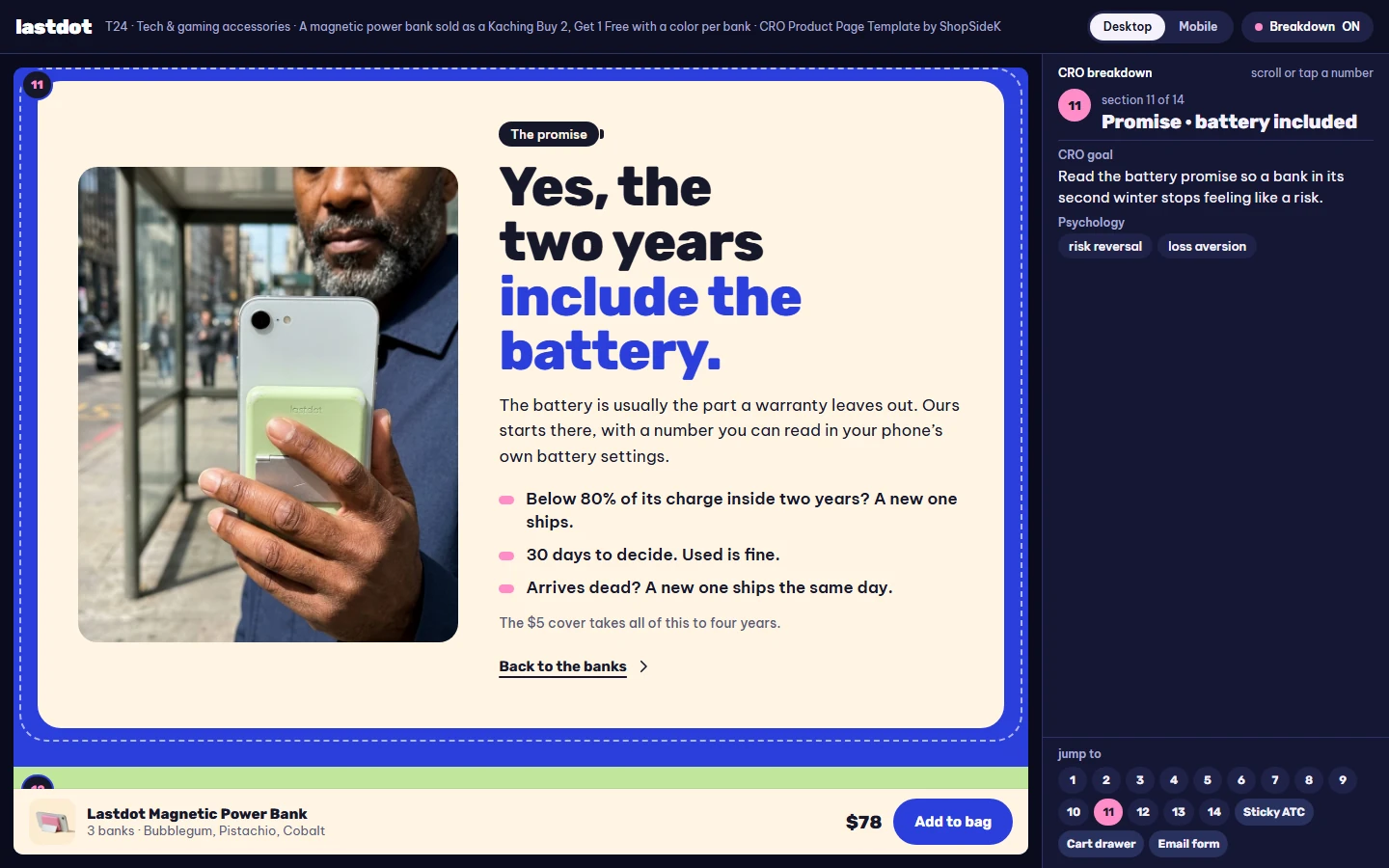
The part a buyer worries about in a power bank is the battery, and it is often the part a warranty leaves vague. Lastdot’s promise names it with a number anyone can read in their phone’s battery settings: if the bank holds less than 80% of its charge within two years, a new one ships. Halfdark does the same for its weak point, covering the sewn-in light strip, the button and the cable for two years.
How to set up a tech accessory bundle in Kaching
- Match the deal type to how people buy. A Buy X Get Y deal for several of the same small item (banks, cables, chargers); a Bundle Upsell for different pieces of one setup (Kaching help: bundle types).
- Let every unit choose. Turn on a variant per item so each bank gets its own color and the cart shows one line per unit (Kaching help: variant dropdowns).
- Add one widget add-on that answers a worry. For a battery that is extra warranty; the accessories that go with the product belong in the cart (Kaching help: add an upsell to your deal bar). For the difference between the two, see Shopify bundle vs upsell.
- Price the worst order before you publish. On the demos’ assumed costs, the deepest Lastdot bar with a 10% welcome code stacked on it still kept 51.6% gross margin, and Halfdark’s top bar with its wheel code about 62%. Check yours in the Shopify discount break-even calculator, and decide whether welcome codes may combine with bundle prices (how Shopify bundle discounts stack).
- Place a real order with mixed choices. Pick a different color for each bank, or swap a piece, and check that every unit reaches the cart and the order with the right variant.
Tech accessories product page checklist
- A compatibility answer above the reviews: a table, a calculator or a one-line test the shopper can run.
- Capacity in watt-hours as well as mAh, and the carry-on rule in the FAQ for anything with a lithium battery.
- Size and weight as plain numbers near the top of the page.
- Hardware described in your own words; trademarks only in “compatible with” phrases you can back up, and logos only with a license.
- A bundle built on how people own the product: one per bag, or the piece missing from the setup.
- A choice for every unit in the bundle, free units included.
- A per-unit price on the multi-unit bars.
- A warranty that names the part people fear, with a number they can check.
- A safety answer in the FAQ for anything that charges or heats.
- One scarcity cue from real stock, and no cart timer unless the price really changes.
- Cart add-ons that finish the setup, and a reward the preselected bar can reach.
FAQ
What should a tech accessories product page include?
A clear answer to “will it work with what I own?”, the key numbers (capacity in Wh and mAh, size, weight, watts), how it charges or connects, a safety answer for batteries, a warranty that names the battery or other weak part, reviews that show the reviewer’s device, and the price of every bundle option.
How can I say my power bank works with iPhone without breaking trademark rules?
Use Apple’s names only in a referential phrase such as “compatible with” and only when it is true, keep them out of your product name and smaller than your own brand, and don’t use Apple’s logos or badges without a license. Describing the hardware, for example “phones with a magnetic back”, avoids the question.
Should a power bank product page list watt-hours?
Yes. US rules for spare lithium batteries on flights are written in watt-hours: up to 100 Wh in carry-on without airline approval, 100 to 160 Wh with approval and at most two spares, never in checked bags. Listing Wh next to mAh answers the travel question on the page.
Can a Shopify store sell power banks as “buy 2, get 1 free” with a different color for each?
Yes. Lastdot uses a Kaching Buy X Get Y deal with three bars and the option that lets customers pick a variant for each item, so the free bank chooses its own color and every bank arrives in the cart as its own line.
How do I stop a 10% welcome code from eating a bundle discount?
Price the worst order first, then decide. Lastdot lets its welcome code stack and still keeps 51.6% gross margin on the deepest bar on the demo’s assumed costs; if your margins are thinner, set the code so it doesn’t combine with bundle prices, or offer a free item instead.
Is a mix & match bundle better than a fixed set for tech accessories?
When buyers already own part of the setup, yes: they add only the pieces they’re missing. Halfdark starts every bar with the mat and lets each added piece be swapped with a Change button, with a deeper discount on each item as the setup grows.
Can I use these templates on my store?
Both are free, interactive demos with a breakdown of every section and the Kaching settings behind the bundle. They are references to rebuild, not themes to install: you set up the offer in Kaching and the sections in your own theme.
More product page examples
Lastdot and Halfdark are part of the ShopSideK library of Shopify product page templates, each with a free section-by-section CRO breakdown. For more pages in this niche, browse the tech and gaming accessories templates, or see every page built on a Kaching Buy X Get Y offer or a Kaching mix & match offer.
For the Cyber Monday version of the desk mat page, read Black Friday product page examples. Another pair of everyday pages: kitchen product page examples.
Sources
- 49 CFR 175.10, exceptions for passengers, crewmembers and air operators, including (a)(18) on spare lithium batteries (Cornell LII)
- Apple: list of Apple trademarks
- Apple: guidelines for using Apple trademarks and copyrights
- Wireless Power Consortium: trademark licenses
- Kaching help: different bundle types
- Kaching help: customize your bundle variant dropdowns
- Kaching help: add an upsell to your deal bar