⚡ ShopSideK Verdict
Is Kaching Subscriptions worth it? Yes. It is the absolute best value-for-money subscription engine on Shopify — with a flat-rate model that has zero transaction fees, OS 2.0 native embed blocks, and 100% free testing on development stores. Rated 4.9 stars across 897+ verified reviews.
Predictable flat monthly pricing with absolutely zero transaction fees. All features are unlocked on the entry tier, helping you scale margins easily.
Alternative local European billing systems (like Klarna or Sofort) are completely unsupported. Analytics and cohort reporting tools are fairly basic.
👉 Remember to enter discount code SSK20
Building reliable recurring revenue is no longer a luxury for e-commerce brands—it is a survival strategy. While traditional single-purchase checkouts force you to pay rising customer acquisition costs on every transaction, a structured subscription model changes the mathematics of your business. Recent data from Envive’s 2026 retention analysis reveals that subscription stores maintain a 67% customer retention rate, compared to a meager 31% industry average for standard checkouts.
However, launching a subscription storefront often introduces technical complexity, custom code requirements, and steep software transaction fees. This guide provides an honest, merchant-first Kaching Subscriptions review. We analyze whether this minimalist billing engine can protect your profit margins, or if its simplified framework introduces hidden operational risks to your checkout.
Kaching Subscriptions Shopify App Overview
| App Metric | Kaching Subscriptions Quick Details |
|---|---|
| Developer | Kaching Apps (Vilnius, Lithuania) |
| Shopify Rating | 4.9 / 5.0 (897+ Verified Reviews) |
| Pricing Model | Flat-Rate Monthly Tiers (No Transaction Fees) |
| Free Trial | 14-Day Risk-Free Trial |
| ShopSideK Exclusive Deal | 20% OFF First 3 Months with promo code SSK20 |
What is Kaching Subscriptions? (An Honest Merchant Introduction)
Kaching Subscriptions is a lightweight, conversion-focused recurring billing app designed specifically for Shopify store owners. Developed by Kaching Apps—the Lithuanian development team widely recognized for their popular Kaching Bundles & Upsells—this tool holds the prestigious “Built for Shopify” validation badge.
Instead of routing buyers through clunky external checkouts that hurt conversions, Kaching Subscriptions processes transactions directly through the native Shopify Checkout, maintaining a seamless, high-trust purchasing path.
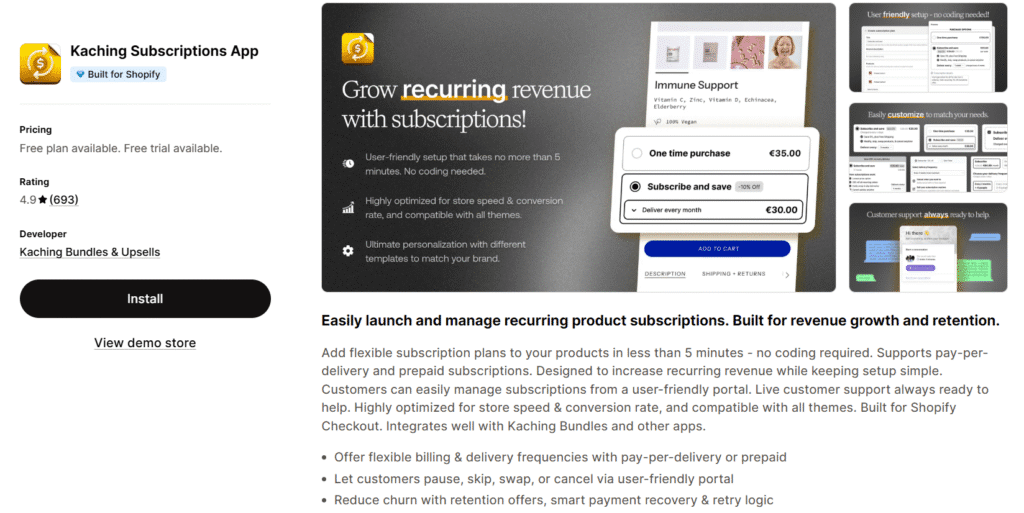
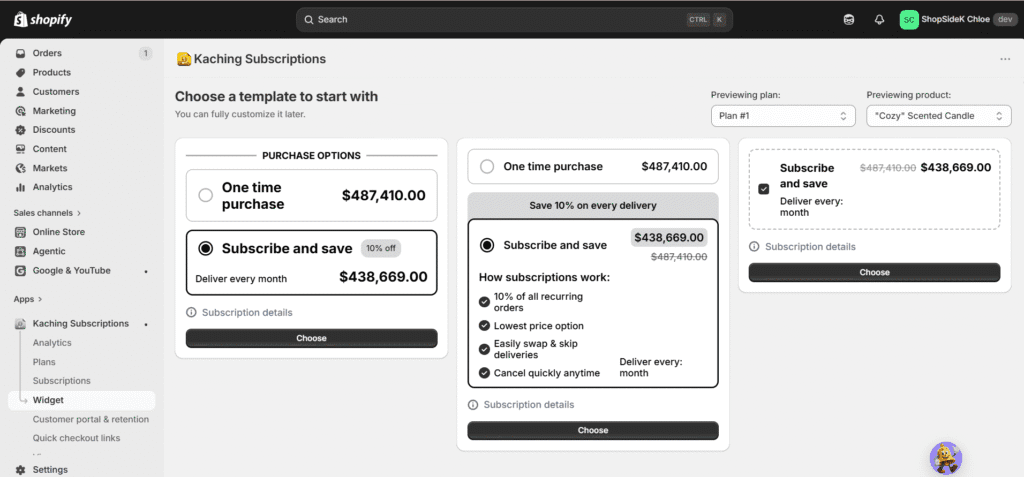
If you have ever wrestled with legacy recurring billing software, you know how easily custom templates can break during theme updates. Kaching bypasses this frustration entirely by utilizing native app embed blocks designed for modern Online Store 2.0 themes. This allows you to install the app, customize the customer-facing widget to match your brand style, and begin accepting automated orders in under 5 minutes without touching a single line of liquid code.
By offering your buyers a reliable “Subscribe & Save” option, you turn high-acquisition-cost transactional orders into predictable, compounding recurring revenue. This structural shift stabilizes your cash flow and builds long-term brand equity. However, rushing to publish a subscription widget to live buyers without prior validation can lead to costly checkout calculation errors.
Kaching Subscriptions Key Features: Pay-Per-Delivery vs. Prepaid Subscriptions
Understanding how your recurring billing structure impacts your physical inventory and cash flow is critical to running a sustainable store. The Kaching Subscriptions Shopify app provides two distinct billing frameworks designed to meet different buyer preferences and inventory cycles.
Pay-Per-Delivery (Subscribe & Save) Mechanics
The pay-per-delivery model is the classic recurring option that most online shoppers expect. Under this pay-as-you-go setup, billing occurs automatically and dynamically at the start of each shipment cycle, such as every 30 or 60 days. The system securely charges the customer’s stored credit card, generates a new fulfillment order in your Shopify admin, and prepares your warehouse team for packing.
To maximize conversion rates on these recurring plans, Kaching allows you to layer advanced incentives directly onto the subscription widget. Instead of offering a basic flat percentage discount, you can configure automatic BOGO (Buy One Get One) campaigns or dynamic BXGY automatic discounts (Buy X Get Y). These upselling strategies give shoppers a compelling reason to commit to recurring shipments rather than placing a one-off order, directly boosting your lifetime value metrics.
💡Merchant Tip: The easiest way to verify if Kaching matches your storefront theme is to try it live. Click here to install Kaching Subscriptions and start your risk-free 14-day trial.
Prepaid Subscription Setup Guidelines
For brands looking to optimize upfront cash flow and secure long-term buyer retention, prepaid subscriptions serve as an excellent operational tool. Under this model, your customer pays for a fixed multi-month cycle—such as a 3, 6, or 12-month commitment—in a single checkout transaction.
Once the initial lump sum is captured, Kaching’s scheduler automatically pushes physical fulfillment orders to your Shopify queue at your designated shipping intervals. No further transactions are charged to the customer’s card until the prepaid cycle runs its course. This setup provides your brand with immediate working capital to fund inventory purchases up front. Additionally, because the buyer has already paid, you completely eliminate the risk of transaction failures due to expired credit cards during the subscription cycle.
Behind the Buy Button: How 3 Brands Style Kaching Subscriptions
In my opinion, analyzing how successful e-commerce brands leverage subscription architecture can help you design a high-converting customer experience. By examining three real-world Shopify stores—Farm Difference, Pluune, and MIYŌ—we can see how different brands use Kaching to increase average order values (AOV) and secure recurring revenue.
1. Supplement Recurring Cash Flow — Farm Difference
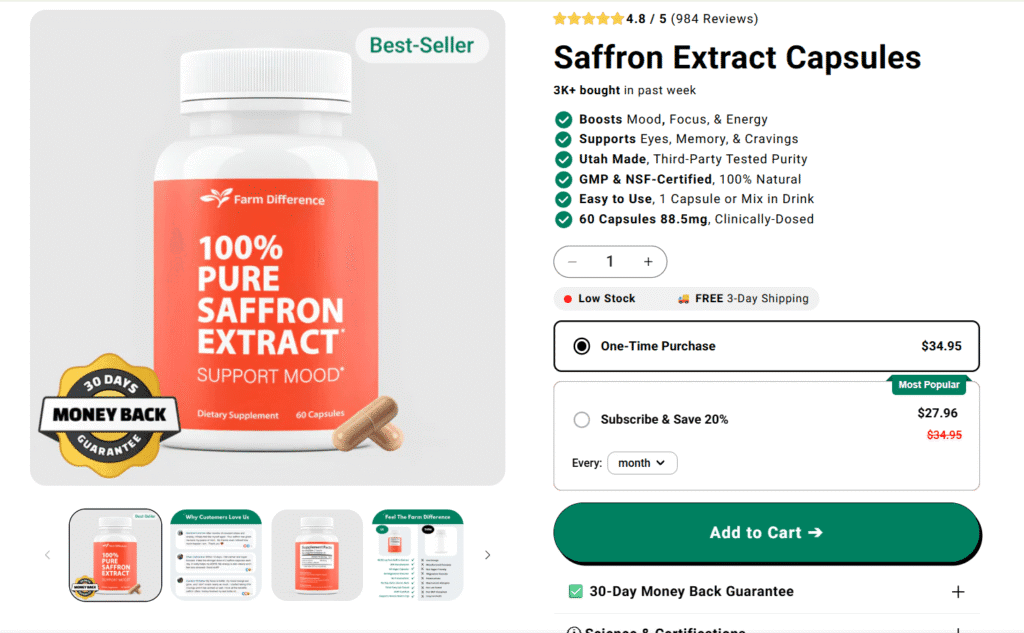
Nutritional brand Farm Difference sells clinically-dosed Saffron Extract Capsules designed to lift mood and enhance focus. Because saffron supplements require daily consistency to show optimal results—with data showing 91% of users see positive changes within one to two weeks—bringing customers into a recurring purchase loop is essential.
Farm Difference uses a clean, high-visibility Kaching widget on their product page to present this clear value choice. Customers can buy a single bottle for $34.95 or opt for the “Subscribe & Save 20%” option, dropping the price to $27.96 with automated monthly shipping. The monthly delivery cycle perfectly matches the physical consumption rate of their 60-capsule bottle, securing a predictable, high-retention cash flow pattern.
2. The Multi-Month Compliance Lock — Pluune
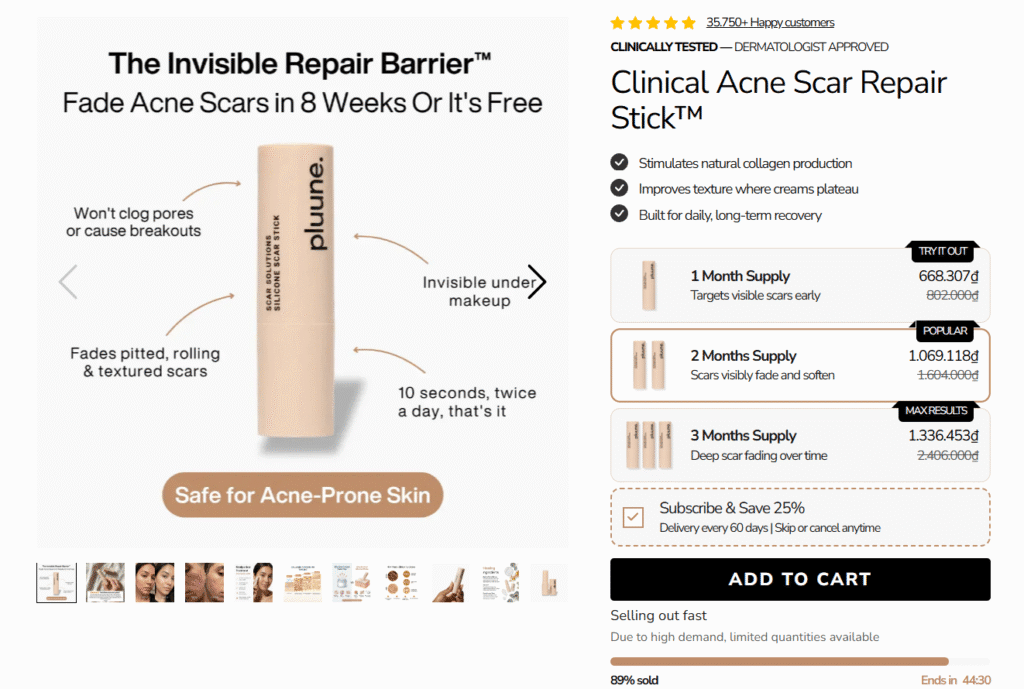
Skincare brand Pluune manufactures a medical-grade silicone Clinical Acne Scar Repair Stick designed to fade rolling, pitted, and textured scars. Because physical scar tissue remodeling takes between 8 and 12 weeks of daily application, single-purchase transactions often result in users abandoning their routine too early.
Pluune addresses this compliance issue by utilizing a clean, dashed-bordered “Subscribe & Save 25%” widget on their product page. Instead of standard monthly billing, Pluune schedules automated shipments to go out every 60 days to match the exact physical lifespan of their travel-friendly silicone stick. This ensures users never experience an interruption in their barrier therapy, locking in a long-term customer relationship over the entire recovery timeline.
3. High-AOV Hybrid Bundle Subscriptions — MIYŌ
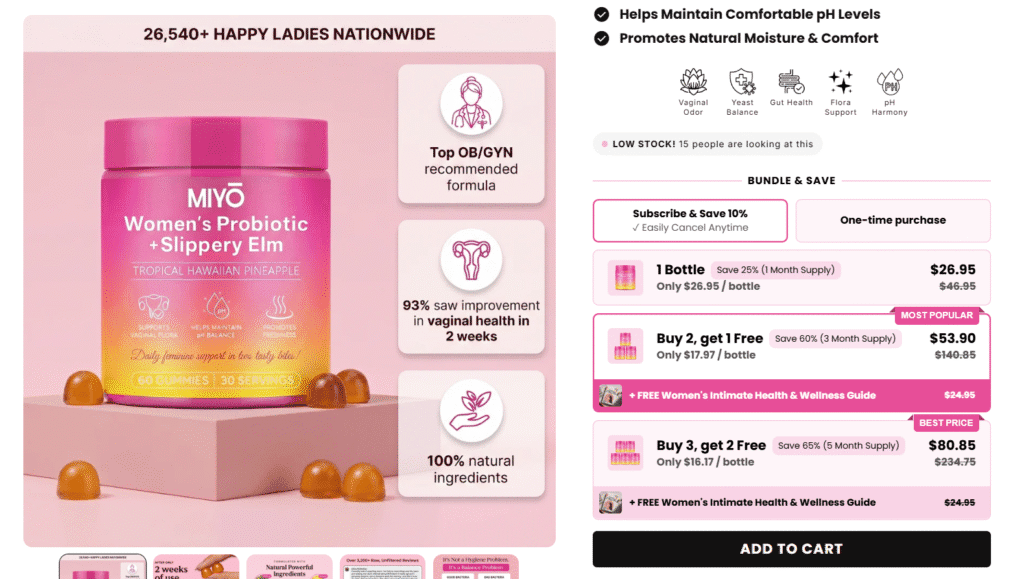
Wellness brand MIYŌ offers Tropical Hawaiian Pineapple Probiotic Gummies designed to maintain comfortable pH levels. Because customer acquisition costs for supplement brands are high, MIYŌ uses a sophisticated hybrid subscription strategy to drive their AOV as high as possible.
MIYŌ splits their buying options into clean “Subscribe & Save 10%” and “One-time purchase” tabs. Selecting the subscription tab unlocks deeper tiered volume discounts: a single bottle is $26.95, a “Buy 2, Get 1 Free” bundle is $53.90, and a “Buy 3, Get 2 Free” bundle is $80.85. To sweeten the deal, they automatically include a free digital wellness guide ($24.95 value) on the multi-pack options. This pushes their recurring subscription order value up to $80.85 per transaction, significantly offsetting their upfront marketing costs.
Kaching Subscriptions Pricing: Starter, Basic, and Growth Tiers
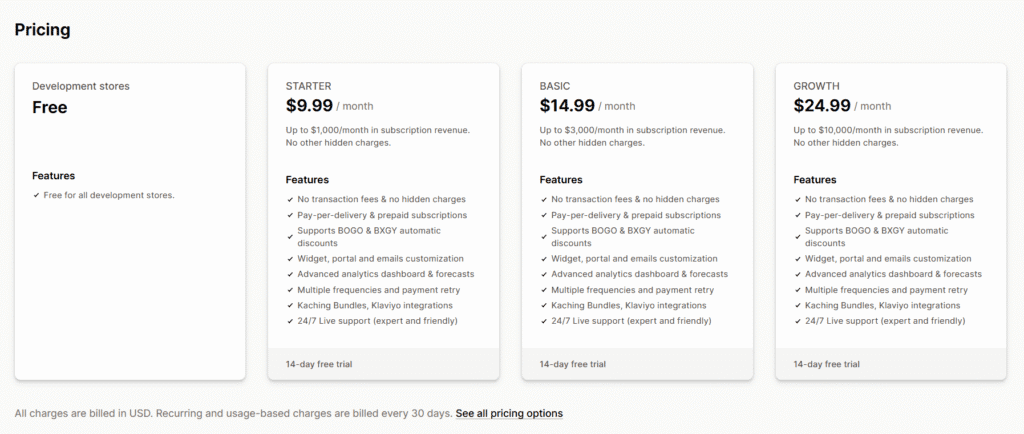
Many e-commerce tools look affordable initially, but they quietly drain your profit margins over time by taking a percentage cut of your recurring revenue. The Kaching Subscriptions Shopify app takes a highly predictable, margin-first approach. Instead of taxing your hard-earned growth, Kaching relies on flat-rate pricing tiers that scale cleanly alongside your store’s performance.
| Plan Tier | Standard Price | ShopSideK Price* | Monthly Subscription Revenue Cap (MRR) | Included Features |
|---|---|---|---|---|
| Development Store | Free | Free | Unlimited (Testing only) | All core features & integrations |
| Starter | $9.99/mo | $7.99/mo | Capped at $1,000 | All core features & integrations |
| Basic | $14.99/mo | $11.99/mo | Capped at $3,000 | All core features & integrations |
| Growth | $24.99/mo | $19.99/mo | Capped at $10,000 | All core features & integrations |
*Promo code applies a 20% discount for the first 3 months of paid plans.
Don’t pay standard rates when launching your store. Use our exclusive promo code SSK20 at checkout to save 20% off any paid plan for your first 3 months.
>> Install Kaching Subscriptions here and activate your 14-day free trial.
The Development Store Plan (100% Free)
Designing a recurring storefront checkout requires careful planning and error-free execution. You need to ensure your billing intervals, discount rules, and customer portals look correct before presenting them to paying buyers. Kaching addresses this requirement by making its entire application 100% free for all Shopify development stores.
This unlimited testing structure provides a completely risk-free sandbox environment. You can build, style, and execute test transactions on your subscription widgets without paying a cent of software overhead. If you are still building your store’s tech stack, explore our curated list of free Shopify apps to complement your subscription setup.
You only choose a paid tier when you are ready to connect a custom domain and launch your store live to the public.
Understanding Paid Plans and Monthly Revenue Caps
Once your storefront goes live, Kaching’s flat-rate pricing plans provide exceptional cost predictability. Unlike competing apps that demand ongoing transaction fees on top of your monthly subscription, Kaching Subscriptions charges a flat monthly fee with absolutely no transaction fees whatsoever. This design protects your unit economics as your transaction volume scales.
The standout benefit of Kaching’s model is that every single paid tier includes the exact same advanced features. You do not have to pay for a high-tier plan just to unlock core functionality. You get complete access to automated email notifications, customer portal styling, live developer support, and native Klaviyo integrations on the entry-level plan.
The only factor that determines your tier is your actual MRR processed through the app. You begin on the Starter plan at $9.99/mo, which covers you up to $1,000 in monthly subscription sales. As your brand gains traction and passes the $1,000 or $3,000 MRR thresholds, the system automatically shifts you to the Basic ($14.99/mo) or Growth ($24.99/mo) tier.
To help lower your initial launch overhead, ShopSideK readers can leverage our exclusive discount. By applying the promo code during checkout, you can reduce your starting cost to just $7.99/mo for your first three months of paid usage, keeping your cash flow lean as you establish your initial subscriber base.
Critical Cons: Hidden Limits, Weak Analytics, and Checkout Risks
Every subscription app has operational trade-offs, and Kaching is no exception. While it is highly praised for its simplicity, understanding its technical limitations and running safe configuration checks will help you construct an error-free checkout experience.
June 2026 Platform Update: While Kaching Subscriptions historically lacked omnichannel checkout compatibility, the development team has officially rolled out full integration with Shopify POS. Omnichannel merchants can now process subscription sign-ups directly at physical retail counters, bridging the gap between offline interactions and your digital recurring engine.
Unsupported Alternative Payment Gateways
On the digital checkout side, Kaching still faces standard payment restrictions. Localized European payment options, including Klarna, Sofort, and mollie iDEAL, are completely unsupported for recurring orders.
If your store relies heavily on localized regional bank transfers, your buyers will need to fall back on globally recognized credit card networks, Shopify Payments, or PayPal Express. This restriction is common to almost all Shopify subscription engines due to the secure pre-authorization mandates required to auto-charge cards, but it is an important geographical factor to map out before migrating.
Streamlined but Basic Analytics (The Reporting Gap)
If you rely on heavy, data-driven buyer cohort analysis, Kaching’s dashboard reporting will feel quite simplified. A minority of advanced power users, such as merchant ohbugi on Reddit, have noted that tracking long-term cohort trends inside Kaching can feel restricted and clunky.
However, this feedback represents an isolated perspective of data-heavy brands. For the vast majority of starting and mid-market merchants, this simplified interface is a massive relief, providing straightforward tracking of core metrics like active subscriber counts and MRR without the clutter of enterprise-grade chart dashboards.
How to Run Safe Checkout Test Transactions
Perhaps the most critical operational check is safeguarding your store against potential checkout pricing calculation errors. While standard checkout configurations perform with absolute consistency, a minority experience involving highly complex, nested discount setups can occasionally cause logic clashes. In a rare, isolated incident during a past update cycle, merchant VelveAura documented a highly damaging checkout glitch where certain multi-item orders totaling ~$100 were miscalculated by the app and charged as only $5 at checkout.
While this calculation mismatch represents a rare event occurring under highly specific nested coupon rules, it serves as an excellent reminder of why testing remains a checkout best practice. To protect your brand from these quiet revenue leaks, my advice is you thoroughly test your checkout logic before pointing live traffic to your widgets.
Use this safety checklist in Shopify Test Mode to verify your configurations:
- Activate the Bogus Gateway: Enable Shopify’s test payment gateway to simulate live credit card checkouts without triggering actual monetary charges.
- Build a Multi-Item Cart: Add a mix of single-purchase products, recurring items, and varying subscription intervals to your shopping cart.
- Apply Advanced Coupons: Test your BOGO or BXGY automatic discounts to verify that the final checkout charge matches your exact pricing logic.
- Inspect the Order Log: Open the test order in your Shopify admin panel and confirm that Kaching’s metadata has correctly scheduled the subsequent billing date and interval.
If you notice any math discrepancies or layout errors during this sandbox run, halt your launch. Contact Kaching’s customer support team immediately to fix the widget mapping before your customers experience a live billing error.
Kaching Subscriptions vs. Competitors: How It Compares to Loop and Joy
Evaluating Shopify subscription apps requires a careful look at how their costs will impact your monthly cash flow. Many developers hide percentage-based fees deep within their documentation, which can quickly erode your retail margins as your sales grow. Comparing the pricing math of Kaching against its top competitors, Joy and Loop, reveals why a flat-rate pricing structure is often the most margin-friendly path for growing storefronts.
Kaching vs. Joy Subscriptions (Flat Rate vs. 1.5% Transaction Fees)
The way I see it, choosing between flat-rate billing software and percentage-based transaction fees can make or break your store’s unit economics over time. Joy Subscriptions offers an appealing entry point, promoting a free plan for up to six months or until your store hits a $1M lifetime revenue benchmark. However, once that introductory period ends, Joy charges a 1.5% flat transaction fee on all subscription sales.
Let us look at the direct pricing math. If your store scales to a moderate $10,000/mo in recurring subscription revenue, Joy’s percentage-based model will cost you $150 every single month. In contrast, Kaching’s Growth plan—which covers you up to that same $10,000/mo threshold—costs a flat rate of just $24.99/mo.
By applying our exclusive promo code, that monthly fee drops to only $19.99/mo for your first three months. For growing brands trying to scale their subscriber base without giving up a slice of their revenue, Kaching is the clear, margin-friendly winner.
Kaching vs. Loop Subscriptions (Starter Simplicity vs. Enterprise Bundling)
While Loop Subscriptions maintains a stellar 5.0-star rating and is a highly respected subscription engine, it is architected primarily for enterprise-scale businesses requiring complex bundle builders and custom shipping rules. Loop’s entry-level free tier is highly restrictive, capping your store at a maximum of 50 active subscribers. If you pass that small limit, Loop’s Starter plan jumps immediately to $99/mo, plus an additional 1.0% transaction fee on every recurring order.
Based on my projects, paying a high monthly base fee combined with ongoing transactional overhead is highly difficult to justify for early-stage or mid-sized merchants. Kaching Subscriptions removes this financial barrier, offering a simplified, no-code setup that charges absolutely zero transaction fees.
Instead of paying hundreds of dollars for enterprise-level bundling features you might not even use yet, Kaching provides the essential subscription tools you need to build your recurring business without the heavy software overhead.
Kaching Subscriptions Discount Codes & Promotional Offers
Finding active promotional offers on the Shopify App Store can be incredibly frustrating. Most developers do not provide public coupons, forcing merchants to pay full price from day one. To help you keep your startup costs as low as possible, we have partnered with the development team to secure a ShopSideK exclusive promotion.
Our readers get an exclusive 20% OFF discount for the first 3 months of any paid tier (Starter, Basic, or Growth). This coupon drops your entry-level Starter plan from the standard price of $9.99/mo down to just $7.99/mo, giving you ample financial runway to build your initial subscriber list before paying the standard flat rate.
🎁 Exclusive Merchant Promo Box
- Offer Value: 20% OFF your first 3 months on any paid plan.
- Applicable Plans: Starter, Basic, and Growth tiers.
How to Apply Your Discount:
- Install Kaching Subscriptions via our partner link and initiate your risk-free 14-day free trial.
- Open the Kaching dashboard in your Shopify admin panel and select your desired pricing tier.
- Enter promo code SSK20 in the discount code field on the Shopify billing approval screen to instantly secure your savings.
Final Verdict: Is Kaching Subscriptions Worth It?
For early-stage and growing brands, protecting your profit margins is essential to survival. Our comprehensive Kaching Subscriptions review confirms that Kaching is the absolute best value-for-money subscription engine on the market today. By eliminating percentage-based transaction fees and replacing them with highly predictable flat monthly rates, Kaching ensures that your financial success remains entirely your own.
If you are looking for a beginner friendly setup that integrates with modern Online Store 2.0 themes in under five minutes, Kaching is the ideal starting point.
Kaching Subscriptions Verdict Checklist
✅ Predictable Cost Control: Flat monthly pricing means your app costs stay fixed, even as your transaction volume scales.
✅ No Code Adjustments: Native app embed blocks align with your theme’s branding and layout settings instantly.
✅ Native Checkout Security: Process recurring sales safely through the high-trust native Shopify checkout environment.
✅ Direct Merchant Support: Reach a responsive team of developers to assist with custom configurations.
While high-volume enterprise brands may miss deep cohort analysis or post-purchase Order Edits API capabilities, Kaching provides the precise operational tools you need to build a compounding subscriber base without the enterprise overhead.
Ready to build a reliable recurring revenue stream? Start your 14-day free trial today. Install the app, choose your tier, and apply code to secure your 20% discount on your first 3 months of paid billing cycles!
Kaching Subscriptions FAQs
Where can I find active Kaching Subscriptions discount codes?
While the developer rarely publishes public promotional coupons, you can use our exclusive partner promo code SSK20 at checkout. This code applies a 20% OFF discount to your first three months on any paid tier (Starter, Basic, or Growth), lowering your starting software overhead while you scale your active subscriber list.
Can I test Kaching Subscriptions without paying a monthly fee?
Yes. Kaching is 100% free to install and configure on any active Shopify development store, making it a risk-free choice for building sandbox store layouts. If your storefront is live, you can utilize the app’s 14-day free trial to customize your layouts and run test transactions before your first paid billing cycle begins.
Does Kaching support Shopify POS or post-purchase order edits?
Yes, Kaching fully supports Shopify POS. Following a major platform update, omnichannel merchants can now set up and accept recurring subscription enrollments in person at physical retail counters. However, note that Kaching does not currently integrate with Shopify’s Order Edits API. This means you cannot dynamically add items, remove products, or swap variants on an active order once a specific recurring billing cycle has already been generated.