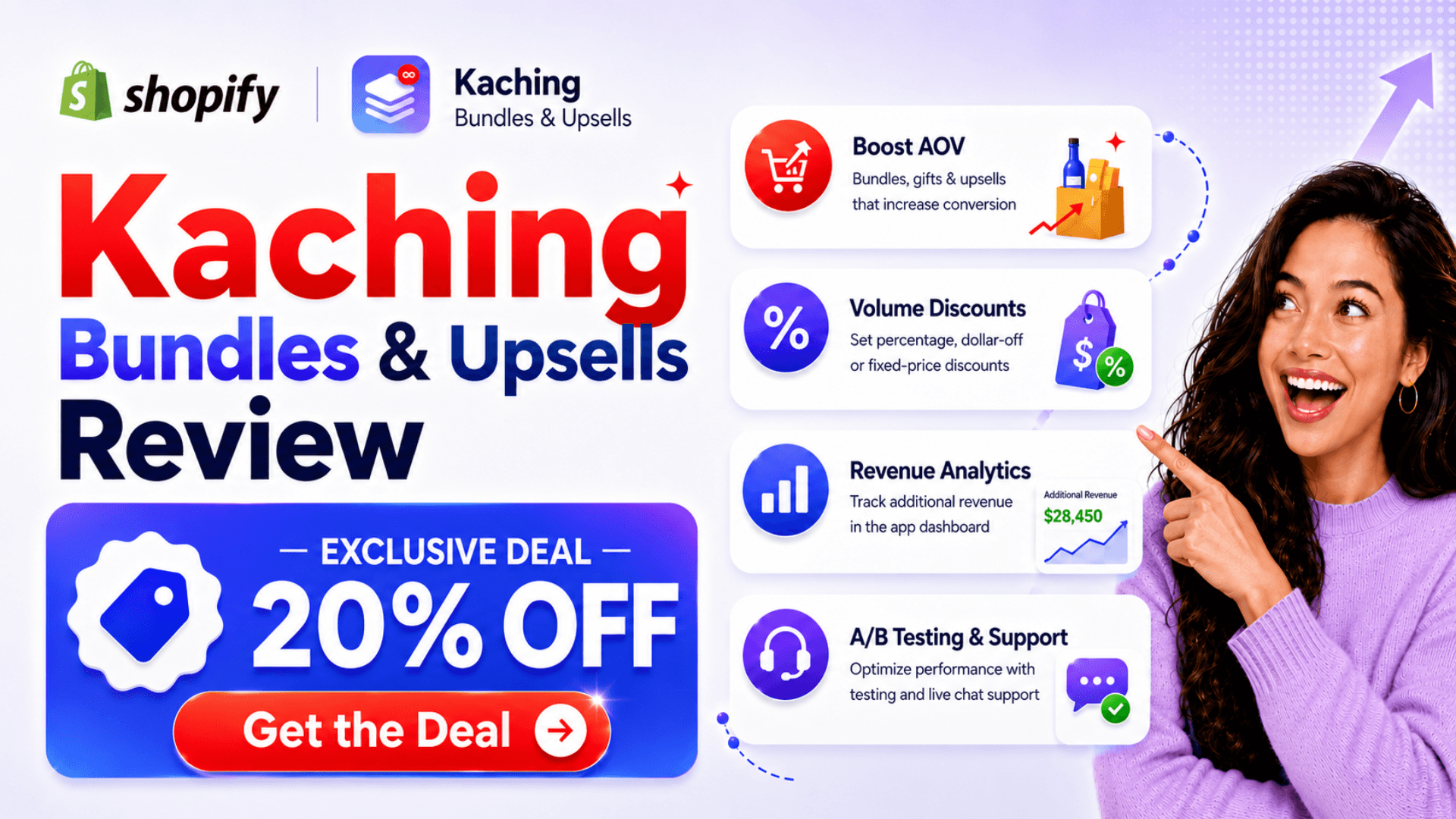
⚡ ShopSideK Verdict
Is Kaching Bundles worth it? Yes. It’s the fastest way to deploy Amazon-style volume discount grids on your Shopify product pages — with beautiful widgets, built-in A/B testing, zero theme code edits, and clean uninstall. Rated 5.0 stars across 5,335+ merchant reviews.
Built-in A/B testing engine lets you split-test discount tiers with zero code — find the exact percentage that maximizes profit instead of guessing.
No native SKU splitting. If you run 3PL warehouses or Shopify POS with barcode scanning, order fulfillment will need manual workarounds.
👉 Remember to enter discount code SSK20
Rising customer acquisition costs eat away at direct-to-consumer margins, making single-item orders unsustainable. To stay profitable, brands must find direct ways to increase Average Order Value (AOV). Installing a high-converting tool like Kaching bundle Shopify app is the most direct way to incentivize multi-item checkouts and maximize revenue on every transaction.
Kaching Shopify app replaces generic product dropdowns with beautifully styled discount grids and multipack offers right on your product detail pages. This review evaluates its core features, measures its impact on page speed, and examines how its backend architecture syncs with your store’s fulfillment systems.
Kaching Bundle Shopify: Review-at-a-Glance
| Performance Metric | Current Status & Details |
|---|---|
| Shopify App Store Rating | 5.0 / 5.0 Stars (based on exactly 5,335 verified merchant reviews) |
| Active Installations | Implemented on 48,731 active Shopify storefronts |
| Risk-Free Trial | 7-day free trial on all paid tiers |
| Exclusive ShopSideK Promotion | 20% OFF your first 3 months with SSK20 |
Instead of leaving easy revenue on the table, forward-thinking merchants are turning to automated discount grids to capture higher margins instantly. You can easily test these layouts on your own products with our exclusive partner discount.
What is Kaching Bundle Shopify & How Does It Increase Your Sales?
At its core, Kaching Bundles is a visual, no-code solution that displays high-converting quantity breaks and promotional packages directly on your product pages. It leverages native Online Store 2.0 app blocks to present tiered pricing in an engaging format used by leading global retailers. Instead of burying discounts at checkout or relying on plain text descriptions, Kaching turns your product options into the visual centerpiece of the shopping experience.
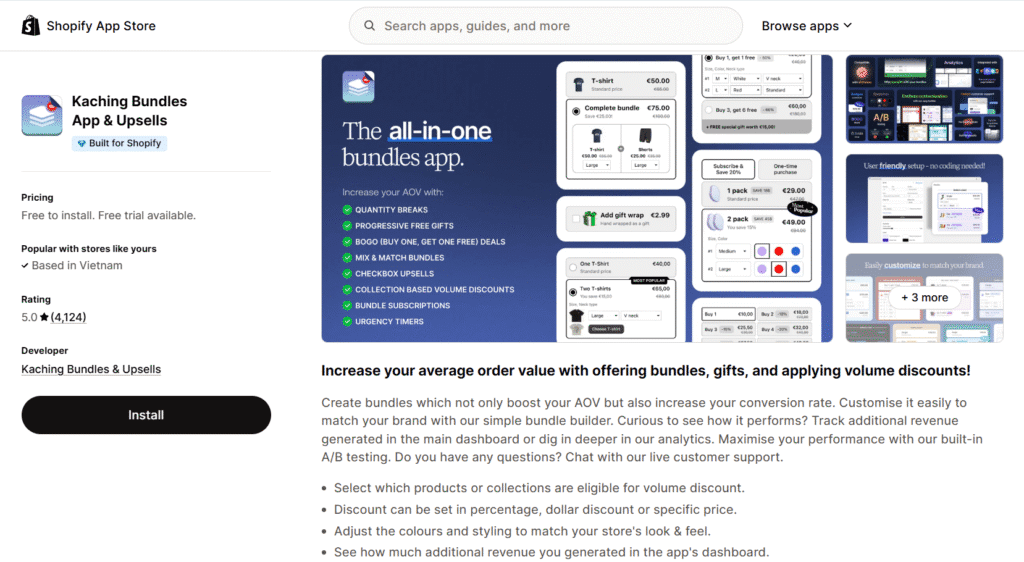
One of the largest friction points when launching a new Shopify app is theme compatibility. Kaching solves this through its advanced automated widget injection system. Once you configure a deal within Kaching’s dashboard in your Shopify Admin, the app automatically embeds the widget onto your selected product pages.
You do not need to manually edit raw theme code, adjust Liquid files, or configure complex layout blocks in the Shopify Theme Editor. It is fully compatible with any default Shopify theme. If your store relies on advanced landing page builders like PageFly or Foxify to design custom layouts, Kaching integrates smoothly as a drag-and-drop element, preventing layout breaks and design conflicts.
To help you design the perfect promotion for your audience, Kaching supports a wide variety of visual incentive structures:
- Volume Discount & Tiered Pricing: Incentivize larger cart sizes by offering progressive discounts as customer order quantities increase (such as Buy 1 for $30, Buy 2 for $50, or Buy 3 for $65).
- BOGO (Buy One, Get One): Easily deploy classic buy-one-get-one promotions or customized “Buy 2, Get 1 Free” offers to move inventory quickly.
- Mix-and-Match Packages: Give customers the flexibility to choose different variants of a product—like combining different colors or sizes—while still qualifying for the bundle discount.
- Progress Bar Free Gifts: Gamify the shopping experience by displaying a dynamic progress bar that rewards customers with a free gift once they hit your target bundle tier.
Since mobile traffic dominates modern e-commerce, storefront loading speed directly impacts your search rankings and conversion rates. Kaching is built using an optimized, CDN-hosted script architecture that loads asynchronously alongside your standard store assets.
This lightweight system prevents layout-blocking delays and ensures your product detail pages load instantly on all mobile devices. By keeping pages fast, you keep cart-addition friction to an absolute minimum.
Kaching Bundles vs. Competitors: How It Compares Side-by-Side
Choosing the right bundling app comes down to matching your visual merchandising goals with your back-office logistics. While some merchants prioritize front-end layouts to drive immediate conversions, others focus heavily on operational stability and inventory reporting.
The comparison matrix below breaks down how Kaching compares to other popular bundle apps on Shopify App Store.
Kaching Bundles Cross-Platform Comparison Matrix
| Comparison Metric | Kaching Bundles & Upsells | Simple Bundles & Kits | BOGOS: Free Gift Upsell | Shopify Bundles (Native) |
|---|---|---|---|---|
| App Store Rating | 5.0 Stars (5,335 reviews) | 4.8 Stars (713 reviews) | 5.0 Stars (3,808 reviews) | 2.7 Stars (565 reviews) |
| Primary Focus | Front-End Layouts & A/B Testing | Back-End SKU & POS Sync | Free Gifts (GWP) & BOGO | Basic, no-code bundle lists |
| Starting Cost | $14.99 / month | Free Plan available | Free Plan available | 100% Free |
| Trial Period | 7-day Free Trial | No Free Trial | 7-day Free Trial | Always Free |
| Inventory Treatment | Applied as a checkout discount | Split into component SKUs | Auto-added gift product | Updated in real-time |
Kaching vs. Simple Bundles: Frontend Customization vs. Backend SKU Sync
Kaching and Simple Bundles, developed by Freshly Commerce, differ most in how they manage discount architecture and inventory logistics. Kaching operates as a frontend-first solution built to maximize conversions. Because it applies promotions at checkout using discount logic, you never need to create unique product variations for each bundle tier.
Personally, I think this approach makes Kaching the ideal option for online-only DTC brands, single-product landing pages, and dropshippers. You can easily run built-in A/B tests to experiment with different pricing structures. You can also swap visual templates instantly and launch multi-buy promotions without ever touching your backend setup.
Conversely, Simple Bundles is a backend-first solution prioritizing backend inventory sync and multi-channel fulfillment. Instead of using visual discount overlays, it automatically splits a bundle into its individual component SKUs the moment a customer places an order.
This deep SKU tracking integration is necessary if you manage complex warehouse operations, work with third-party logistics (3PL) providers, or sync physical retail transactions through Shopify POS. For omnichannel brands that require individual barcode scans at packaging stations, Simple Bundles is the logical choice. However, if you want high-converting, beautiful product-page layouts with zero backend inventory complexity, Kaching is the more direct solution.
Kaching vs. BOGOS: Volume Discounts vs. Advanced Gift-With-Purchase (GWP)
When comparing Kaching to BOGOS, formerly known as Secomapp Free Gifts, the distinction comes down to your promotional strategy. Kaching focuses on increasing cart sizes using clean, structured volume grids directly on the product detail page. Its clear visual layout encourages shoppers to buy multiple quantities of the same product—or simple variations—right before clicking the add-to-cart button.
BOGOS, by contrast, specializes in gamified GWP strategies and cart-level upsells. If your marketing relies on incentives like “Spend $100, get a free travel pouch” or auto-adding promo items based on what is currently in the cart, BOGOS is a powerful option.
While BOGOS is highly rated and excels at automated gifting rules, it lacks the Amazon-style visual volume discount tables that Kaching places directly on the product page. If your goal is to showcase clear bulk-savings grids on your landing pages, Kaching remains the more effective option.
Solving Your Store’s Visual and CRO Friction Points
Running a successful Shopify store requires constant conversion optimization to turn casual browsers into paying customers. When evaluating new apps for your storefront, it is entirely normal to have concerns about technical execution, layout styling, and return on investment.
To help you move forward with confidence, we have analyzed the three biggest visual and operational anxieties Shopify merchants face and examined how Kaching addresses them.
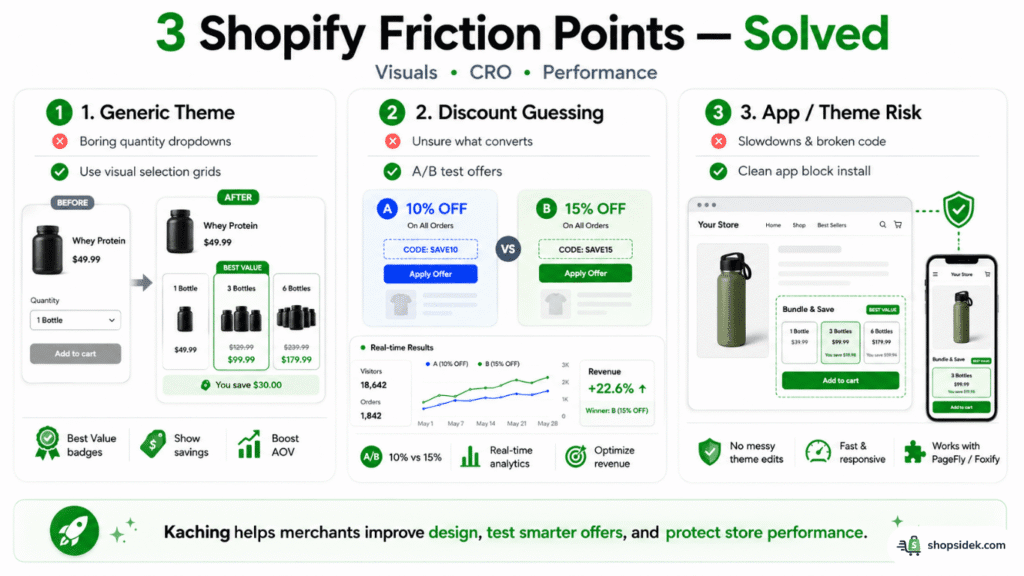
Pain Point 1: “My default Shopify theme looks generic and drives low sales.”
Standard Shopify themes often rely on basic dropdown menus or tiny text boxes for quantity selection. These design elements fail to capture buyer attention, make the buying experience feel generic, and do nothing to actively promote multi-buy options.
Kaching’s built-in layout editor solves this by replacing boring dropdown options with highly engaging, Amazon-style selection grids. These custom design templates naturally draw the customer’s eye toward higher-value packages by highlighting pre-selected “Most Popular” or “Best Value” badges. By transforming your quantity options into clear visual blocks that show exact discount savings, you make buying in bulk feel like an easy decision, helping to increase your AOV without any added marketing costs.
Pain Point 2: “I don’t know which discount percentage gets the best conversions.”
I often notice that many e-commerce store owners lose money by guessing their discount rates. Setting your discounts too low might fail to motivate buyers to purchase in bulk, while discounting too aggressively unnecessarily cuts into your profit margins.
Kaching solves this optimization puzzle through its built-in, code-free split testing engine. Rather than guessing what works, you can easily set up an A/B test to compare a “Buy 2, Save 10%” offer against a “Buy 2, Save 15%” layout. By monitoring performance metrics through the app’s real-time revenue analytics dashboard, you can see exactly which discount tier drives the highest revenue, allowing you to base your pricing strategy on actual shopper data.
Pain Point 3: “Adding third-party apps will slow down my site or break my theme code.”
Adding multiple marketing apps to a store can clutter your code, slow down your overall page speed, and cause visual layout bugs when your theme updates.
Kaching is built specifically to address these performance concerns. Because it utilizes automated widget injection directly from its admin control panel, it does not write messy scripts into your core Liquid theme files. Instead, it operates through standard Shopify Online Store 2.0 app blocks, allowing you to safely install, adjust, or remove the widget without leaving broken code behind.
Furthermore, if you use advanced design tools like Foxify or PageFly to build custom product landing pages, Kaching embeds cleanly as a native integration block, keeping your mobile loading speeds fast and your layout layout-responsive.
If you want to see how these visual solutions look on your storefront, you can launch Kaching on your Shopify store today to start personalizing your product pages.
Calculating Your Bundle Math (Setting Profitable Tiered Discounts)
One of the most common mistakes Shopify merchants make when setting up a bundling app is copying a competitor’s discount percentages without understanding their own financials. While a “Buy 3, Save 20%” offer might look great on your product page, running it without performing a proper breakeven analysis can quickly erode your net margins. If your backend shipping, acquisition, or gross product cost structures are different, a blind copycat strategy can end up costing you money on every bulk transaction.
To avoid this trap, you must calculate your margins and establish a clear upper boundary for your promotional discounts. By utilizing the Margin-Safe Bundle Discount Formula, you can ensure that every quantity break remains highly profitable:

To see how this works in practice, let’s walk through an example. Suppose you sell a premium skincare serum with a retail price of $30. Your cost of goods sold (COGS) is $9, which gives you a strong starting gross margin of 70%.
If you want to design a “Buy 3 for $72” bundle (saving the customer $18, which represents a 20% discount off the standard $90 retail price), let’s calculate the outcome. At $72 for three items, your total COGS is $27 ($9 x 3). This leaves you with a net profit of $45 on the bundle, meaning your transaction profit margin remains a healthy 62.5% ($45 / $72).
This math shows how bundling can dramatically improve your store’s cash flow. Instead of making a single $30 sale with a $21 profit margin, you have transformed that transaction into a $72 order with a $45 profit. By increasing your AOV from $30 to $72, you now have far more budget to cover your customer acquisition costs while keeping your business highly profitable.
Real-World Example: The Power of Bundle Math
Product: Premium Skincare Serum (Retail Price: $30 | COGS: $9)
Standard Order Value (AOV)
Value: $90 (Save 20%)
Before launching your next bulk promotion, you can utilize Shopify’s backend dashboard to track your unit margins and ensure your bundle pricing is fully optimized for profit.
Kaching Bundles Pricing (2026): Picking the Right Plan
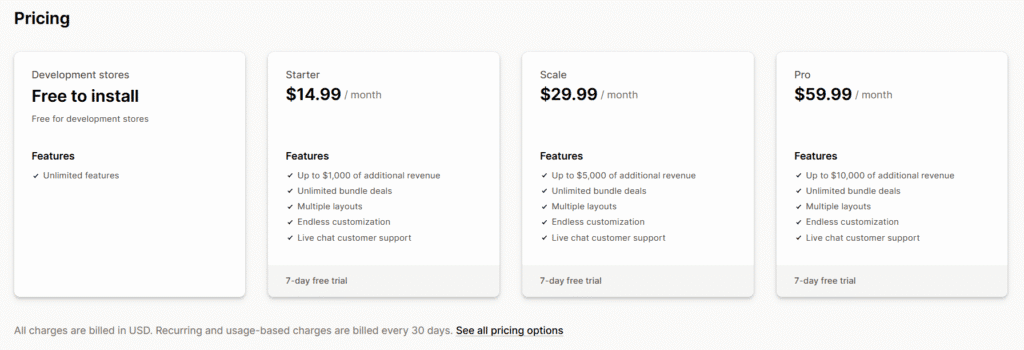
When selecting a conversion app for your e-commerce stack, keeping an eye on your budget and projected ROI is crucial. Kaching pricing uses a scaling structure designed to align directly with your store’s performance. This tier-based model ensures that early-stage businesses can access premium conversion tools without heavy overhead, while growing brands pay only as their bundle-driven sales expand.
To help you launch your first promotions affordably, we have arranged an exclusive deal with the developer. The cost comparison table below outlines the standard subscription levels alongside your special partner rate.
Standard Pricing vs. ShopSideK Exclusive Promotion
| Kaching App Plan | Standard Monthly Price | ShopSideK Cost (First 3 Months) | Included Features & Revenue Limits |
|---|---|---|---|
| Starter Plan | $14.99 / month | $11.99 / month with code | Up to $1,000 of additional bundle revenue |
| Scale Plan | $29.99 / month | $23.99 / month with code | Up to $5,000 of additional bundle revenue |
| Pro Plan | $59.99 / month | $47.99 / month with code | Up to $10,000 of additional bundle revenue |
All paid subscription options include access to Kaching’s 7-day free trial, allowing you to test-drive their layout editor and analytics dashboard completely risk-free.
Starter Plan ($14.99/mo) – Perfect for Launching New Stores
The Starter Plan is the ideal entry point for newly launched e-commerce stores starting on Shopify’s Basic Plan. For $14.99 a month, you unlock unlimited bundle configurations, full design customization, and live chat support from the Kaching development team.
By applying our exclusive promo code SSK20 during installation, your subscription price drops to just $11.99 a month for your first three months. This extended lower-cost runway gives you ample time to build your storefront, drive traffic, and prove the economic value of quantity breaks on your product detail pages before taking on any significant operational overhead.
Understanding Kaching’s Operational Revenue Caps
A unique element of Kaching’s subscription model is its reliance on operational revenue caps. Instead of charging based on your store’s total overall sales, Kaching only counts the additional revenue directly generated when a customer purchases a package built within the app. For example, if a buyer chooses a quantity break package instead of a single product, only the difference or bundle subtotal counts toward your monthly $1,000 Starter, $5,000 Scale, or $10,000 Pro cap.
While some merchants might initially worry about upgrade triggers, these caps are structured to scale alongside your profits. If your volume deals generate $1,000 in additional sales, upgrading to the $29.99 Scale Plan is a straightforward decision because the software has already proven its value many times over. Because pricing is linked directly to performance, Kaching functions more like a performance-based marketing partner than a traditional flat-fee expense.
If you are ready to explore how these pricing tiers fit into your business projections, you can try Kaching’s 7-day free trial on your current store setup to verify its impact on your daily sales.
Your First 10 Minutes with Kaching: An Onboarding Setup Checklist
Setting up a new marketing app can sometimes feel overwhelming, but Kaching is designed to get your first campaign live in under ten minutes. Here is your step-by-step onboarding checklist to configuring your first profitable promotion, fully updated to match the latest admin dashboard flow.
Step 1: Installation & Discount Activation (0–2 Minutes)
Click our partner link to open Kaching Bundles & Upsells listing on Shopify App Store. And then click the install button to add it directly to your store’s backend. When authorizing the app subscription during the billing approval screen, remember to input our exclusive ShopSideK code to instantly lock in your 20% discount for your first three months of conversion optimization.
Step 2: Start Your Promotion (2–3 Minutes)
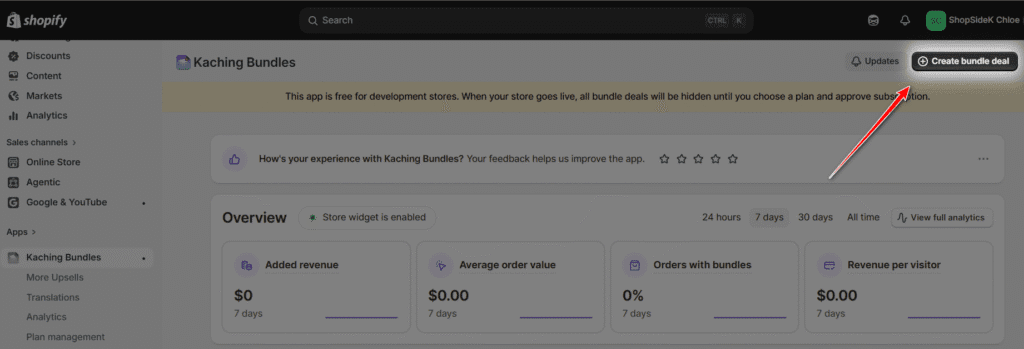
Once Kaching is installed, you will land on your main overview dashboard. To initiate your campaign, simply click the prominent Create bundle deal button in the top right corner. This central hub is also where you can monitor your real-time dashboard analytics—including added revenue, average order value, orders with bundles, and overall conversion percentages—once your promotions begin driving sales.
Step 3: Select Your Discount Model & Color Theme (3–5 Minutes)
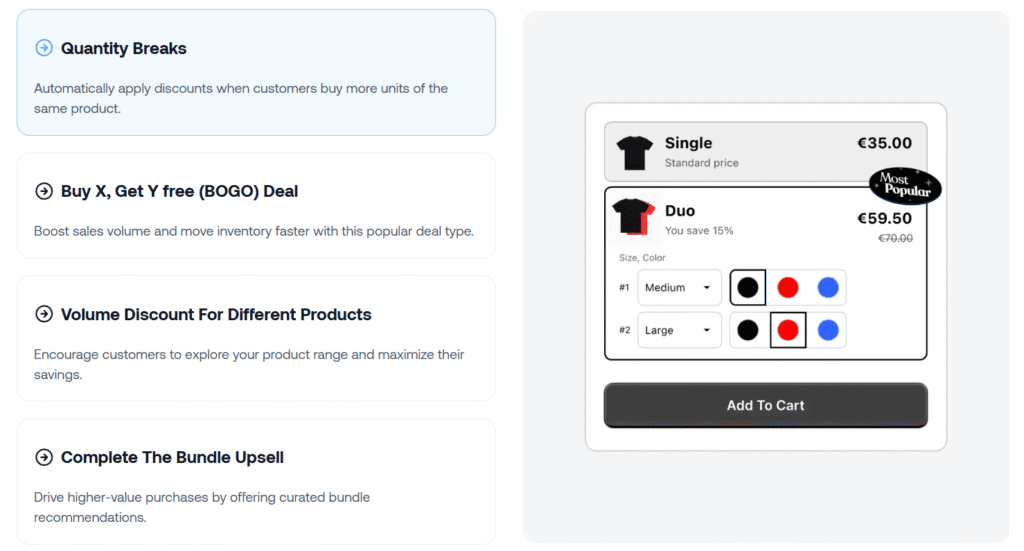
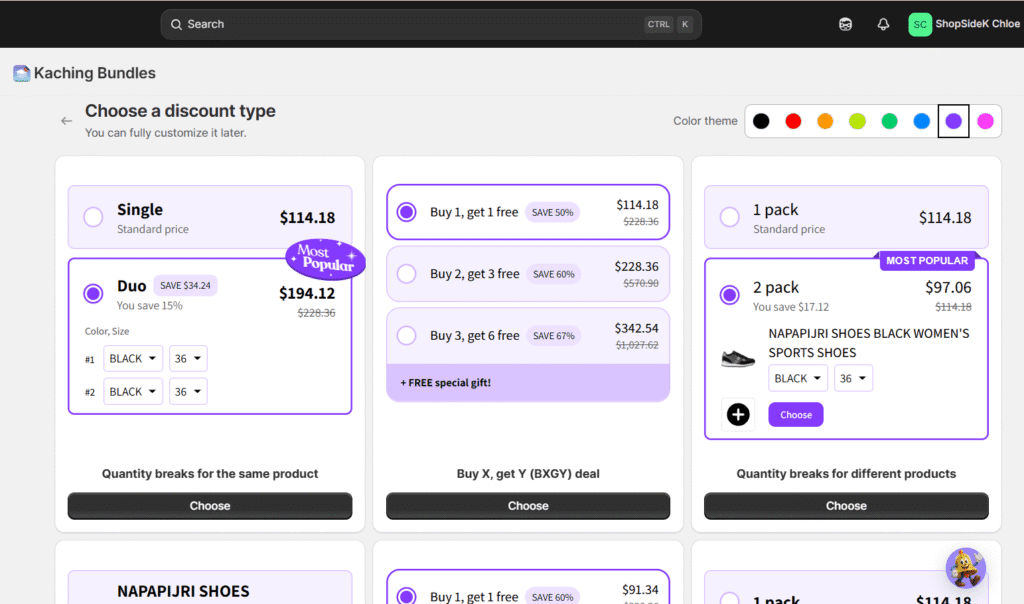
You will now be prompted to choose a baseline framework for your bundle setup. Before picking a template, use the color palette selector in the top-right corner to match the widget with your store’s palette using pre-configured color theme circles (such as purple, lime green, orange, or black). Next, select one of Kaching’s six pre-designed visual layouts to fit your specific promotional strategy:
- Quantity breaks for the same product: Best for selling multiple units of a single item with built-in size and color variant selectors.
- Buy X, get Y (BXGY) deal: Perfect for running classic “Buy 1, Get 1 Free” or “Buy 2, Get 3 Free” campaigns.
- Quantity breaks for different products: Ideal for cross-selling complementary inventory items (like pairing sports shoes with custom socks).
- Complete the bundle: Encourages customers to buy matching collections or styled packages in a single click.
- Subscription: Great for driving predictable, recurring subscription revenue on repeat-purchase products.
- Progressive gifts: Gamifies the shopping experience by adding free gift thresholds as checkout basket sizes grow.
Step 4: Configure Visibility & Preview Your Widget (5–8 Minutes)
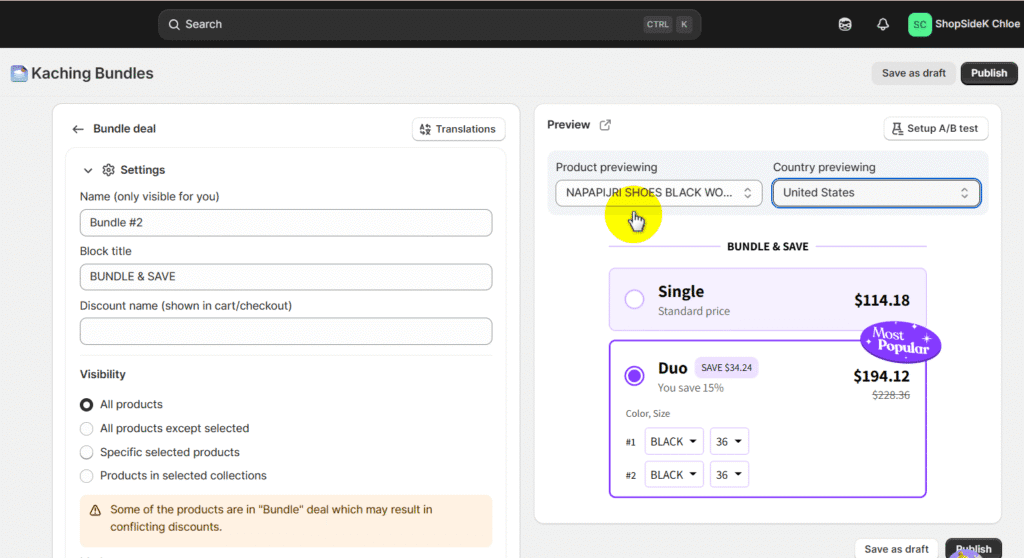
Once you choose your layout, you will enter Kaching’s primary layout editor and configuration screen. On the left pane, assign an internal name for your campaign, specify a customer-facing “Block title” (such as BUNDLE & SAVE), and define your offer’s visibility. You can set the widget to display across all products, target specific collections, or assign it only to selected items.
On the right pane, use the live interactive preview tool to verify exactly how the offer looks to customers. You can select different products or test localized country pricing to ensure your layout renders cleanly. From this screen, you can also click the Setup A/B test button in the top right of the preview pane to run split-tests on different discount structures.
Step 5: Save as Draft or Publish (8–10 Minutes)
When you are satisfied with your configuration, click Publish in the top right corner to instantly push the promotional widget to your live storefront. If you want to make further adjustments later, you can click Save as draft instead. Kaching’s automated widget injection handles the entire placement on your product detail pages, meaning you never have to open the Shopify theme editor or manually modify raw Liquid code to get your deals running.
Who is Actually Scaling with Kaching? (Real Store Data & Demographics)
To truly evaluate a CRO tool, we must look beyond marketing claims and examine real-world adoption patterns. Looking at how established brands structure their promotions provides practical proof of whether Kaching can handle high-volume sales.
Platform Usage Metrics from Store Leads
According to the latest global usage data compiled by the Store Leads analytical database, Kaching Bundles has established a strong footprint within the e-commerce ecosystem. The app is currently installed on over 48,731 active Shopify storefronts worldwide, proving its technical stability across various hosting environments and theme setups.
Analyzing the industry demographic breakdown reveals that it is highly concentrated in fast-moving consumer niches. The Apparel category leads global usage with 19.1% of active installs, followed closely by the competitive Beauty & Fitness sector at 17.6%.
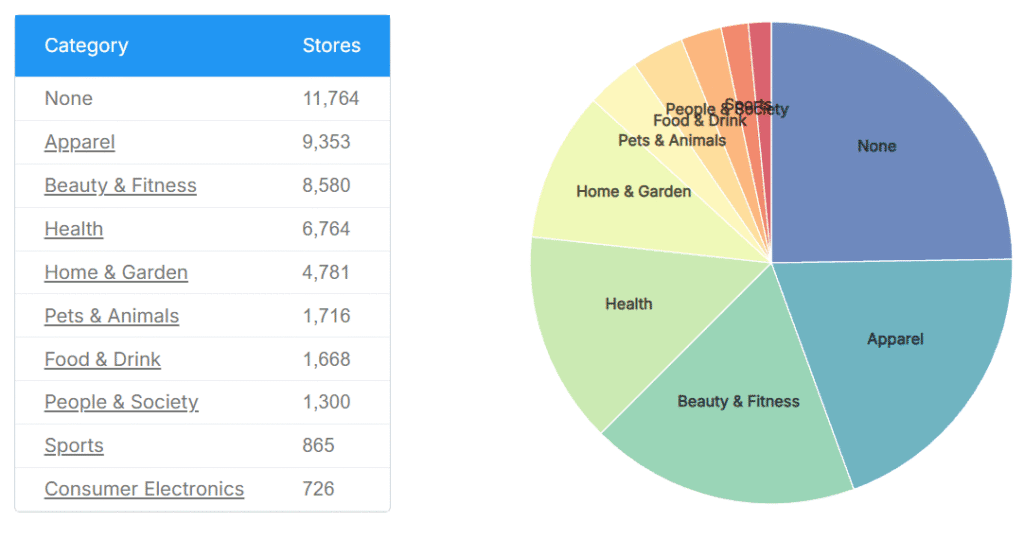
Interestingly, 58.3% of Kaching-enabled stores manage highly focused, small catalogs containing between 1 and 9 products. This metric confirms that Kaching is exceptionally popular among single-product DTC brands, niche dropshippers, and specialized catalog launches that need to squeeze the highest possible revenue from a focused inventory list.
Verified Merchant Success Stories
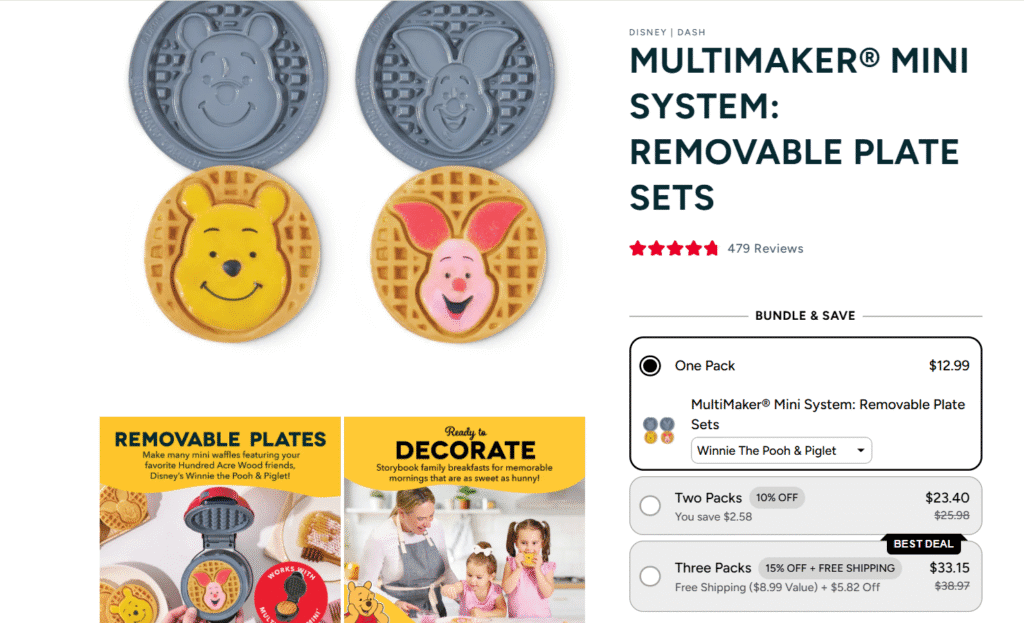
To understand how high-volume brands implement these strategies, we can look at the visual layouts of successful merchants like Dash (bydash.com) and Ekster (ekster.com).
On their product detail page for the Disney Removable Plate Sets, Dash uses Kaching to structure a clean, engaging “Bundle & Save” module. Instead of forcing buyers to click back and forth to add individual plate options, they present a vertical grid: a One Pack for $12.99 (including a character dropdown), a Two Pack offering a 10% discount, and a Three Pack offering a 15% discount plus free shipping. Labeled as the “Best Deal,” this highest tier makes purchasing the complete set highly attractive for collectors.
Similarly, the premium travel gear manufacturer Ekster utilizes Kaching to sell their TravelPack Vacuum Kit. Their mobile-responsive layout displays three distinct tiers: a 1 Pack, a 2 Pack, and a 4 Pack marked as their “Bestseller.” By displaying the original prices crossed out alongside the discounted rates, Ekster highlights the value of bulk buying directly on the product detail page, encouraging customers to purchase multiple travel sets in a single click.
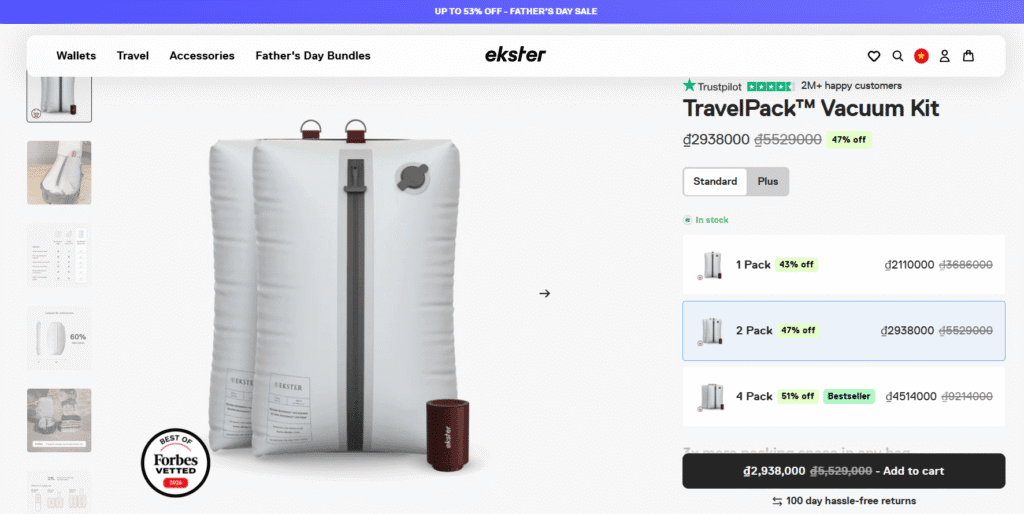
In my opinion, these pre-packaged visual layouts are incredibly effective because they bypass the buying friction of adding individual items to a cart sequentially. By displaying clear, pre-calculated bundle options directly below the primary price block, you can easily convert a single-item intent into a multi-quantity checkout.
The Hidden Trade-Offs: Kaching Cons & Limitations
While Kaching excels at visual presentation and storefront conversion rates, merchants must understand its underlying architectural limitations before installing it.
The core challenge stems from how Kaching processes orders. It operates primarily as a frontend visual discount overlay. This means that when a customer purchases a multi-pack or tiered quantity break, the app applies the savings as a checkout-level discount rather than generating unique product SKUs or splitting the package into individual component SKUs inside the order screen.
This frontend-focused approach keeps your dashboard setup incredibly fast and clean, but it can create friction for complex backend operations. If your business relies on automated 3PL inventory sync models, ERP platforms, or physical POS systems that require scanning individual barcodes for packaging and shipping, this discount logic can cause tracking mismatches.
Additionally, because the app relies on frontend theme scripts to apply discount codes, generating manual draft orders inside your Shopify Admin will not automatically trigger Kaching’s bundle pricing. This can lead to minor manual adjustments if you regularly take customer orders over the phone.
For the vast majority of online-only dropshippers and DTC brands that ship single products or simple inventory catalogs, this tracking model is not a problem. However, if your brand manages complex, multi-warehouse backend fulfillment networks or physical retail checkout lanes, you may want to evaluate SKU-native options. In those advanced operational environments, a backend-first tool like Simple Bundles might serve your scaling needs better by automatically breaking down orders into their individual component warehouse items.
Final Verdict: Should You Install Kaching Bundles on Your Shopify Store?
Reaching a final verdict on your software stack is about balancing immediate conversion goals with your long-term business trajectory. If you want to protect your profit margins from day one, a solid bundle strategy is essential. This makes choosing the right app a vital step in your Shopify store setup.
✅ Install Kaching if you want to:
- Deploy quick quantity breaks: Launch highly visual volume discounts directly on standard Online Store 2.0 themes with zero manual coding or complex layout adjustments.
- Retain page builder flexibility: Integrate seamlessly with drag-and-drop page builders if you choose to build custom landing pages later.
- Keep your storefront fast: Load lightweight, CDN-hosted frontend templates that match your branding without slowing down mobile page speed.
- Optimize using real data: Use built-in A/B testing to run split tests on different discount tiers and find the pricing configurations that maximize your profits.
❌ Avoid Kaching if:
- You require native SKU tracking: You manage complex warehouse networks (3PLs) or sell in physical brick-and-mortar stores using Shopify POS, where backend SKU splitting is required for physical barcode scanning.
Don’t leave easy order-value growth on the table. You can secure your partner discount and start optimizing your storefront today.
(Remember to enter our exclusive code SSK20 during checkout to lock in 20% off your first 3 months of automated bundling)
Kaching Bundle Shopify FAQs
Does Kaching Bundles slow down my Shopify store’s loading speed?
No. Kaching Bundles & Upsells is designed specifically to protect mobile loading speeds. The app uses highly optimized, CDN-hosted scripts that run asynchronously alongside your storefront’s code. This architecture prevents render-blocking delays and layout shifting, ensuring your product pages load quickly and cleanly for all visitors.
Do I need a third-party page builder to use Kaching?
No. You do not need to install any custom page builders to display these volume discount grids. Kaching is built for seamless, automated theme integration with standard Shopify Online Store 2.0 themes. The widget automatically injects itself as a native App Block on your product detail pages without requiring manual theme editing.
How does Kaching handle inventory levels for bundled items?
Because Kaching operates as a visual discount overlay, it updates the inventory levels of the standard product variants chosen by the customer. When a buyer purchases a “3-Pack” of a product, Shopify automatically deducts three units from your live inventory upon checkout.
However, if you are looking to bundle entirely distinct products together (like a kit containing a wallet, a pen, and a keyholder) that require separate SKU-level fulfillment at a warehouse, you may need a system-level app to split those component SKUs on your packing slips.
How do I redeem the ShopSideK 20% off discount code?
Redeeming your savings is incredibly easy. When installing the app through our link, you will be prompted to select a monthly plan. On the billing authorization screen, enter the exclusive code SSK20 in the promo code field. This will instantly apply a 20% discount to your monthly subscription bills for your first three months of usage. This offer runs concurrently with your standard 7-day trial, giving you a risk-free runway to test these promotions.