⚡ ShopSideK Verdict
Is UpPromote worth it? Yes. It’s the most complete affiliate & referral marketing app on Shopify, trusted by 61,990+ active stores with a 4.9★ rating from 3,386 verified reviews. Start free, scale with full automation, and only pay when affiliates generate real sales.
Built-in affiliate marketplace + anti-coupon-leak protection. Recruit pre-vetted creators from a global directory instantly, and auto-block discount scraper fraud at checkout — two critical problems most competitors don’t solve at all.
Lower-tier plans cap approved referrals at 200–300/month, and the dashboard’s depth can overwhelm first-time users. Budget for a plan upgrade if campaigns scale fast.
14-day free trial on all paid plans · No code required
⚡ Installs in under 5 minutes
Building a profitable store is harder than ever as soaring ad costs drain startup budgets. To scale sustainably, successful merchants are moving away from unpredictable upfront ad spend. Instead, they are shifting toward pay-per-performance marketing. UpPromote Shopify app solves this exact challenge by helping you launch, manage, and scale a fully automated affiliate and referral program directly from your Shopify admin.
You do not need a massive inventory or a technical background to succeed with this strategy. Data from Store Leads reveals that 21% of Shopify stores using Uppromote manage focused catalogs of just one to nine products. This makes it a highly practical choice for Shopify beginners, dropshippers, and emerging brands looking to turn partners into an active sales force.
The matrix below highlights how the app fits into the Shopify ecosystem:
| UpPromote Performance Matrix | Key Details & Offers |
|---|---|
| Shopify App Store Rating | 4.9 out of 5 Stars (from 3,386 verified merchant reviews) |
| Active Stores Worldwide | Over 61,990 live Shopify merchants trust the platform |
| Starting Cost | 100% Free plan available (up to 200 approved referrals/month) |
| Exclusive Partner Deal | 20% OFF any paid monthly subscription for the lifetime via our link |
This comprehensive guide walks you through setting up your program, protecting your margins, and using UpPromote to build a high-performing affiliate network.
- Pain Point 1: “Nobody knows my brand—how do I find people to promote my products?”
- Pain Point 2: “Manual commission tracking and payouts are taking over my life.”
- Pain Point 3: “Affiliates are leaking my discount codes to coupon scrapers.”
- Pain Point 4: “How do I build a larger ambassador program without managing everyone manually?”
What is UpPromote and How Does It Automate Your Shopify Referral Sales?
At its core, UpPromote is an all-in-one, automated affiliate, influencer, and referral marketing software suite built specifically for Shopify. Instead of forcing you to manually manage creators, trace spreadsheet data, or calculate individual payouts, UpPromote centralizes your entire referral system directly inside your Shopify admin. This allows you to scale your word-of-mouth marketing campaigns without adding hours of administrative work to your week.
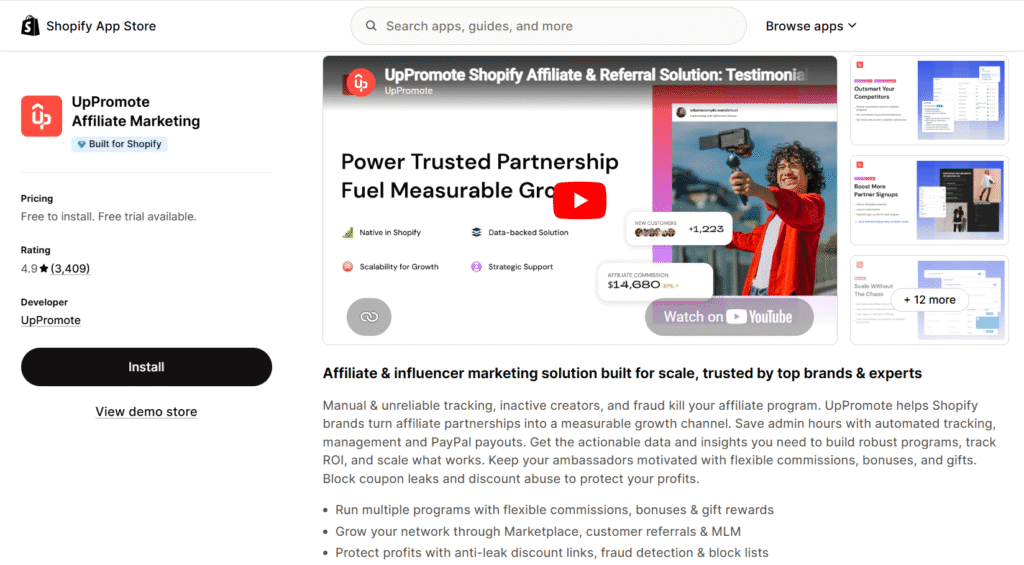
The system relies on a reliable and simple workflow to keep your business running smoothly behind the scenes:
- Partner Enrollment: Affiliates register through your branded signup form and instantly receive their unique referral links or custom coupon codes.
- Customer Purchase: When a shopper clicks an affiliate’s referral link or applies their custom coupon code at your checkout, UpPromote tracks the interaction in real time.
- Automatic Logging: The software automatically attributes the sale to the correct promoter and logs the transaction details directly within your Shopify admin.
- Commission Calculation: The system instantly calculates the exact commission payout based on the custom rules you defined, updating the affiliate’s portal simultaneously.
Many Shopify store owners hesitate to add marketing apps because they fear slowing down their website. UpPromote addresses this by utilizing a single, highly optimized, lightweight script hosted on a global Content Delivery Network (CDN).
Because it integrates seamlessly with Shopify’s modern Online Store 2.0 architecture, the tracking script loads asynchronously, preserving your mobile page speeds and checkout performance.
UpPromote vs. Competitors: How It Compares Side-by-Side
Choosing the right referral tool is a critical decision that directly affects your profit margins and operational workload. While some apps look budget-friendly on paper, hidden transaction fees and manual payout workflows can quickly turn into administrative headaches as your brand grows.
To help you make an objective, data-driven decision, the matrix below compares the top Shopify affiliate apps across key operational metrics:
| Comparison Metric | UpPromote | Shopify Collabs | GoAffPro | Referral Candy & Affiliate |
|---|---|---|---|---|
| App Store Rating | 4.9 Stars (3,386 reviews) | 4.0 Stars (387 reviews) | 4.7 Stars (889 reviews) | 4.9 Stars (1,450 reviews) |
| Starting Cost | Free Plan available ($0/mo) | Free to install | Free Plan available | Starts at $39/month |
| Standard Trial Period | 14-Day Free Trial on paid plans | N/A | 15-Day Free Trial (Premium) | 7-Day Free Trial |
| Referral Surcharges | +2% (Growth), +1.5% (Pro), +1% (Enterprise) | +2.9% commission processing fee | 0% transaction fees | 10.5% (Basic), 3.5% (Grow), 1.5% (Scale) |
| Language Support | 17 languages supported | English only | English only | 2 languages (English, Spanish) |
| Auto-Payout Support | PayPal bulk payments, Store Credit, Gift Cards | Shopify Bill / Auto Payouts | PayPal, Store Credit | Cash, Custom Rewards, Store Credit |
| Marketplace Access | Included (Global network list) | Creator Marketplace | Basic directory | No public recruiter marketplace |
UpPromote vs. Shopify Collabs: Official App vs. Independent Powerhouse
While Shopify Collabs has improved to a 4.0-star rating and is deeply integrated into the platform, its simplicity comes with distinct limitations. Shopify Collabs charges a 2.9% commission processing fee on automatic payments, which can rapidly surpass UpPromote’s flat fee tiers.
Additionally, Collabs is restricted to English-only setups and relies solely on Shopify’s internal creator database. If you sell to a global audience or require localized portals, UpPromote’s 17-language support and multi-level tracking offer the flexibility needed to run international campaigns successfully.
UpPromote vs. GoAffPro: The Battle of the Free Plans
GoAffPro is a popular choice for absolute beginners due to its competitive free tier, which offers 0% transaction fees on unlimited referral revenue. However, GoAffPro’s dashboard is limited to English only and lacks a robust built-in public marketplace to recruit new partners.
UpPromote’s Free plan caps approved referrals at 200 per month, but it unlocks key growth features like custom branding, multi-language support, and direct access to the UpPromote Marketplace. For new stores seeking actual promotional talent, the ability to recruit pre-vetted affiliates directly from a public directory often outweighs GoAffPro’s lack of transaction limits.
UpPromote vs. Referral Candy: Protecting Your Unit Economics
Referral Candy is a well-known name in the Shopify ecosystem, but its pricing structure can be incredibly challenging for low-margin startups. The Basic plan starts at $39 per month and adds a steep 10.5% transaction surcharge on referral sales, which can quickly erase your profitability.
In contrast, UpPromote’s Growth plan is more cost-effective at $29.99 per month (or $23.99 per month when utilizing our exclusive 20% discount code), keeping the success fee capped at just 2%. Combined with a 14-day free trial compared to Referral Candy’s 7-day trial, UpPromote provides a safer and more affordable pathway to positive ROI.
You can try UpPromote’s 14-day free trial on any paid tier to run your own pilot campaigns and experience these cost differences firsthand.
Mapping UpPromote Features to Your Biggest Affiliate Pain Points
Launching an affiliate program is straightforward, but running it without burning out is a completely different challenge. Many merchants quickly find themselves buried under manual tracking tasks, payment bottlenecks, and lost profits.
Developed by the seasoned team at Secomapp, UpPromote is designed to address these exact operational friction points. The software turns a complex marketing channel into an automated, hands-off revenue stream. Let’s break down how its primary features solve the most common frustrations experienced by scaling Shopify brands.
Pain Point 1: “Nobody knows my brand—how do I find people to promote my products?”
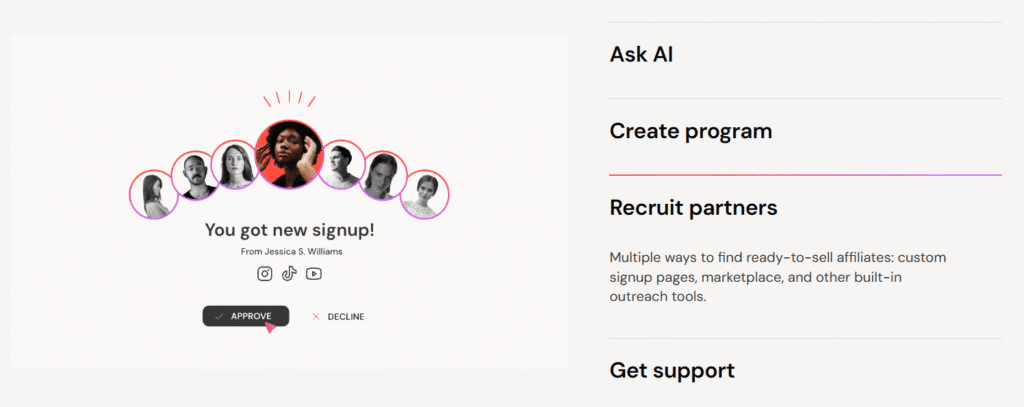
Starting a program from scratch makes finding initial promoters feel almost impossible. UpPromote solves this through two powerful acquisition channels. First, the built-in UpPromote Marketplace puts your campaign directly in front of a global network of active, pre-vetted affiliates looking for new brands to partner with.
Second, the platform features a Post-Purchase Referral Popup that allows you to convert satisfied customers into brand advocates. By displaying a clean signup banner on your Shopify thank-you page, you can invite buyers to share their unique referral link the exact moment their purchase excitement is highest.
Pain Point 2: “Manual commission tracking and payouts are taking over my life.”
Copying and pasting transaction data into spreadsheets and organizing individual bank transfers is incredibly tedious. UpPromote eliminates this workflow bottleneck with its dashboard-integrated PayPal auto-payouts system and automated store credit options.
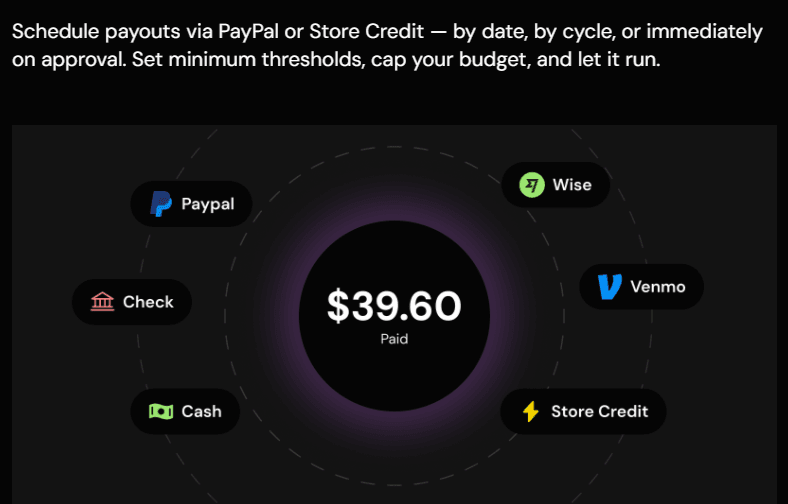
Instead of manually cross-referencing custom coupon codes and referral link clicks, you can approve and execute bulk payments with a single click. This automated payout framework keeps your affiliates motivated with on-time payments while saving you hours of spreadsheet work every week.
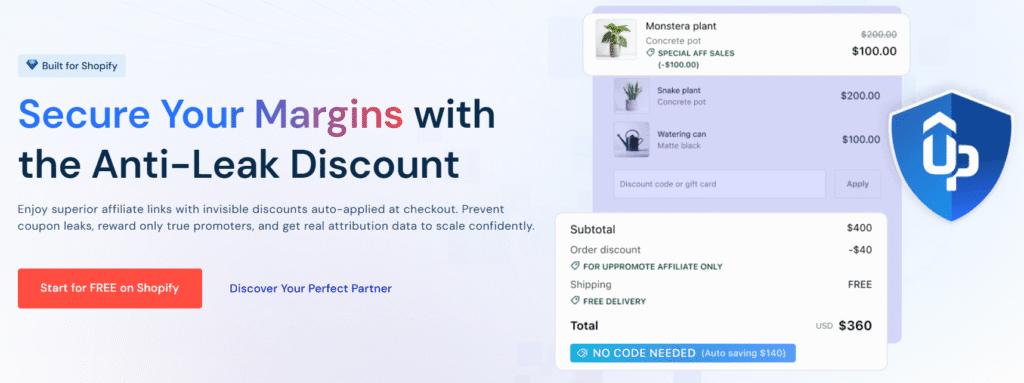
Pain Point 3: “Affiliates are leaking my discount codes to coupon scrapers.”
Coupon fraud is a silent killer of product profit margins. When affiliates leak their custom coupon codes to public discount databases like Honey or RetailMeNot, organic shoppers use those codes at checkout, forcing you to pay a commission on a sale that would have happened anyway.
UpPromote’s Anti-Coupon Leak tool addresses this directly by monitoring checkout behavior. The system automatically detects when an affiliate’s code is applied from an unauthorized third-party extension, letting you deactivate the code or reject the commission automatically.
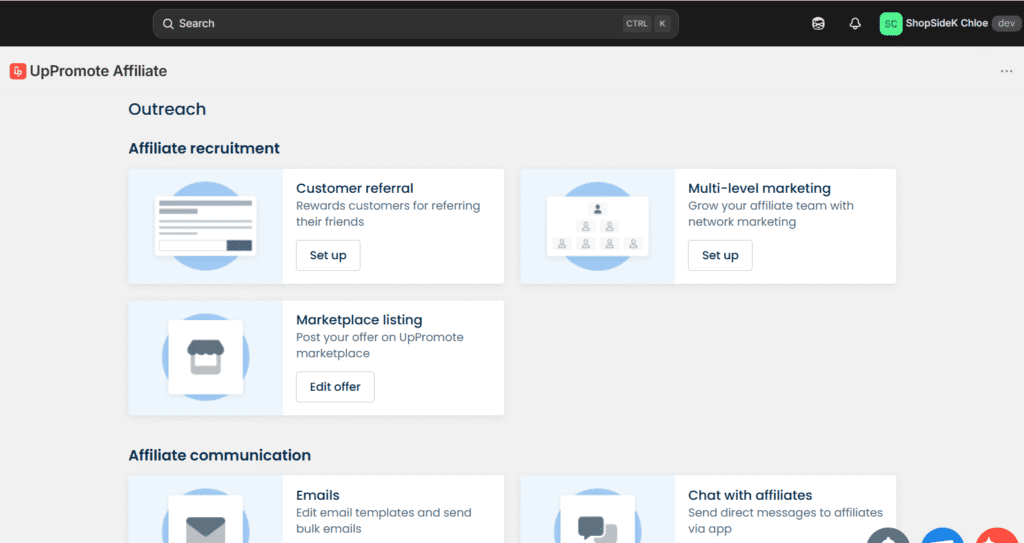
Pain Point 4: “How do I build a larger ambassador program without managing everyone manually?”
Managing hundreds of micro-influencers individually is a full-time job that most small teams cannot support. UpPromote addresses this scalability issue through its Multi-Level Marketing (MLM) structure. This setting allows your top-tier affiliates to recruit their own sub-affiliates, earning a small network override on the sales their recruits generate.
Brands like Kess, led by Influencer Marketing Team Lead Pauline Stark, successfully scaled to over 44,000 referral orders using these automated network-building features. Similarly, Philipp Riedl, founder of the health brand Vetain, managed to drive 40% of his company’s total revenue with UpPromote by establishing self-managing affiliate hierarchies that operate without daily merchant oversight.
You can set up your first post-purchase popup on UpPromote’s Growth plan to start turning your next checkout customer into an active brand promoter today.
Calculating Your Commission Math (Protecting Your Product Margins)
One of the most common mistakes Shopify store owners make is selecting an affiliate commission rate out of thin air. While offering a high flat rate like 25% or 30% sounds highly appealing to potential partners, doing so without carefully analyzing your unit economics can quickly make your program unprofitable. If your product margins are already tight, uncalculated commissions will quietly erase your earnings on every referral sale.
To prevent this, you should establish a reliable mathematical framework to determine your maximum safe commission. By calculating this ceiling before recruiting your first partner, you can design commission rules that incentivize promoters while guaranteeing that your business remains healthy.
You can calculate this ceiling using the Margin-Safe Commission Formula:
Target Commission % ≤ Gross Margin % − Ad Acquisition Cost % − Desired Net Profit Margin %
Let’s look at how this calculation works in practice for a typical online store:
- Product Sale Price: $100
- Gross Margin: 70% (meaning it costs $30 to manufacture and ship the item, leaving $70 of gross profit)
- Ad Acquisition Cost: 20% (the baseline marketing overhead you typically spend on paid ads to acquire a customer)
- Desired Net Profit Margin: 15% (the minimum bottom-line profit you want to keep after all business expenses)
Using the formula, we can quickly find your maximum safe payout:
Target Commission ≤ 70% − 20% − 15% = 35%
In this scenario, your maximum safe commission ceiling is 35%. Offering any rate below this threshold keeps your business profitable, while exceeding it directly compromises your target net profit margin.
Instead of giving every new partner your maximum 35% rate immediately, you should structure your program dynamically using UpPromote’s tiering system. For example, you can start new affiliates at a conservative 10% commission rate. As they drive more transaction volume, they can graduate to a 15% or 20% tier. This tiered approach keeps your average acquisition cost low while giving your top-performing promoters a clear, motivating path to earn more.
35%
You can easily build these tiered commission rules directly inside UpPromote’s dashboard by setting up automated performance milestones for your partners.
UpPromote Pricing (2026): Finding the Right Plan for Your Store’s Scale
UpPromote’s pricing structure is designed to scale dynamically alongside your business growth. Unlike other platforms that lock essential tracking features behind expensive enterprise tiers, UpPromote provides robust baseline features on all of its plans. This allows you to launch your partner network and validate your campaigns without committing to heavy monthly overhead.
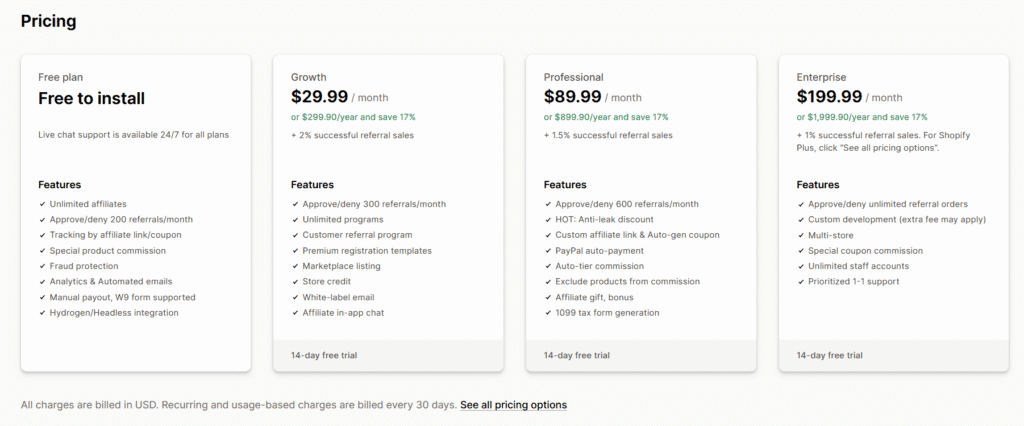
To help you calculate your exact costs and choose the right option, the comparison matrix below outlines the standard rates alongside our exclusive partner discounts:
| UpPromote Plan | Standard Monthly Cost | Your Exclusive Partner Offer | Successful Referral Sales Fee | Approved Referral Cap | Trial Period & Core Features Included |
|---|---|---|---|---|---|
| Free Plan | $0.00 / month | $0.00 / month | 0% | 200 referrals / month | No Trial; Unlimited affiliates, manual payouts, and W9 form support |
| Growth Plan | $29.99 / month | $23.99 / month (Lifetime 20% Off) | + 2% | 300 referrals / month | 14-Day Free Trial; Marketplace listing, customer referrals, and store credit rewards |
| Professional Plan | $89.99 / month | $71.99 / month (Lifetime 20% Off) | + 1.5% | 600 referrals / month | 14-Day Free Trial; PayPal auto-payments, anti-leak discount, and 1099 tax form generation |
| Enterprise Plan | $199.99 / month | $159.99 / month (Lifetime 20% Off) | + 1% | Unlimited referrals | 14-Day Free Trial; Multi-store tracking, custom development, and priority support |
Brand-New Stores (Free Plan: 0 to 1,000 Visitors / Month)
If you are currently launching a new storefront and have minimal web traffic, the Free Plan offers an ideal, low-risk testing ground. This tier allows you to register unlimited affiliates and approve up to 200 referral orders per month without paying a monthly subscription fee or transaction surcharge.
Even on the free tier, you receive essential tools like custom signup pages, manual commission processing, and W9 tax document collection, allowing you to establish a structured affiliate network with zero upfront capital.
Scaling Brands (Growth Plan: 1,000 to 50,000 Visitors / Month)
As your Shopify store begins generating consistent traffic and regular organic sales, upgrading to the Growth Plan is a logical step. Available at a discounted rate of $23.99 per month through our lifetime partner offer, this plan increases your approved referral limit to 300 orders per month with a small 2% successful transaction fee.
The 14-day free trial on this plan provides ample opportunity to test post-purchase thank-you page popups and customer referral loops, allowing you to generate actual referral sales before your first billing cycle.
Established Stores (Professional Plan: 50,000+ Visitors / Month)
For high-volume merchants looking to eliminate manual administrative bottlenecks entirely, the Professional Plan is highly recommended. Priced at $71.99 per month with our exclusive discount, this plan supports up to 600 approved referrals per month at a reduced transaction fee of 1.5%.
This plan is essential for mature brands because it unlocks vital automation features, including integrated bulk PayPal payouts, automatic commission tier scaling, anti-coupon leak protection, and automated 1099 tax form generation to simplify year-end business accounting.
To start automating your affiliate workflows and protect your store’s profit margins, use our exclusive partner link to install UpPromote today and claim your 20% lifetime discount.
Your First 30 Minutes on UpPromote: A Quick-Start Onboarding Checklist
You’ll probably notice that configuring a new backend tool can sometimes feel intimidating. But, UpPromote’s onboarding structure is remarkably straightforward. You do not need any coding knowledge or development experience to get your campaign off the ground. By following this practical 30-minute checklist, you can have your tracking systems, registration pages, and commission rules fully functional and ready to accept partners today.
Step 1: Installation & Permission Approval (0 to 5 Minutes)
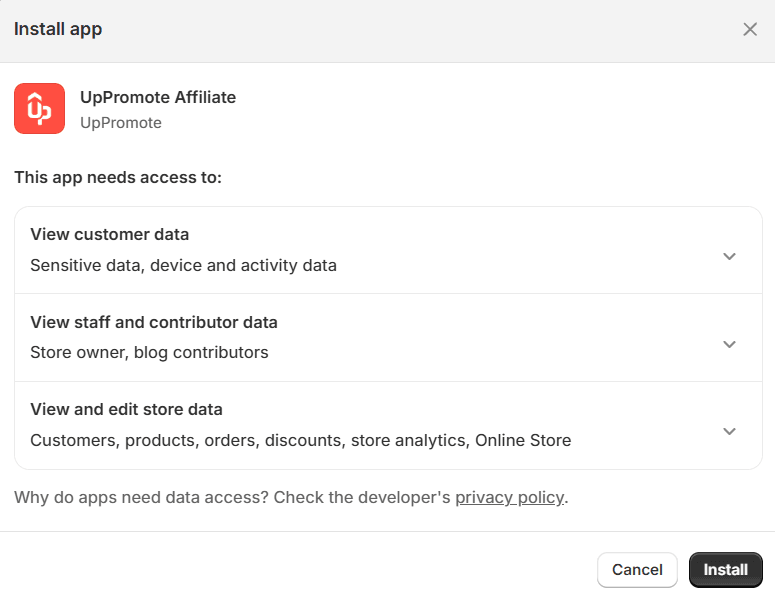
First, click our exclusive partner link to open UpPromote on Shopify App Store and click “Install” to ensure your 20% lifetime discount is properly applied to your account. Once redirected to your admin dashboard, review the requested app permissions and click “Install App” to establish the secure API connection. The core software will instantly integrate with your store without modifying your live theme files.
Step 2: Launch the Onboarding Wizard (5 to 15 Minutes)
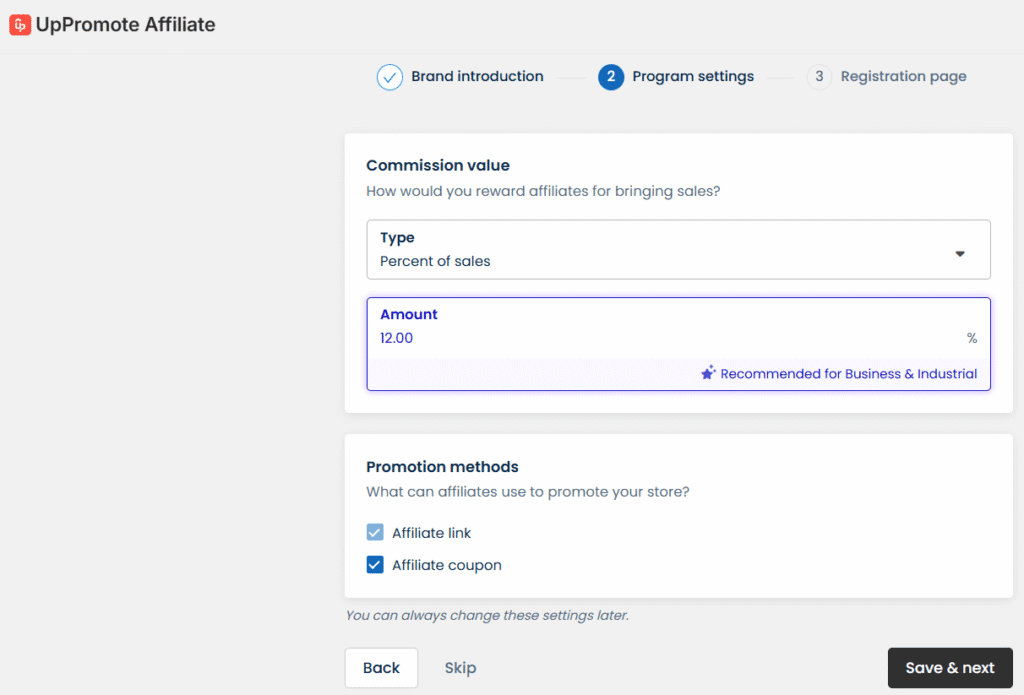
After installation, the interactive onboarding wizard will launch automatically to guide you through your baseline configuration. In this window, you will define your primary tracking method—such as unique referral links, custom checkout discount codes, or customer email addresses. You will also set up your baseline commission rules, establishing a solid, margin-safe starting rate (such as a flat 10% payout) for your initial program.
Step 3: Build Your Custom Signup Page (15 to 25 Minutes)
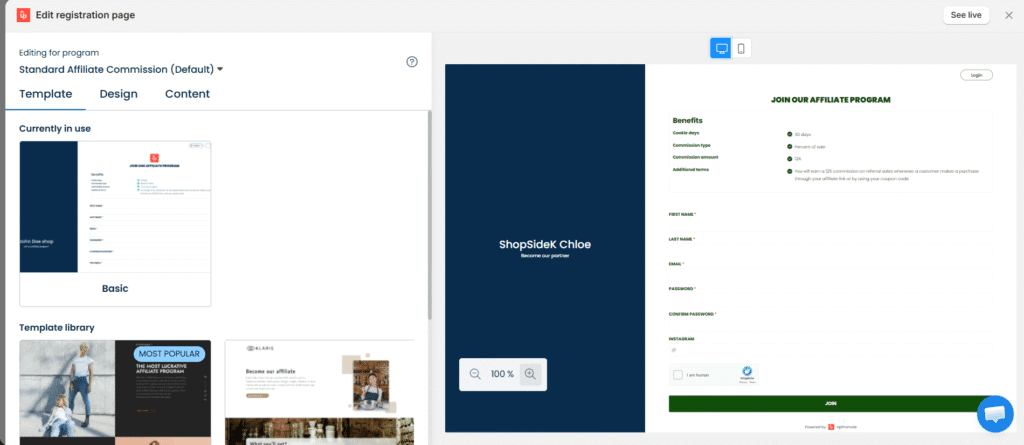
To attract high-quality partners, you need a polished, branded landing page where affiliates can register. UpPromote integrates with popular drag-and-drop page builders like PageFly, allowing you to embed your signup form directly into your native theme layout. Use this design window to customize the text, explain your program’s perks, and clearly detail your commission structures.
Step 4: Run a Setup Test (25 to 30 Minutes)
Before driving actual public traffic, it is critical to verify that your tracking triggers are fully accurate. Within your dashboard, generate a test link, open it in an incognito browser window, and complete a mock purchase on your store. Return to the UpPromote admin to confirm that the sale logged successfully, and take a moment to align the app settings with your store’s refund policy to ensure commissions on canceled orders are automatically voided.
Who is Actually Scaling with UpPromote? (Real Store Data & Demographics)
Understanding whether a software tool is right for your business requires looking at who is actually using it to drive revenue. UpPromote has established itself as a highly versatile solution, powering a diverse range of brands from solo dropshippers to multi-million dollar international enterprises.
Real-World Usage Metrics from Store Leads
According to platform data compiled by the e-commerce database Store Leads, UpPromote has captured massive global adoption, with over 61,990 active Shopify stores utilizing the software. The system is particularly dominant in highly visual, consumer-facing niches where influencer and affiliate channels excel. The Apparel industry leads adoption, representing 24.2% of all active installs (approximately 15,016 stores), followed closely by the Beauty & Fitness sector at 16.9% (10,508 stores).
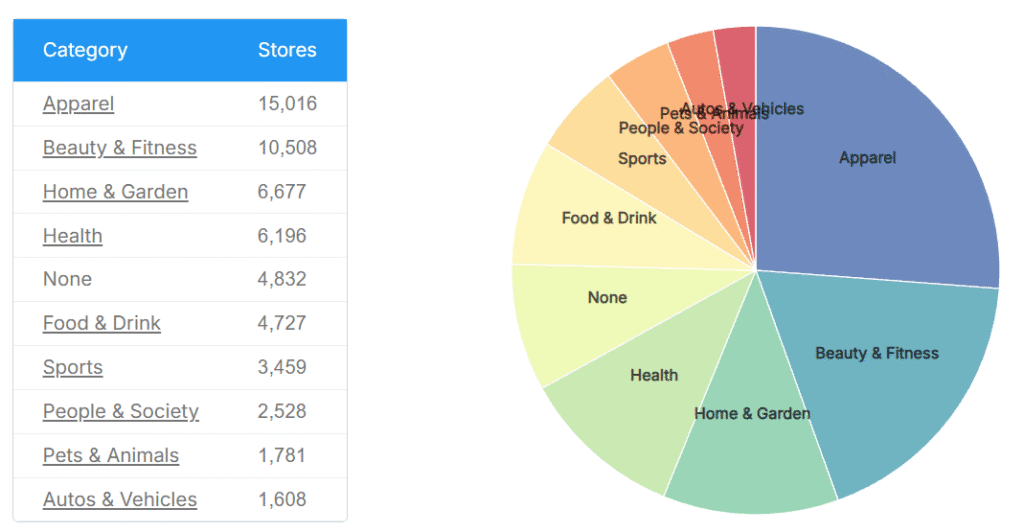
At the same time, the platform is remarkably startup-friendly. Store Leads reports that 21% of active UpPromote stores manage highly focused catalogs containing only one to nine products. This indicates that you do not need a massive SKU count or complex logistics to launch a profitable, automated referral program. However, as your catalog expands, the system scales with you, easily supporting large-catalog enterprise merchants such as Sunny Health & Fitness, the crafting brand Altenew, and iHealth Labs Inc.
Verified Merchant Case Studies
The platform’s features have driven documented revenue milestones across several distinct e-commerce industries:
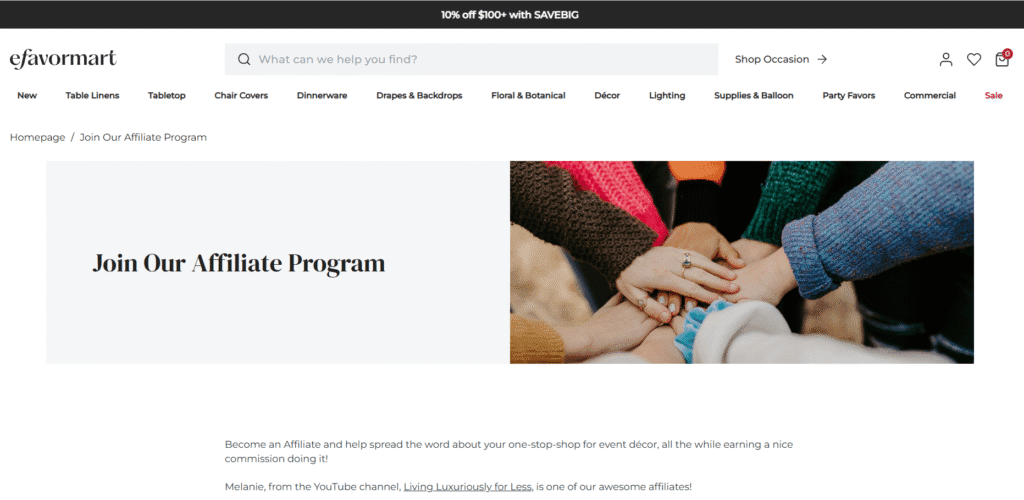
🏆eFavormart (Event & Party Supplies): This leading event decor retailer generated more than $800,000 in affiliate sales in just eight months. By leveraging UpPromote’s Multi-Level Marketing (MLM) features, they offered standard creators a 10% base commission while allowing them to earn a 30% override commission on the earnings of any new affiliates they recruited and mentored.
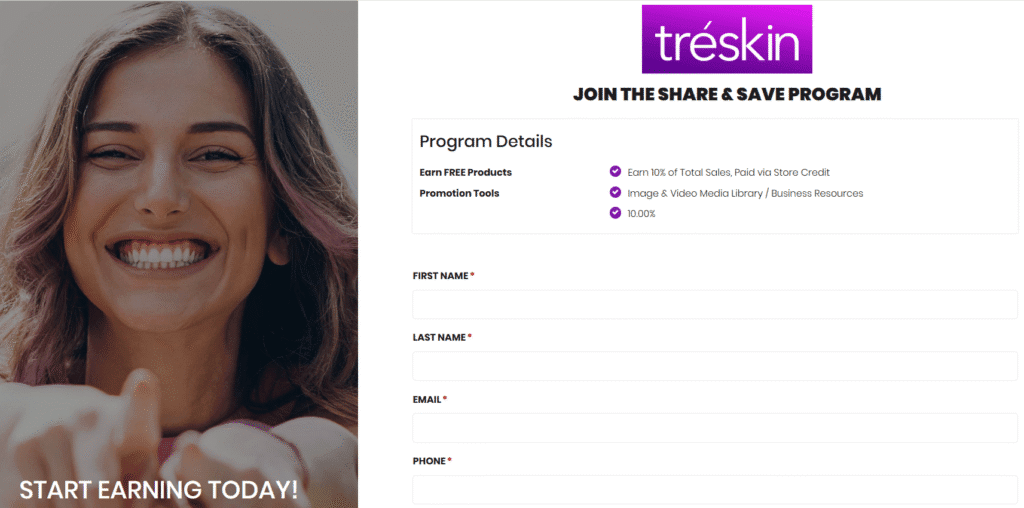
🏆TréSkin (Organic Skincare & Wellness): Led by Chief Creative Officer Kiel Tredrea, this organic beauty brand bypassed traditional paid advertising entirely, generating $120,000 in affiliate revenue in only three months. They attracted top-tier influencers by listing their program on the UpPromote Marketplace and offering competitive, direct payouts on high-ticket skincare collections.
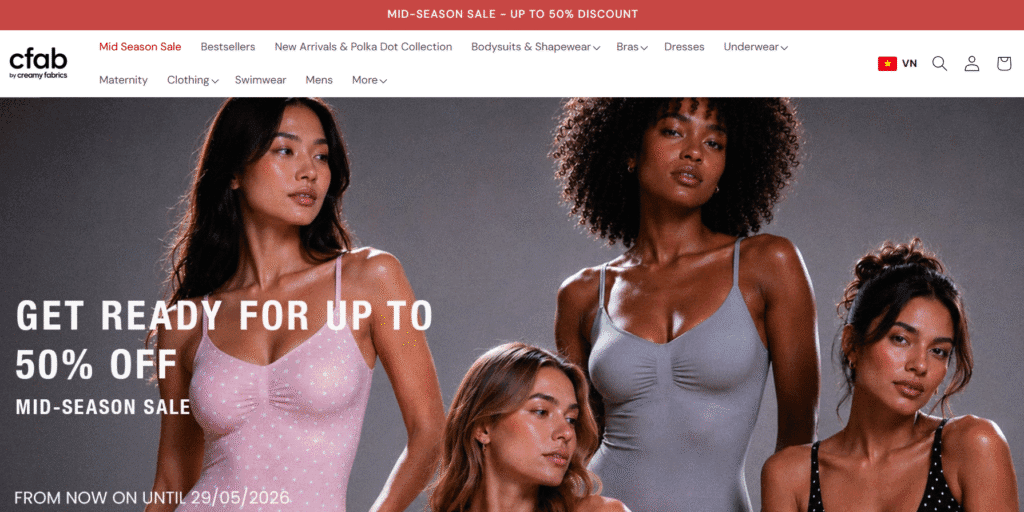
🏆cfab (Intimate Apparel): Ronan Dallender, head of affiliate and influencer operations at the German apparel brand cfab (formerly Creamy Fabrics), scaled their creator channel to generate $1.4 million in affiliate revenue. By utilizing UpPromote’s Enterprise plan, Dallender’s team designed custom analytics dashboards to track individual creators and configured a non-cumulative tiered bonus structure that incentivized volume while protecting product profit margins.
The Hidden Trade-Offs: UpPromote Cons & Limitations
No software is perfect, and establishing a trusted review means looking closely at where a tool has limitations. While UpPromote is incredibly feature-rich, there are a few operational trade-offs and cost structures that Shopify merchants should consider before committing to the platform.
First, you must monitor the strict monthly caps placed on approved referral orders across the lower-priced plans. The Free plan caps you at 200 approved referrals per month, while the Growth plan limits you to 300. If your campaigns scale faster than anticipated, any transaction that exceeds these limits is subject to a transaction surcharge, which can quietly add up if you do not manually upgrade your tier in a timely manner.
Second, while UpPromote includes basic email automation to send standard transactional notifications to your partners, it is not a replacement for dedicated marketing software. If you want to design highly personalized nurture sequences, launch targeted creator newsletters, or segment your affiliates by performance, you will need to integrate the app with an external email service provider like Omnisend or Klaviyo.
Finally, because the backend dashboard provides a massive amount of customization, the user interface can feel a bit overwhelming for absolute beginners. Compared to simpler, bare-bones tracking plugins that offer plug-and-play setups, configuring complex commission rules, custom registration portals, and multi-tier tracking requires a slightly steeper learning curve to master.
Final Verdict: Should You Install UpPromote on Your Shopify Store?
Our final verdict on UpPromote Shopify app is highly positive. It bridges the gap between complex affiliate logistics and user-friendly automation, making it a powerful growth engine for most merchants. To help make your decision as clear as possible, use the quick checklists below to see if the software aligns with your current business goals.
✅ Install UpPromote if:
- You want to scale an affiliate marketing campaign organically with zero upfront advertising risk.
- You need to automate your monthly promoter payouts using integrated bulk PayPal transfers.
- You want to protect your product margins from public discount code leaks and scraper extensions.
- You want direct access to a global, pre-vetted marketplace of active, high-performing creators to promote your products.
❌ Avoid UpPromote if:
- You only want a basic, set-and-forget “refer-a-friend” loyalty widget for your existing buyers and have no plans to recruit external professional affiliates, manage tracking links, or design custom signup portals.
- Your store operates on razor-thin profit margins with a massive volume of low-ticket referral orders, where alternative tools with unlimited referral tiers might be a tighter financial fit.
When combined with a strategic Shopify store setup, UpPromote provides one of the most reliable and cost-effective marketing setups available for modern e-commerce. It allows you to build a motivated partner network while ensuring that you only pay for promotional work when a verified transaction is successfully completed.
An automated sales network is waiting. Launch your campaign with confidence: use our exclusive partner link to install UpPromote today, lock in your 20% lifetime discount, and recruit your first brand ambassador risk-free.
UpPromote Affiliate Marketing FAQs
Does UpPromote slow down my Shopify store’s loading speed?
No, UpPromote is designed to have a negligible impact on your website performance. The app uses a highly compressed, lightweight tracking script hosted on a secure global Content Delivery Network (CDN). Because it is built to integrate with Shopify’s Online Store 2.0 architecture, the script loads asynchronously, ensuring your front-end page speed and checkout experience remain completely unaffected.
Can I migrate my affiliates from another app without losing their data?
Yes, transferring your network to UpPromote is a simple process. The platform features a dedicated migration checklist that allows you to import your existing partner database using a standard CSV template. You can seamlessly transfer affiliate profiles, custom referral links, and payment preferences without experiencing any program downtime, protecting your established relationships.
Does UpPromote support W9 and 1099 tax forms?
Yes, the software includes built-in compliance tools to simplify your year-end business accounting. You can require new promoters to upload digital W9 forms directly within their affiliate dashboard during registration. Furthermore, the Professional plan supports automatic 1099 tax document generation based on your affiliates’ cumulative annual earnings.
How does the exclusive 20% OFF discount work?
The promotional rate is automatically activated when you install the application using our exclusive partner link. Once you select a paid subscription tier—such as the Growth, Professional, or Enterprise plan—the 20% discount will apply directly to your billing cycle and remain active for the lifetime of your subscription.