Choosing the right theme is a pivotal step, especially when you’re considering a premium option like Shopify Warehouse theme. With its $320 price tag, it’s a significant investment for any growing business. Designed by Maestrooo for large catalogs and high-volume stores, it promises a suite of features built for performance and conversion.
But does it deliver on that promise?
In this definitive 2026 review, we’ve done the heavy lifting for you. We’ll analyze its key features, share real performance data, and break down examples from successful brands to help you decide if the Warehouse theme is the right investment for your store.
To supplement this post, I’ve created a visual breakdown that explains the core concepts through illustrations.
At a Glance: The Shopify Warehouse Theme Verdict
Short on time? Here’s our expert take on the Warehouse theme from Maestrooo after in-depth analysis. It’s a powerful, feature-rich theme designed for merchants who need to manage and sell large inventories effectively.
- Who It’s For: Ideal for stores with large catalogs, such as electronics retailers, auto parts suppliers, hardware businesses, and high-volume dropshippers.
- Who It’s Not For: Best avoided by single-product stores, small-inventory boutiques, or brands whose primary focus is long-form visual storytelling.
Our Verdict
8.9/10Curious to see it in action? Explore the official Warehouse theme demo for free while you read our full review.
Who Should Use the Warehouse Theme (and Who Should Avoid It)?
The Shopify Warehouse theme is a specialist, not a generalist. It’s engineered for a specific type of merchant, and understanding if that’s you is the most important step in your decision.
This Theme is Ideal For:
✅ High-volume stores and dropshippers. If you manage hundreds or thousands of products, Warehouse is built for you. Its powerful filtering, predictive search, and collection page design are made to prevent customers from getting lost in a sea of options.
✅ Retailers with extensive product catalogs. Think electronics, auto parts, or industrial supplies. The theme’s structure excels at organizing complex inventories, similar to navigating a large marketplace like Amazon or Best Buy.
✅ Brands that run frequent promotions and sales. With built-in features like custom promotion tiles, exit pop-ups, and announcement banners, you can run marketing campaigns directly from your theme, saving you money on standalone Shopify apps.
You Should Consider an Alternative If:
❌ You sell a single product or a very small collection. The robust features of Warehouse would be overkill. A simpler, more focused theme would better serve a limited product line and save you the investment.
❌ Your brand relies heavily on long-form, visual storytelling. Warehouse is optimized for efficient product discovery and conversion, not immersive narratives. Brands that need beautiful, long-scrolling pages with rich visuals may find its layout too rigid.
❌ You have a tight budget. At $320, this is a premium theme. If you’re just starting out, a powerful free theme like Shopify’s own Dawn is an excellent choice until your business is ready to invest in a more feature-heavy solution.
A Hands-On Look at the 3 Warehouse Presets
The Warehouse theme isn’t a one-size-fits-all solution; it comes with three distinct presets, or “styles,” that serve as excellent starting points for different types of brands. Each preset uses the same powerful features but presents them with a unique design aesthetic.
Warehouse (Default): The Amazon-Style Powerhouse
The default “Warehouse” preset is built for pure efficiency. It features a classic, conversion-focused grid layout that will feel instantly familiar to anyone who has shopped on a major online marketplace. The design prioritizes function over form, making it incredibly easy for customers to navigate vast product catalogs and compare items.
This no-nonsense approach is ideal for electronics stores, industrial suppliers, auto parts retailers, and general-purpose superstores where product specs and selection are paramount.

Wood: The Modern & Clean Look
The “Wood” preset offers a more refined and contemporary feel. It leverages generous whitespace and clean typography to create a sophisticated, modern aesthetic that allows high-quality product photography to shine. This style is less about density and more about creating a curated shopping experience.
It’s the perfect fit for brands selling homeware, furniture, kitchen goods, or upscale hardware, where brand perception and a premium feel are essential for building customer trust and justifying higher price points.

Mesh: The Bold & Sporty Vibe
Designed for high-impact brands, the “Mesh” preset uses strong imagery and a more energetic layout to capture attention. It’s built to showcase bold product photography and lifestyle action shots, making it a natural choice for brands with a strong visual identity.
This vibrant, dynamic design is best suited for sporting goods, activewear, fashion apparel, and accessories. It helps create an immersive experience that sells not just a product, but a lifestyle.

Warehouse’s Key Features That Actually Drive Sales
A theme’s value isn’t just in its looks—it’s in the tools it provides to help you sell more. The Shopify Warehouse theme is packed with built-in features that often require separate, paid apps. Here’s a breakdown of the tools that directly impact your bottom line.
For Product Discovery: Mega Menu & Advanced Filtering
When you have hundreds of products, a simple dropdown menu isn’t enough. Warehouse’s mega menu allows you to build a multi-column navigation system with images, guiding customers deep into your catalog without overwhelming them. But discovery doesn’t stop there.
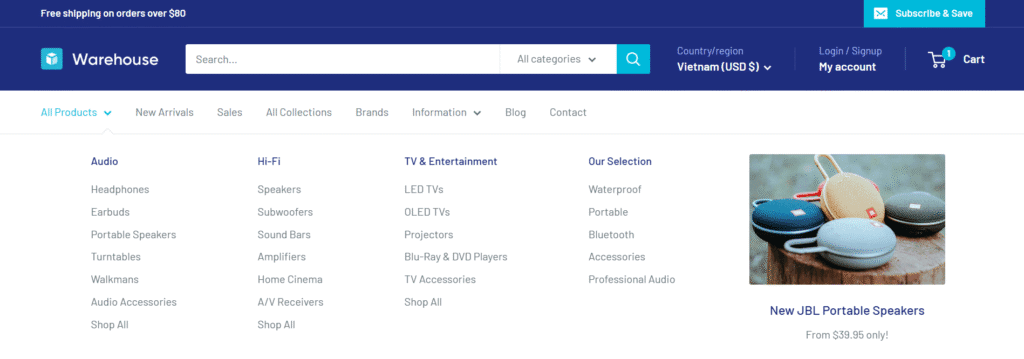
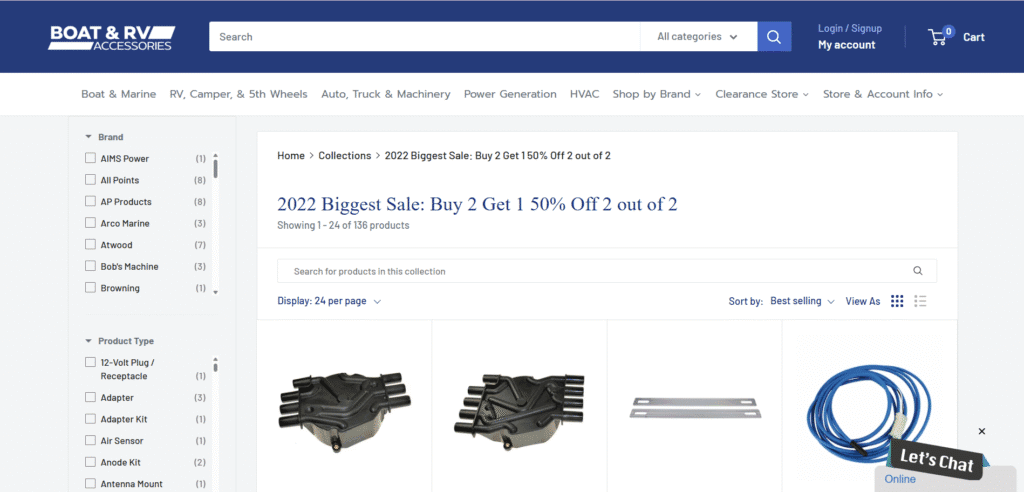
Once on a collection page, the theme’s powerful advanced filtering lets shoppers find products by brand, price, and custom product tags. I’ve found this one-two punch is crucial for large inventories. Stores with complex catalogs, like Boats & RV Accessories, use the mega menu to organize dozens of categories, then rely on filtering to help customers pinpoint the exact item they need from a long list of options.
For Marketing & Conversions: Custom Promotion Tiles & Exit Popups
Warehouse includes powerful, native marketing tools. The homepage features customizable promotion tiles that you can use to spotlight sales, feature new collections, or drive traffic to specific landing pages. This is a feature many themes lack, forcing you to use less flexible banner images.

Additionally, the built-in exit-intent popup helps capture visitor emails before they leave your site. By handling this natively, Warehouse can save you the monthly cost of a dedicated popup app while helping you build your email list and drive repeat sales.

For Urgency & Social Proof: Stock Counter & Trust Badges
This theme leverages proven marketing psychology to boost conversions. The stock level indicator shows customers when inventory is low (e.g., “Only 3 left in stock!”), creating a powerful sense of urgency that encourages immediate purchase.

On product and cart pages, you can easily add trust badges—like payment provider logos or security seals.

The way I see it, these small visual cues are incredibly effective at reducing purchase anxiety and reassuring customers that their information is safe. This is a crucial step in building the confidence needed to complete a checkout.
For User Experience: Predictive Search & Color Swatches
A smooth user experience is critical for turning browsers into buyers. Warehouse’s predictive search function delivers instant results as customers type, helping them find products faster.
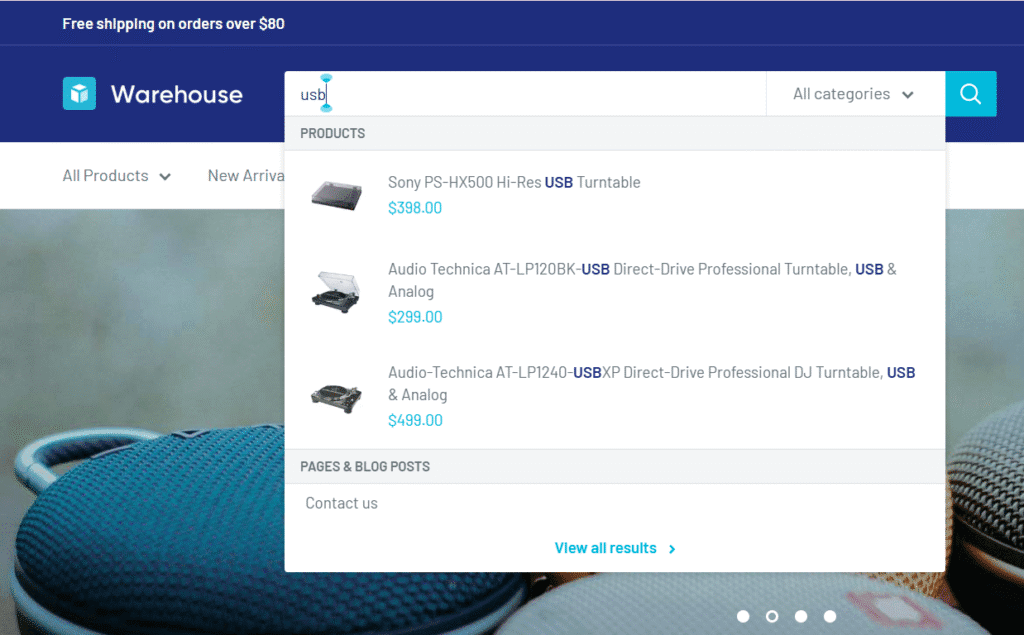
For apparel or electronics stores, the built-in color swatches are a game-changer. Instead of selecting colors from a clunky dropdown list, shoppers can click a visual swatch that instantly updates the product image.

This small detail makes the shopping experience more intuitive and enjoyable, which can lead to higher customer satisfaction and increased average order value.
Performance Test: How Fast is the Shopify Warehouse Theme?
In 2026, site speed isn’t just a technical metric—it’s a critical factor for both SEO and conversions. A slow-loading site can hurt your Google rankings and, more importantly, frustrate potential customers until they leave. With its extensive features, a key question is whether Warehouse can stay fast and responsive, especially on mobile devices.
To find out, we ran a fresh performance test on a clean Warehouse theme demo store using Google PageSpeed Insights.
Our Performance Test Results
- Mobile Score: 74
- Desktop Score: 96

So, what do these numbers actually mean for your store?
The Desktop score of 96 is exceptional. It proves the theme is incredibly well-coded and optimized for users shopping on laptops or home computers. This is a huge advantage for B2B stores or retailers selling high-consideration products where customers often do their final research on a larger screen.
Personally, I think the Mobile score of 74 is strong for a theme packed with features. This highlights an important trade-off: built-in tools like predictive search, mega menus, and pop-ups add more code than a minimalist theme. While a simpler free theme like Dawn might score higher on mobile, it lacks the conversion-driving functionality that Warehouse offers.
Ultimately, Warehouse strikes a very effective balance, delivering robust features without seriously compromising the speed that is essential for a modern online store.
Real Stores, Real Strategies: 3 Warehouse Theme Examples Analyzed
Seeing a theme in action on real, successful stores is the ultimate test of its capabilities. Instead of just listing examples, we’re breaking down the specific strategies these brands use—and how the Warehouse theme makes them possible.
ESafety Supplies: Nailing B2B with Advanced Filtering & Popups
For a B2B supplier like ESafety Supplies, customers need to find specific products from a massive catalog quickly. This is where Warehouse’s advanced filtering shines. Their collection pages feature a robust sidebar that allows users to instantly drill down by price and manufacturer. This built-in functionality is crucial for a business whose customers are buying for professional needs, not casual browsing.

Beyond filtering, they also leverage the theme’s popup capabilities to increase average order value. When a user shows intent to leave or interacts with their cart, a “Find products you love” window appears, recommending popular items. This is a smart, native feature that encourages upsells right before checkout.

Tennis Giant: Mastering the Mega Menu & Search
Tennis Giant is a perfect example of a retailer managing a deep and varied catalog. They masterfully use Warehouse’s mega menu to organize hundreds of products by brand, player type, and equipment category (racquets, apparel, shoes). This allows both beginners and experts to navigate the store intuitively.

Furthermore, their prominent and powerful search bar is essential for customers looking for specific models from brands like Babolat, Wilson, or Head. For a store like this, fast, predictive search isn’t a bonus—it’s a necessity that directly impacts sales, and Warehouse delivers it out of the box.
Appliances Club: Building Trust with a Clean Layout & Clear Details
When selling high-ticket items like a ZLINE dual fuel range, trust and clarity are paramount. Appliances Club uses Warehouse’s clean, grid-based layout to create a professional storefront that puts the products first.

This clarity extends to their product pages, where they leverage the theme’s built-in features to build customer confidence. For a nearly $6,000 appliance, they immediately communicate value with a prominent red “Save $1,500” product badge. Just below, the clear “In stock” indicator removes any doubt about availability. These details, presented within a clean layout, create a trustworthy experience for serious buyers researching brands like LG, Samsung, and Whirlpool.

Inspired by what’s possible? You can try the Warehouse theme on your own store with a free, unlimited trial from Shopify and see how it fits your brand.
Warehouse vs. The Competition: Premium vs. Free
The Shopify Warehouse theme doesn’t exist in a vacuum. To truly understand its value, you need to see how it stacks up against its top competitors: another premium powerhouse, Empire, and Shopify’s best-in-class free theme, Dawn. This head-to-head comparison is the ultimate decision-making tool.
We chose Empire because it’s another highly-rated premium theme built for large, Amazon-style catalogs. We chose Dawn as it represents the absolute best performance and modern design you can get for free, setting the perfect baseline for value.
Head-to-Head Comparison
| Feature | Warehouse Theme | Empire Theme | Dawn Theme |
|---|---|---|---|
| Price | $320 | $340 | $0 Free |
| Performance | Excellent Desktop (96), Good Mobile (74) | Good Desktop (78), Fair Mobile (58) | Outstanding (Desktop 99, Mobile 95) |
| Best For | Balanced features & speed for large catalogs | Stores needing Amazon-style filtering, even with a speed trade-off | Startups and brands prioritizing maximum speed over built-in features |
| Key Feature | Built-in Conversion Tools (Popups, Stock Counter) | Advanced Product Filtering & Search | Unbeatable Speed & Simplicity |
| Our Rating | 9.2/10 | 8.7/10 | 8.0/10 (for its purpose) |
Analysis: What the Data Tells Us
The table reveals a clear story about what you’re paying for.
While Dawn is the undisputed speed champion, that performance comes from its simplicity. To replicate Warehouse’s functionality—like exit popups, promotion tiles, and advanced menus—you would need to install multiple third-party apps, each potentially slowing down your site and adding monthly fees.
Empire offers arguably the most powerful filtering on the market, but our tests show this comes at a significant cost to mobile performance. A mobile speed score of 58 is a serious trade-off that scaling stores need to consider carefully.
This is where Warehouse emerges as the strategic choice. It offers the best balance of robust, built-in features and strong performance. You get a complete suite of conversion tools without a major compromise on speed, making it a smart, all-in-one investment for serious stores that need both power and a great user experience.
Potential Drawbacks & Common Complaints
While Warehouse is an exceptional theme, it’s important to consider every angle before investing. Based on our analysis and real Shopify Warehouse theme reviews, here are a few potential drawbacks to be aware of.
The Price Tag: At $320, this is a premium theme, and that one-time cost can be a significant upfront investment for new stores. While the built-in features can save you money on apps in the long run, the initial price is a hurdle that businesses on a tight budget need to consider.
A Steeper Learning Curve: With great power comes greater complexity. The sheer number of features and customization options means Warehouse can be more intimidating for an absolute beginner than a minimalist theme like Dawn. I always suggest you set aside time to explore the Shopify Warehouse theme documentation to get the most out of it.
Some Users Expect More Features for the Price: A recurring theme in critical reviews on the Shopify Theme Store is that the theme lacks certain advanced features for its premium price. Some merchants feel that more customization options should be built-in, avoiding the need for manual code edits that can break when the theme is updated.

Our Final Verdict: Is the Warehouse Theme a Smart Investment?
After a comprehensive analysis, our Shopify Warehouse theme review concludes with a clear answer. For merchants with large inventories who prioritize speed, a rich feature set, and powerful conversion tools, the Warehouse theme isn’t just a good choice—it’s one of the best investments you can make. It strikes the optimal balance between robust functionality and strong performance, offering a complete package that can save you hundreds of dollars in app fees over time.
So, is it really worth $320?
For the right business—a scaling store with an extensive catalog—the answer is an emphatic yes. It’s a professional-grade tool built to handle complexity and drive sales, providing a reliable foundation for long-term growth.
Ready to build a store that can scale? Start your Shopify store today and give your high-volume business the professional foundation it deserves.

Just a heads-up: As a Shopify Media Partner, I may earn a small commission if you sign up. It won’t cost you anything, and it helps me continue providing free resources.
FAQs About The Shopify Warehouse Theme
What kind of support is included with the Warehouse theme?
Support for the Warehouse theme is provided directly by its developers, Maestrooo. According to the official documentation, this support covers answering questions about the theme’s features, helping with the settings, and fixing any bugs that may arise. However, it’s important to note that their support does not cover theme customizations, troubleshooting issues caused by third-party apps, or general Shopify configuration.
Can I download the Warehouse theme for free?
No, a direct Warehouse Shopify theme free download for a fully functional, publishable version is not available. The Warehouse theme is a premium product that costs $320.
However, the Shopify Theme Store offers an unlimited free trial for all paid themes. This means you can add Warehouse to your store, customize it with your own branding, and preview it with your products for as long as you need. You only pay the one-time fee when you decide to hit “Publish” and make it your live theme.
How do I install the Warehouse Shopify theme?
Installing the theme is very straightforward. Click this official link, which will take you directly to the Warehouse page on the Shopify Theme Store. Once there, just click the “Try theme” button. Shopify will automatically add it to your theme library (found under “Online Store” > “Themes” in your admin panel). You can then customize it with your own branding and products to see how it looks before deciding to purchase and publish.
Is Warehouse good for SEO?
Yes, from my experience, the Warehouse theme provides a strong foundation for SEO. Its code is clean and optimized for performance, which is a major ranking factor for Google. As our tests showed, it boasts excellent desktop speed and a solid mobile score. Features like a clear navigation structure with mega menus and fast predictive search also improve the user experience, which can lead to lower bounce rates and longer session durations—positive signals for search engines.