⚡ ShopSideK Verdict
Can you make money with Shopify Print on Demand? Yes. By partnering with a top supplier (like Printify, Gelato, or Printful), you can launch a custom e-commerce store with zero upfront inventory costs and have order fulfillment run on autopilot. Successful stores require choosing a specific niche, setting a profit-margin buffer of 30-50%, and executing a consistent marketing strategy.
- 1 Choose Your Niche & Designs — Identify a passionate audience (e.g. hikers, pet parents) and create 5-10 targeted designs using Canva or hiring a freelance artist.
- 2 Install a POD Partner App — Sync your Shopify store with a trusted supplier like Printify (best margins) or Printful (best consistency) to create mockups and sync catalog.
- 3 Sync Shipping Profiles (Critical!) — Avoid losses by linking your POD supplier’s shipping rates directly to your Shopify Shipping and Delivery settings so customers pay exact rates.
- 4 Set Policies & Payments — Auto-generate refund, privacy, and TOS policies to build trust, and activate Shopify Payments to accept credit cards from day one.
- 5 Run a 30-Day Marketing Plan — Validate designs on Reddit, launch a “friends & family” discount, share Instagram Reels/Pinterest Pins, and set up a $5/day retargeting ad.
Best for profit margins (~54%) and product variety (900+ item catalog).
Best for reliable in-house print quality, packaging inserts, and global shipping.
Ideal for hybrid stores wanting custom neck labels and automated factory dropshipping.
Extended 3-Month Trial at $1/Month · No credit card required
Let’s be honest: starting a Shopify print on demand store is easy. The platform makes it possible to launch in a single weekend. But making that store profitable? That’s the hard part.
It’s easy to get lost comparing dozens of apps, confused by hidden costs, and completely stuck on how to actually make your first sale. This guide is different. We’re not just showing you how to start a print on demand business; we’re giving you a transparent, step-by-step playbook to make it successful.
We’ll walk you through the real costs you can expect, provide a data-driven comparison of the best apps for your specific needs, and hand you an actionable marketing plan for your first 30 days. Think of this as your complete launch kit for building a Shopify print on demand business that doesn’t just exist—it thrives.
- Printful: Best for All-in-One Service & Quality
- Printify: Best for Product Variety & Profit Margins
- Gelato: Best for Eco-Conscious Brands & Global Reach
- ShineOn: The Go-To for Jewelry & Personalized Gifts
- CustomCat: Best for US Fulfillment & Branded Products
- Apliiq: Best for High-End Apparel & Custom Branding
- Teelaunch: Best for Unique Products (Like Tumblers & Electronics)
- Bonus Sourcing Partner: FFOrder Dropshipping & POD
What is Print on Demand? A 60-Second Explainer
Print on demand (POD) is a business model that lets you sell custom-designed products online without ever holding physical inventory. Instead of buying items in bulk, you partner with a supplier who creates products with your designs only after a customer makes a purchase.
This means you never have to worry about printing, packaging, or shipping. Your partner handles it all, freeing you up to focus on creating great designs and marketing your store.
This low-risk approach is why the print on demand business model is one of the most popular ways for entrepreneurs and creators to start selling online.
In fact, POD is simply a highly customized variation of the traditional dropshipping model. If you’re weighing your fulfillment options, you might also want to read our full guide on how to dropship on Shopify.
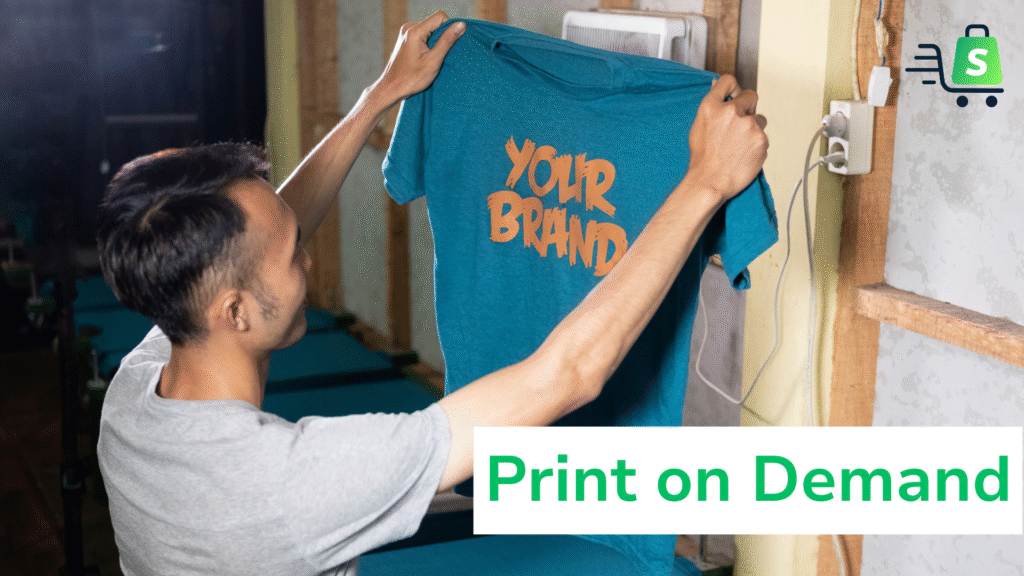
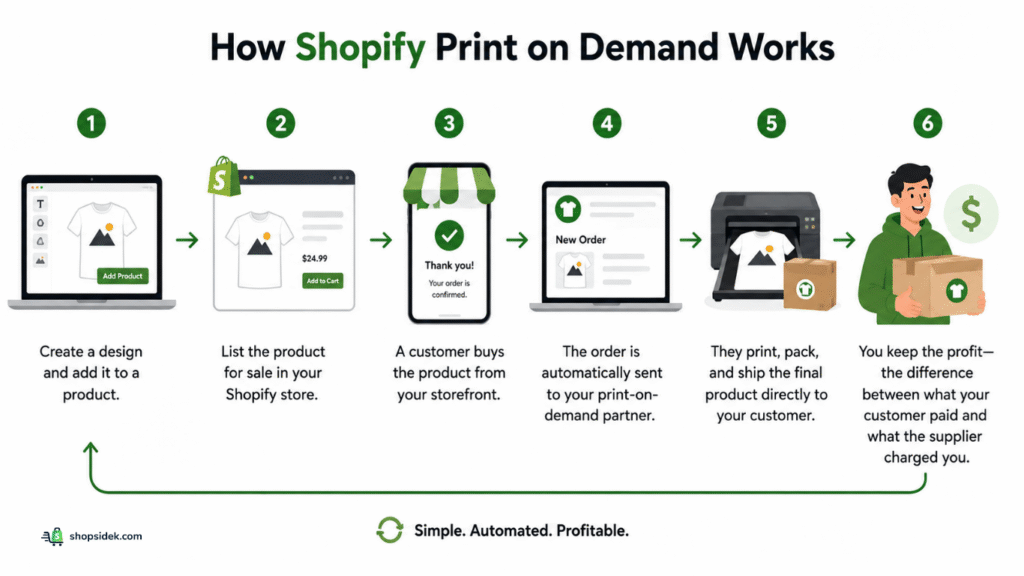
The entire workflow is a simple, automated cycle. Here’s how Shopify print on demand works from start to finish:
- You create a design and add it to a product, like a t-shirt or a mug, in your chosen POD app.
- You list the product for sale in your Shopify store, complete with professional mockups and a price.
- A customer buys the product from your storefront.
- The order is automatically sent to your print-on-demand partner.
- They print, pack, and ship the final product directly to your customer.
- You keep the profit—the difference between what your customer paid and what the supplier charged you.
The Real Costs: A Transparent Breakdown of Your Startup Budget
Profitability starts with understanding your numbers. While Shopify print on demand eliminates the cost of holding inventory, it’s not free.
From my experience, knowing exactly where your money goes is the first step to building a sustainable business. Let’s break down the real costs you can expect.
One-Time & Recurring Platform Costs
These are the foundational expenses for your digital storefront. Think of them as your rent and utilities.
- Shopify Subscription: Your core operating cost. The Basic plan is the perfect starting point and typically costs around $29 per month when billed annually. This gives you everything you need to build your store, list products, and process payments.
- Domain Name: Personally, I think a custom domain (like yourbrand.com) is crucial for building trust. A registrar like Namecheap makes this easy — domains start at around $15/year, and you can connect them to your Shopify store in minutes.
- Website Theme (Optional): Shopify offers excellent free themes. However, if you want more advanced features or a specific aesthetic, a one-time premium theme purchase can range from $180 to $350.
For a detailed look at every potential expense, see our complete guide on the real Shopify website cost.
The True Cost of a T-Shirt: Printful vs. Printify vs. Gelato
Your biggest variable cost will be the product itself. The base price of an item plus its shipping cost determines your profit margin. To make this tangible, let’s compare the estimated cost of a classic Gildan 5000 t-shirt from the three leading print-on-demand providers.
| POD Provider | Sample T-Shirt | Est. Base Cost | Est. US Shipping | Total Cost To You | Potential Profit (at $30 retail) |
|---|---|---|---|---|---|
| Printify | Gildan 5000 | ~$8.50 | ~$4.75 | ~$13.25 | ~$15.58 |
| Gelato | Gildan 5000 | ~$10.00 | ~$4.50 | ~$14.50 | ~$14.33 |
| Printful | Gildan 5000 | ~$12.95 | ~$4.99 | ~$17.94 | ~$10.89 |
Note: Prices are estimates and can vary based on the specific print provider, fulfillment location, and current rates.
The Potential Profit is calculated using the formula: Retail Price ($30) – Total Cost – Shopify Fee.
For this calculation, we used the standard Shopify Payments online transaction fee of 2.9% + $0.30 per order.
As you can see, your choice of partner has a direct impact on your profitability for every single sale.
“Hidden” Costs Every Beginner Overlooks
Finally, budget for a few essential expenses that new sellers often forget until it’s too late.
- Sample Orders: My advice is to never sell a product you haven’t seen and touched yourself. Budget to order 2-3 of your core products to test print quality, color accuracy, and durability. You’ll pay the full base cost plus shipping for these.
- Design Assets: If you’re not a designer, you’ll need help. This could be a subscription to a tool like Canva Pro or hiring a freelance designer from a platform like Fiverr or 99designs, where a single t-shirt design can cost anywhere from $20 to $100+.
- Marketing Budget: Your store won’t get visitors by itself. Set aside a small starting budget, even just 100−200 for your first month, to run social media ads or collaborate with small influencers.
Now that you have a clear picture of the budget, the next step is to get familiar with the platform. You can start a free Shopify trial to build your store and explore these features risk-free.
The 7 Best Shopify Print-on-Demand Apps in 2026
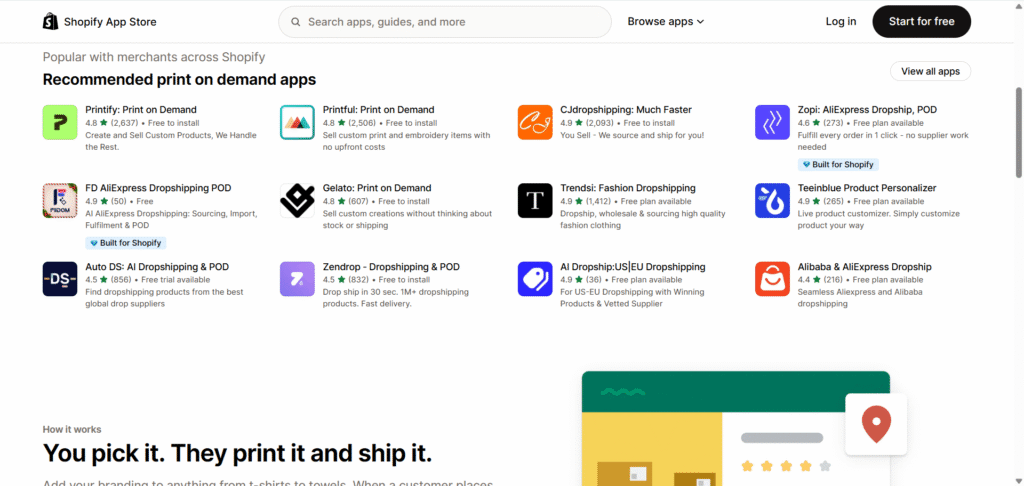
Your Shopify print-on-demand app is the engine of your business. It handles everything from product creation to fulfillment, so choosing the right partner is one of the most important decisions you’ll make.
While there are dozens of options, they generally fall into two categories: the versatile giants and the niche specialists.
To help you decide, we’ve created a data-driven comparison of the top 7 Shopify apps, pulling ratings directly from the Shopify App Store.
| App | Overall Rating | Best For | Key Feature |
|---|---|---|---|
| Printful | 4.8/5 (2,500+ reviews) | All-in-One Service & Quality | In-house global fulfillment |
| Printify | 4.8/5 (2,600+ reviews) | Product Variety & Profit Margins | Marketplace model with competing suppliers |
| Gelato | 4.8/5 (600+ reviews) | Eco-Conscious Brands & Global Reach | 100+ local print hubs in 32 countries |
| ShineOn | 4.5/5 (470+ reviews) | Jewelry & Personalized Gifts | High-margin products with message cards |
| CustomCat | 4.5/5 (90+ reviews) | US Fulfillment & Branded Products | Fast US-based production & shipping |
| Apliiq | 4.9/5 (250+ reviews) | High-End Apparel & Branding | Premium options like woven labels & patches |
| Teelaunch | 4.1/5 (110+ reviews) | Unique Products (Tumblers, etc.) | Diverse catalog beyond standard apparel |
Printful: Best for All-in-One Service & Quality
Printful is a great choice for beginners who value reliability and simplicity. Because they own and operate their fulfillment centers across the globe, they offer consistent print quality and a streamlined user experience. While their base product costs can be higher, you’re paying for a seamless, all-in-one service where you know exactly what you’re getting every time.
Printify: Best for Product Variety & Profit Margins
Printify operates on a marketplace model. Instead of handling printing themselves, they connect you to a vast network of independent print providers around the world. This creates competition, which often leads to lower base costs and better profit margins for you.
It also gives you access to an enormous catalog of over 900 products. The trade-off is that quality can vary between suppliers, making it essential to order samples.
Gelato: Best for Eco-Conscious Brands & Global Reach
Gelato stands out with its focus on sustainability and efficiency. With a network of over 100 print hubs in 32 countries, they automatically route orders to the facility closest to your customer.
This dramatically reduces shipping distances, costs, and carbon emissions. For brands that want to emphasize responsible production and serve a global audience, Gelato is a top contender.
ShineOn: The Go-To for Jewelry & Personalized Gifts
If you want to enter a high-margin niche, ShineOn is the undisputed leader for print-on-demand jewelry. They offer unique products like necklaces and bracelets that can be customized with personalized message cards, creating highly giftable items. This specialization allows sellers to command higher prices and stand out in a crowded market.
CustomCat: Best for US Fulfillment & Branded Products
For merchants primarily focused on the US market, CustomCat offers a significant speed advantage. With their large production facility in the United States, they can often print and ship products faster than competitors with more distributed networks. They offer a solid range of products and are known for their reliability and quick turnaround times.
Apliiq: Best for High-End Apparel & Custom Branding
Apliiq is for brands that want to move beyond basic t-shirts. They specialize in premium apparel and offer branding options that most POD services don’t, such as custom woven labels, patches, and embroidery.
If you’re building a genuine fashion brand and want your products to feel like they came from a boutique, not a printer, Apliiq provides the tools to do it.
Teelaunch: Best for Unique Products (Like Tumblers & Electronics)
Want to sell something other than apparel? Teelaunch has built its reputation on offering a diverse and sometimes quirky product catalog. You can find everything from tumblers and cutting boards to Bluetooth speakers and pet accessories. This variety is perfect for stores targeting specific hobbies or niches where a standard t-shirt just isn’t enough.
Bonus Sourcing Partner: FFOrder Dropshipping & POD
If you plan to run a hybrid store that sells both custom POD apparel and traditional factory-direct dropshipping items, FFOrder Dropshipping is a highly practical add-on app. It lets you bridge the gap between custom merchandise and wholesale catalog sourcing without the headache of managing separate suppliers and invoicing platforms.
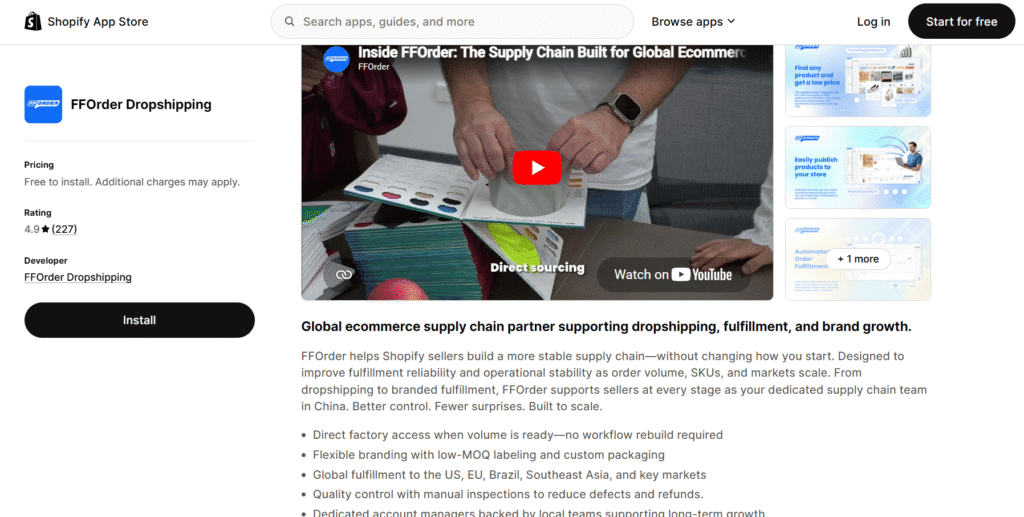
Unlike standard marketplaces, FFOrder routes all items through their centralized warehouse for manual quality control checks before they ship. This ensures consistent product quality and allows you to add custom neck tags, stickers, or brand cards with low MOQ. They offer fast shipping to the US/EU in 7-9 business days (10–15 business days globally) with 24-hour tracking auto-sync.
🎁 You can also claim an exclusive $15 signup coupon here to start!
How to Start: A 5-Step Shopify POD Store Setup Guide
With your budget in mind and a potential app partner chosen, it’s time to build your store. This five-step guide walks you through the entire technical setup, from a blank slate to a launch-ready business, highlighting the one critical step where most new sellers make a mistake.
(If you are completely new to e-commerce and need a broader overview of building a brand, registering an LLC, and setting up taxes, bookmark our master playbook on how to start a Shopify business.)
Step 1: Start Your Shopify Trial & Choose a Name
Use our official Shopify partner link below to create your store. It’s the same secure signup page, and while it costs you nothing extra, it helps support our content.
This $1 for 3 mon deal gives you full access to build out your Shopify store before you have to commit to a monthly plan. During this process, you’ll be asked to choose a store name. Don’t overthink this—you can always purchase and connect a custom domain name later. The initial yourstore.myshopify.com name is just a placeholder.
Step 2: Choose and Install Your Print-on-Demand App
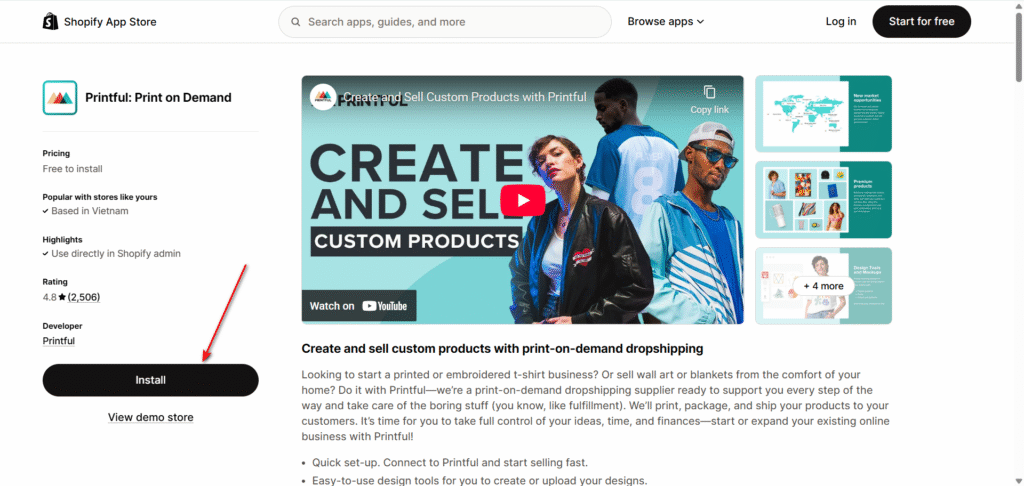
Once you’re inside your Shopify dashboard, navigate to the Shopify App Store. This is where you’ll find and install your chosen print-on-demand partner. Using Printful as an example:
- Search for “Printful” in the app store.
- Click “Install” on their listing page.
- You’ll be prompted to authorize the connection between Printful and your Shopify store. Approve it.
This will create a Printful account for you and automatically link it to your store, allowing the two systems to communicate seamlessly.
Step 3: Create Your First Product & Set Pricing
Now for the creative part. Inside your newly installed POD app, you’ll find a product catalog. The process is straightforward:
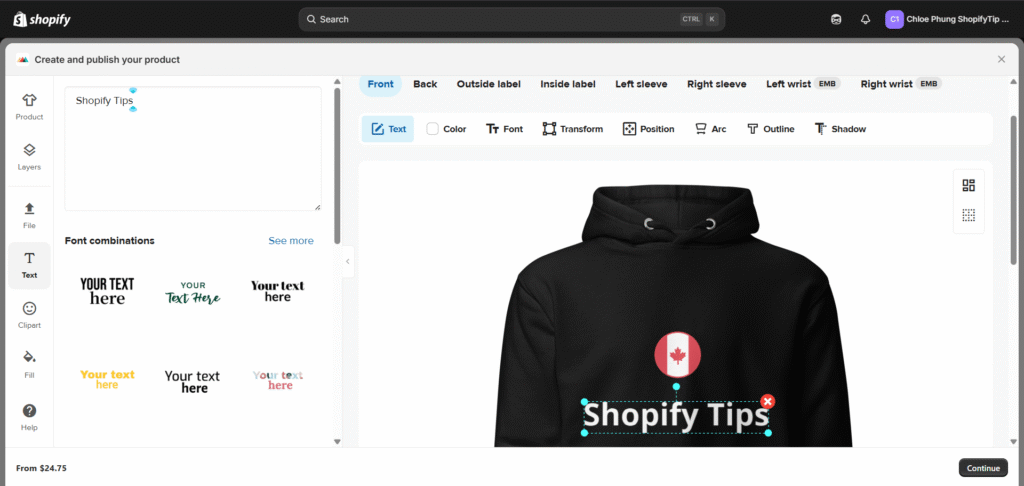
- Select a product: Browse the catalog and choose an item, like a hoodie.
- Add your design: Upload your artwork and position it using the app’s mockup generator. This tool will create realistic product images for your store.
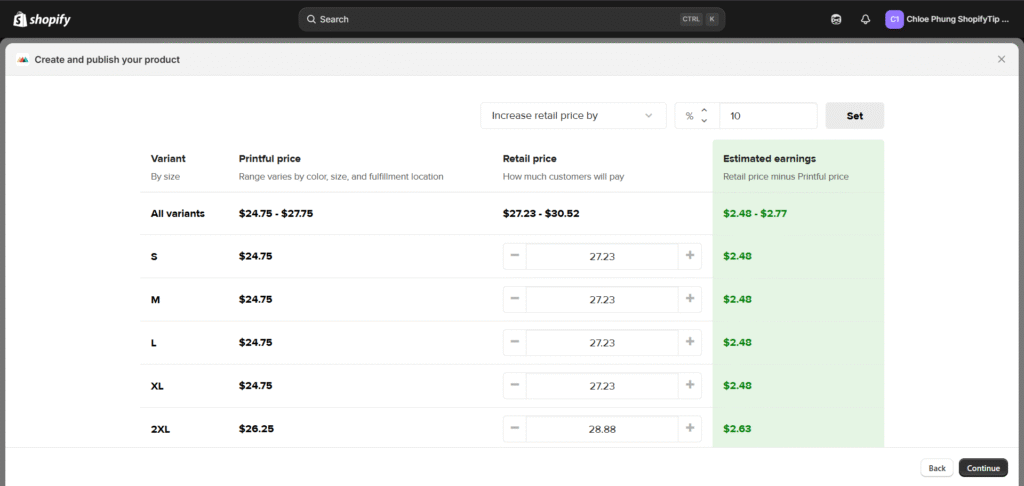
- Set your price: The app will show you its base cost for the product. You then set your retail price. Most apps will display your potential profit in real-time, helping you make an informed decision.
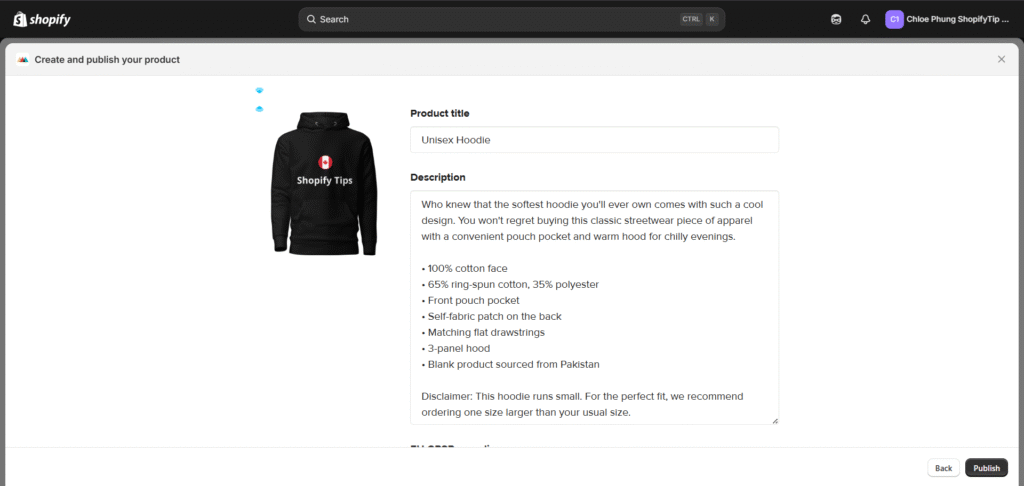
Once you’re happy with the result, you’ll “publish” the product to your Shopify store. It will appear just like any other product, ready for customers to buy.
Step 4: Configure Your Shipping Settings (The Critical Part!)
Pay close attention here. Incorrectly configured shipping is the single most common and costly mistake new POD sellers make.
Your POD app has its own shipping rates, but so does your Shopify store. If these aren’t synced, you could end up charging a customer $5 for shipping when the actual cost is $10, eating the loss yourself.
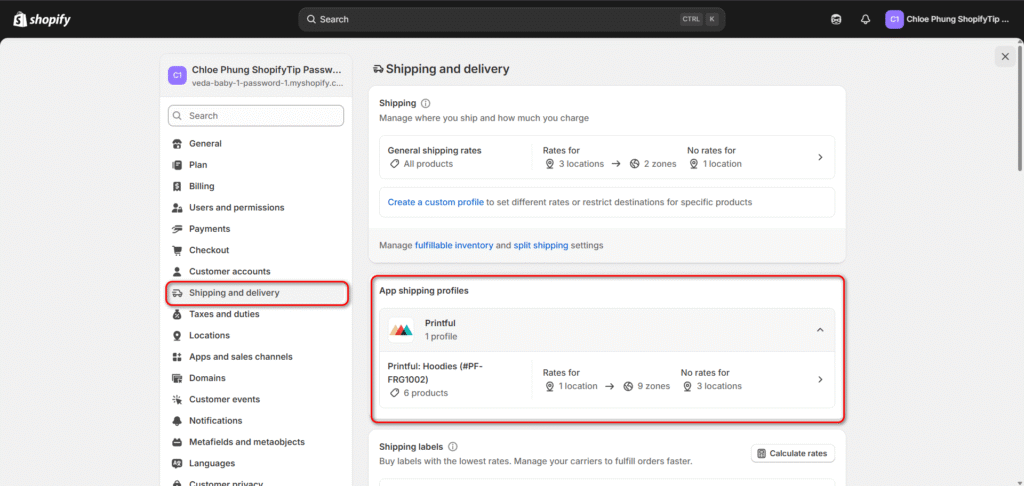
Thankfully, top apps like Printful and Printify can automatically manage this for you. After you add your first product, your POD app should create a shipping profile in Shopify. I recommend you take a moment to verify it’s working correctly.
Go to your Shopify Admin > Settings > Shipping and delivery. You should see a shipping profile created by your app. Click into it and ensure that the rates are assigned to the correct products and locations. This single check can save you hundreds of dollars in lost profit.
Step 5: Add Legal Pages & Set Up Payments
Finally, a few quick but essential steps to build trust and operate professionally. Shopify makes this easy with built-in templates. Go to Settings > Policies and generate templates for your:
- Refund Policy
- Privacy Policy
- Terms of Service
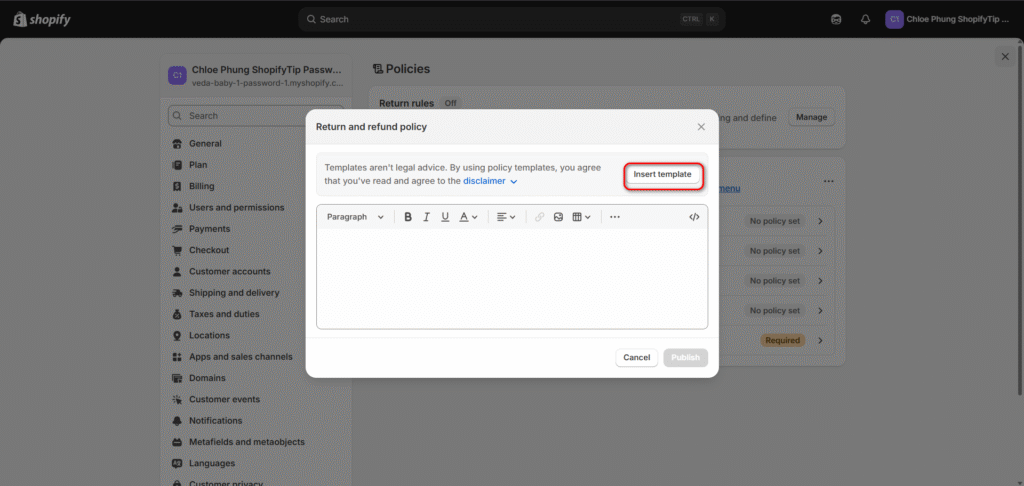
Having these pages isn’t just for customer trust; it’s a requirement for many marketing channels, including Pinterest’s Verified Merchant Program. After your policies are in place, follow the prompts to set up Shopify Payments so you can start accepting credit card orders on day one.
Your First 30-Day Marketing Plan to Get Sales
Your Shopify print on demand store is now live. This is where the real work of entrepreneurship begins: getting people to see and buy your products. Shopify marketing can feel overwhelming, so we’ve broken it down into a simple, week-by-week plan to build momentum and drive your first sales.
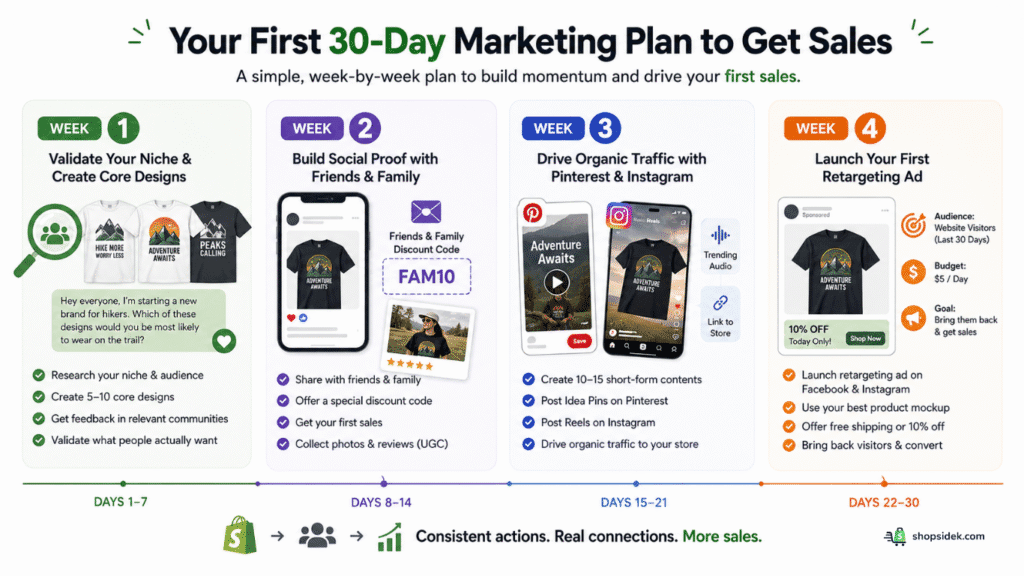
Week 1: Validate Your Niche & Create Core Designs
My number one rule is this: before you spend a dollar on ads, make sure you’re selling products people actually want. This week is all about market research and getting crucial feedback.
💡If you aren’t quite sure where to begin, browsing a list of winning Shopify product ideas can help you pinpoint a profitable niche before you start designing.
Your goal is to create 5-10 core designs and validate them with your target audience. Go where your potential customers hang out online. If you’re selling shirts for hiking enthusiasts, find a relevant Facebook Group or subreddit like r/hiking.
Share your product mockups with a simple, honest question: “Hey everyone, I’m starting a new brand for hikers. Which of these designs would you be most likely to wear on the trail?” This free feedback is invaluable and will guide you toward creating products that sell.
Week 2: Build Social Proof with Friends & Family
An empty store with zero sales can feel untrustworthy to new visitors. Your goal this week is to get your first few orders and generate social proof. It’s time for a soft launch to your personal network.
Post on your personal social media accounts and email close friends and family. Explain your new venture and offer them a special “friends and family” discount code as an incentive. The goal isn’t to get rich; it’s to get those first few sales on the board.
Once an order is delivered, follow up and ask them to send a photo of them using or wearing the product. This user-generated content (UGC) is marketing gold—far more authentic and persuasive than any professional mockup.
Week 3: Drive Organic Traffic with Pinterest & Instagram
With a few sales and hopefully some real customer photos, you can now start building your organic traffic channels. This week, focus on creating 10-15 pieces of short-form content for Pinterest and Instagram.
As marketing expert Alisa Meredith demonstrates in her own case study, Pinterest is a powerful visual search engine for eCommerce. Create Idea Pins using a tool like Canva. A simple Pin could be a 5-second video that cycles through a few of your best mockups with text overlay.
On Instagram, create simple Reels using the same mockups or UGC photos set to trending audio. The key is to showcase your products in an engaging way, linking back to your store to drive traffic that is ready to browse.
Week 4: Launch Your First Retargeting Ad
Now it’s time to bring back anyone who visited your store but didn’t buy. This week, you’ll launch your first retargeting ad with a small, manageable budget of $5 per day.
Retargeting shows your ads specifically to people who have already been to your website. Because they’re already familiar with your brand, they are far more likely to convert. Using the Facebook & Instagram sales channel in Shopify, you can easily set up a simple ad campaign.
- For your audience, select “Website Visitors from the last 30 days.”
- For the ad creative, use your most popular product mockup or a collage of your best designs.
- Add a simple offer, like free shipping or 10% off, to give them a final nudge to complete their purchase.
Shopify Print on Demand Conclusion
You’ve made it to the end of the playbook. You know how to budget for the real costs, how to choose the right app for your goals, and exactly what to do for your first 30 days of marketing. The technical setup is the easy part; true success in Shopify print on demand is built on a foundation of unique designs, smart partnerships, and consistent promotion.
You have the complete guide in your hands—the only thing separating your idea from a real, profitable business is the first step. Don’t wait for the perfect moment. The journey starts now.
Your brand is waiting to be built. You have the guide, the tools, and the plan. Start your free Shopify trial today and turn your creative ideas into a real business.
FAQs About Print on Demand for Shopify
Is print on demand still profitable in 2026?
Absolutely, but it requires a smart approach. The market is more competitive than ever, which means profitability no longer comes from simply uploading a generic design to a t-shirt. Success in 2026 is driven by creating a real brand, finding a specific niche you can dominate, and offering unique designs that connect with your target audience.
The global print-on-demand market is projected to continue its strong growth, and because the startup costs are so low, the potential for high-profit margins remains very strong for entrepreneurs who treat it like a real business, not a get-rich-quick scheme.
Can I really start with no money?
You can get very close, but starting with absolutely zero dollars is unrealistic. The “no inventory” aspect of print on demand eliminates the biggest startup expense, and Shopify’s free trial lets you build your entire store without any initial cost.
However, as we detailed in the cost breakdown, you should budget for a few essential expenses: your Shopify plan after the trial ends (~ $29/month), a custom domain name (~ $15/year), and the cost of ordering your own product samples to verify quality. While it’s one of the most accessible and low-cost business models available, a small initial budget is necessary to start correctly.
What happens if a customer wants a return?
This is a critical point to understand. Because every product is printed specifically for the customer who ordered it, print-on-demand companies generally do not accept returns for issues like ordering the wrong size or buyer’s remorse.
However, all reputable providers will offer a free replacement or a full refund if the product has a manufacturing defect, such as a flawed print, incorrect item, or damage from shipping. In practice, your responsibility is to manage customer expectations upfront.
A smart tactic is to add a clear disclaimer to your product pages and your official Refund Policy, stating that since items are custom-made, you can only process returns for quality issues. This simple step can prevent most customer service headaches.