In eCommerce, speed is everything. Every millisecond your website takes to load has a direct impact on your conversion rate and, ultimately, your revenue. This makes choosing a theme one of the most critical decisions you’ll make for your store.
When looking for a high-performance Shopify theme, Turbo by Out of the Sandbox is almost impossible to ignore. Widely recognized as a premium solution for high-volume merchants, it has built a massive reputation around its bold speed claims and flexible, conversion-friendly design. But is the Turbo Shopify theme actually as fast as advertised?
Instead of just taking their word for it, we put the official Turbo theme demo to the test with Google PageSpeed Insights. In this review, we’ll share the real data and break down exactly what it means for your store. We’ll also take a deep dive into its features, showcase real stores using the theme, and give you a step-by-step guide to get it installed today.
I’ve brought this guide to life in an animated video for anyone who finds it easier to follow along visually.
⚠️ Note: This review covers Turbo by Out of the Sandbox. There is a separate theme with the same name on the Shopify Theme Store, developed by a different company. The two products are unrelated.
Is the Turbo Theme Worth $425? The 60-Second Verdict
For merchants who need a quick answer, here it is: The Turbo Shopify theme is a premium, feature-rich one designed for established brands that prioritize site speed, scalability, and design flexibility above all else. Its powerful engine and extensive customization options make it an excellent investment for ambitious, high-volume stores with large product catalogs, particularly those on Shopify Plus.
From what I’ve seen, its premium price and advanced feature set come with a steeper learning curve that may overwhelm new merchants. While it boasts a powerful foundation, achieving elite mobile speed requires careful optimization, as our tests reveal.
Overall Rating
9.0/10| Pros | Cons |
|---|---|
| Blazing-fast desktop performance | High one-time cost of $425 |
| Highly flexible with extensive customization options | Mediocre mobile speed scores without proper optimization |
| Packed with built-in conversion features (no extra apps needed) | “Ludicrous” speed mode can create app compatibility issues |
| Designed for large inventories and Shopify Plus merchants | Steep learning curve for beginners |
If you’re new to eCommerce, you can start a free Shopify trial to explore the platform while you read the rest of our review.
The Speed Test: Real Performance Data from Turbo’s Official Demo
Out of the Sandbox markets Turbo as the “Ferrari” of Shopify themes, but marketing slogans don’t reduce bounce rates—performance does. To verify these claims, we ran the official Shopify Turbo theme demo (Portland preset) through Google PageSpeed Insights.
These tests provide a realistic look at how the theme performs out-of-the-box, loaded with the high-resolution images and sections typical of a live store.
| Metric | Desktop Score | Mobile Score |
|---|---|---|
| Overall Performance | 97/100 (Excellent) | 64/100 (Needs Work) |
| Speed Index | 0.8 s | 5.2 s |
| Largest Contentful Paint (LCP) | 0.9 s | 7.1 s |
Desktop Performance: Excellent (97/100)
On desktop, the Turbo theme lives up to its name with an elite performance score of 97/100. This result confirms that the theme’s underlying codebase is exceptionally clean and efficient when delivered over a standard broadband connection.
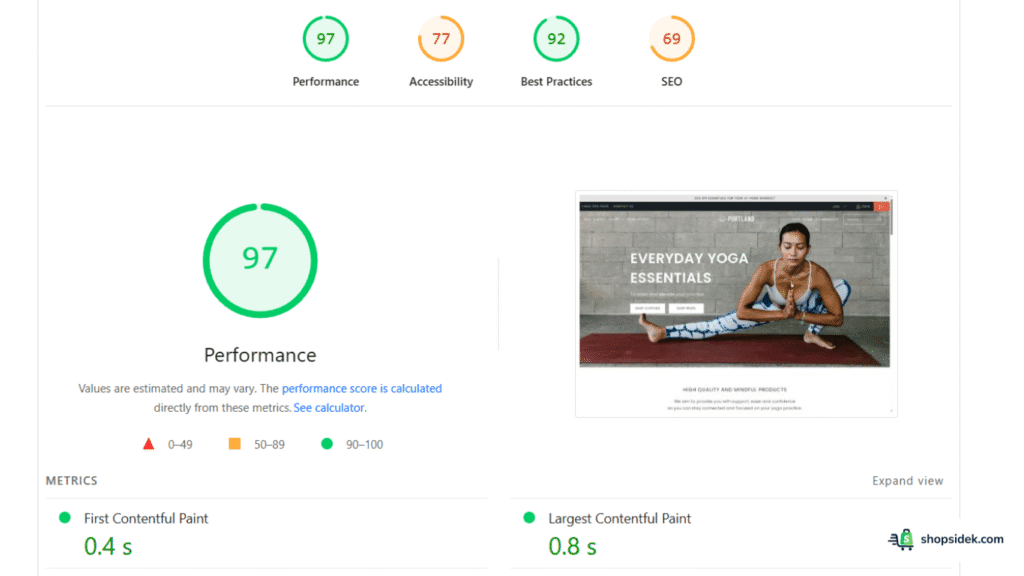
Key takeaways from the desktop data include a Speed Index of 0.8 seconds, meaning the visible parts of the page populate almost instantly. The Largest Contentful Paint (LCP)—a core web vital that measures when the main content is likely useful to the visitor—clocked in at a lightning-fast 0.9 seconds.
For merchants whose traffic comes primarily from desktop users (such as B2B wholesalers or office-supply retailers), Turbo provides a nearly frictionless browsing experience.
Mobile Performance: Needs Optimization (64/100)
The mobile results paint a more nuanced picture. With a score of 64/100, the mobile performance is average and highlights the reality of using a feature-heavy premium theme.
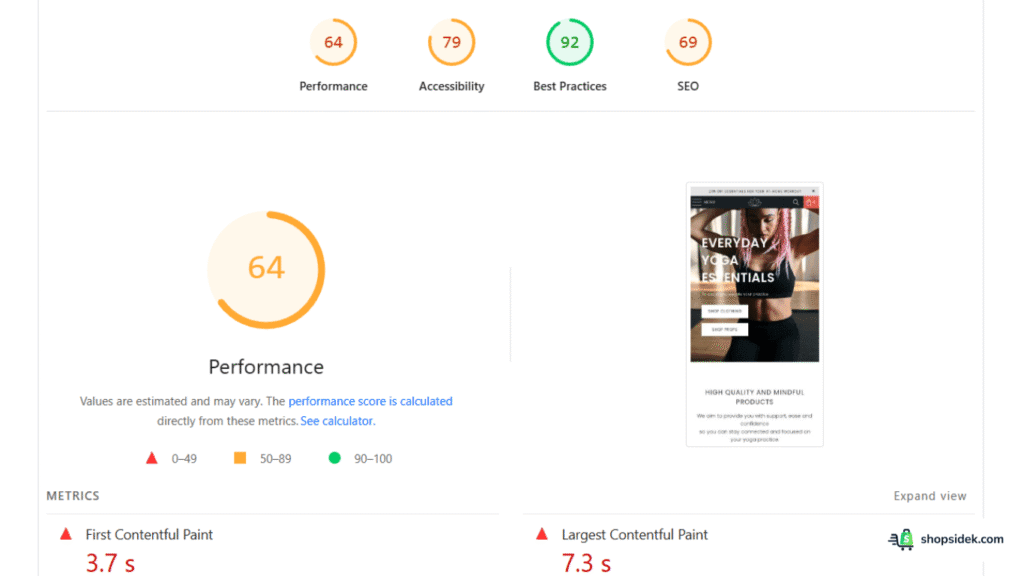
The data shows a First Contentful Paint (FCP) of 3.8 seconds and an LCP of 7.1 seconds. While these numbers might seem alarming compared to the desktop score, they are largely driven by the heavy media assets used in the demo store. The demo is packed with high-resolution hero banners and complex sliders that, while beautiful, strain 4G connections.
This score doesn’t mean the theme is “slow”—it means the theme is heavy. It carries a lot of functionality, and if you upload massive, unoptimized images (as seen in the demo), mobile speeds will suffer.
Analysis: What These Scores Mean for Your Store
The gap between the desktop (97) and mobile (64) scores reveals a critical insight for prospective buyers: The Turbo Shopify theme is a powerful engine, but you are the driver.
The theme provides the technical foundation for extreme speed—evident in the near-perfect desktop score. However, its mobile performance is highly sensitive to how you configure it. In practice, to unlock the “Turbo” speeds on mobile, you cannot simply install the theme and walk away. You must:
- Aggressively compress all images.
- Be selective with homepage sections (avoid stacking too many sliders).
- Utilize the theme’s built-in “Performance” settings (discussed in the features section below).
If you are willing to put in the work to optimize your assets, Turbo offers a ceiling for performance that few other themes can match.
A Guided Tour of Turbo’s 6 Styles (& Who Should Use Each)
One of the strongest selling points of the Turbo Shopify theme is its versatility. It comes with six distinct “styles” (or presets) included in the price. These aren’t just simple color swaps; they are pre-configured layouts designed to give your store a specific look and feel the moment you install them.
Here is a breakdown of the six styles and the types of brands they suit best.
1. Portland
The Versatile All-Rounder
Portland is the default style you’ll see in most Turbo theme demos. It features a clean, minimalist aesthetic that puts your product imagery front and center without distraction. Its balanced use of whitespace and typography makes it incredibly flexible.
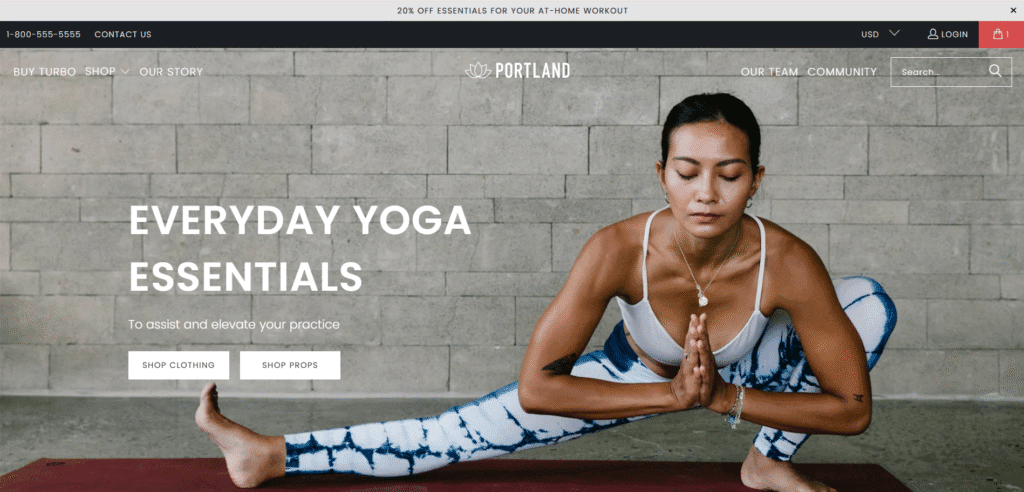
- Best For: Fashion boutiques, general lifestyle brands, and merchants who want a proven, conversion-focused layout.
2. Seoul
Smooth & Polished
Seoul softens the edges of the Turbo framework. With a focus on rounded buttons, smoother typography, and a gentle color palette, it feels more organic and approachable than the sharper styles.
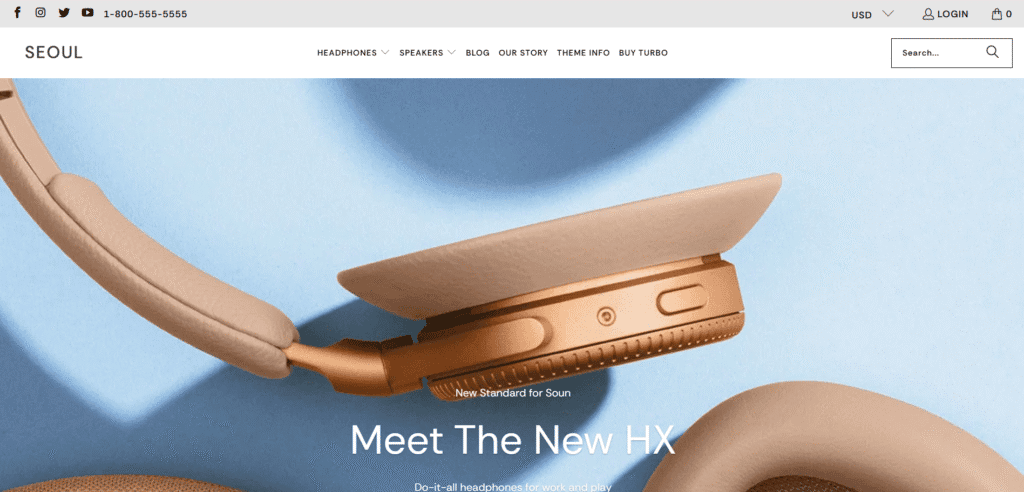
- Best For: Beauty brands, skincare lines, wellness products, and stores aiming for a calm, trustworthy customer experience.
3. Chicago
Bold & Retro-Inspired
If you want to make a statement, Chicago is the preset to choose. It uses bold, heavy typography and high-contrast layouts to create a rugged or retro vibe. It stands out immediately from the typical “clean” eCommerce look.

- Best For: Streetwear labels, men’s grooming products, coffee roasters, or any brand with a gritty, urban identity.
4. Dubai
Sleek & International
As the name suggests, Dubai is all about modern luxury. It utilizes sharp lines, a gold-and-black default palette, and a sophisticated grid layout. It feels expensive and professional, ideal for high-ticket items.
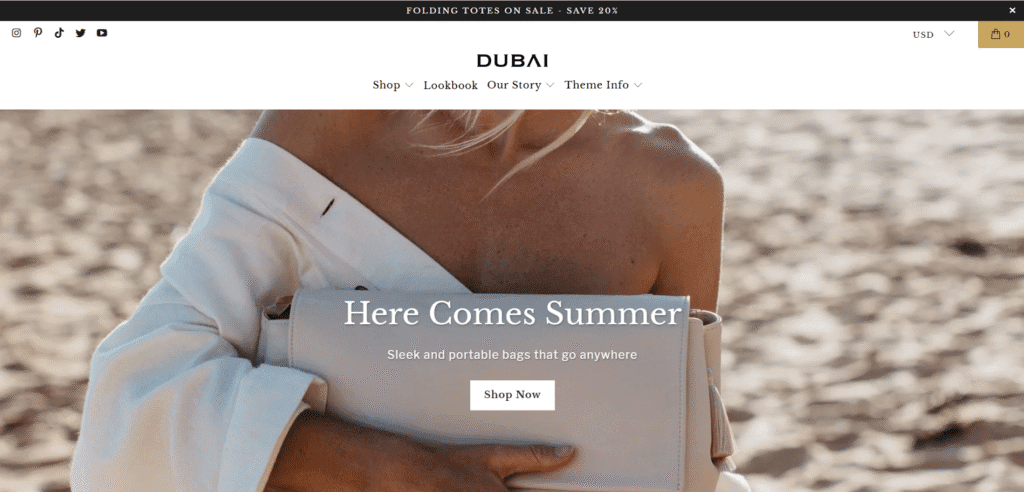
- Best For: Luxury jewelry, high-end watches, premium furniture, or exclusive tech accessories.
5. Florence
Elegant & Refined
Florence takes a softer, more boutique approach. It emphasizes fine details and elegant serif typography, creating a “curated” feel that mimics a high-end magazine spread.
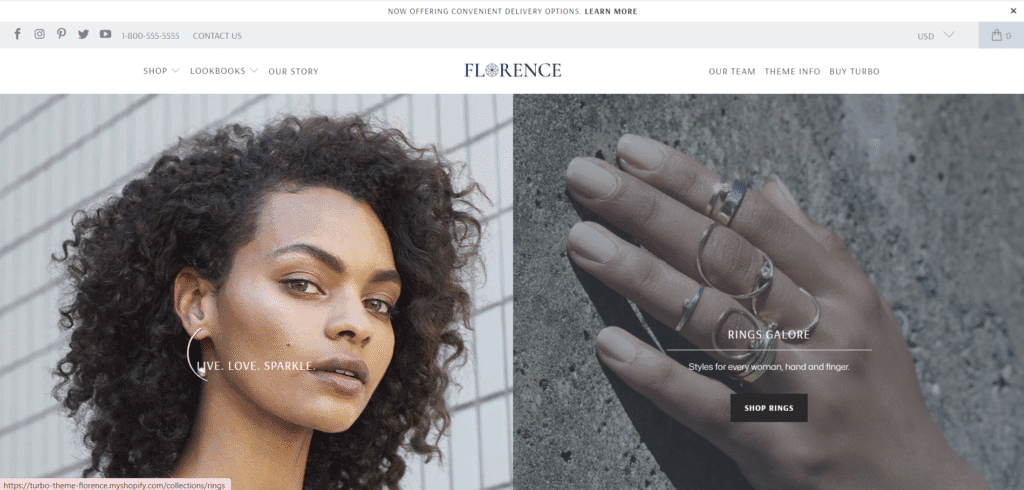
- Best For: Artisanal home goods, handcrafted jewelry, bridal shops, or sustainable fashion brands.
6. Tennessee
Immersive & Full-Width
Tennessee is designed to be visually arresting. It makes heavy use of full-width banners and large image sections, making it perfect for storytelling. It creates a browsing experience that feels more like a lookbook than a standard catalog.
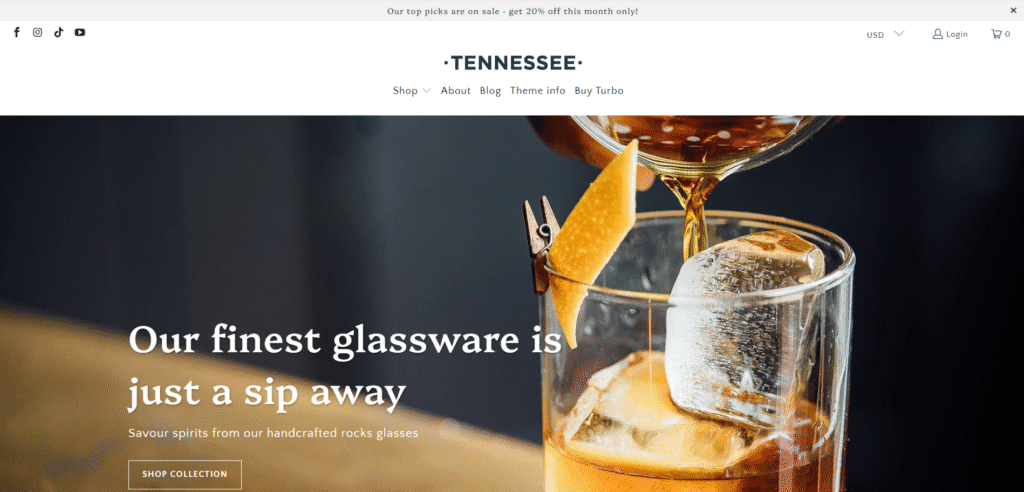
- Best For: Brands with exceptional lifestyle photography, outdoor gear, or stores with a smaller catalog that relies on strong visual storytelling.
A Deep Dive into Turbo’s Core Features
While speed is the headline act, the Turbo Shopify theme is also a comprehensive toolkit for building a high-conversion store. Out of the Sandbox has packed it with features that usually require expensive third-party apps, allowing you to streamline your tech stack. Here is a closer look at the engine under the hood.
The Two Performance Modes: “Sport” vs. “Ludicrous”
One of Turbo’s most unique selling points is its adjustable speed settings. Unlike most themes that have a single performance standard, Turbo lets you toggle between two distinct modes: Sport and Ludicrous.
Sport is the default setting. It provides a robust, high-performance experience that includes standard optimizations like image lazy loading and minified code. For most merchants, this offers the perfect balance of speed and stability.
Ludicrous mode kicks things into overdrive. It uses advanced page preloading technology to predict where a user is going to click next. When a customer hovers over a link, the theme begins loading that page in the background before they even click. The result is near-instant navigation that feels incredibly snappy. However, this aggressive preloading can sometimes conflict with third-party apps that rely on specific page load events. It is a powerful tool, but one that requires testing to ensure your other apps play nicely with it.
Advanced Product Discovery for Large Catalogs
If you have a catalog of 500+ products, guiding customers to the right item quickly is a massive challenge. Turbo solves this with enterprise-grade navigation tools designed specifically for large inventories.
Personally, I think the standout feature here is the multi-column mega menu. This allows you to create broad, easy-to-scan drop-down menus that organize complex categories (e.g., “Men’s > Shoes > Running > Trail”). You can even embed images and promotional banners directly inside the menu to drive traffic to specific collections.
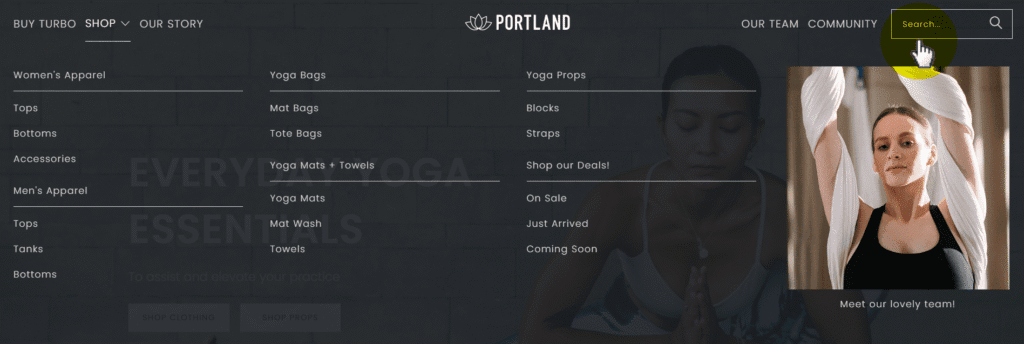
Paired with this is the predictive search bar. As a customer types, the search bar instantly displays product thumbnails, prices, and suggestions in real-time. This reduces the friction of hitting “enter” and waiting for a results page, helping shoppers find exactly what they need in seconds.
Built-in Tools to Boost Conversion Rates
Reducing the number of clicks to checkout is the golden rule of eCommerce conversion optimization (CRO). The Turbo Shopify theme includes several native features designed to remove friction and encourage impulse buys.
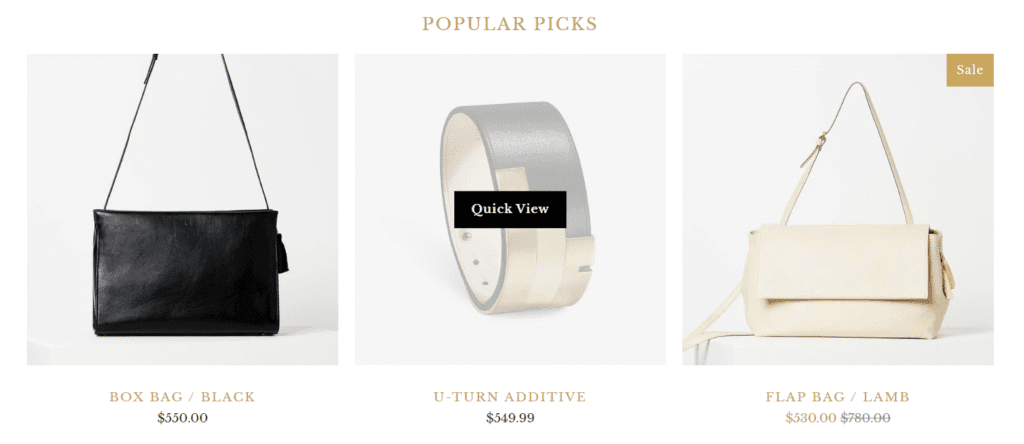
The Quick Shop functionality is a game-changer for collection pages. It allows customers to view product details, select variants, and add items to their cart without ever leaving the browsing page. This keeps the shopping momentum going and encourages multi-item orders.
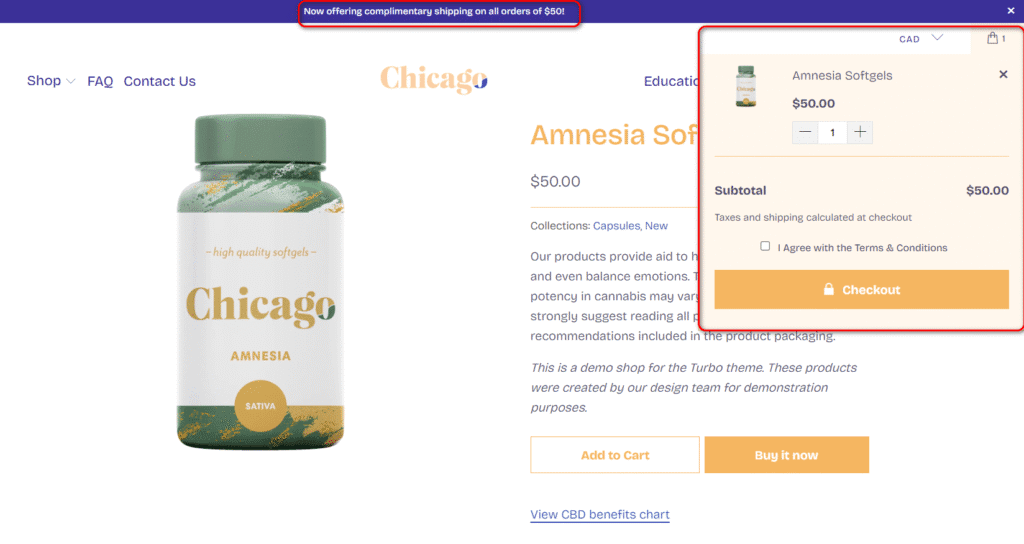
Additionally, the interactive slide-out mini cart lets users manage their cart without navigating away from the product they are viewing. For added urgency, you can enable built-in stock counters (“Only 3 left!”) and promotional banners directly in the header or product page. By having these features baked into the theme, you avoid the monthly fees and slower load times associated with installing separate “sales boost” apps.
High-Impact Merchandising & Visual Storytelling
Performance doesn’t mean boring design. Turbo excels at what is often called “visual storytelling”—using media to build a premium brand equity.
The theme supports full-width video banners (YouTube, Vimeo, or HTML5) on the homepage, allowing you to instantly immerse visitors in your brand lifestyle.
For fashion and home decor brands, I always suggest utilizing the Lookbook page template. It lets you upload lifestyle images with “hotspots”—clickable tags that link directly to the products featured in the photo. This turns inspiration directly into sales, bridging the gap between browsing a magazine and shopping online.
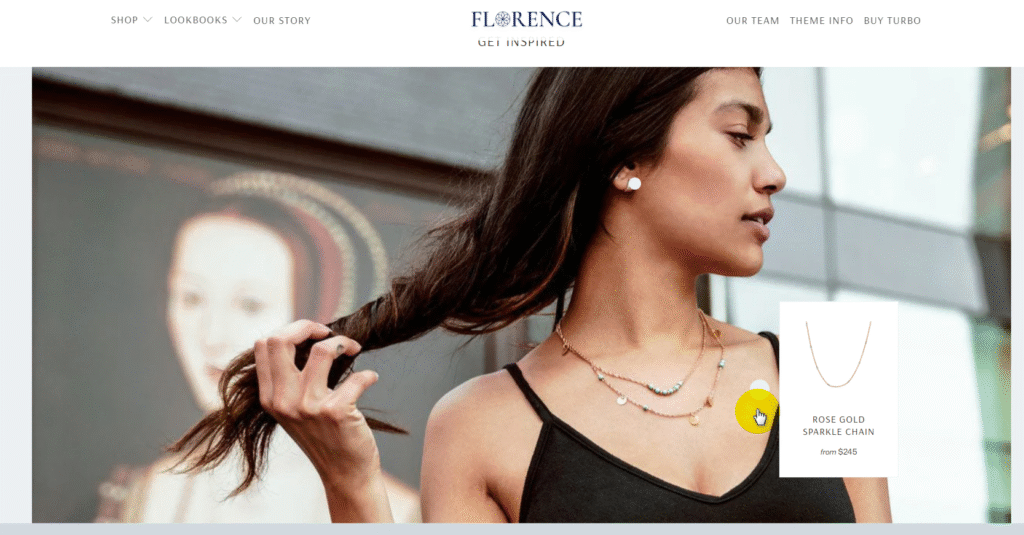
Inspired by these features? See them live on the official Turbo demo store, or see how they feel inside your own store with a free Shopify trial.
Real Shopify Stores Winning with the Turbo Shopify Theme
The true test of any Shopify theme isn’t how it looks in a carefully curated demo, but how it performs for real businesses processing real transactions. Turbo’s versatility allows it to power everything from sleek, single-product brands to massive furniture catalogs.
Here are three successful Turbo theme Shopify stores that are driving sales, showcasing exactly how different niches utilize its features.
To verify that these stores are indeed using Turbo, we checked them with our free Shopify theme detector tool, which identifies the active theme powering any Shopify store.
Case Study: Modkat
Niche: Premium Pet Supplies
Key Strategy: Handling Complex Variants with Minimalism
Modkat has transformed a typically utilitarian product—cat litter boxes—into a sleek, design-focused brand. Their use of the Turbo theme (specifically the “Portland” style) proves that you don’t need a cluttered interface to sell complex products.
Why It Works:
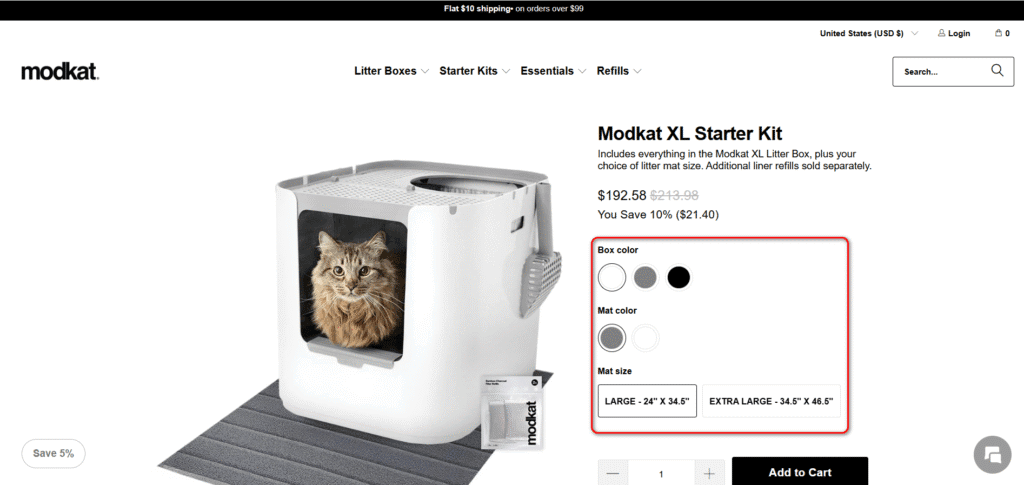
Clean Variant Swatches: As seen in their “Starter Kits,” Modkat sells products with multiple customization options (Box Color, Mat Color, and Mat Size). Instead of overwhelming the user with three separate drop-down menus, Turbo displays these as clean, clickable color swatches and button selectors. This makes the decision-making process visual and intuitive, reducing friction on the product page.
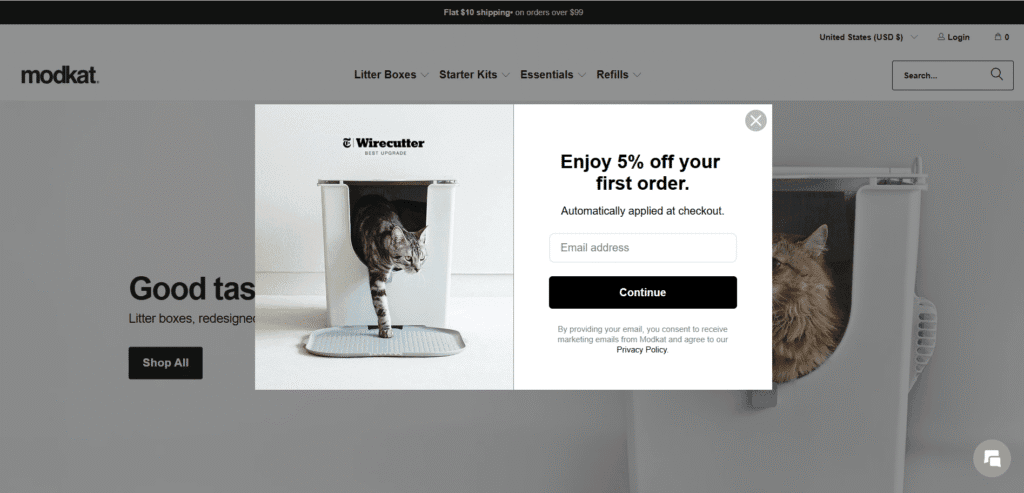
High-Converting Popup: Modkat utilizes Turbo’s native newsletter popup to capture leads immediately. By offering a clear incentive (“Enjoy 5% off”) combined with strong social proof (the “Wirecutter Best Upgrade” badge) directly in the popup, they build trust and value before the customer even browses the catalog.
Case Study: Tiem Athletic
Niche: Performance Cycling Footwear
Key Strategy: Visual Storytelling & Frictionless Cart
Tiem Athletic sells high-performance cycling shoes, a product category that relies on both technical specs and lifestyle appeal. They lean heavily on Turbo’s visual storytelling tools to bridge this gap effectively.
Why It Works:
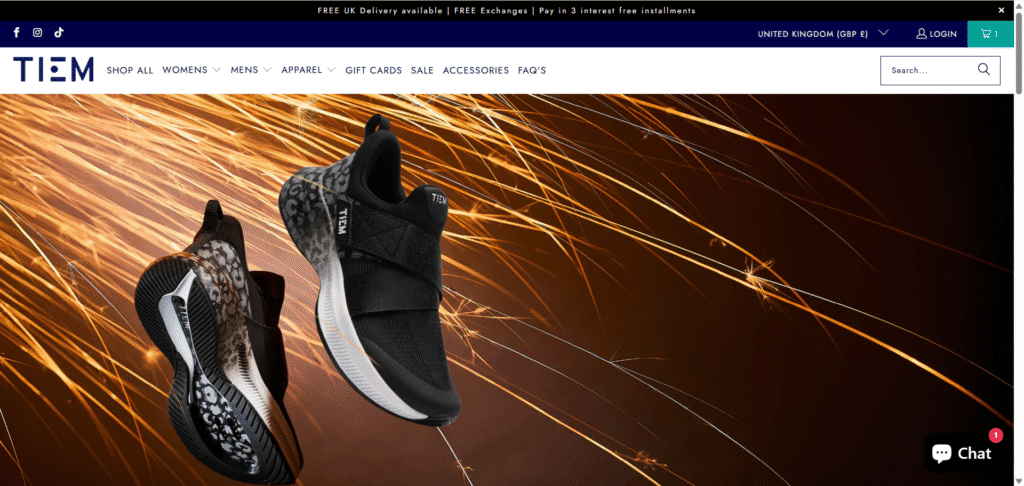
Immersive Hero Banners: As shown in the screenshots, Tiem uses Turbo’s full-width banner sections to display high-resolution, dynamic photography. The theme handles these heavy visual assets efficiently, allowing the brand to create a premium, immersive first impression without sacrificing load speeds.
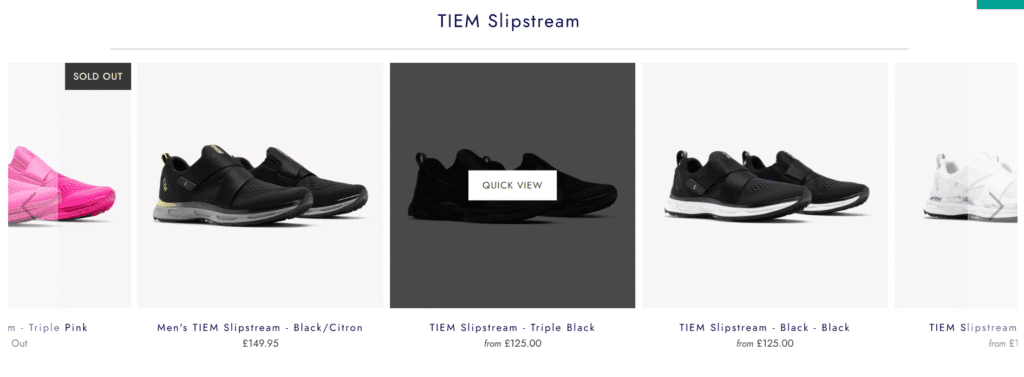
Quick View & Slide-Out Cart: To maximize conversions, Tiem utilizes Turbo’s “Quick View” feature on collection pages. When a user hovers over a shoe style, a “Quick View” button appears, allowing them to see details instantly.
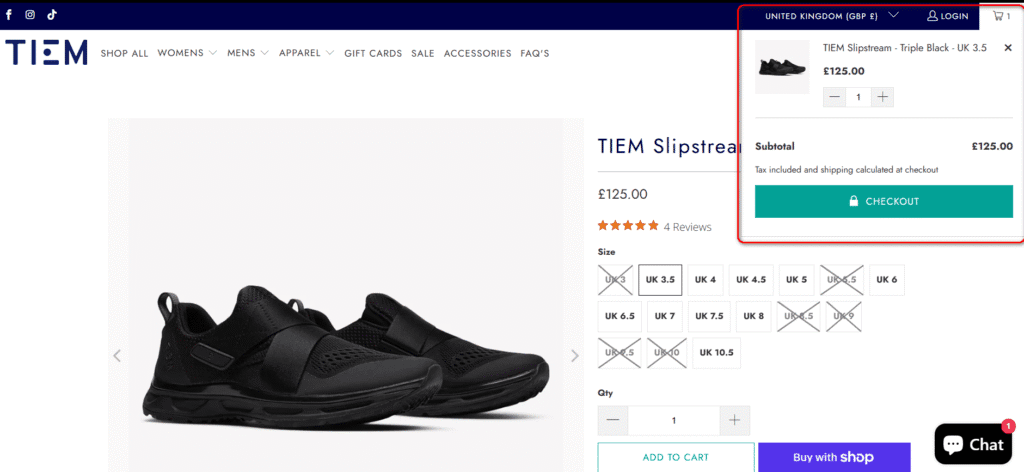
Once an item is added, the slide-out mini cart activates on the right side of the screen. This confirms the addition and offers a direct path to checkout, keeping the customer engaged without forcing a page reload.
Case Study: Froy
Niche: Modern Furniture & Decor
Key Strategy: Mastering Large Inventory Navigation
Furniture stores face a unique challenge: a massive catalog with complex categories (e.g., Living Room > Seating > Sectionals). Froy uses Turbo’s robust navigation engine to make thousands of SKUs easy to browse without overwhelming the shopper.
Why It Works:
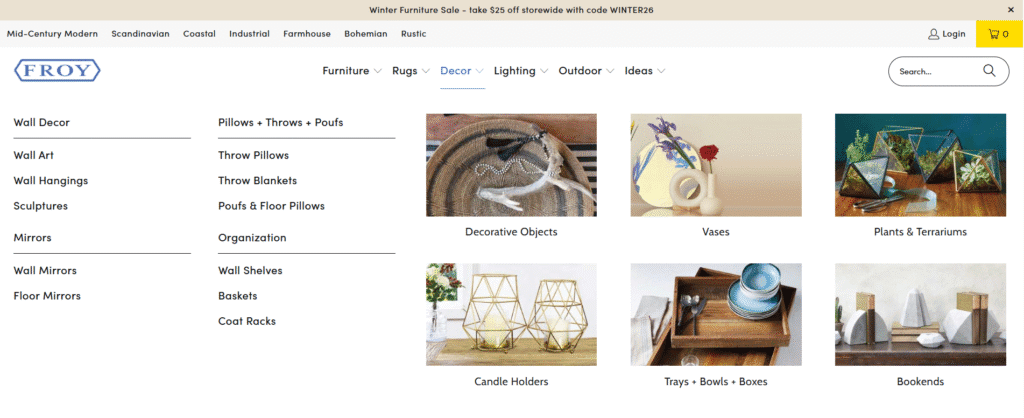
Visual Multi-Column Mega Menu: Froy organizes its extensive inventory using Turbo’s advanced mega menu. As shown in the screenshot, the “Decor” drop-down isn’t just a boring list of links. It combines clear text categories (Wall Decor, Mirrors) on the left with visual thumbnails (Vases, Plants) on the right. This visual cue helps customers instantly recognize the category they want.
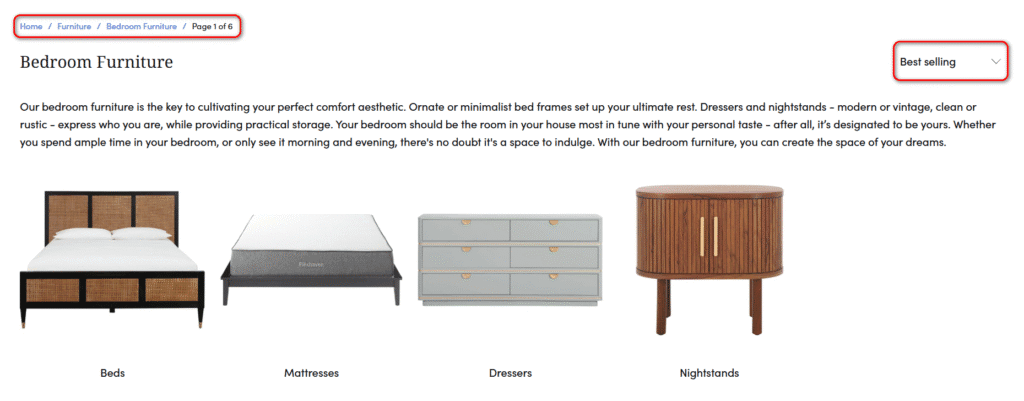
Sub-Collection Navigation: Instead of dumping all products onto a single “Bedroom Furniture” page, Froy utilizes Turbo’s ability to display sub-collections at the top of the page. Users can click specifically into “Beds,” “Mattresses,” or “Dressers” via clean image blocks. Paired with clear breadcrumb trails and “Best Selling” sorting options, this structure prevents the “endless scroll” fatigue often seen on large catalog sites.
How to Purchase and Install Shopify Turbo Theme
Unlike standard themes, you won’t find Turbo in the official Shopify Theme Store. Because it is a premium third-party theme, the installation process is slightly different but still straightforward.
Follow these five steps to get your store running on Turbo:
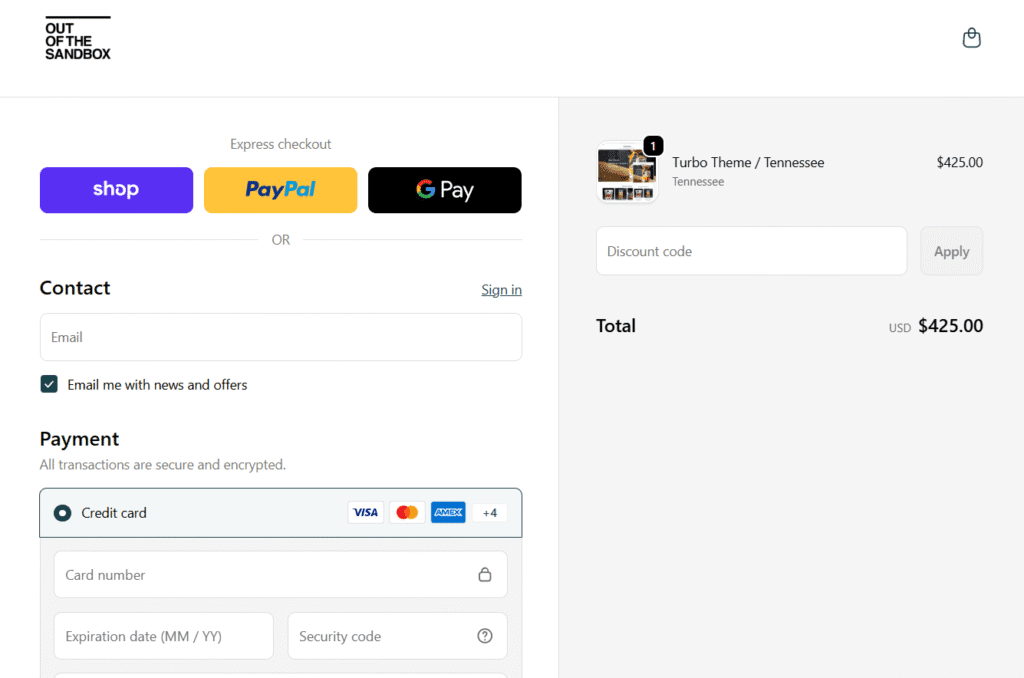
1. Purchase from the Developer
Go to the official Out of the Sandbox website and purchase the Turbo Shopify theme license. You will need to provide your shop URL (e.g., yourstore.myshopify.com) during checkout to register your license.
2. Download the Theme File
Check your email for the order confirmation. It will contain a link to download the theme package. Save the turbo.zip file to your computer.
Note: If the download gives you a folder containing multiple files, unzip it first and locate the specific .zip file named after the theme.
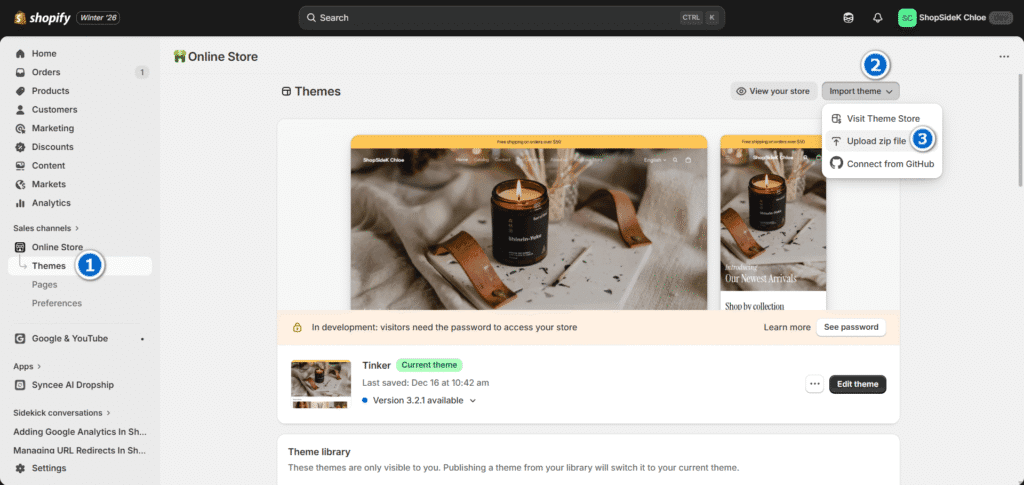
3. Go to Your Shopify Admin
Log in to your Shopify store. In the left-hand dashboard menu, click on Online Store, then select Themes.
- Click the Import themes button.
- Select Upload zip file.
- Choose the turbo.zip file you downloaded in Step 2 and click Upload file.
5. Customize and Publish
The theme will now appear in your library. It is not live yet! Click Edit theme to start adding your logo, products, and configuring the settings. When you are ready for customers to see it, click Publish to replace your current theme.
The Hidden Downsides: What to Know Before You Buy
While the benefits are clear, no theme is perfect. Before making a $425 investment, it is crucial to weigh the cons and understand the common Turbo theme problems that merchants encounter once they start building.
The “Ludicrous” Mode & App Compatibility
Turbo’s “Ludicrous” speed setting is a major selling point, but it can quickly become a double-edged sword. Because this mode uses aggressive background preloading to make navigation feel instantaneous, it frequently causes compatibility issues with third-party apps that rely on traditional page load events.
Experienced Shopify experts, such as the developers at JadePuma who have built hundreds of stores with the theme, have noted that this aggressive caching often breaks complex apps or product review widgets. Consequently, I often notice that many merchants are forced to downgrade to the safer “Sport” mode to keep their tech stack functioning.
The Reality of Third-Party Support
Because you purchase this theme directly from Out of the Sandbox rather than the official Shopify Theme Store, your technical support is handled entirely by the developer. While they provide an extensive library of documentation and a robust knowledge base, user feedback points to mixed experiences with direct ticket response times.
It’s worth remembering that if you run into a severe coding conflict, you cannot rely on Shopify’s 24/7 support team to fix it. This reliance on third-party support can be stressful if you encounter a critical bug during peak shopping events.
Requires Careful Image Optimization
As our mobile PageSpeed test revealed earlier, simply installing Turbo does not guarantee perfect performance out of the box. The theme provides a highly optimized foundation, but if you upload massive, uncompressed hero images or bulky video files, your site will still load slowly.
Achieving elite mobile speed requires you to rigorously compress every visual asset, utilize modern formats like WebP, and follow strict performance best practices. Turbo is a high-performance engine, but it is entirely up to you to keep it lightweight.
Final Verdict & Who Should Invest in Shopify Theme Turbo
After running the data, analyzing its features, and exploring real-world examples, our Turbo theme review concludes that this is a technically powerful and remarkably flexible theme, but it’s not a magic wand. Its near-perfect desktop performance score proves that it has an elite engine capable of delivering incredible speed, a critical factor for boosting conversions.
The Turbo Shopify theme is the right choice for serious, established merchants who understand that a premium theme is an investment in scalability. If you have a large product catalog, prioritize desktop shopping, and are prepared to follow image optimization best practices to achieve top-tier mobile speed, then Turbo provides a powerful foundation that can grow with your brand for years to come.
However, if you’re a new merchant on a tight budget or someone looking for a simple “plug-and-play” solution, the high price and steep learning curve might be a barrier. For those ready to build a high-performance store, Turbo is one of the best investments you can make.
Ready to build a high-performance store? Get the Turbo Theme from Out of the Sandbox and start your free Shopify trial today.

Transparency Note: I’m an official Shopify Media Partner. If you sign up through my link, I may earn a small commission—never at any cost to you. Your support helps keep this blog free and valuable.
FAQs About Turbo Theme For Shopify
Can I try the Turbo theme for free?
Turbo does not offer an unlimited free trial version to install on your live store. However, Out of the Sandbox provides a 14-day money-back guarantee. This allows you to purchase the theme, test its features and performance in your specific environment, and get a full refund if it doesn’t meet your expectations.
Can I get a Shopify Turbo theme free download?
No, there is no legal way to download the Turbo theme for free. It is a premium product protected by copyright. Be extremely cautious of websites offering a “nulled” or free version of the Turbo theme. These files often contain malicious code, malware, or backdoors that can compromise your store’s security and steal customer credit card data.
Additionally, pirated themes do not receive updates or support, leaving your store vulnerable to bugs. It is safer to invest in the official license or use a free Shopify theme while you grow.
Is the Turbo Shopify theme good for SEO?
Yes. Turbo is built with clean, semantic HTML and CSS, making it easy for search engines to crawl. Its focus on speed and mobile responsiveness also aligns with Google’s Core Web Vitals, giving you a strong technical foundation for higher rankings.