Choosing a Shopify theme is one of the most important decisions you’ll make for your online store. The Shrine theme is a popular contender, promising a “conversion machine” that’s both beautiful and fast. But with a sea of glowing marketing claims and skeptical user reviews, it’s hard to know if it’s truly a smart investment.
You need data, not just opinions.
Our mission is to provide the most transparent review of the Shrine theme Shopify available. We’ll explore its features and design, but we’ll also go deeper by testing its performance against key benchmarks and analyzing its true long-term cost. By the end of this review, you’ll have the unbiased information you need to decide if Shrine is the right foundation for your business.
I’ve also provided an illustrated video version of this topic for your convenience.
My advice is before you spend a dollar on any theme, it’s smart to get a feel for the platform itself. You can start building your store on Shopify’s free trial while you finish this review.
What is the Shrine Theme Shopify? A 60-Second Overview
The Shrine theme, developed by Shrine Solutions, is a premium third-party theme for Shopify designed for a specific type of merchant. Its core promise is to deliver a minimalist aesthetic packed with a bundle of conversion features, reducing the need for some third-party apps.
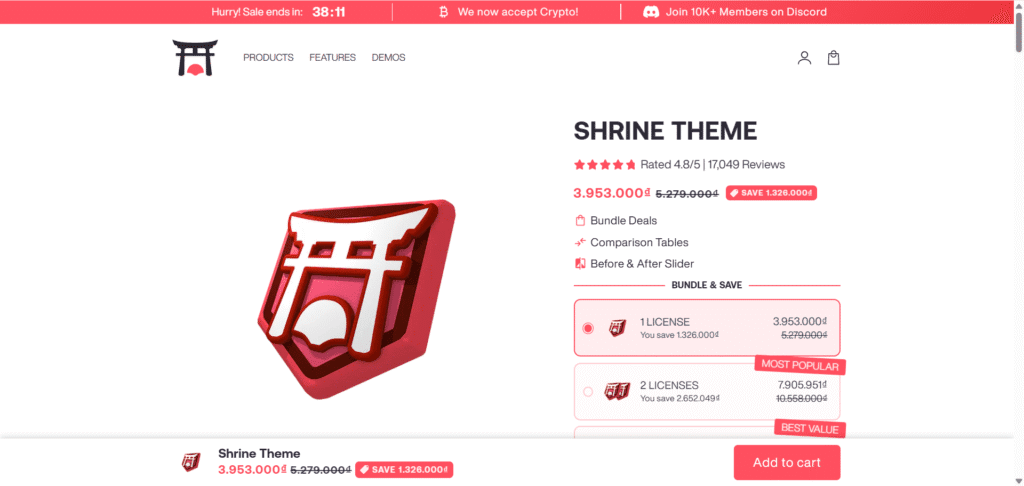
Shrine focuses on a clean, visually-driven layout that puts product imagery front and center. It aims to boost average order value with integrated tools like cart upsells, quantity breaks, and “before & after” image sliders. This makes it particularly popular among direct-to-consumer (DTC) brands and new store owners who want a streamlined setup without complex configurations.
Here’s a quick look at the essential details:
| Feature | Detail |
|---|---|
| Creator | Shrine Solutions |
| Best For | DTC brands, beginners, visually-driven stores |
| Core Promise | Aesthetic design with bundled conversion tools |
| Pricing Model | One-time fee (with specific tiers) |
How Fast is Shrine? Live Speed Test vs. Key Benchmarks
Shrine’s official website promises a theme “Built For Peak Performance.” But in an online world where every millisecond counts, how fast is it really? To answer this, we moved beyond marketing claims and conducted our own objective analysis.
On February 4, 2026, we tested the official demo stores for Shrine and three key competitors using Google PageSpeed Insights. We compared them against Shopify’s own free Dawn theme to establish a reliable performance benchmark. Here’s what the data revealed.
Mobile Performance Analysis
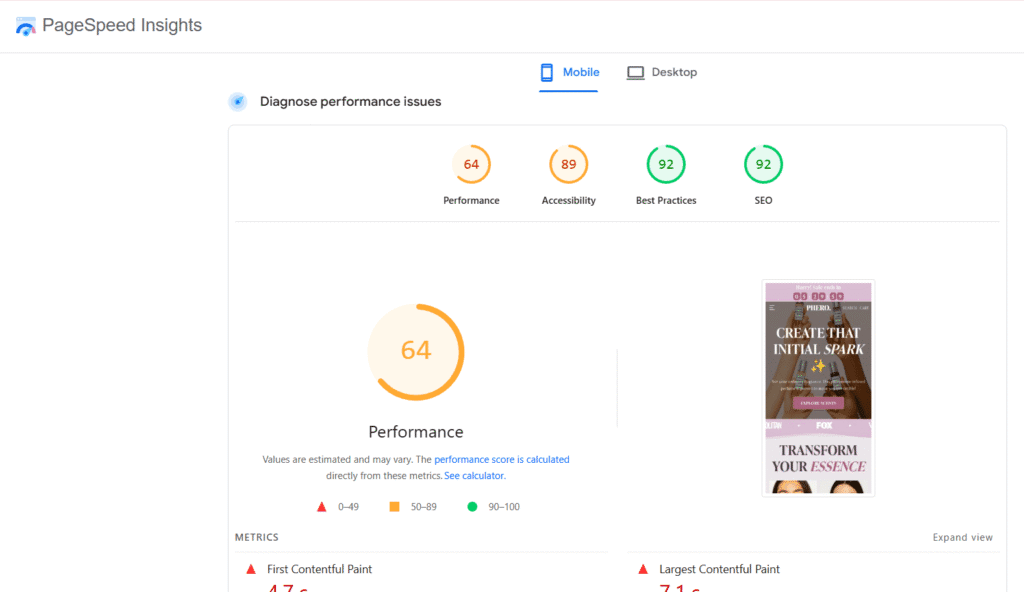
For mobile users, speed is everything. In our tests, Shrine scored a 64, placing it in the average performance tier alongside Booster Theme (61). While this is a respectable score, the most important benchmark is Shopify’s free Dawn theme, which scored an exceptional 94. This high score indicates a superior level of optimization for mobile shoppers, which is critical since a majority of eCommerce traffic now comes from mobile devices. Debutify rounded out the comparison with a score of 52.
Desktop Performance Analysis
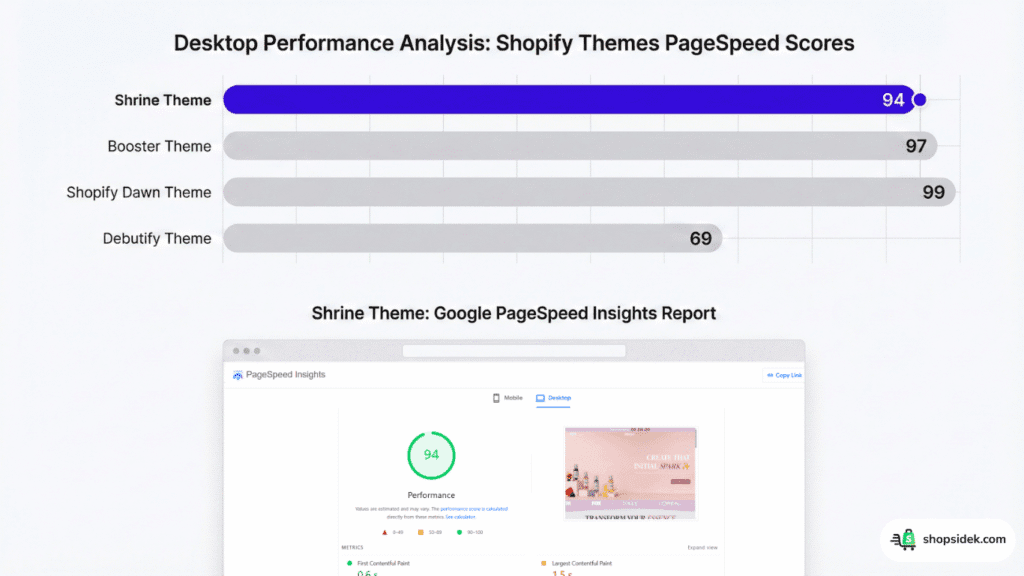
On desktop, the story is much different. Shrine performs excellently with a score of 94, putting it in the top tier for speed. This score nearly matches the performance of Booster Theme (97) and the benchmark set by Shopify’s Dawn theme (99). This data confirms that Shrine provides a very fast and smooth browsing experience for customers shopping on a laptop or desktop computer, which is a significant strength. Debutify’s desktop performance was lower, with a score of 69.
The Great Review Debate: Shrine’s 20,000+ Reviews vs. Trustpilot’s 2.5 Stars
One of the most confusing aspects of researching Shrine theme Shopify is its social proof. The official website claims the theme is trusted by over 30,000 stores and boasts a near-perfect rating based on thousands of reviews. However, a quick search on public review platforms like Trustpilot paints a drastically different picture.
To me, this massive discrepancy is a significant red flag for any potential buyer. While the on-site testimonials, including screenshots from a private Discord server, seem authentic, they clash with the unfiltered feedback available elsewhere. Let’s break down what users on public forums are actually saying.
What Users Praise: The Good
Among the positive reviews, a clear pattern emerges. Satisfied customers frequently praise Shrine’s minimalist design and clean aesthetic, which allows their product photography to shine. Many users appreciate that key conversion features work well right out of the box, providing immediate value without extensive setup.
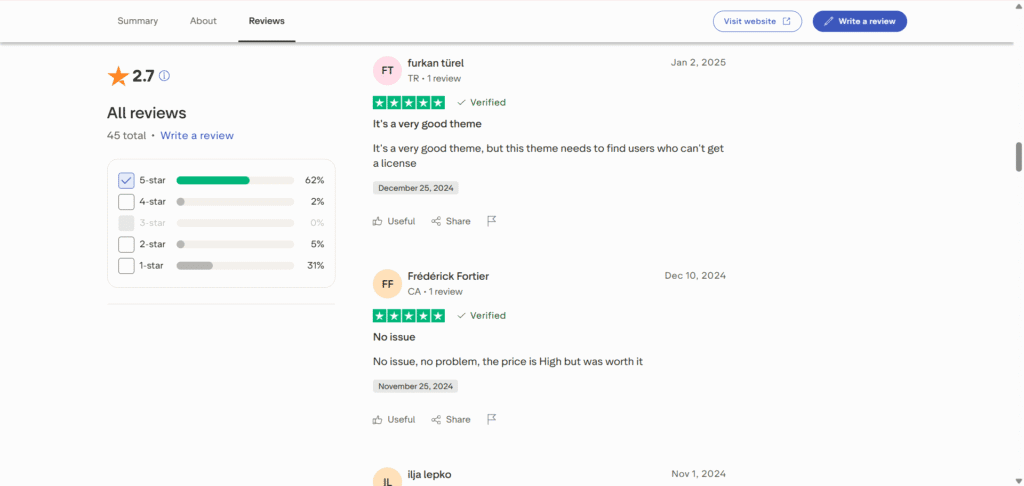
In some specific cases, users have also reported receiving helpful and effective support that resolved their issues, suggesting that positive experiences are possible, even if they are not the majority voice on public platforms.
What Users Complain About: The Bad
The negative feedback is more voluminous and centers on a few critical issues. The most common complaint across both Trustpilot and Reddit is the near-total lack of customer support. Many users report sending multiple emails and messages with no response, leaving them stranded with bugs or setup problems.
Another major point of frustration is the gap between marketing promises and reality, especially concerning the “lifetime” license and built-in features. As one user detailed in their Trustpilot review:
Disappointing theme, limited features and misleading marketing claims… While the website presents Shrine as a highly conversion-focused and feature-rich theme, in practice the options are quite limited. Many basic things require workarounds or additional paid apps.
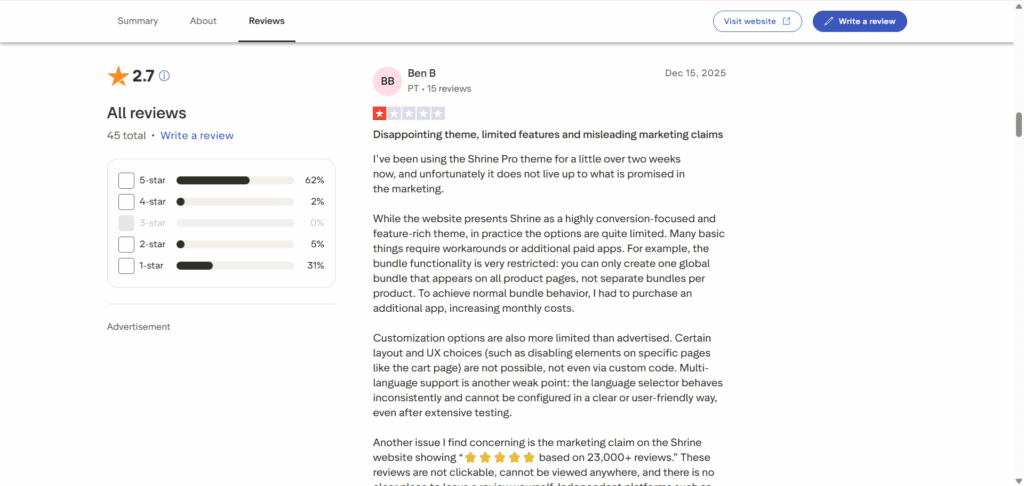
This sentiment is echoed in Reddit discussions where users often attempt to sell their licenses or admit to seeking out free versions, suggesting the value proposition feels misaligned with the price for a significant portion of its customer base.
3 Real Examples of Shopify Stores Using the Shrine Theme
Theory and data are useful, but seeing a theme in action provides the ultimate proof. To fill a gap left by nearly every other review, we found real-world Shopify stores that use Shrine to power their business. This is how actual brands leverage its design and features.
Example 1: Luhxe – The Minimalist Showcase
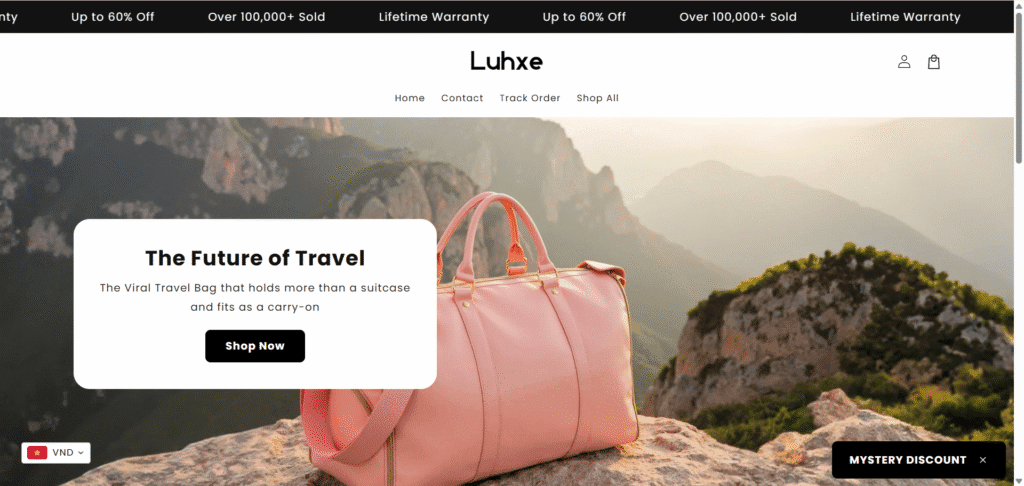
Travel accessories brand Luhxe is a perfect example of Shrine’s “less is more” design philosophy. The homepage immediately greets visitors with a large, high-quality hero image that showcases their product in a lifestyle context. The theme’s clean typography and minimalist header put the focus entirely on the visuals and the core value proposition: “The Future of Travel.”
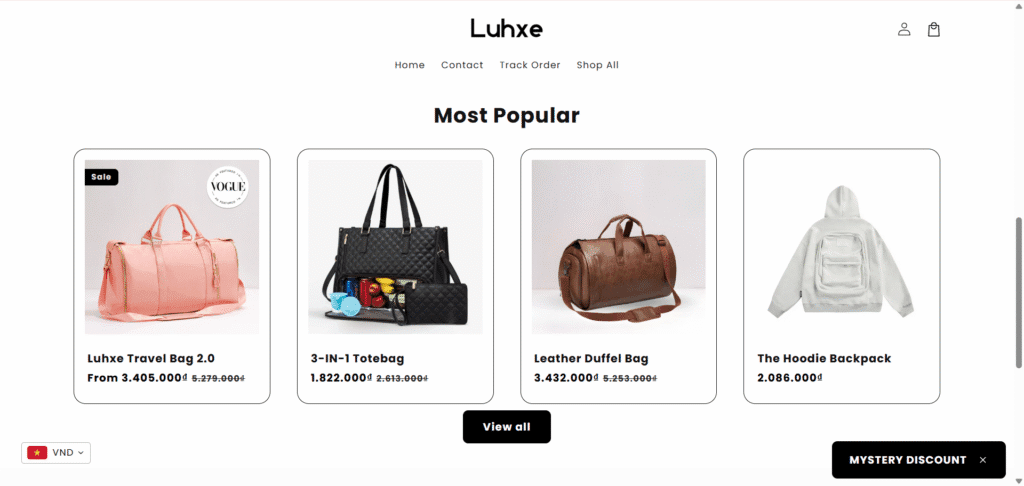
Luhxe leverages Shrine’s simple grid layout to present its most popular products, creating a frictionless browsing experience that feels premium and trustworthy. This is Shrine used to its greatest strength—creating a sleek, professional storefront for a visually-driven brand.
Example 2: Bleame – Maximizing the Product Page
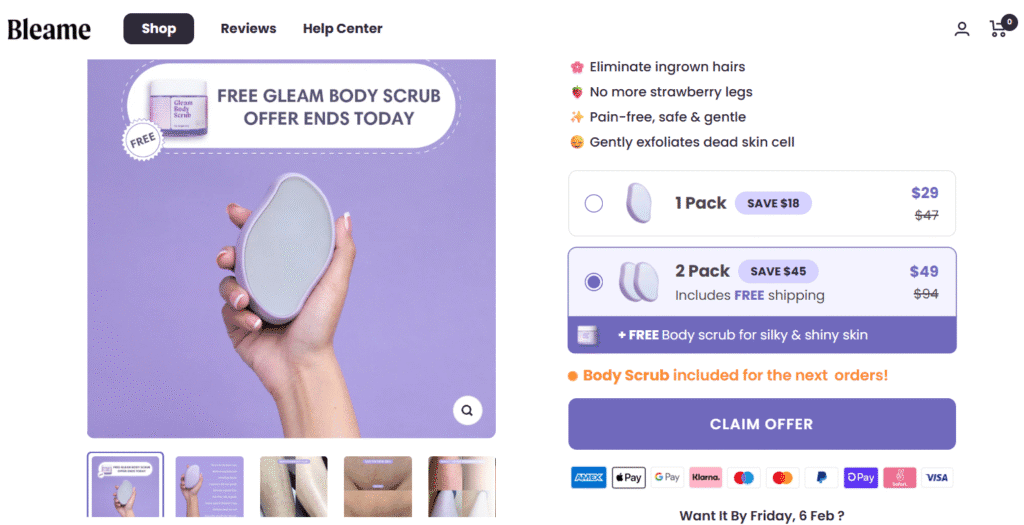
Skincare brand Bleame leverages Shrine’s product page capabilities to build confidence and increase order value. The page is structured to answer every customer question, using collapsible rows to neatly organize product details and FAQs. A prominent “Buy More, Save More” feature is strategically placed on the page. It encourages customers to purchase multiple items by highlighting clear savings.
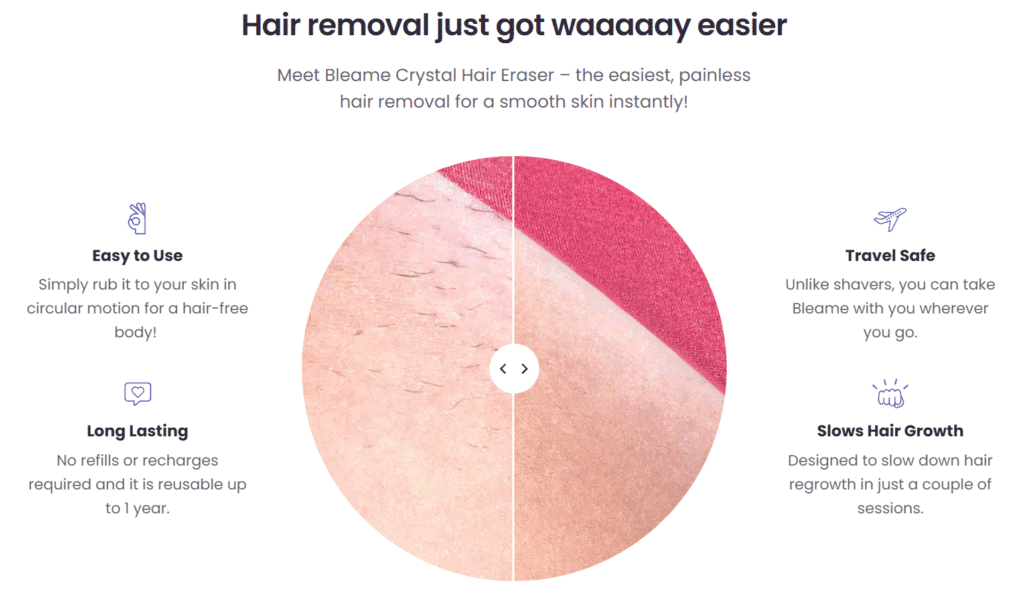
Meanwhile, the powerful “Before & After” slider provides compelling visual proof of the product’s effectiveness. This combination of features, integrated directly into the theme, creates a proven conversion playbook for health and beauty brands.
Example 3: Hustle24 Clo – Optimizing for Action
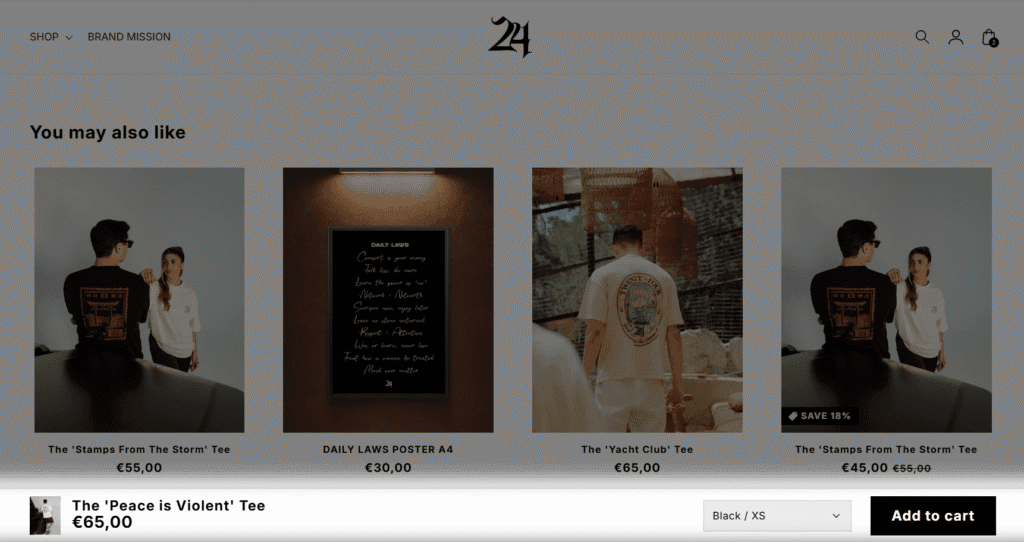
Streetwear brand Hustle24 Clo demonstrates how Shrine drives action throughout the customer journey. On the product page, a “sticky” add-to-cart button appears as the user scrolls, ensuring the call-to-action is always visible and reducing friction.
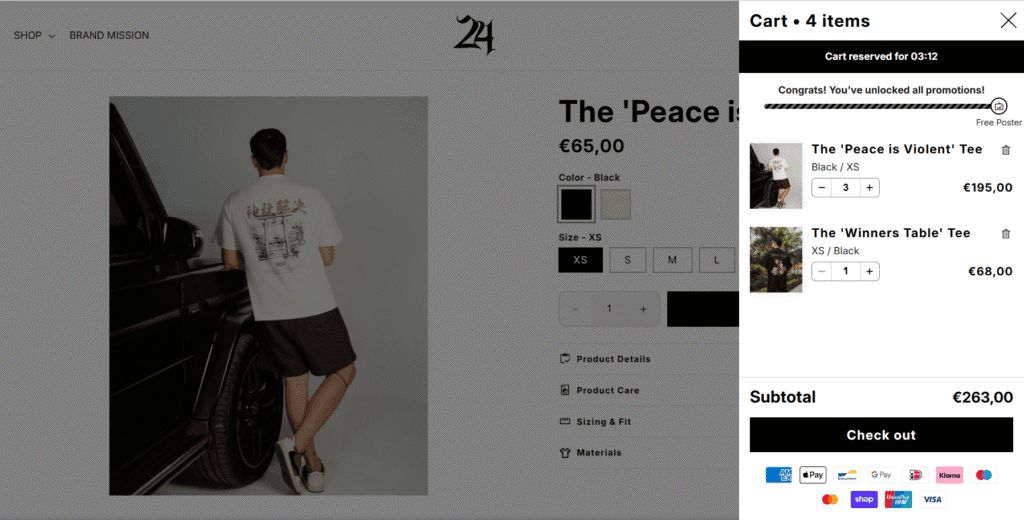
Once an item is added, the theme’s slide-out cart appears with a clear incentive: a progress bar showing how close the customer is to earning a free gift. This combination of a persistent call-to-action and an upsell-focused cart illustrates how Shrine’s features work together to maximize the value of every visitor.
Feeling inspired? Seeing these live stores shows the power of a solid theme on the right platform. If you want to see how easy it is to set up your own product pages, you can experiment right now with a free Shopify trial.
Shrine vs. The Competition: A Comparison of Trade-Offs
Choosing a theme isn’t about finding a single “winner.” It’s about understanding the trade-offs between speed, features, cost, and support, then picking the option that best aligns with your business goals.
To ensure total transparency, here are the exact live demo stores we used for our speed tests. We encourage you to open these to experience the navigation and design firsthand while you review the data below.
The table below uses our live testing data to compare Shrine Pro against these key competitors, as well as the free Shopify Dawn theme, which serves as a performance benchmark.
| Feature | Shrine Pro | Booster Theme | Debutify | Shopify Dawn |
|---|---|---|---|---|
| Primary Value | Aesthetic & Bundled Features | All-in-One CRO Toolkit | Scalable with Add-ons | Speed & Reliability |
| Price | $349 (One-Time) | $299 (Lifetime) | $0 – $149/mo | Free |
| Mobile Speed | 64 (Average) | 61 (Average) | 52 (Average) | 94 (Elite) |
| Desktop Speed | 94 (Excellent) | 97 (Excellent) | 69 (Average) | 99 (Elite) |
| Updates Policy | “Use Forever” Claimed | Lifetime Included | Included with Subscription | Included Free Forever |
| Support | Mixed (per user reviews) | 24/7 Support Claimed | 24/7 Support Claimed | Official Shopify Support |
The Core Trade-Off: Built-in Features vs. Raw Speed
Our data reveals a clear trade-off. With themes like Shrine, you are paying for a curated package of built-in features and a specific design aesthetic. This can save time and the cost of some apps, which is a powerful advantage for new store owners.
However, the data shows this convenience comes at the cost of raw mobile performance when compared to a leaner, speed-focused theme like Dawn. Themes packed with features simply have more code to load, which can impact scores on mobile devices where connectivity is less reliable.
Why You Might Choose Shrine for Its Features & Design
Despite the speed trade-off, Shrine remains a compelling option for merchants who prioritize its specific visual style and integrated toolset. If features like the “Before & After Slider” or its unique cart upsell design are a perfect match for your product, the convenience is undeniable. Having these tools built-in and pre-styled to match your theme can be a major advantage over finding, configuring, and styling separate apps to achieve the same look.
Analyzing True Cost & Long-Term Value
When considering value, you must weigh the upfront cost of the theme against potential long-term expenses. While Shrine’s $349 fee now includes a “use forever” promise according to their site, this investment must be factored against any extra apps you might still need for more advanced functions.
Alternatively, starting with a free theme like Dawn eliminates the upfront cost entirely, allowing you to invest that budget into marketing or specific best-in-class apps that meet your exact needs.
Pricing & The “True Cost”: Is Shrine a One-Time Fee or a Money Pit?
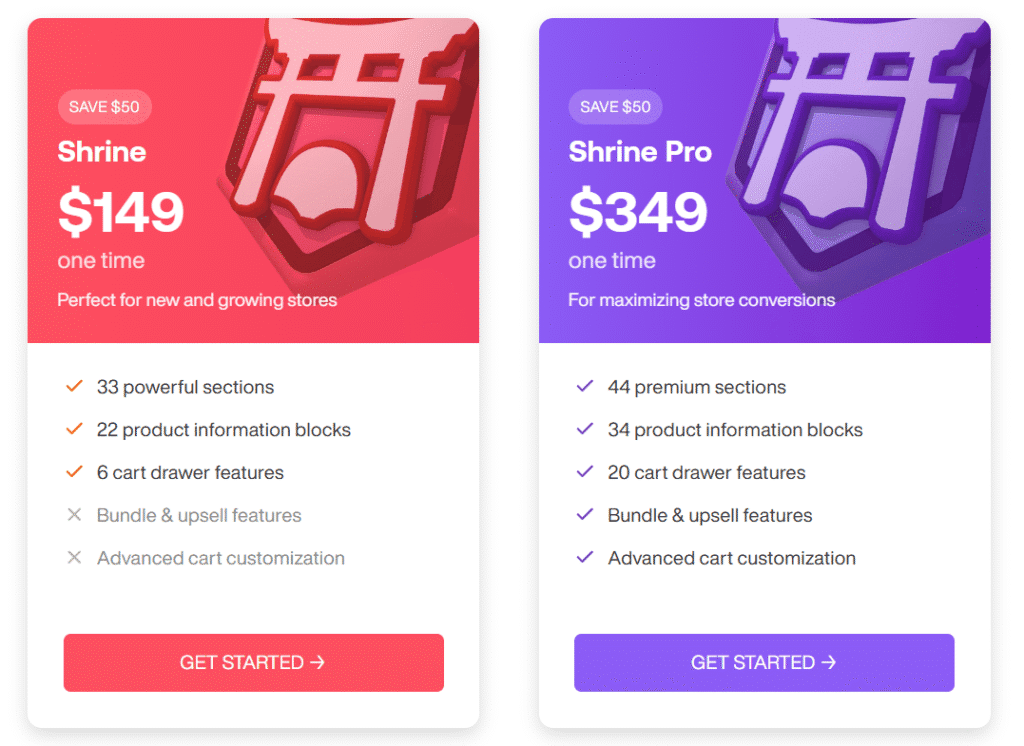
A one-time fee is an attractive proposition for any new business owner, but it’s crucial to understand what that price truly includes. Shrine has recently updated its pricing to a simpler two-tier model, moving away from its previous three-plan structure.
Breaking Down Shrine’s Official Pricing Tiers
Based on their official site, here is the new pricing structure:
Shrine ($149 one-time): Positioned for new and growing stores, this base version provides the core theme with 33 powerful sections and 22 product information blocks. However, it notably lacks the key “Bundle & upsell features” and “Advanced cart customization” that are central to its marketing.
Shrine Pro ($349 one-time): This is the full-featured version designed for maximizing conversions. It includes all 33 sections from the base plan and adds 11 exclusive premium sections, for a total of 44. It also expands the number of product info blocks to 34 and more than triples the cart drawer features to 20. Crucially, this is the only version that includes the built-in bundle and upsell functionality.
Hidden Costs & “Lifetime” License Caveats
This is where an unbiased review is critical. Shrine’s website now states, “Pay once, use forever,” suggesting a true lifetime license that includes future updates. This is a significant shift from their previous one-year update policy.
However, it’s essential to weigh this new promise against the historical user feedback. Past complaints frequently cited a lack of updates being included in “lifetime” deals as a major issue. While the new marketing is a step in the right direction, buyers should remain aware that the user experience has not always aligned with the marketing claims. Furthermore, as the base version lacks key sales features, many merchants will find the $349 Pro version is the only one that truly fits their needs, and even then, may require extra paid apps for more advanced functionality.
The Final Verdict: Is the Shrine Theme the Right Choice for You?
So, after analyzing the speed data, user reviews, and real-world examples, is Shrine theme Shopify worth it? The answer depends entirely on what you value most for your store. The way I see it, there is no perfect theme, only the right theme for your specific priorities.
This final verdict is designed to help you make a confident choice based on your business goals.
You Should Buy the Shrine Theme Shopify If Your Priorities Are:
- Aesthetic First: You love Shrine’s specific minimalist design and want your store to look exactly that way with minimal effort. Its clean lines and focus on imagery are a perfect match for your brand’s visual identity.
- Feature Convenience: You need the exact set of conversion tools that Shrine offers, like quantity breaks and cart upsells. You prefer the convenience of having them integrated and pre-styled rather than managing multiple third-party apps.
- Acceptable Speed: You are comfortable with an average mobile speed score and prioritize the excellent desktop performance for your customer base. You’ve weighed the data and decided this trade-off works for your business.
You Should Consider Alternatives If Your Priorities Are:
- Maximum Performance: Achieving the highest possible mobile speed score is your non-negotiable top priority. You want to start with the fastest possible foundation, like the one offered by Shopify’s free Dawn theme.
- Flexibility and Control: You prefer to build your store’s functionality piece by piece, choosing individual, best-in-class apps on top of a lean and reliable theme. You want complete control over your tech stack.
- Guaranteed Support: You require the peace of mind that comes with official, round-the-clock customer support. Given the widespread user complaints, the risk of unresponsive support is a deal-breaker for you.
The Best Way to Decide: Test the Platform for Yourself
A theme is a critical choice, but it’s important to remember that it’s just one part of your eCommerce ecosystem. The most powerful theme in the world won’t succeed without a solid, reliable, and scalable platform supporting it. Before you commit to any theme—free or premium—the smartest first step is to get familiar with the core platform itself.
Ultimately, the only way to know what’s right for your business is to get hands-on. By starting a free trial on Shopify, you can test the free Dawn theme to experience its elite speed firsthand, explore the app store to see what’s possible, and get a true feel for managing products and orders. From there, you’ll be in the perfect position to decide if investing in a premium theme like Shrine is the right next step for your brand.
Start your Shopify free trial today and build your store on your own terms.

Transparency Note: I’m an official Shopify Media Partner. If you sign up through my link, I may earn a small commission—never at any cost to you. Your support helps keep this blog free and valuable.
FAQs About Shrine Theme Shopify
To help you make the final call, we’ve answered the most common questions based on our research and live testing of the theme.
What is the difference between Shrine ($149) and Shrine Pro ($349)?
The biggest difference between the two tiers is the access to conversion features. While both versions share the same aesthetic foundation, the Pro version is required if you want to eliminate the need for third-party upsell apps.
Is Shrine theme Shopify good for dropshipping stores?
Yes, Shrine is specifically engineered for dropshipping and direct-to-consumer (DTC) brands. Its features—like the “Before & After” slider, quantity breaks, and sticky add-to-cart buttons—are designed to create urgency and build trust quickly, which are essential tactics for high-volume dropshipping stores.
Do I still need apps if I buy Shrine Pro Theme Shopify?
Shrine Pro Shopify theme aims to replace common apps like bundle builders, sticky carts, and announcement bars. However, it is not a replacement for everything. You will likely still need apps for specific functions like email marketing (Klaviyo), reviews (Judge.me or Loox), or complex subscription management.
Does Shrine offer customer support?
This is the most controversial aspect of the theme. While they claim to offer support, public reviews on Trustpilot and Reddit are mixed, with a significant number of users complaining about slow or non-existent responses. If reliable, 24/7 support is critical for your business, I recommend you consider themes listed on the official Shopify Theme Store, which are held to stricter support standards.