Learning how to get Shopify page at front page of Google is the most critical challenge for any new e-commerce brand. To make it simple, this guide demonstrates a repeatable 5-phase blueprint using an example store: The Cozy Corner Candle Co.
Like many new owners, The Cozy Corner started with a common fear: without a massive budget, would their store ever be found by customers? This guide provides the answer.
Mastering Shopify Google SEO isn’t just a nice-to-have; it’s essential. According to industry data, a minuscule 0.63% of searchers ever click past the first page of results. If you’re not on page one, you’re practically invisible.
As you follow The Cozy Corner’s journey, you can explore Shopify’s features yourself. Start a free trial and build alongside this guide.
If you’re a visual learner, I’ve also created an explainer video on Shopify SEO tips.
Phase 1: The 48-Hour Foundation for Google Visibility
Before you can rank on the front page, Google needs to know your store exists. This foundational phase is about making your site visible to search engines and ensuring there are no technical roadblocks. For The Cozy Corner, this took less than an hour, and it’s the most important first step to get Shopify indexed.
Step 1: Verify Your Store with Google Search Console
Google Search Console (GSC) is a free, non-negotiable tool. It’s your direct line of communication with Google, offering data on how your site performs in search, what keywords people use to find you, and any errors that might be holding you back.
Here’s how The Cozy Corner got set up:
- Go to the Google Search Console website and sign in with your Google account.
- Click “Start now” and select the “URL prefix” option.
- Enter your full Shopify store URL (e.g., https://your-store-name.myshopify.com or your custom domain).
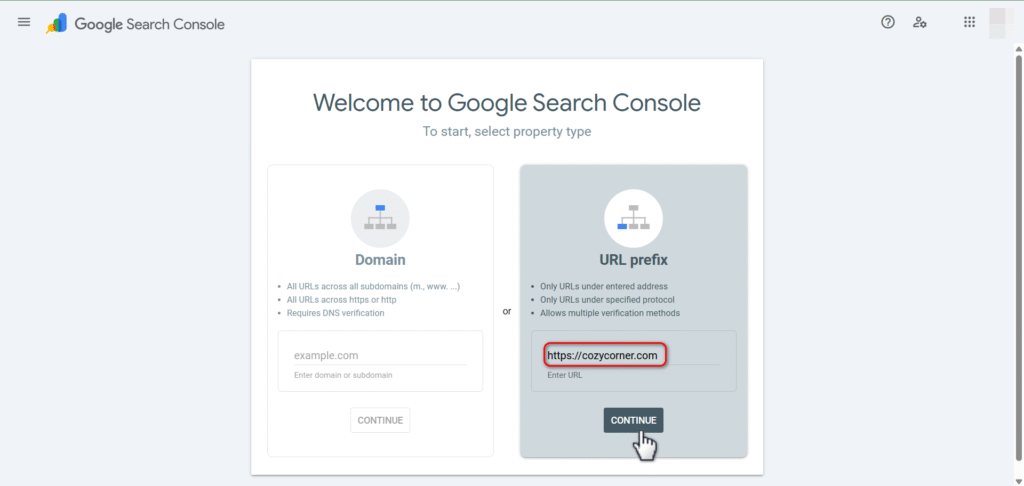
- Google will provide several verification methods. I’ve found that the easiest for Shopify is typically the “HTML tag” method. Copy the meta tag provided.
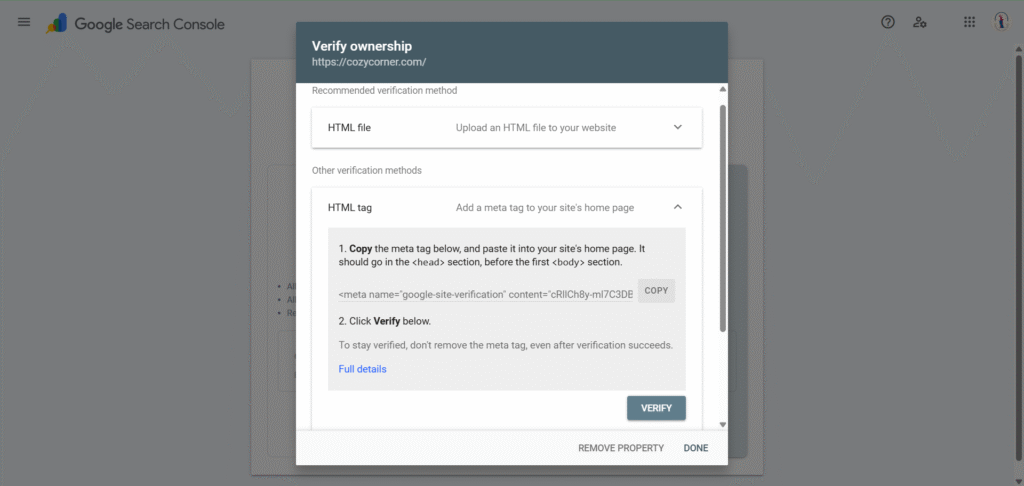
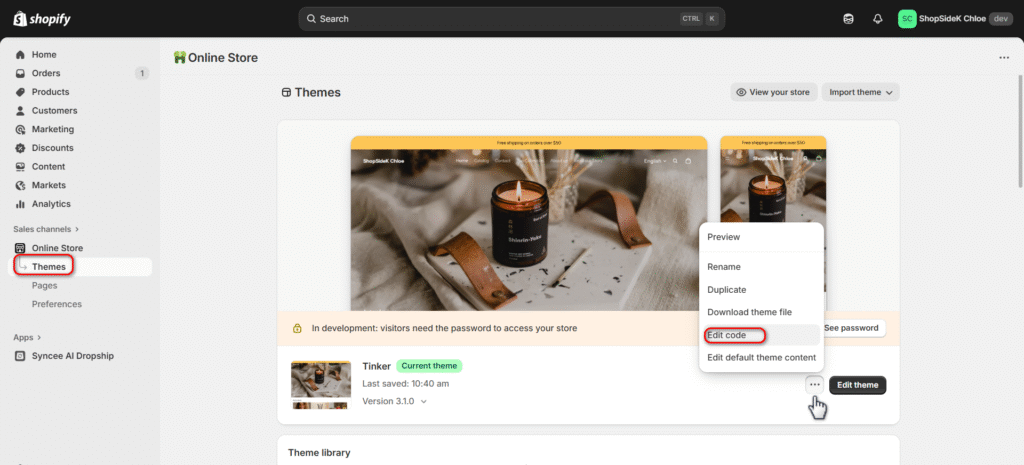
- In your Shopify admin, go to Online Store > Themes. Find your current theme, click the three dots for Actions, and then select Edit code.
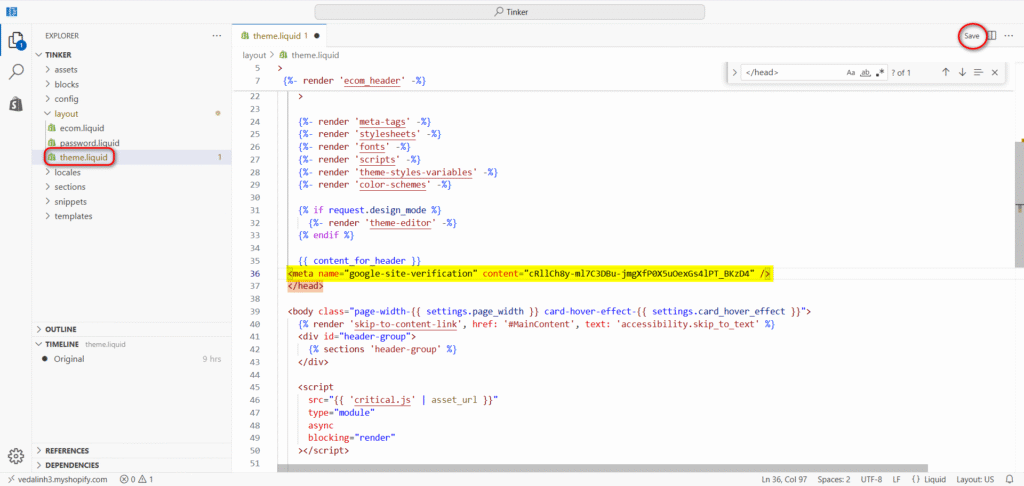
- Under the Layout section, open the theme.liquid file and paste the copied meta tag just before the </head> tag. Save your changes.
- Return to GSC and click “Verify.”
Step 2: Find and Submit Your Shopify Sitemap
A sitemap is exactly what it sounds like: a map of your website that tells Google about all your important pages, including products, collections, and blog posts. It helps Google discover your content faster and more efficiently.
Thankfully, Shopify automatically creates and updates this file for you. All you need to do is tell Google where to find it.
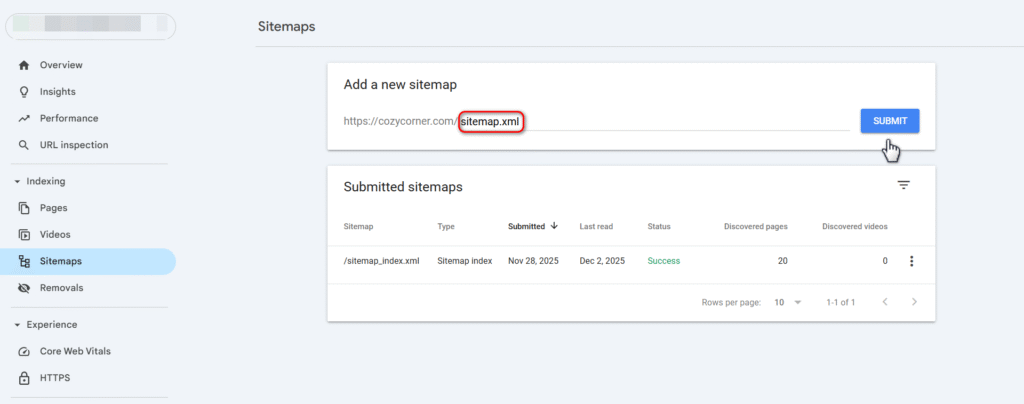
Your Shopify store’s sitemap is always located at the same address: yourstore.com/sitemap.xml
To submit it, go to your new Google Search Console dashboard, find “Sitemaps” in the left-hand menu, paste your sitemap URL into the “Add a new sitemap” field, and click “Submit.” Google will now be able to crawl your site structure systematically.
Step 3: Check for Critical Indexing Errors
Sometimes, a simple setting can prevent your entire store from being indexed. Before moving on, it’s crucial to check for these common roadblocks.
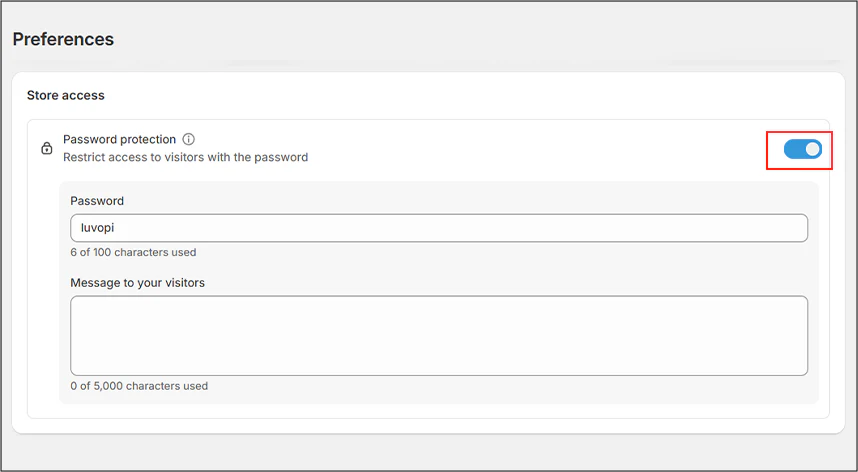
Password Protection: The most frequent issue for new stores is leaving the password page active. If your store is password-protected, search engines can’t access it. To check, go to your Shopify admin and navigate to Online Store > Preferences. Scroll down to the “Password protection” section and make sure it’s disabled.
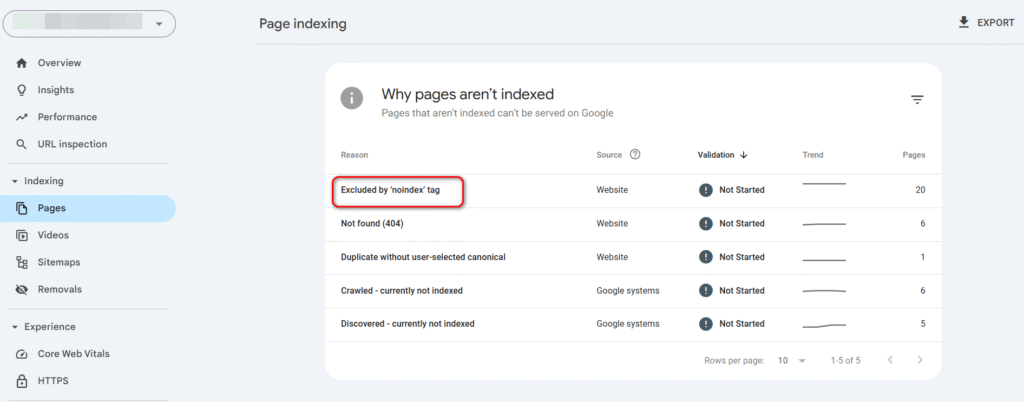
“noindex” Tag: This is a piece of code that explicitly tells Google not to add a page to its index. While sometimes useful, an accidental noindex tag can make your homepage or key product pages invisible. You can spot these issues in Google Search Console under the Pages > Page indexing report, which will flag any pages “Excluded by ‘noindex’ tag.”
Incorrect robots.txt File: The robots.txt file gives search engines instructions on which pages they can or cannot crawl. Shopify’s default file is set up correctly for 99% of stores, but it’s good to know that this file exists as a potential source of crawling issues.
Phase 2: Building Your E-commerce Site Structure
A confusing store layout frustrates customers and confuses search engines. A logical Shopify site structure ensures that both humans and Google’s crawlers can easily find your most important pages. It’s like creating clear, well-lit aisles in a physical shop—it improves the experience and guides visitors to what they’re looking for.
For The Cozy Corner, we implemented a simple but powerful framework that forms the backbone of all good product page SEO.
The “3-Click Rule” Site Architecture
The best e-commerce sites follow the “3-Click Rule”: a user should be able to get from your homepage to any product page in three clicks or fewer. This creates a shallow, intuitive navigation path that Google loves.
The ideal hierarchy is straightforward and scalable:
- Homepage: Your digital storefront, linking to your most important collections.
- Collection Pages: These are your category pages that group similar products together.
- Product Pages: The individual pages for each item you sell.
For The Cozy Corner, this looked like a simple flow: a visitor lands on the Homepage, clicks on the “Scented Candles” Collection, and then clicks on the “Lavender Soy Candle” Product.
This clean structure keeps the site organized as it grows.
Optimizing Your URLs for Clarity and Clicks
Your page URLs are another signal you send to Google. My advice is they should be short, descriptive, and easy to read. Shopify automatically generates URLs, but you can—and should—edit them to be more SEO-friendly.
A clean URL helps users and search engines understand the page’s content at a glance. For The Cozy Corner’s best-selling candle, we made a simple change:
- Bad URL: cozycorner.com/products/89274-item-v2-final
- Good URL: cozycorner.com/products/lavender-soy-candle
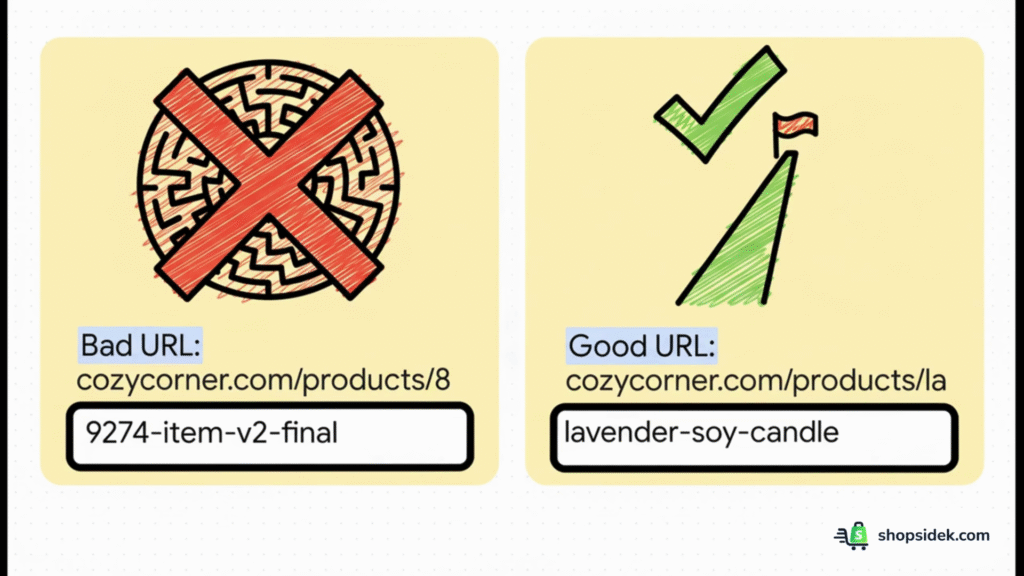
The second version is instantly recognizable and includes a relevant keyword. You can edit a page’s URL in Shopify’s admin panel within the “Search engine listing” section at the bottom of the product or page editor.
Setting Up Internal Linking That Guides Google
Internal links are the pathways you create between the pages on your site. A strong internal linking strategy helps spread “link equity” (ranking power) throughout your site and shows Google which pages are most important.
The site architecture you just built creates a natural linking flow. Now, you just need to be intentional about it.
From your homepage, make sure you link out to your main Shopify collections using clear, descriptive text. For example, a navigation menu item that says “Shop Scented Candles” is far more effective than one that just says “Products.”
From each collection page, ensure every product listed links directly to its product page. This simple top-down linking makes your site easy to navigate and crawl.
Phase 3: Finding Keywords That Drive Sales
Effective keyword research is about understanding the exact words and phrases your ideal customers type into Google when they’re ready to buy. For an e-commerce store, this means focusing less on general interest and more on commercial buyer intent. The goal is to attract visitors who are actively looking to make a purchase.
Understanding Buyer Intent: “Buy Now” vs. “Look Around” Keywords
Not all keywords are created equal. Some signal that a user is researching, while others indicate they are ready to purchase. In practice, targeting the right kind is the difference between getting traffic and getting sales.
- Informational Intent (“Look Around”): These are queries like “how to make candles” or “what are the benefits of soy wax?” While valuable for a blog, these searchers aren’t ready to buy yet.
- Commercial Intent (“Buy Now”): These are product-focused queries like “buy lavender soy candle”, “8oz scented candle for sale”, or “best vegan candles online.” These are the keywords that should be the primary focus for your product and collection pages.
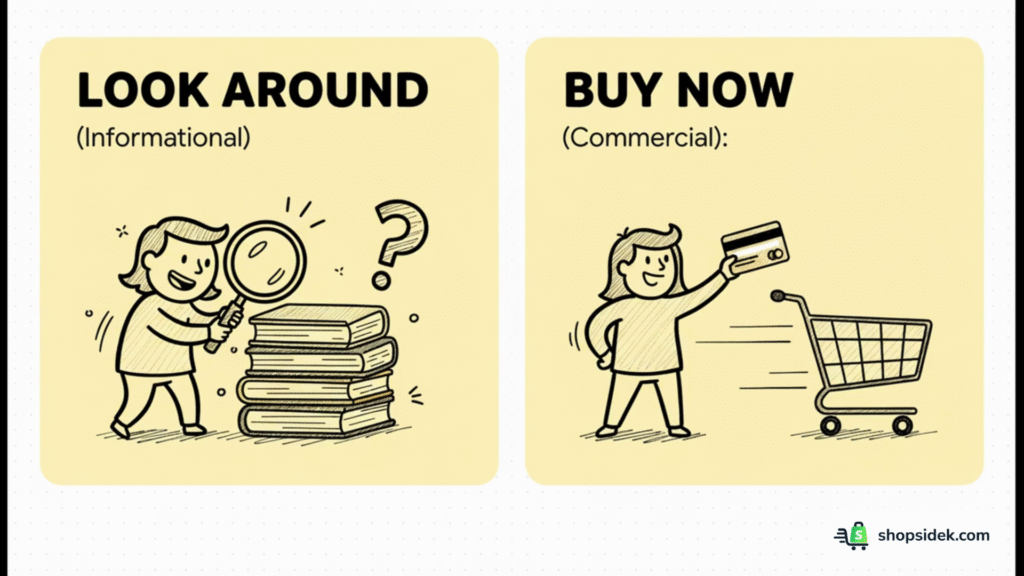
For The Cozy Corner, we ignored the informational keywords initially and focused entirely on finding high-intent “Buy Now” terms.
A 3-Step Workflow for Finding Profitable Keywords
You don’t need expensive tools to start. This simple workflow combines free methods with insights from professional tools to build a powerful keyword list.
1. Use Google & Amazon Autosuggest
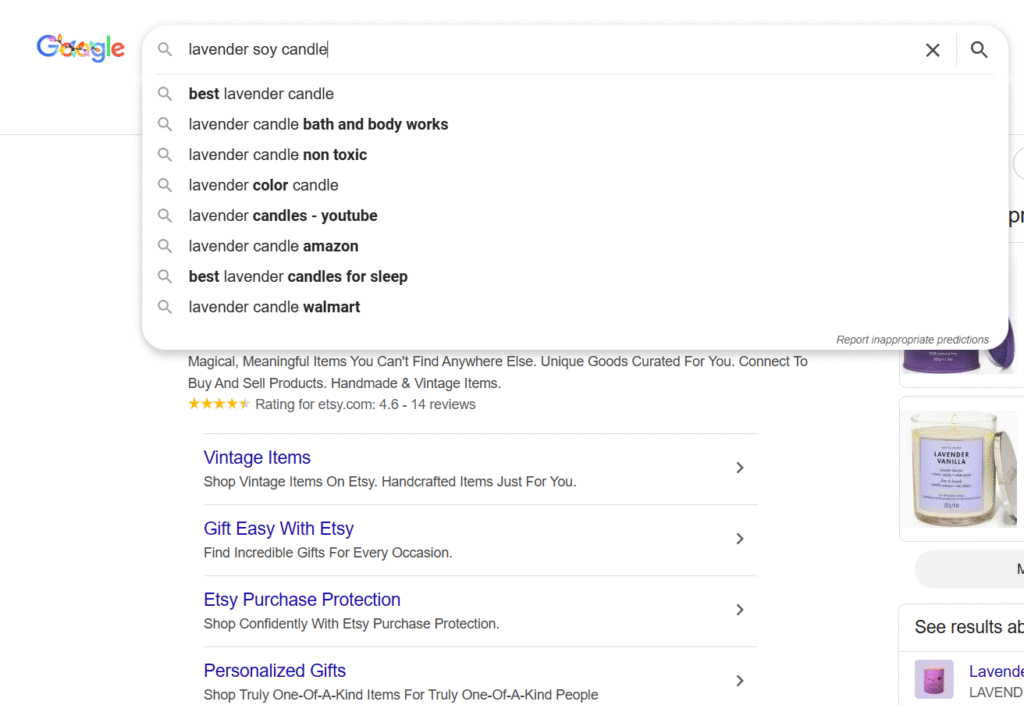
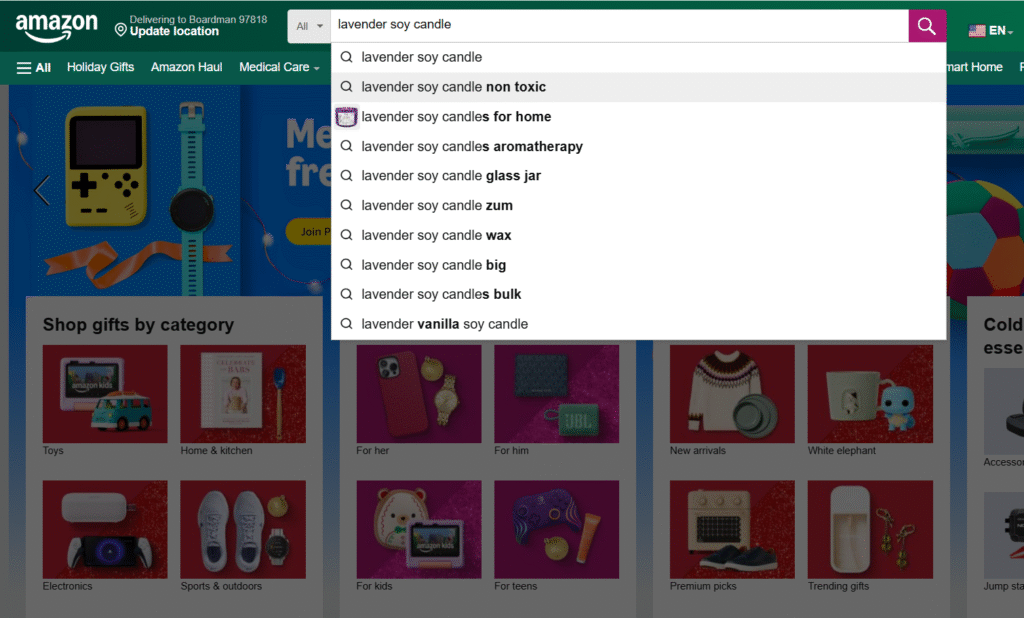
The suggestions that appear when you start typing in a search bar are a goldmine. They are the most popular queries related to your starting term.
For The Cozy Corner, I typed “lavender soy candle” into both search bars and instantly got ideas like “best lavender candle,” “lavender candle bath and body works,” and “lavender candle nontoxic.”
2. Analyze Your Competitors
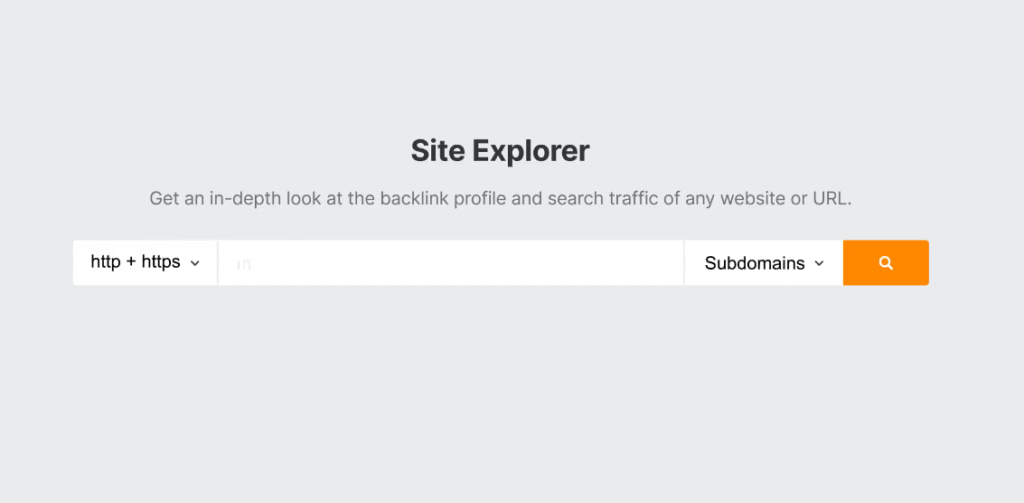
See what’s already working for other stores. Using SEO tools like Ahrefs or SEMrush, you can enter the URL of a competitor’s product page and see a list of the keywords it ranks for. Personally, I think this is the fastest way to find proven, purchase-intent keywords in your niche. While these tools are paid, many offer limited free trials or features.
3. Find Long-Tail Gold
Long-tail keywords are longer, more specific phrases (usually 3+ words). They have lower search volume but much higher conversion rates because they are so specific.
Instead of targeting the highly competitive term “scented candles,” The Cozy Corner focused on “handmade vanilla bean soy candle 8oz.” A free tool like Google Keyword Planner is perfect for discovering these variations.
Mapping Your Keywords to the Right Pages
Once you have a list of keywords, the final step is to assign them to the correct pages on your site. This ensures each page is optimized for a specific set of terms, preventing you from competing against yourself.
For The Cozy Corner, we created a simple map:
| Page Type | Page Name | Primary Keyword | Secondary Keywords |
|---|---|---|---|
| Collection | Scented Candles | scented candles | buy scented candles online |
| Product | Lavender Soy Candle | lavender soy candle | vegan lavender candle, 8oz soy candle |
| Collection | Holiday Candles | holiday candle gift set | Christmas scented candles |
| Product | Spiced Pumpkin Candle | spiced pumpkin candle | autumn soy candle, pumpkin spice candle |
This simple exercise brings order to your SEO strategy and ensures every page has a clear purpose.
Phase 4: The Anatomy of a Perfect Shopify Product Page
Your product pages are the most important assets for Shopify product page SEO. This is where a customer makes the decision to buy, and it’s where Google looks for specific, detailed information to rank your products.
For this phase, we’ll dissect the exact optimizations we made to The Cozy Corner’s best-selling “Lavender Soy Candle” page, turning it into a magnet for both traffic and sales.
Crafting Unique Title Tags and Meta Descriptions
The title tag and meta description are your 3-second pitch in Google’s search results. They are the first impression a potential customer has of your product, and they heavily influence whether someone clicks on your link or a competitor’s.
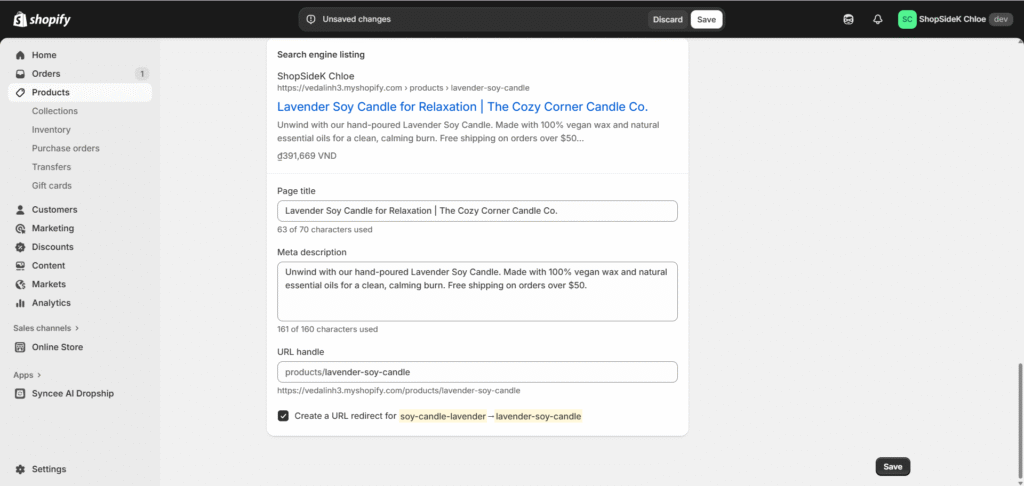
For the lavender candle, we created a title that was clear, descriptive, and included our main keyword. The meta description focused on the primary benefit (relaxation) to entice the click.
- Title Tag: Lavender Soy Candle for Relaxation | The Cozy Corner Candle Co.
- Meta Description: Unwind with our hand-poured Lavender Soy Candle. Made with 100% vegan wax and natural essential oils for a clean, calming burn. Free shipping on orders over $50.
This combination tells Google exactly what the page is about while simultaneously speaking to the customer’s needs. You can edit these for any page in your Shopify admin under the “Search engine listing” section.
Writing Product Descriptions That Sell and Rank
A great product description does two jobs: it convinces a human to buy, and it convinces Google to rank it. I always suggest you avoid simply listing specifications. Instead, tell a story and focus on the benefits, weaving in your keywords naturally.
We used a simple template for The Cozy Corner’s descriptions:
- A Benefit-Led Opening: Start by describing the experience.
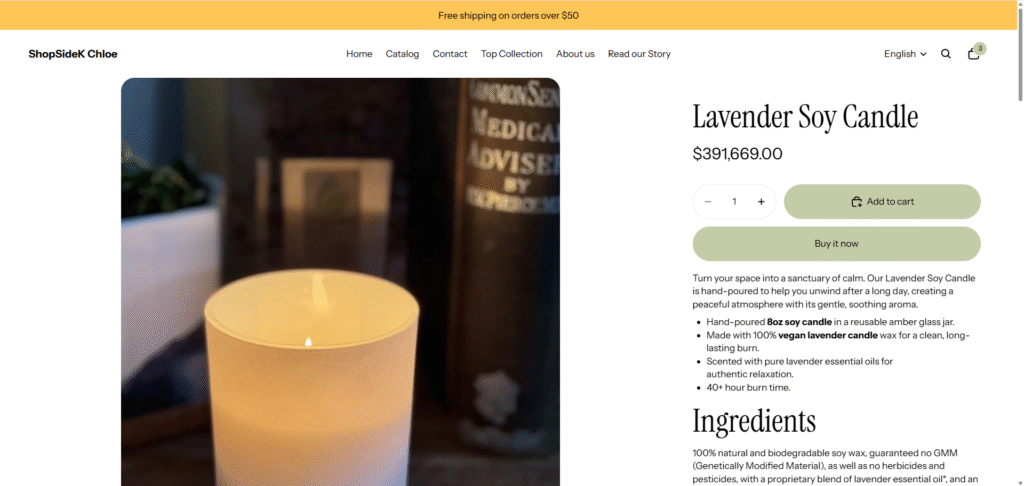
- Example: “Turn your space into a sanctuary of calm. Our Lavender Soy Candle is hand-poured to help you unwind after a long day, creating a peaceful atmosphere with its gentle, soothing aroma.”
- A Keyword-Rich Bulleted List: Make key details scannable.
- Hand-poured 8oz soy candle in a reusable amber glass jar.
- Made with 100% vegan lavender candle wax for a clean, long-lasting burn.
- Scented with pure lavender essential oils for authentic relaxation.
- 40+ hour burn time.
- A Trust-Building Close: End with a note on quality or mission.
- Example: “At The Cozy Corner, all our candles are crafted in small batches with sustainable ingredients.”
Optimizing Product Images with Alt Text and Compression
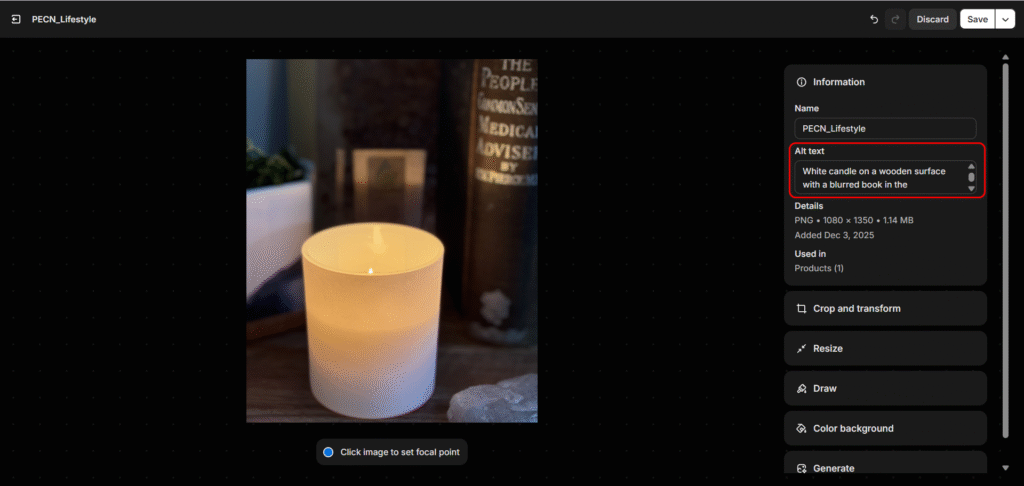
Product images are a critical part of the shopping experience, and they’re also an SEO opportunity. Google can’t “see” images, so you need to provide context using descriptive alt text.
Alt text (alternative text) serves two purposes: it’s read aloud by screen readers for visually impaired users, and it tells search engines what an image is about.
- Bad Alt Text: IMG_1234.jpg
- Good Alt Text: White candle on a wooden surface with a blurred book in the background
Furthermore, high-resolution images can dramatically slow down your page speed, which is a key ranking factor. Before uploading any photos to Shopify, we recommend compressing them with a free tool like TinyPNG. This can reduce file size by over 50% without sacrificing quality, ensuring your pages load quickly.
Building Trust with Product Reviews and Schema Markup
Trust is everything in e-commerce. For Google, this is measured through signals of Experience, Expertise, Authoritativeness, and Trust (E-E-A-T). One of the best ways to build this trust is through authentic customer reviews.
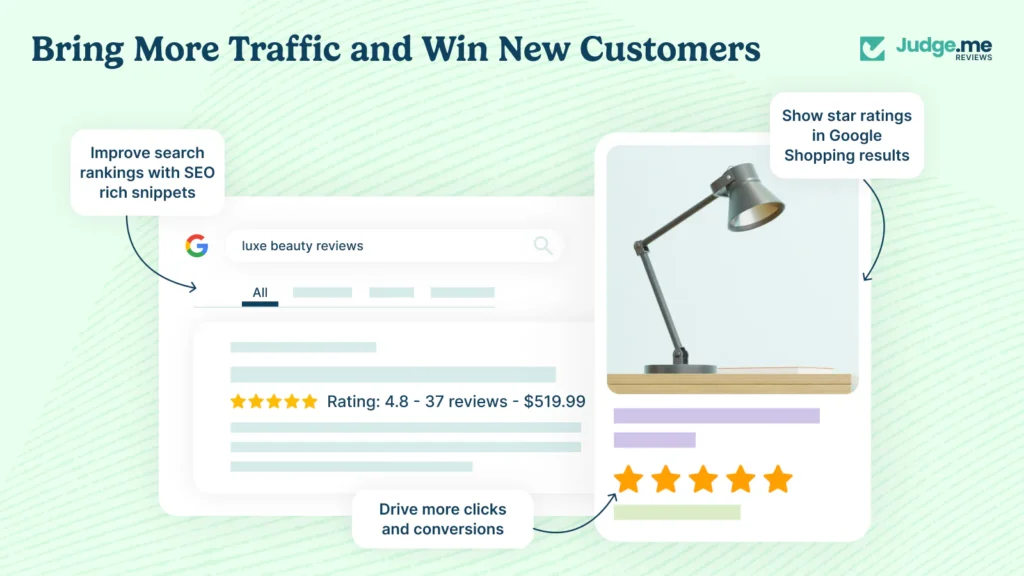
But just having reviews isn’t enough; you need to tell Google about them. This is done using structured data (or schema markup), a special code that helps search engines understand your content. The right schema can result in “rich snippets”—like the gold star ratings you see in search results.
The easiest way to implement this is with Shopify Apps. We installed Judge.me (alternatives like Loox are also excellent) for The Cozy Corner. These apps automatically collect customer reviews and, crucially, add the correct JSON-LD product schema to your pages.
Those star ratings make your listing stand out, build immediate trust, and can dramatically increase your click-through rate from search results.
You now have the blueprint for a perfect product page. Ready to put it into practice? Launch your Shopify store today and turn these steps into sales.
Phase 5: Building Authority with Content and Backlinks
Once your store is technically sound and your pages are optimized, the final phase is about building authority. This means demonstrating to Google that your store is a credible, trustworthy resource in its niche. You achieve this through high-value content marketing and earning quality backlinks from other websites.
Writing One High-Value Blog Post, Not Ten Mediocre Ones
Many new store owners think they need to pump out new blog posts every week. This is a myth. For a new business, it’s far more effective to create one truly exceptional piece of content than ten mediocre ones. This is often called a “pillar” or “cornerstone” article.
Instead of writing short posts like “5 Reasons to Love Soy Candles,” The Cozy Corner invested its time in creating “The Ultimate Guide to Candle Scents for Every Mood.” This comprehensive resource covered everything from the science of aromatherapy to specific scent recommendations for focus, relaxation, and energy.
This single article accomplished several goals:
- It attracted “top-of-funnel” traffic from people searching for solutions, not just products.
- It positioned The Cozy Corner as a genuine expert in the candle niche.
- It provided immense value, making it a resource other websites would naturally want to link to.
Your Shopify blog is a powerful tool when you focus on quality over quantity. Think about the biggest questions your customers have and create the single best answer on the internet.
Two Simple Ways to Earn Your First High-Quality Backlinks
Backlinks are links from other websites to your store. Google views them as “votes of confidence” or recommendations. Earning links from reputable, relevant sites is one of the most powerful ranking factors. While it can seem intimidating, getting started is simpler than you think.
Here are two beginner-friendly strategies The Cozy Corner used to earn its first valuable backlinks:
- Partner with a Local Lifestyle Blogger: We found a small, local blogger whose audience and aesthetic matched The Cozy Corner’s brand. We sent them a free product package in exchange for an honest review on their blog. The result was a genuine story that included high-quality photos and, most importantly, a link back to the product page. This not only provided a quality backlink but also drove referral traffic.
- Get Featured in a Niche Gift Guide: Many bloggers and online magazines publish gift guides for holidays or special occasions. We used Google to search for terms like “best handmade gift guide” and “cozy home decor gift ideas.” We then reached out to the authors of these articles, introduced The Cozy Corner, and provided beautiful product photos. This strategy landed a feature in a “Top 10 Gifts for Homebodies” list, resulting in a highly relevant backlink.
Conclusion: Your Playbook for Page One
The journey from an invisible brand to a front-page feature isn’t magic—it’s a process. You now have the complete 5-phase playbook that answers how to get Shopify page at front page of Google, from establishing a technical foundation and structuring your site to mastering keyword research, optimizing your product pages, and building lasting authority.
This is the core of effective Shopify SEO. Remember, the key to long-term success is consistency. The Cozy Corner’s results didn’t happen overnight, but they were built on these steady, repeatable actions. Applying these steps over time is what separates thriving stores from the ones that remain hidden on page ten.
To keep your momentum going, move from this case study to our Ultimate Shopify SEO Playbook: From Zero to Traffic in 3 Phases, where we show you how to scale these results into a long-term traffic engine.
The path to the front page is clear. If you’re ready to start your own success story, claim your Shopify free trial now and begin your journey. 👇

Disclosure: This post contains an affiliate link through my Shopify Media Partner relationship. If you sign up, I may earn a small commission with zero extra cost to you, helping me continue creating helpful content.
Frequently Asked Questions About Shopify SEO
How long does it really take to get a Shopify store on the front page?
While our case study illustrates an ambitious 90-day timeline, a realistic timeframe for a new store to see significant front-page rankings is typically 4 to 6 months.
The actual speed depends on several factors: the competitiveness of your niche, the authority of your domain, and the consistency of your efforts.
Getting indexed can happen in days, but climbing to the front page is a marathon that requires patience and persistent application of the strategies outlined in this guide.
Can I do all of this Shopify SEO for free?
Yes, you can execute the vast majority of this playbook for free. Foundational tools like Google Search Console and Google Keyword Planner are completely free. All on-page optimizations—writing titles, meta descriptions, alt text, and product descriptions—only cost your time.
The primary costs come from paid SEO tools like Ahrefs or SEMrush for deeper competitive analysis, or premium Shopify apps.
However, when you’re just starting a Shopify business, your biggest investment will be your time and effort, not your money on SEO.
Should I use paid Google Ads instead of focusing on SEO?
This is a common question, and the best strategy is to see them as complementary partners, not competitors. Google Ads provide immediate visibility and are excellent for testing keywords, promoting sales, and generating initial traffic.
SEO is a long-term investment that builds a sustainable, free source of traffic and establishes brand credibility. Google has confirmed that running ads does not directly improve your organic SEO rankings.
My recommendation: use ads for short-term wins while you build your long-term SEO foundation.
What’s more important for SEO: my homepage, collection pages, or product pages?
For most e-commerce stores, the priority should be:
Product Pages: These are your “money” pages where conversions happen. They should target very specific, long-tail keywords (e.g., “8oz lavender soy candle in glass jar”).
Collection Pages: These pages target broader, high-volume keywords (e.g., “scented soy candles”) and are crucial for organizing your products and guiding users.
Homepage: The homepage’s main SEO job is to establish your brand’s overall authority and target your main brand name as a keyword.
Do I really need a special Shopify SEO app to rank?
From my experience, no. You do not need a dedicated, all-in-one SEO app to rank on Google. Shopify has strong built-in SEO features for titles, descriptions, and alt text.
However, certain apps can simplify or automate specific tasks. For example, image compression apps can improve site speed, and review apps like Loox or Judge.me can automatically add valuable schema markup.
Think of apps as helpful accelerators, not mandatory requirements. Focus on mastering the fundamentals in this guide first.
What should I do if my rankings start to drop?
Don’t panic—ranking fluctuations are normal. First, use Google Search Console to check for any manual penalties or technical errors (like new noindex tags). Second, check if a competitor has significantly improved their page or if there was a recent Google algorithm update.
Often, a drop is a sign that your content needs a refresh. Update your page with new information, add fresh customer reviews, and check that all your internal and external links are still working.