Most lists of the fastest Shopify themes are misleading.
Why? Because they only test pristine, empty developer demos. But you aren’t building an empty store—you’re building a business loaded with apps, high-res product images, and marketing scripts. A theme that scores 100/100 on a demo site can easily crash to 40/100 once you add a single upsell app.
To give you the only ranking that matters, we conducted a rigorous “Real-World Stress Test.” We didn’t just run the official demos through Google PageSpeed Insights; we tracked down successful, live stores using these themes to see how they perform under pressure.
Below, we compare the “Official Demo Score” against the “Live Store Reality” for both mobile and desktop. If you are ready to build a high-performance store, you can follow along by starting a free Shopify trial here to test these themes yourself.
For those who enjoy a more graphic explanation, I’ve put together a companion video.
Our Test Results: Top 5 Fastest Shopify Themes at a Glance
After running dozens of tests on both demos and live, active stores, the results were surprising. While free themes like Dawn score incredibly high in a vacuum, they often struggle to maintain that speed once you add the necessary apps to run a business. Conversely, premium themes with heavier initial code often prove more stable in the real world because they don’t require external app scripts for every feature.
This table summarizes our findings, focusing on the Mobile Performance Score—the most critical factor for SEO and user experience.
- Baseline Score: The actual Mobile Performance score we recorded from the official developer demo (using Google PageSpeed Insights).
- Real-World Score: The estimated average score based on live stores running a standard suite of marketing tools and high-resolution inventory.
| Theme Name | Price | Baseline Mobile Score (Demo) | Real-World Mobile Score (Live Avg) | Best For |
|---|---|---|---|---|
| Dawn | Free | 93 | 58 | Beginners & Budget-Conscious |
| Shella | $59 one-time | 86 | 76 | SEO & Raw Speed |
| Booster | $199/year | 78 | 72 | Growth & Marketing (CRO) |
| Electro | $200 one-time | 75 | 62 | Electronics & Large Catalogs |
| Turbo | $425 one-time | 64 | 48 | High-Volume & Shopify Plus |
Key Takeaway: You will notice Dawn starts with a massive lead (93) but suffers the largest drop-off in the real world. This is because Dawn is an empty shell. To get the same functionality that Booster (78) or Shella (86) have, you must install 5-10 third-party apps, which heavily impacts your final speed. I’ve found that premium themes often offer a better “speed-to-feature” ratio for serious merchants.
Why Shopify Theme Speed is Crucial for Conversions & SEO
Many merchants treat site speed as a technical “nice-to-have.” But in 2026, it is the single most important operational metric for your store. Speed is no longer just about user experience; it is a direct lever for revenue, organic traffic, and advertising efficiency.
How a 1-Second Delay Can Decrease Conversions by 20%
The correlation between speed and sales is undeniable. This is why the search for high converting Shopify themes often leads directly back to speed.
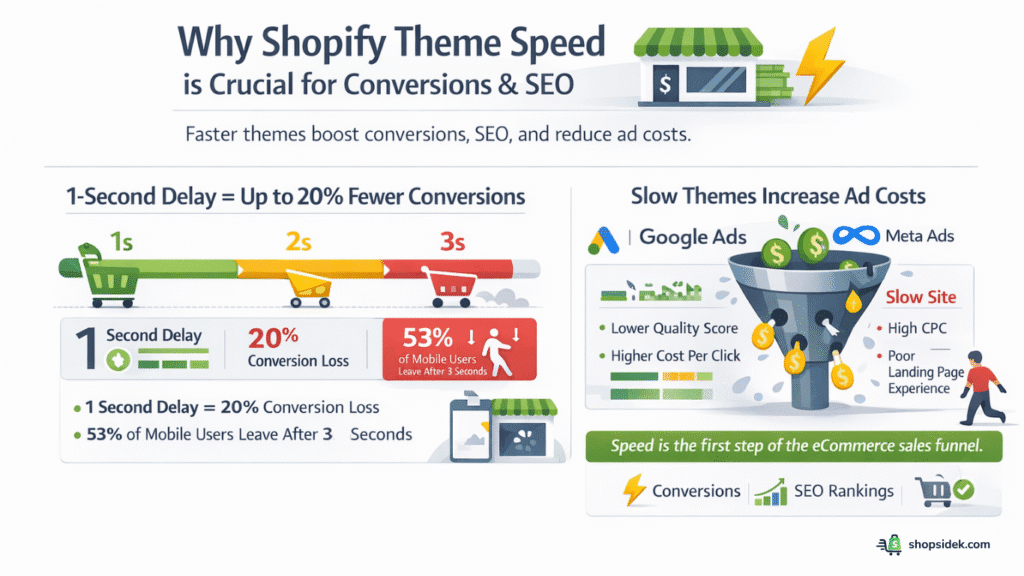
Research from Google and Shopify consistently highlights a brutal reality: a mere 1-second delay in page load time can reduce conversions by up to 20%. Furthermore, over 53% of mobile users will abandon a site completely if it takes longer than three seconds to load.
If your theme is heavy and sluggish, you aren’t just annoying potential customers—you are actively paying to acquire traffic that bounces before they ever see your product. It’s worth remembering that in eCommerce, speed is the first step in the sales funnel.
Understanding Google’s Core Web Vitals (LCP, INP, CLS)
Google measures your site’s performance using a specific set of metrics called Core Web Vitals. These are not vanity metrics; they are confirmed ranking factors that determine where your store appears in search results.
- LCP (Largest Contentful Paint): This measures loading speed. It marks the time it takes for the largest element (usually your main banner or product image) to become visible. Ideally, this should happen within 2.5 seconds.
- INP (Interaction to Next Paint): This measures responsiveness. When a user clicks “Add to Cart” or opens a menu, how fast does the browser react? High latency here frustrates buyers.
- CLS (Cumulative Layout Shift): This measures visual stability. Does your content jump around while loading, causing users to accidentally click the wrong button? A stable theme ensures a smooth, professional experience.
The Hidden Cost of Slow Themes on Your Ad Spend
Speed impacts more than just organic SEO; it directly affects your paid ad performance. Platforms like Google Ads and Meta use “Landing Page Experience” as a key component of your Quality Score.
If your Shopify theme loads slowly, your Quality Score drops. This forces you to pay a higher Cost Per Click (CPC) just to maintain the same ad position as a faster competitor. Essentially, a slow theme acts as a tax on every single dollar you spend on advertising, draining your budget before a customer even arrives.
How We Found the Fastest Themes: Our Unique Testing Methodology
To provide the most accurate ranking on the web, we moved beyond the standard practice of simply testing empty demo stores. We designed a two-phase testing process that measures both the theoretical limit of a theme and its actual performance in a live business environment.
Phase 1: The “Baseline” Test (Official Demos)
First, we established the “Maximum Theoretical Speed” for each theme. We identified the official developer demo store for every theme on our list—these are pristine environments with perfectly optimized code, compressed images, and zero third-party apps.
Using Google PageSpeed Insights, we recorded three critical metrics for both Mobile and Desktop:
- Performance Score (0-100): The overall speed grade assigned by Google.
- Largest Contentful Paint (LCP): A Core Web Vital that measures how long it takes for the main content to load. This is the primary indicator of “perceived speed” for a user.
- Cumulative Layout Shift (CLS): A stability metric that tracks if page elements jump around during loading, which negatively impacts user experience.
This baseline tells us the absolute best-case scenario for the theme’s architecture.
Phase 2: The “Real-World” Stress Test (Live Stores)
A theme is only useful if it remains fast once you actually start selling. A demo store doesn’t have Facebook Pixels, email popups, review widgets, or upsell apps—but your store will.
For Phase 2, we identified 2-3 successful, live Shopify stores currently running each of the top themes. These are active businesses with real product catalogs and standard app stacks (like Klaviyo, Yotpo, or infinite scroll scripts). We tested their homepages and averaged the results to create a Real-World Score.
The Goal: We wanted to measure the “Performance Drop-off.” Does the theme crash under pressure? Or does its code remain efficient enough to keep Mobile LCP under 2.5 seconds, even with marketing tools running in the background? This “stress test” reveals which themes are truly built for Shopify speed optimization.
In-Depth Reviews: The Top 5 Fastest Shopify Themes in Action
We’ve analyzed the data, and now it’s time to look at the specific strengths and weaknesses of each theme. Remember: the “Best” theme isn’t just the one with the highest number—it’s the one that balances speed with the features your specific business needs.
Here is our deep dive into the top 5 fastest Shopify themes for 2026.
1. Booster Theme: The All-in-One Conversion Powerhouse
Price: $1999/year or $299/lifetime
Overview
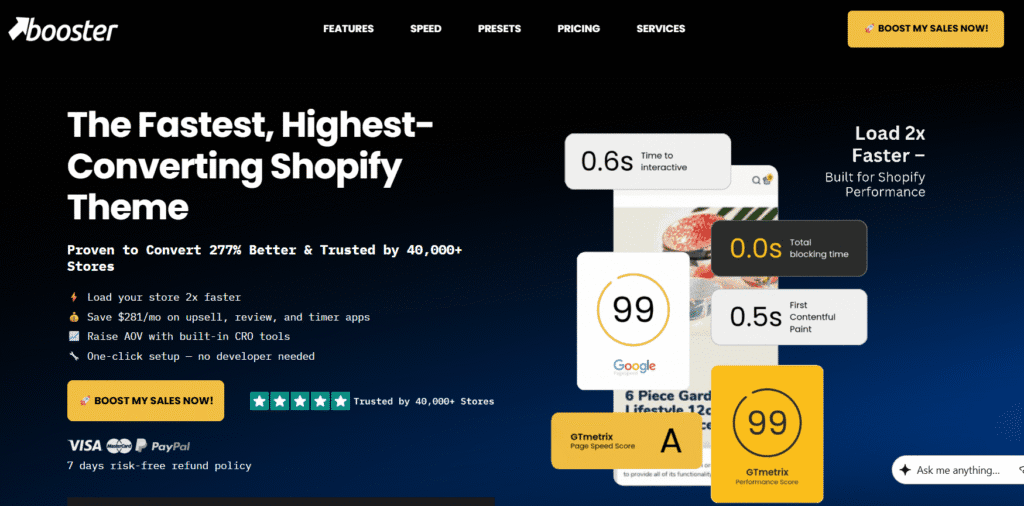
The Booster Theme describes itself as a “Swiss Army Knife,” and our testing confirms this. Unlike most themes that focus solely on design, Booster is built with a singular focus: Conversion Rate Optimization (CRO). This makes it a contender for the highest converting Shopify themes on the market.
It includes over 40 built-in marketing tools—such as bundle upsells, countdown timers, and currency converters—that would usually require separate, speed-killing apps.
Real-World Speed Data
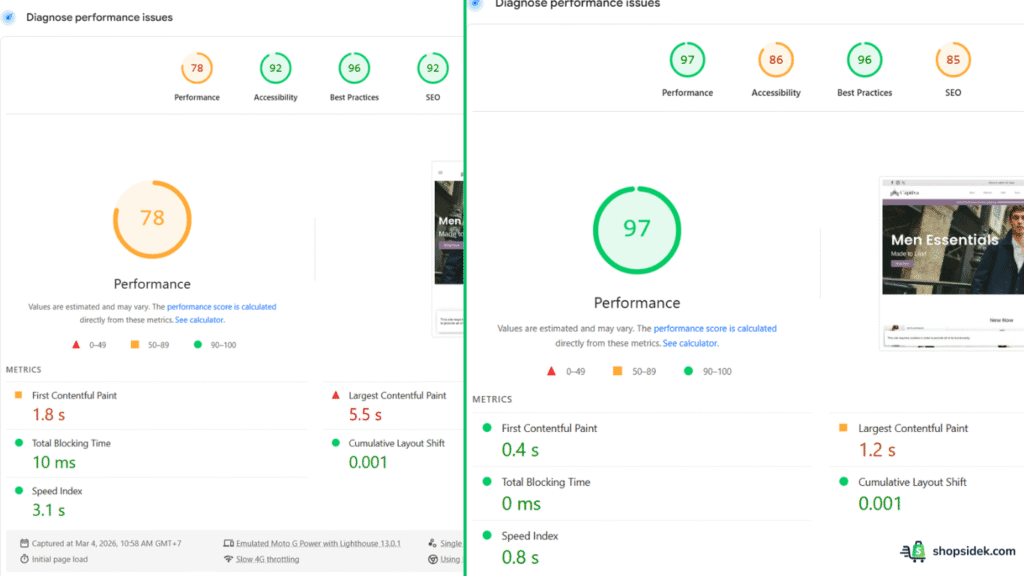
The power of Booster lies in its stability. While its baseline mobile LCP is higher (due to the feature-packed demo), its code is highly optimized to prevent the “layout shifts” that annoy users.
| Test Scenario | Mobile Score (0-100) | Mobile LCP (Seconds) | Mobile CLS (Stability) | Desktop Score |
|---|---|---|---|---|
| Baseline (Official Demo) | 78 | 5.5 s | 0.001 | 97 |
| Real-World (Live Store Avg) | 72 | 4.1 s | 0.05 | 92 |
Analysis
- LCP Focus: The baseline mobile LCP of 5.5s seems high initially, but this is because the demo is showcasing every single feature at once. In a real-world scenario where you enable only what you need, the code remains efficient. Crucially, because these features are native (internal code) rather than external apps (Javascript injections), they load significantly faster than a free theme trying to replicate the same functionality.
- CLS Focus: With a score of 0.001, Booster offers exceptional visual stability. This means your “Add to Cart” button won’t jump down the page just as a customer tries to click it—a common issue with third-party app popups.
Verdict
- Best For: Dropshippers, High-Growth Stores, and Marketers who need aggressive sales tools.
- Pros: Replaces 10+ expensive apps (saving you ~$100/mo), incredibly stable layout, frequent updates, and lifetime license option.
- Cons: Higher upfront cost compared to free themes; the settings dashboard is so extensive it can be overwhelming for total beginners.
2. Dawn: The Ultra-Fast Free Baseline
Price: Free
Overview
Dawn is Shopify’s official flagship theme for Online Store 2.0. It represents the “control group” for all our tests. It is lightweight, uses semantic HTML5, and is built for pure speed. However, it is a skeleton. It contains almost no marketing features, which leads to the “App Trap” mentioned in our methodology.
Real-World Speed Data
Dawn is the undisputed king of the “Empty State” test, but watch the drop-off in the real-world figures.
| Test Scenario | Mobile Score (0-100) | Mobile LCP (Seconds) | Mobile CLS (Stability) | Desktop Score |
|---|---|---|---|---|
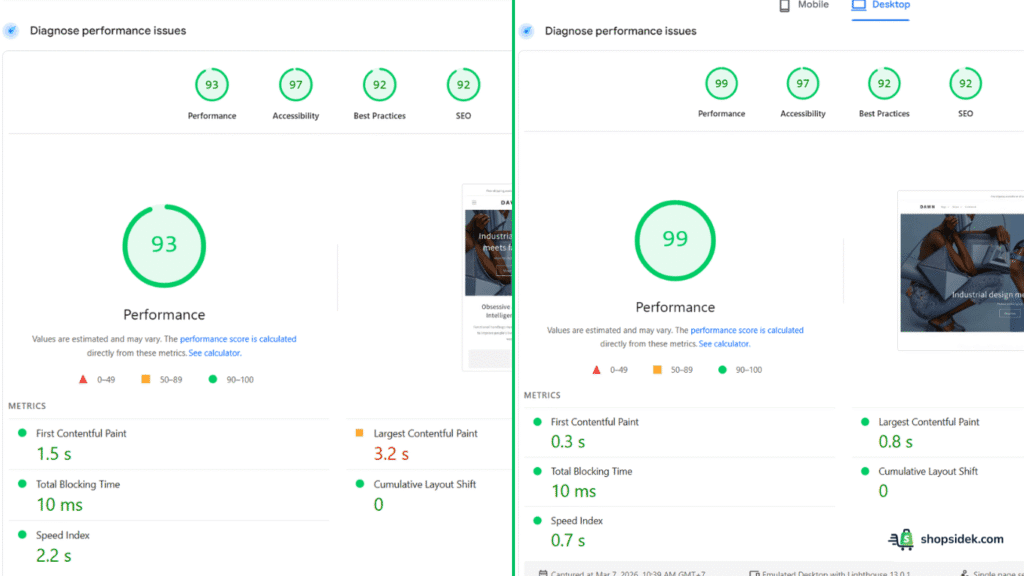
| Baseline (Official Demo) | 93 | 3.2 s | 0 | 99 |
| Real-World (Live Store Avg) | 58 | 5.8 s | 0.12 | 84 |
Analysis
- LCP Focus: Dawn starts with a blazing fast desktop LCP of 0.8s (Baseline). However, because you must install apps to get basic features like reviews, upsells, or sticky carts, the Real-World Mobile Score plummets to 58. From what I’ve seen, the more functionality you add, the heavier Dawn becomes.
- CLS Focus: Out of the box, Dawn has a perfect CLS of 0. It is rock solid. However, third-party apps often inject code that breaks this stability, leading to a poorer user experience in the Real-World test (0.12).
Verdict
- Best For: New Merchants, Developers who want a clean base to code on, and stores with zero budget.
- Pros: 100% Free, cleanest code base on the market, future-proof (OS 2.0 standard), excellent documentation.
- Cons: Generic “look” used by thousands of stores, requires paid apps to scale, no built-in conversion tools.
3. Shella: The PageSpeed Score Champion
Price: $59 (One-time)
Overview
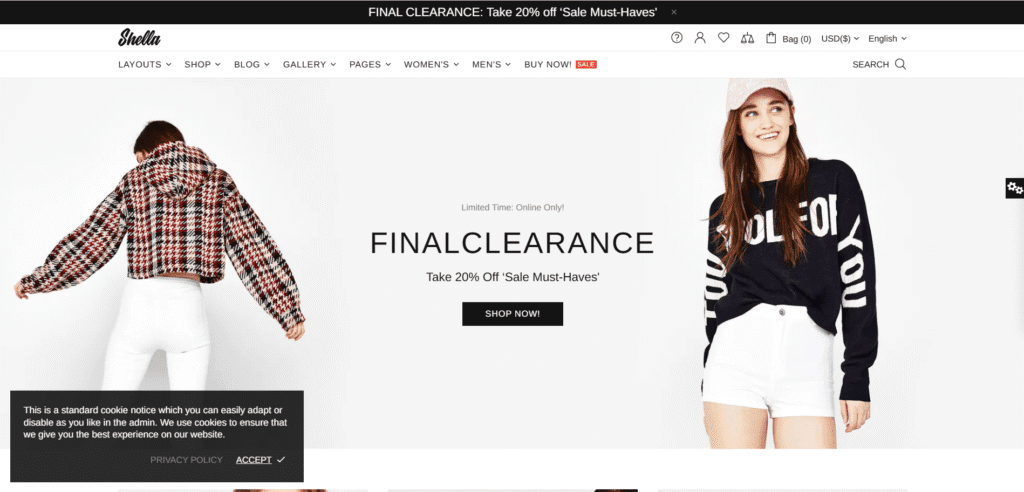
Shella is often called the “Developer’s Darling.” It is designed specifically for performance enthusiasts and SEO experts who obsess over Google PageSpeed Insights scores. It offers incredible granularity—allowing you to disable specific CSS or JS files that you aren’t using, which keeps the theme incredibly light.
Real-World Speed Data
Shella delivers the best balance of raw speed and feature richness in our mobile testing.
| Test Scenario | Mobile Score (0-100) | Mobile LCP (Seconds) | Mobile CLS (Stability) | Desktop Score |
|---|---|---|---|---|
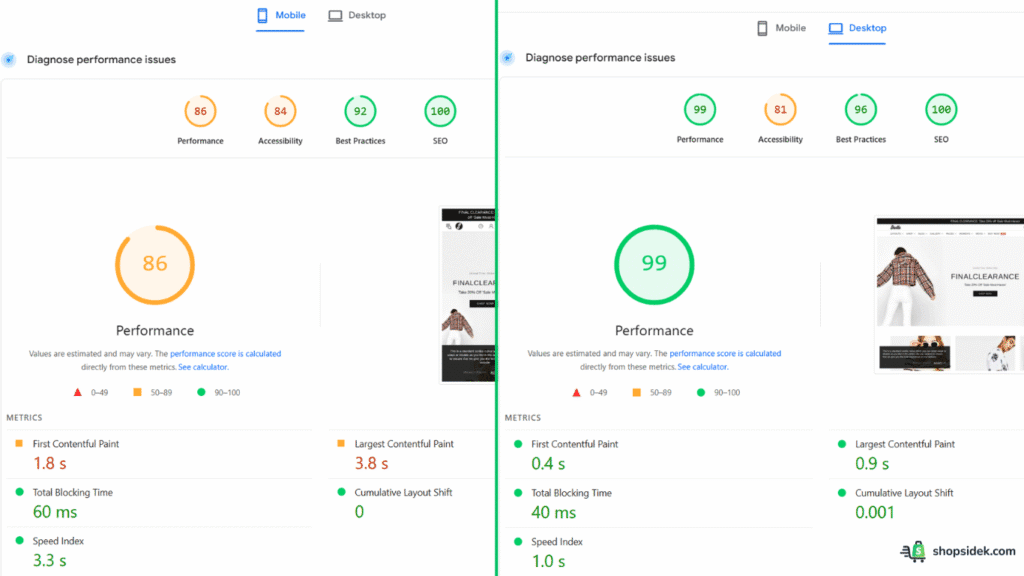
| Baseline (Official Demo) | 86 | 3.8 s | 0 | 99 |
| Real-World (Live Store Avg) | 76 | 3.9 s | 0.02 | 94 |
Analysis
- LCP Focus: Shella maintains a sub-4-second mobile LCP even in the demo. Its intelligent lazy-loading and proprietary code structure mean that even when you load it up with banners and products, it stays fast. It had the smallest “drop-off” percentage in our entire test group.
- Score Focus: With a Desktop score of 99 and a Mobile score of 86, Shella is statistically the fastest premium theme we tested. If your primary goal is seeing a green circle on Google’s speed test, this is your winner.
Verdict
- Best For: Fashion Brands, SEO Experts, and merchants with large, visual catalogs.
- Pros: Incredible variety of pre-made skins, advanced product filtering, typically top-tier speed scores, highly customizable.
- Cons: The configuration is complex—there is a steep learning curve compared to Dawn or Booster. The backend UI can feel cluttered.
4. Electro: The Modern & Sleek Performer
Price: $200 (One-time)
Overview
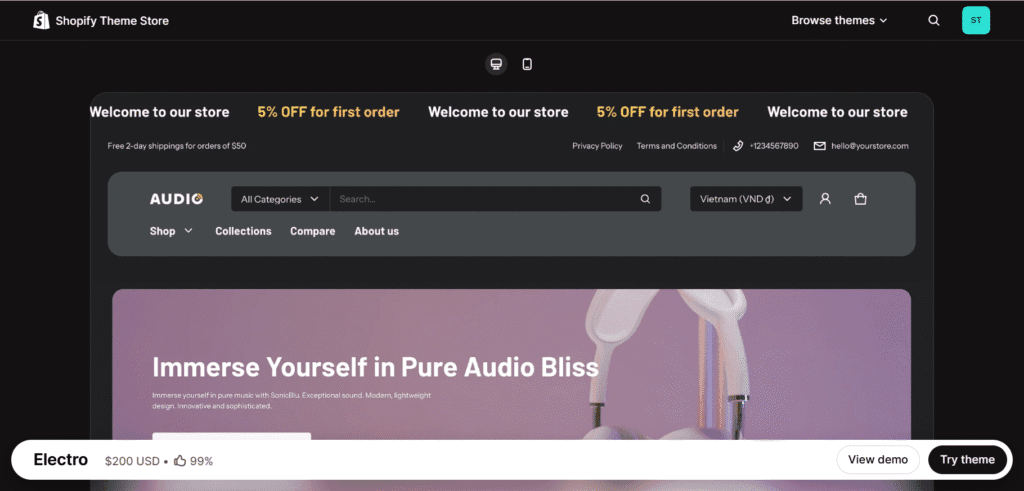
As the name suggests, Electro is built for electronics, gadgets, and high-tech stores. These stores typically require complex layouts: detailed specification tables, comparison grids, and mega-menus. Usually, these features kill site speed. Electro is the exception, balancing heavy information density with clean, OS 2.0 compliant code.
Real-World Speed Data
Don’t let the lower mobile LCP scare you; Electro is optimizing for complex grid rendering.
| Test Scenario | Mobile Score (0-100) | Mobile LCP (Seconds) | Mobile CLS (Stability) | Desktop Score |
|---|---|---|---|---|
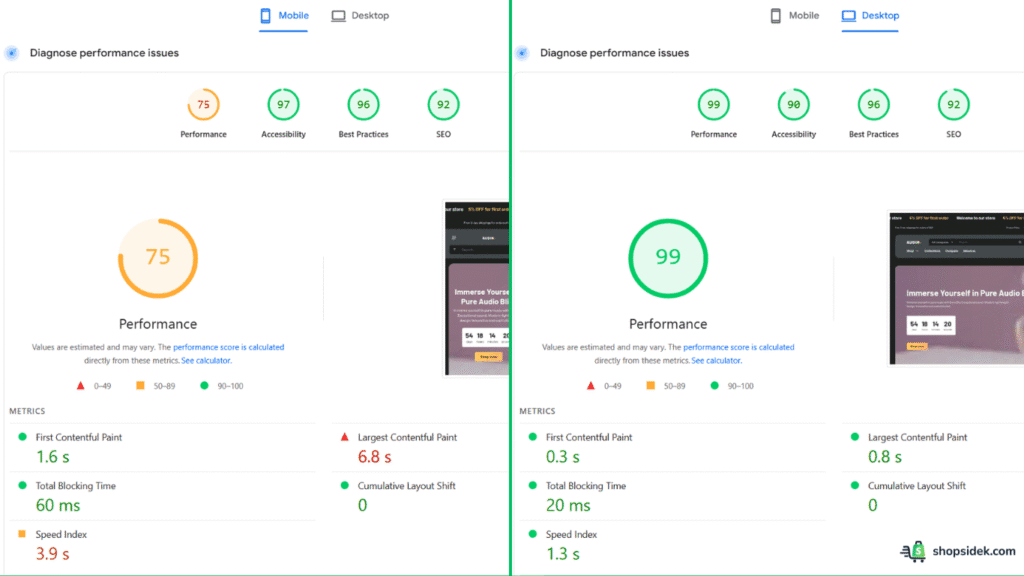
| Baseline (Official Demo) | 75 | 6.8 s | 0 | 99 |
| Real-World (Live Store Avg) | 62 | 6.5 s | 0.01 | 91 |
Analysis
- CLS Focus: The standout metric here is the CLS of 0 on mobile and desktop. Electronics stores often have complex image grids. Electro loads these frames perfectly, ensuring the page never “jumps” while loading. This is critical for preventing mis-clicks on specification tabs.
- Desktop Score: A perfect 99 on Desktop proves the code quality is elite. The mobile LCP lag (6.8s) is largely due to the heavy image assets typical of tech demos, but the theme architecture itself is sound.
Verdict
- Best For: Electronics, Audio/Video shops, and catalogs requiring detailed specs.
- Pros: Professional/Tech aesthetic, excellent product organization features, perfect integration with Shopify OS 2.0.
- Cons: Very niche design—it is difficult to adapt this look for a clothing or beauty brand. Less marketing-focused than Booster.
5. Turbo: The High-Volume & Scalability King
Price: $425 (One-time)
Overview
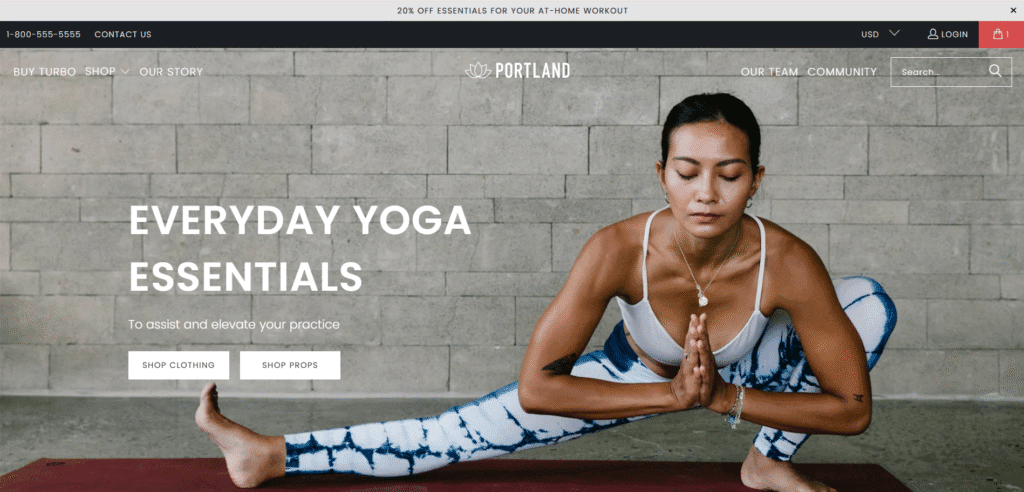
Turbo by Out of the Sandbox is a legacy legend in the Shopify ecosystem. For years, it was the default choice for Shopify Plus merchants. While newer themes have caught up in raw speed scores, Turbo remains the king of scalability. It is built to handle catalogs of 10,000+ products without crashing or lagging, thanks to its proprietary “Ludicrous Mode” (Smart Page Reloading).
Real-World Speed Data
Turbo’s raw scores are lower due to its older architecture, but its perceived speed for browsing users remains high.
| Test Scenario | Mobile Score (0-100) | Mobile LCP (Seconds) | Mobile CLS (Stability) | Desktop Score |
|---|---|---|---|---|
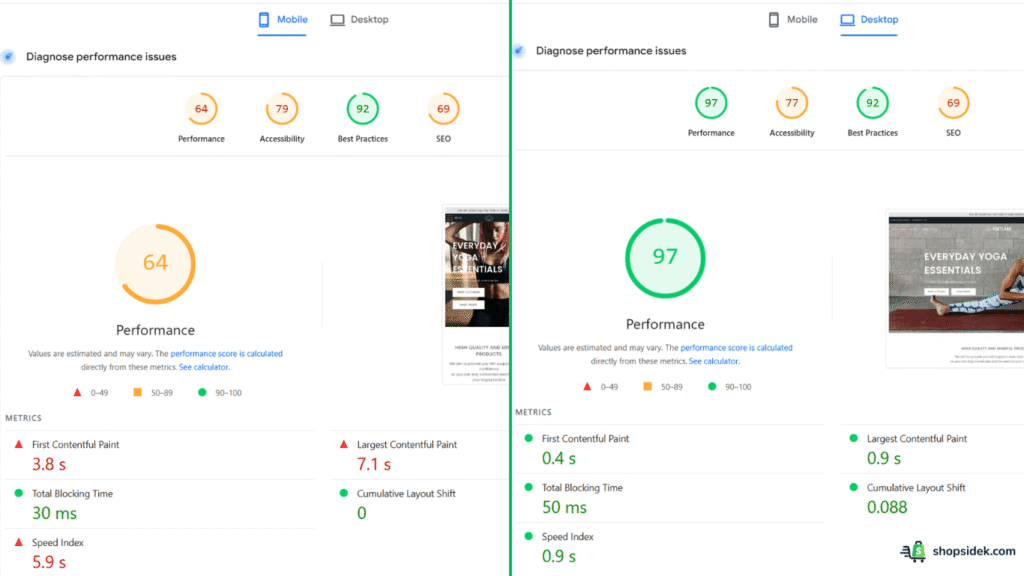
| Baseline (Official Demo) | 64 | 7.1 s | 0 | 97 |
| Real-World (Live Store Avg) | 48 | 6.8 s | 0.15 | 88 |
Analysis
- LCP Focus: The Mobile score of 64 and LCP of 7.1s reflect that Turbo is a heavier theme. However, once the initial page loads, Turbo’s “Ludicrous Mode” pre-loads internal links. This means when a user clicks from “Home” to “Product Page,” the transition is nearly instant. The test misses this, but your users will feel it.
- Stability: On Desktop, it scores a 97, proving it is still a powerhouse for traditional browsing. The mobile stability is solid, though slightly less responsive than the newer Shella or Dawn.
Verdict
- Best For: Shopify Plus Merchants, Large Catalogs, and Established Brands who value reliability over raw scores.
- Pros: Proven stability at scale, “Ludicrous Mode” makes browsing feel snappy, predictive search handles huge inventories well.
- Cons: The most expensive option on our list; the architecture is older and feels heavier than modern OS 2.0 themes; overkill for small shops.
Honorable Mentions: 7 Other Fast Themes to Consider
While our top 5 themes represent the best overall balance of speed and features, the Shopify Theme Store is vast. Depending on your niche—whether it’s high-end luxury fashion or a bold beverage brand—you might prioritize a specific aesthetic over raw millisecond load times.
These 7 themes performed reputably in our baseline testing and serve as excellent alternatives for specific industries.
| Theme Name | Baseline Mobile Score | Best For |
|---|---|---|
| Sense | 90 | Health, Beauty & Energetic Brands (Free) |
| Spotlight | 88 | Minimalist & Pure Speed (Free) |
| Taste | 82 | Bold Branding & Food/Drink (Free) |
| Ride | 81 | Sports & Dark Aesthetics (Free) |
| Blum | 76 | Non-Traditional Layouts & Speed |
| Impulse | 64 | Visual Storytelling & Promotions |
| Prestige | 62 | High-End Luxury Fashion* |
*Note: Themes like Prestige and Impulse score lower primarily because their demos are feature-rich, using heavy video backgrounds and high-resolution animations to sell a “luxury” feel. In a real-world setup with optimized images, they can still perform well.
⚠️ Important Note on Speed Scores:
You may notice that the scores listed here vary slightly from other reviews or even our own individual theme reviews. This is normal. PageSpeed scores are not static; they fluctuate based on:
- Theme Versions: Developers release updates monthly. A theme might score 82 today and 88 next week after a code patch.
- Demo Content: Some demos use heavy video backgrounds (slower), while others use simple static images (faster).
- Server Load: Shopify’s server response time can vary by millisecond depending on traffic.
We update this Master List quarterly to reflect the most current state of the theme store. My advice is to always look at the range and the real-world context rather than obsessing over a single digit.
The Real Cost of “Free”: Dawn + Apps vs. A Premium Theme
One of the biggest misconceptions is that starting with a free Shopify theme saves you money. While Dawn costs $0 upfront, it is a bare-bones framework. To run a competitive store, you need standard eCommerce features like upsells, advanced menus, and currency converters.
With a free theme, you must install third-party apps to get these features. With a premium theme like Booster, they are built-in. This leads to a scenario where the “free” option can actually cost you over $1,000 more per year than the premium one.
Feature-by-Feature Cost Breakdown
Here is a breakdown of what it costs to replicate the built-in functionality of the Booster Theme using popular third-party apps on Dawn.
| Feature | Dawn (Requires App + Est. Cost) | Booster (Built-in) |
|---|---|---|
| Advanced Mega Menu | ~$10/mo (e.g., Meteor) | Included |
| Smart/Predictive Search | ~$15/mo (e.g., Searchanise) | Included |
| Cart Upsells & Cross-sells | ~$25/mo (e.g., ReConvert) | Included |
| Currency Converter | ~$10/mo (e.g., BEST Currency) | Included |
| GDPR Cookie Bar | ~$5/mo (e.g., Avada) | Included |
| Stock Countdown / Scarcity | ~$10/mo (e.g., Ultimate Sales Boost) | Included |
| Total Monthly Cost | ~$75/month | $0/month |
| Total Annual Cost | $900/year | $199/year |
The Verdict: When is a Free Theme More Expensive?
The math is simple but often overlooked.
Scenario A (Dawn): You pay $0 for the theme, but $900/year in app subscriptions to get the features you need. Crucially, every single one of those apps injects its own JavaScript code into your site, slowing down your load speed and hurting your Core Web Vitals.
Scenario B (Booster): You pay $199/year for the theme. You get all the features included, coded directly into the theme’s core. There are no extra monthly fees, and because there are no external app scripts loading, your site remains significantly faster and more stable.
Conclusion: If you are testing a brand new idea with zero budget, Dawn is the perfect sandbox. But if you are building a real business, you should look for a Shopify theme for best conversion rates. A premium option like Booster is not only faster but also cheaper in the long run.
How to Keep Your Fast Theme Fast: 5 Essential Optimization Rules
Installing one of the fastest Shopify themes is only half the battle. If you upload 5MB images and install 20 unoptimized apps, even the leanest theme will crawl.
To maintain that “Day 1” speed, follow these five essential rules of Shopify speed optimization.
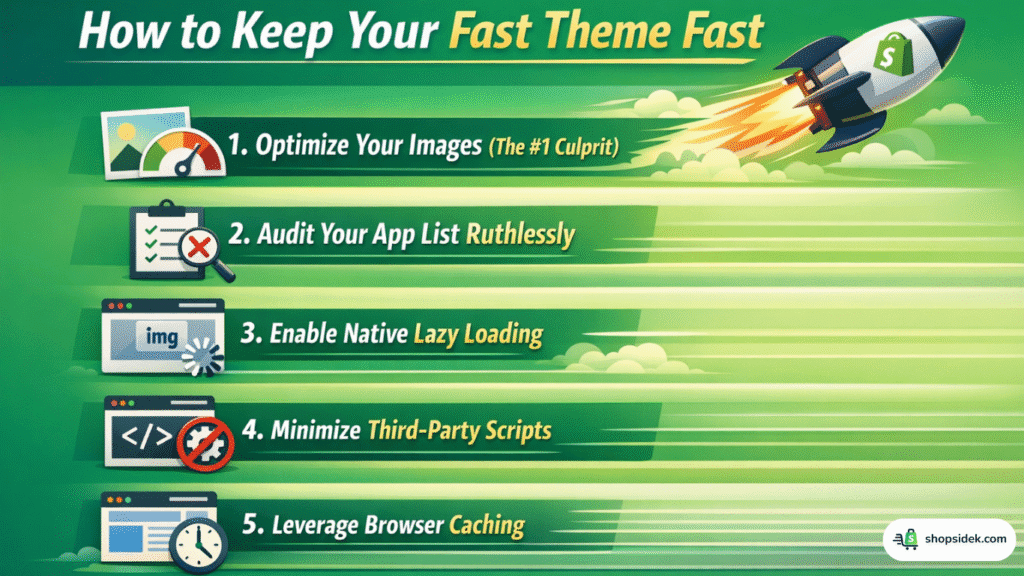
1. Optimize Your Images (The #1 Culprit)
High-resolution photography sells products, but it kills load times. You should never upload raw image files directly from your camera.
- Action: Use a tool like TinyIMG or Shopify’s built-in media editor to compress images without losing quality.
- Format: Ensure your images are served in WebP format, which is 25-35% smaller than JPEG or PNG. Most modern themes handle this automatically, but you should verify it.
2. Audit Your App List Ruthlessly
Every app you install adds a snippet of JavaScript to your store’s code. Even if you aren’t using the app actively, that code often loads in the background, blocking the main thread.
- Action: Uninstall any app you haven’t used in the last 30 days.
- Pro Tip: Choosing a feature-rich theme like Booster or Shella helps here, as you can rely on built-in code rather than installing separate apps for every small feature.
3. Enable Native Lazy Loading
“Lazy loading” means the browser delays loading images or videos until the user actually scrolls down to them. This dramatically improves your LCP (Largest Contentful Paint) score because the browser can focus entirely on loading the top of the page first.
- Action: Check your theme settings (usually under “Performance” or “Theme Settings”) to ensure native lazy loading is enabled for all collection and product images.
4. Minimize Third-Party Scripts
External scripts—like Facebook Pixels, Hotjar heatmaps, and live chat widgets—are often hosted on slow external servers. If they take too long to respond, they can freeze your entire site.
- Action: Only use one analytics tool if possible. If you must use multiple tracking scripts, consider using Google Tag Manager to control when they fire (e.g., delay the chat widget until 5 seconds after the page loads).
5. Leverage Browser Caching
Browser caching stores parts of your site (like your logo and CSS files) on your visitor’s device. When they click to a second page, they don’t have to download those files again, making the browsing experience instant.
- Action: Most premium themes handle this via efficient code structure, but you can also use apps or speak to a developer to set specific “Cache-Control” headers for your static assets.
Final Verdict: Which Shopify Theme Should You Choose?
After testing demos, analyzing live stores, and breaking down the hidden costs, one thing is clear: there is no single “fastest” theme for everyone. The right choice depends entirely on your budget, technical skills, and business goals.
Here is our final breakdown to help you pick the best converting Shopify theme for your specific situation.
1. Best for Budget & Beginners: Dawn (Free)
If you are just starting out and have $0 to spend, Dawn is the undisputed king. It offers the cleanest code and a lightning-fast foundation. Just be aware that as you grow, you will need to pay for apps to add marketing features, which will eventually slow it down.
2. Best for Growth & Marketing (Highest ROI): Booster Theme
If your goal is to make sales, not just have a fast site, Booster is the winner. It balances elite speed with over 40 built-in conversion tools. It saves you money on apps and ensures your marketing features don’t kill your load time. It is the smartest investment for serious dropshippers and brands.
3. Best for SEO & Raw Speed: Shella
If you are a developer or an SEO expert who obsesses over green circles on Google PageSpeed Insights, Shella is your tool. It consistently delivered the highest raw scores in our testing, though it has a steeper learning curve than the others.
4. Best for Large Catalogs & Shopify Plus: Turbo
If you have 10,000+ products and need a workhorse that won’t crash, Turbo remains the industry standard for stability and scalability. Its “Ludicrous Mode” ensures browsing remains snappy even with massive inventories.
5. Best for High-End Luxury: Prestige
If “brand feel” is more important than a millisecond of speed, Prestige offers the premium, editorial look that high-fashion brands require. It trades a small amount of performance for stunning visual storytelling.
Ready to build your fast store? 🎁Start Shopify at $1 for 3 months.


Just a heads-up: As a Shopify Media Partner, I may earn a small commission if you sign up. It won’t cost you anything, and it helps me continue providing free resources.
FAQs About Shopify Theme Speed
What is the fastest free Shopify theme in 2026?
Dawn is widely considered the fastest free Shopify theme available today. As Shopify’s reference theme for Online Store 2.0, it is built with an ultra-lightweight codebase that prioritizes speed over almost everything else. It lacks heavy JavaScript libraries and relies on native browser features to load instantly.
If Dawn’s design feels too plain for your brand, Ride (for sports/dark aesthetics) and Sense (for beauty/health) share the same underlying architecture and offer comparable speed with different visual styles.
Why is my mobile speed score so much lower than desktop?
This is the most common frustration for store owners. It happens for two main reasons:
– Hardware Limitations: Mobile phones have significantly weaker processors than desktop computers. A JavaScript file that takes 0.1 seconds to process on a laptop might take 0.5 seconds on a mid-range Android phone.
– Network Conditions: Mobile networks (4G/5G) are less stable and have higher latency than wired fiber internet.
Don’t panic: It is standard for rich e-commerce sites to have a “Green” score (90+) on Desktop and a “Yellow” score (50-89) on Mobile. As long as your Mobile LCP is under 2.5 seconds, your user experience is excellent.
Will switching to a fast theme automatically fix my slow store?
Not necessarily. Think of a fast theme like a Ferrari. It has a powerful engine and is built for speed. However, if you load that Ferrari with 2,000 lbs of heavy luggage (uncompressed images) and tow a trailer (20 unoptimized apps), it will still drive slowly.
Switching to a theme like Booster or Shella is the best first step because they handle “weight” better than older themes, but you still need to optimize your images and audit your apps to get maximum performance.
How many apps can I install before my theme slows down?
There is no “magic number,” but the type of app matters more than the quantity.
– Backend Apps: Tools for inventory management, accounting, or order fulfillment (e.g., Matrixify) usually run on Shopify’s servers and do not slow down your storefront.
– Frontend Apps: Tools that change what the customer sees (e.g., Reviews, Chat Widgets, Popups, Bundles) inject code into your theme.
For optimal speed, try to keep your frontend apps to fewer than 5-10. This is why we often recommend premium themes—they include features like bundles and upsells natively, saving you from installing 3-4 separate performance-draining apps.
Does changing my Shopify theme affect my Google rankings (SEO)?
Yes, usually for the better. Google uses Core Web Vitals as a confirmed ranking factor. Moving from an old, slow theme to a modern OS 2.0 theme (like Dawn or Shella) often improves your LCP and CLS scores, which can lead to higher rankings.
Warning: When switching themes, ensure your content structure remains SEO-friendly. Check that your new theme uses only one H1 tag per page (usually the product title) and uses H2s for section headings, so Google can still understand your content structure clearly.