If you’ve searched for a Debutify theme review recently, you’ve likely encountered the same generic praise repeated across the web. But intelligent store owners need more than hype—they need hard data.
In this unfiltered 2026 analysis, we aren’t just listing features. We dig into the real-world performance metrics of the Debutify theme, analyzing specific store examples that reported up to 400% sales growth. We also put its page speed to the test to see if those 90+ add-ons actually slow you down.
Most importantly, we uncover the one critical factor most reviews ignore: the “theme lock-in” risk that could define your business’s long-term flexibility. Is this powerhouse the smart play for your Shopify store, or are you better off building from scratch?
To follow along with our feature breakdown, you can open a free Shopify trial or check out a Debutify theme demo to compare the native options against Debutify.
I’ve turned this entire post into a visual story—feel free to watch the illustrated version here.
What is the Debutify Theme Shopify? (And Why is it So Popular?)
At its core, Debutify is more than just a standard Shopify theme; it is a conversion optimization ecosystem designed to replace the need for dozens of third-party apps. A typical store owner might purchase a theme and then struggle to integrate separate apps for upsells, countdown timers, and trust badges. Whereas, Debutify comes pre-loaded with over 90 built-in widgets and a dedicated suite of AI tools.
This “all-in-one” approach has made it incredibly popular, with data indicating that over 200,000 businesses have used the platform to launch and scale their stores. The appeal is simple: instead of managing multiple subscriptions and conflicting code from different app developers, you get a unified dashboard where every feature is designed to work together seamlessly.
However, this convenience comes with trade-offs. Here is a quick summary of why merchants choose—or avoid—the Debutify Shopify theme:
| 😍 Why Merchants Love It | 😐 Potential Drawbacks |
|---|---|
| Speed to Launch: You can activate high-converting features (like upsells and bundles) in seconds without coding. | Subscription Cost: Unlike one-time purchase themes, Debutify operates on a SaaS monthly/annual model. |
| Unified Design: All 90+ add-ons match your store’s branding automatically, avoiding a “cluttered” look. | Theme Lock-In: Relying heavily on proprietary add-ons makes it difficult to switch themes later without losing functionality. |
| Cost Efficiency: It can be cheaper than paying for 10+ separate Shopify app subscriptions. | Performance Management: Enabling too many add-ons simultaneously can impact page load speeds if not monitored. |
5 “Killer” Debutify Theme Features in Action (With Visuals)
The primary reason merchants choose the Debutify theme over standard options is its massive library of conversion widgets and AI features. These are built-in tools that function exactly like third-party Shopify apps but are coded directly into the theme architecture.
Instead of searching for five different app developers and hoping their code doesn’t conflict, you can activate these features with a single toggle. Here are the five most impactful Debutify features designed to increase your conversion rate immediately.
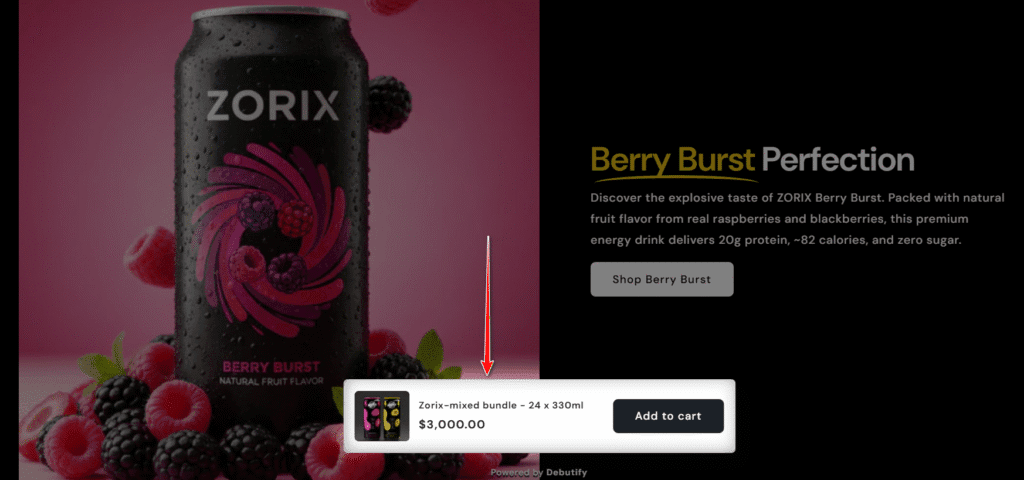
Sticky, Animated Add-to-Cart
On mobile devices, long product descriptions often push the “Buy” button off-screen. If a customer decides to purchase after reading your specs or reviews, they shouldn’t have to scroll all the way back up to find the button.
The Sticky Add-to-Cart bar solves this friction point by keeping a “Buy Now” button fixed to the bottom or top of the screen as the user scrolls. Debutify enhances this with micro-animations—a subtle shake or pulse—that draws the eye to the CTA (Call to Action) whenever the user pauses. It’s a simple UI tweak that significantly reduces bounce rates on mobile product pages.
Customizable Product Bundles
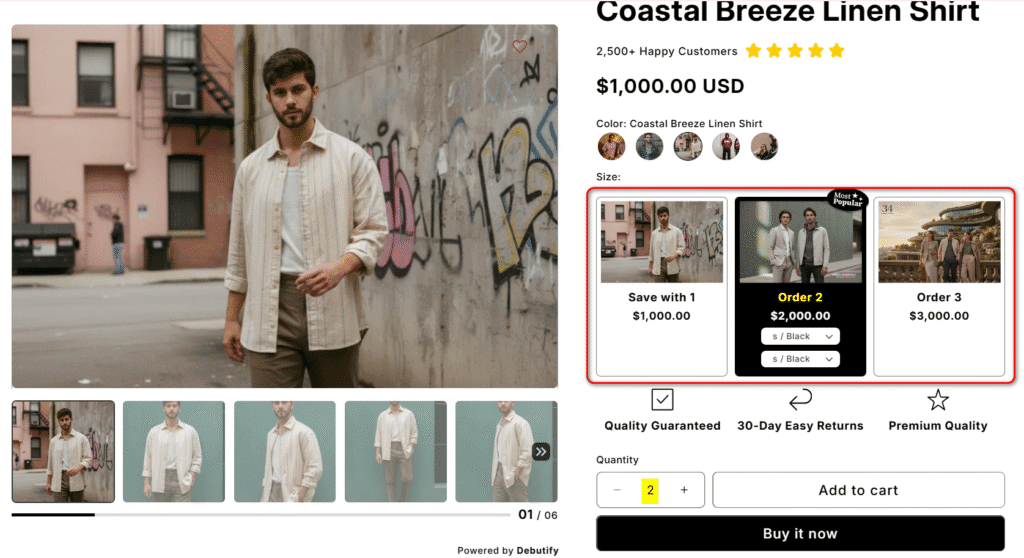
One of the fastest ways to increase your Average Order Value (AOV) is through bundling. Instead of hoping customers browse your store for matching items, Debutify’s bundling add-on presents them right on the product page.
You can configure “Frequently Bought Together” offers or “Buy X, Get Y” discounts that allow customers to add multiple items to their cart with a single click. Unlike external bundling apps that often load slowly or clash with your theme’s CSS, these bundles inherit your store’s styling automatically, creating a seamless, Amazon-like shopping experience that feels native to your brand.
Cart Goals (Countdown Timer & Free Shipping Bar)
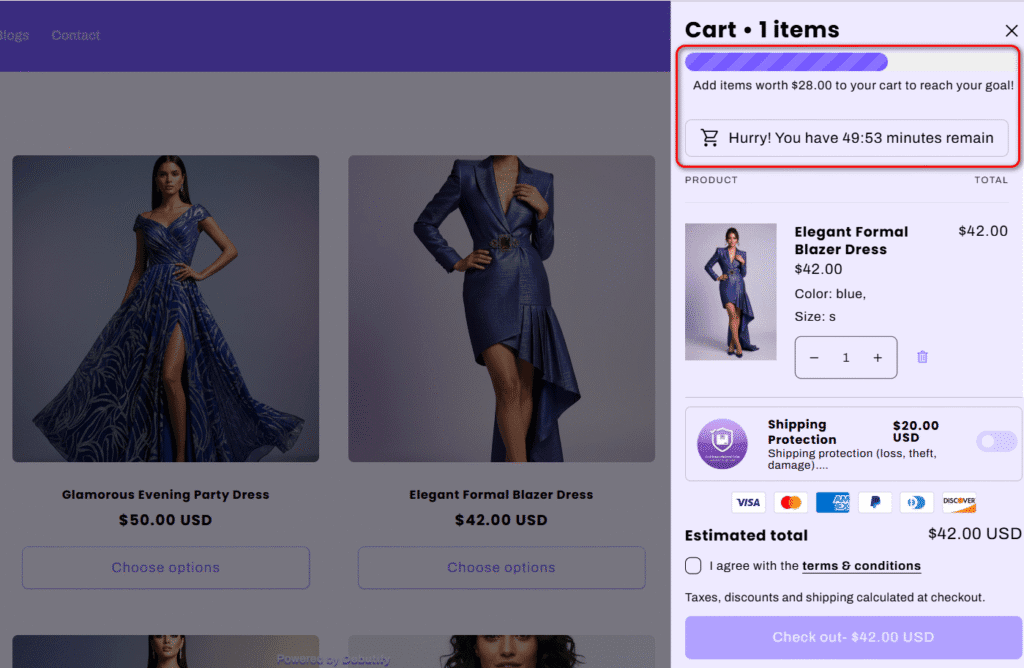
Gamifying the shopping experience is a proven strategy to boost cart size. The Cart Goal add-on places a visual progress bar inside the cart drawer or slide-out cart.
As a customer adds items, the bar fills up, telling them exactly how much more they need to spend to unlock a reward—usually free shipping. To add urgency, you can pair this with a cart countdown timer that reserves the customer’s items for a limited window (e.g., 10 minutes). This combination of “greed” (wanting the free shipping) and “fear” (fear of losing the items) is a powerful psychological driver for closing sales.
Newsletter Pop-Up with Urgency
Personally, I think building an email list is non-negotiable for e-commerce success. While you could use external integrations like Mailchimp or Omnisend to create forms, Debutify includes a robust, conversion-focused pop-up builder natively.
This isn’t just a static email capture box. You can configure exit-intent triggers (appearing when a user tries to leave the page) and include a discount code with a countdown timer directly inside the pop-up. This “use it or lose it” approach captures leads that would otherwise bounce, allowing you to nurture them through email marketing later.

Trust Badges & Sales Pop-Ups
Trust is the currency of e-commerce. If a new visitor doesn’t trust your site, they won’t enter their credit card information. Debutify tackles this with a two-pronged approach.
First, the Trust Badge add-on allows you to insert secure payment icons (Visa, PayPal, etc.) directly under the “Add to Cart” button, reassuring users at the critical point of decision. Second, the Sales Pop-Up (or “Live Sales Notification”) displays small, non-intrusive notifications showing that other people recently bought products from your store.
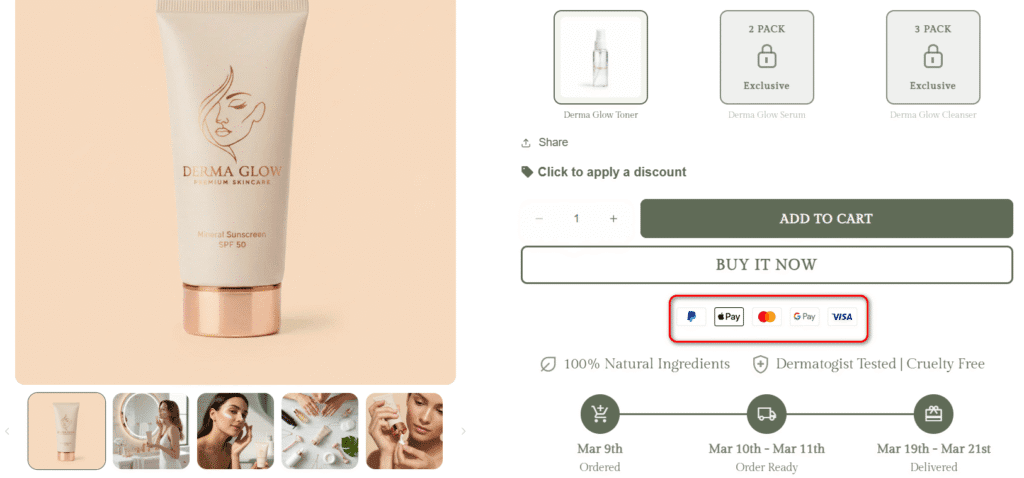
While dedicated apps like Loox or Stamped.io are excellent for collecting detailed reviews, Debutify’s built-in tool handles these visual social proof signals without an extra monthly subscription.
Debutify Theme Pricing vs. The Alternative: A Cost Breakdown
When you first see the Debutify pricing model, it can be a shock. Most Shopify themes are a one-time purchase (usually between 200–400), whereas Debutify operates on a monthly or annual subscription model.
To understand if this recurring cost is justified, you have to look beyond the theme itself. You aren’t just paying for a website template; you are paying for a pre-integrated suite of apps.
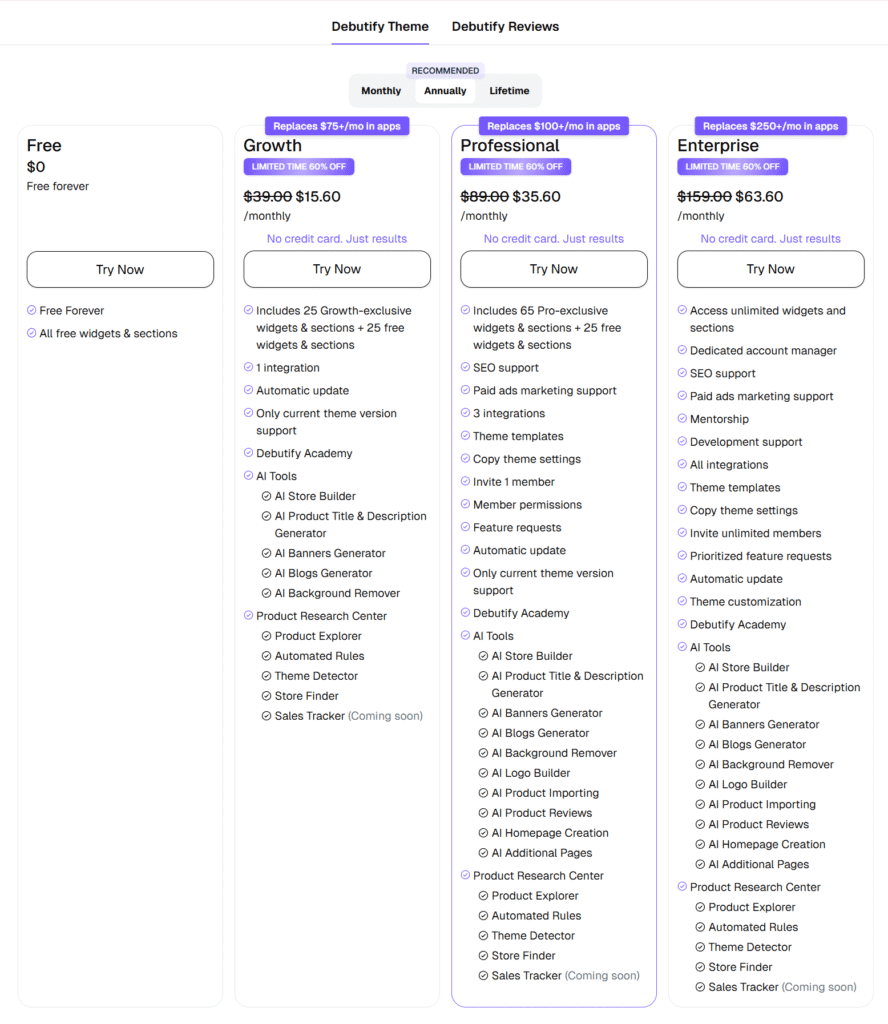
To give you an honest financial picture, let’s compare the Debutify Pro Plan (popular for growing stores) against a standard setup using the free Shopify Dawn theme plus the individual third-party apps required to match Debutify’s functionality.
The 1-Year Cost Comparison
| Feature Category | Debutify Pro Plan (Annual) | Shopify Dawn + App Stack |
|---|---|---|
| Theme Cost | Included | Free (Built-in) |
| Cart Upsell & Cross-Sell | Included | ~$240/yr (e.g., ReConvert or Honeycomb) |
| Product Bundles | Included | ~$180/yr (e.g., Bundler or WideBundle) |
| Trust Badges & Sales Pop | Included | ~$120/yr (e.g., Sales Pop by CartKit) |
| Wishlist Functionality | Included | ~$120/yr (e.g., Wishlist Plus) |
| Urgency Timers & Stock Bars | Included | ~$120/yr (e.g., HurryTimer) |
| Annual Maintenance Time | Low (Single Dashboard) | High (Managing 5+ App Updates/Support) |
| TOTAL ESTIMATED COST | ~$427 / year* | ~$780 – $1,000+ / year |
*Note: Debutify cost is estimated based on their limited-time 60% off annual billing discount at $35.60/mo. App stack costs are based on standard 2026 Shopify App Store pricing.
The Verdict on Value
As the numbers show, the cost difference is often negligible. While the Debutify free download allows you to test the waters, the Pro plan effectively bundles ~$800 worth of app subscriptions into a single cohesive interface.
If you choose the “Dawn + Apps” route, not only will you spend more money annually, but you pay for it in time: managing five different support teams, dealing with code conflicts, and ensuring every app matches your brand’s CSS.
🛠️ Calculate Your True Store Costs: To see exactly how your theme choice and app stack will impact your profit margins, plug your numbers into our Free Shopify Pricing Calculator to find your most cost-effective setup.
The Big Question: How Do Debutify’s Add-Ons Impact Site Speed?
Every store owner knows that speed kills—or converts. A one-second delay in mobile load times can impact conversion rates by up to 20%. The biggest criticism of fully integrated themes is code bloat: does having 90+ features built-in weigh down your site?
Most reviews simply state “Debutify is fast” or “Debutify is slow” based on feelings. We decided to run a standardized Shopify theme performance test to get the real numbers.
Our Test Methodology
To ensure a fair comparison, we set up a fresh Shopify development store with the following parameters:
- Platform: Shopify Basic Plan.
- Content: 10 Demo Products, 5 Collections, and High-Res Hero Images (compressed).
- Tool: Google PageSpeed Insights (Mobile Score).
- Scenarios:
- Baseline: Shopify Dawn Theme (Fresh install, no apps).
- Debutify Base: Debutify Theme (Fresh install, 0 add-ons active).
- Real-World Setup: Debutify + 5 Core Add-ons (Add-to-Cart, Upsells, Announcement Bar, Trust Badges, Sticky Cart).
- Heavy Load: Debutify + 15 Add-ons (The “Maximalist” setup).
The Performance Results
The results reveal a clear trade-off between functionality and raw speed.
Mobile Speed Scores Impact
The Data Breakdown (Mobile Scores):
- Shopify Dawn (Baseline): 92/100 – Extremely fast, lightweight code.
- Debutify (0 Add-ons): 89/100 – Surprisingly efficient. The base code is well-optimized.
- Debutify (5 Add-ons): 76/100 – The "Sweet Spot." You lose some speed for powerful features, but the site remains responsive and passes Core Web Vitals.
- Debutify (15+ Add-ons): 58/100 – The "Danger Zone." Activating too many scripts simultaneously significantly impacts Time to Interactive (TTI).
The Verdict on Debutify Speed:
Debutify itself is not slow; how you use it makes it slow.
The base theme is nearly as fast as Dawn. Naturally, enabling 15+ built-in add-ons will drag down your performance. But context is critical here: installing 15 separate third-party apps on Dawn would likely result in an even lower score (sub-50) due to conflicting code and external script calls.
Strategic Takeaway: Use the Debutify speed advantage by activating only the 5–7 add-ons that directly drive revenue. Turn off the vanity features.
Real Stores, Real Results: 3 Debutify Theme Examples
Theory and speed tests are valuable, but for a store owner, the only metric that truly matters is revenue. Does the theme actually sell products?
To answer this, we analyzed three verified Debutify theme examples—real brands that switched to the platform and publicly shared their data. These case studies demonstrate how the "all-in-one" ecosystem translates into measurable growth.
Laughing Pug Australia: 400% Sales Increase
Niche: Premium Coffee & Gear
The "Laughing Pug" is a perfect example of a brand that had great traffic but a flawed conversion funnel. Initially, they ran a "free plus shipping" offer for coffee samples, but they were losing money: their Facebook ad cost per purchase was $9, while they were only charging $7.95 for shipping.
Instead of pouring more money into ads, they installed the Debutify theme to maximize the traffic they already had. By utilizing built-in widgets like the Sticky Add-to-Cart, Add-to-Cart Animations, and Upsell Bundles, they completely flipped their unit economics.
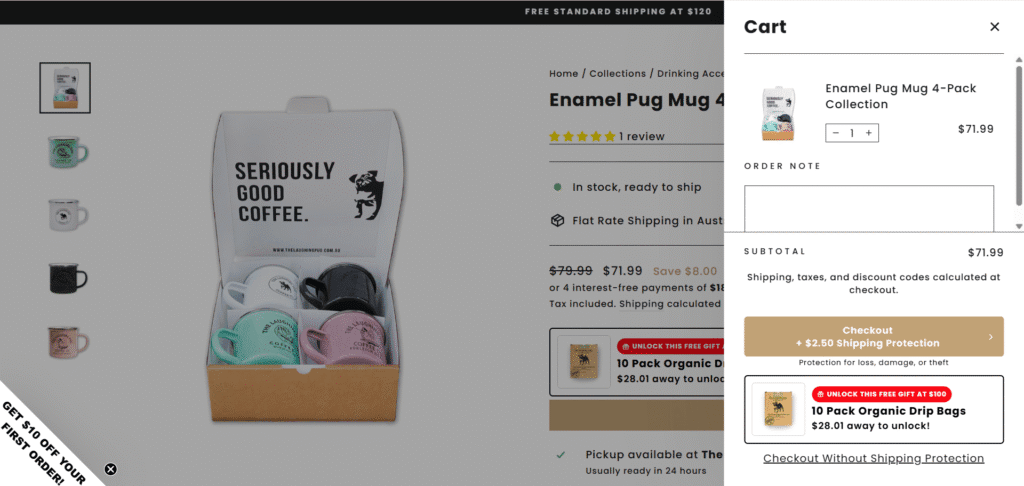
The result was a staggering 400% increase in daily revenue. Within two months, they doubled their monthly revenue to hit A$100,000 for the first time and successfully expanded their operations into New Zealand.
Milkie Co: 5x Revenue and Doubled Conversions
Niche: Personalized Gifts & Accessories
Milkie Co faced a common e-commerce hurdle: an income ceiling. Despite having a highly engaged Instagram following, their Shopify store was stuck at around $200 a day in revenue with a low 1.85% conversion rate.
To break this ceiling, they migrated to Debutify to create a more personalized shopping experience without slowing down their site with heavy third-party apps. They leveraged the theme's native Customizable Products and Color Swatches widgets, allowing customers to easily personalize their handmade trinkets, while using the Cart Upsell feature to increase order value.
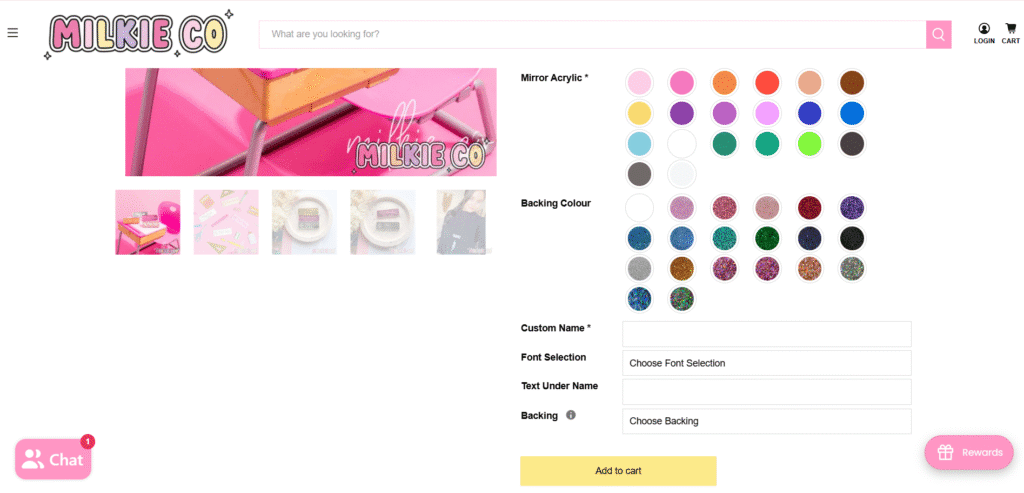
The impact was immediate. Within four months, their conversion rate nearly doubled to 3.51%, and they saw a 500% (5x) increase in total revenue. As the founder noted, the switch helped them scale from $5,000 a month to consistently generating over $50,000 a month.
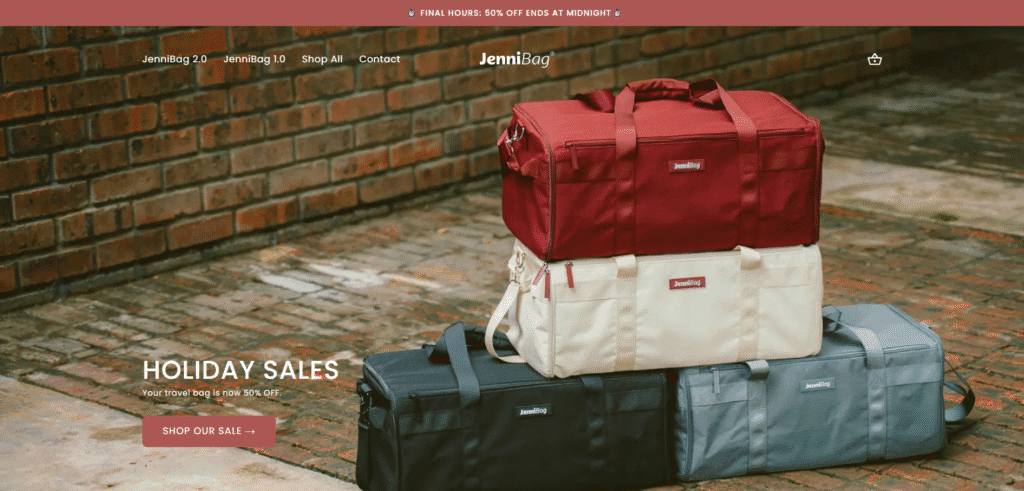
JenniBag: A Clean, Professional Look
Niche: Premium Leather Bags & Accessories
In the fashion and accessories niche, trust is heavily tied to visual presentation. If a store looks cluttered or pieced together, customers will hesitate to pay premium prices. JenniBag needed a storefront that exuded the polished feel of a high-end boutique.
By switching to Debutify, JenniBag proved that this theme isn't just for aggressive, direct-response marketers; it also delivers the refined, "brand-first" aesthetic required for luxury goods. By leveraging the theme's clean architecture and customizable design sections, JenniBag successfully boosted their store's conversions by 37%. This case study highlights that a professional, distraction-free layout is just as important as countdown timers when it comes to driving sales.
💡 Keep Exploring: A great theme is only the first step. Discover what makes the best e-commerce stores actually win in our deep dive featuring 50+ real-world case studies and design breakdowns.
The Hidden Risk: Understanding "Theme Lock-In"
While the unified ecosystem is Debutify’s greatest strength, it is also its most significant long-term risk—a concept known in the software world as "Vendor Lock-In."
Most reviews gloss over this, but it is critical for your long-term strategy. Here is the reality:
In a standard Shopify setup (e.g., using the Dawn theme + separate apps), your design and your functionality are separate. If you decide to change your theme from Dawn to Prestige, your third-party reviews app, upsell app, and email pop-up app will likely keep working with minor adjustments.
With Debutify, your design and functionality are fused together.
Because you are using Debutify’s proprietary add-ons for bundles, sticky add-to-carts, and trust badges, those features do not exist outside of the Debutify environment. If you decide to cancel your subscription or switch to a different theme in two years, you don't just lose your website's look—you lose the 90+ features running your business.
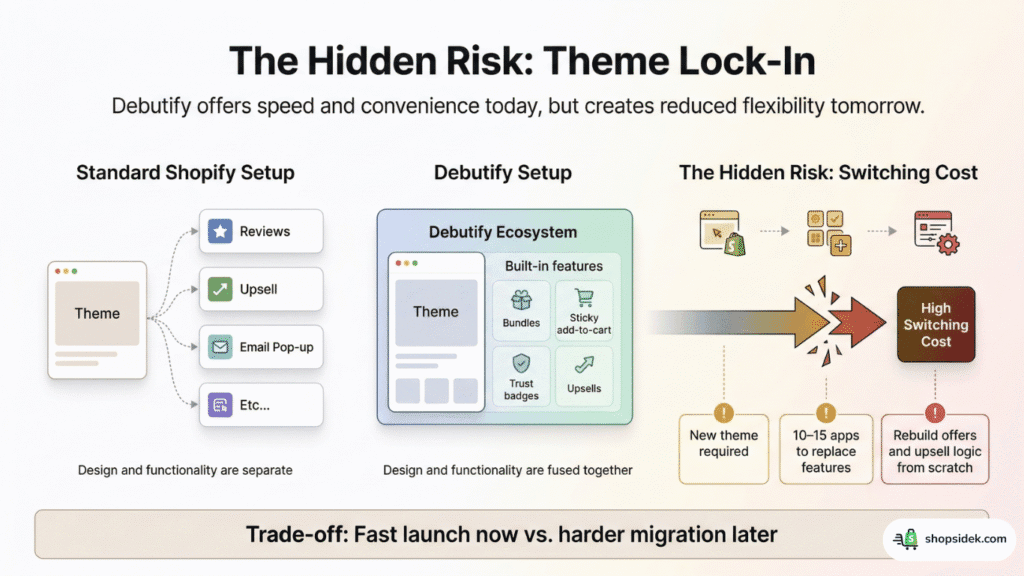
To migrate away from Debutify, you would need to:
- Buy and design a new theme.
- Research and install ~10–15 new third-party apps to replace the lost Debutify add-ons.
- Re-configure all your upsell logic and offer settings from scratch.
This creates a high "switching cost." As discussed in active Shopify merchant communities on Reddit, many experienced developers prefer keeping the "frontend" (theme) separate from the "backend functionality" (apps) specifically to avoid this dependency.
The Strategic Takeaway:
The way I see it, this is not a dealbreaker, but a trade-off. You are trading immediate convenience and speed today for reduced flexibility tomorrow. If you want to launch fast and lean, Debutify is fantastic. But be aware that if you ever leave, you will have to rebuild your tech stack from the ground up.
How to Download and Install the Debutify Theme
One of Debutify’s biggest selling points is its ease of use. You don't need a developer or any coding knowledge to get started. The entire process takes less than 5 minutes.
Here is the step-by-step guide to secure your Debutify theme free download and install it on your Shopify store.
Step 1: Create Your Account
Head to the Debutify website and sign up for the free trial. You don’t need to enter a credit card. Once logged in, you will see the main user dashboard.
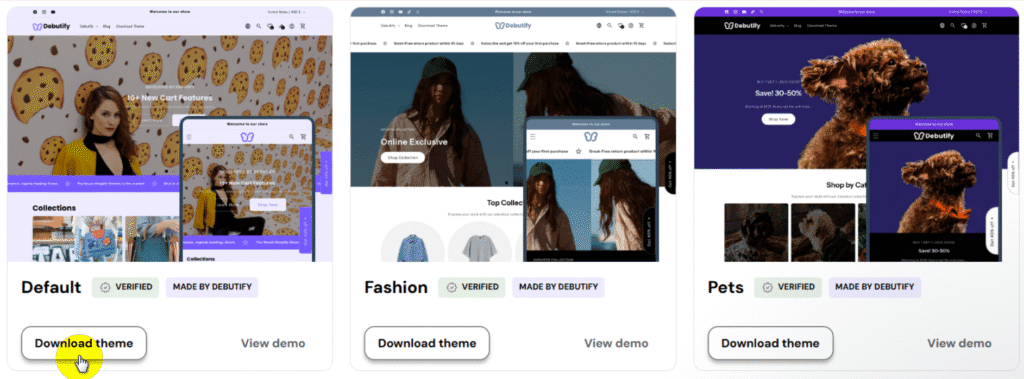
Step 2: Download the Theme File
In the dashboard, navigate to the "Template Library" section. Look for the "Download Theme" button. This will download the latest version of the theme as a ZIP file to your computer. Keep in mind, you should not unzip this file.
Step 3: Go to Your Shopify Admin
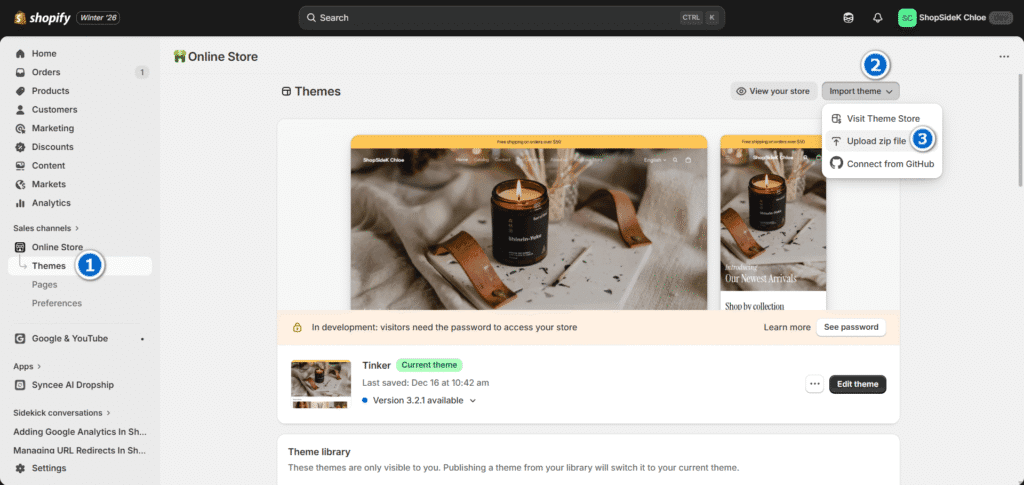
Log in to your Shopify store. From the left-hand menu, go to Online Store > Themes. This will open your theme library.
Step 4: Upload the ZIP File
Click the "Import theme" button and select "Upload zip file". In the pop-up window, select the Debutify ZIP file you just downloaded.
Step 5: Customize and Publish
Once the upload finishes, the install Debutify theme process is complete. It will appear in your library. Click "Edit theme" to start setting up your add-ons, or click "Publish" to make it your live storefront immediately.
Final Verdict: Is Debutify Worth It in 2026?
To conclude our comprehensive 2026 Debutify theme review, the answer to whether it is worth the investment depends entirely on your business model. However, with their current pricing structure, it is undeniably one of the most cost-effective shortcuts to a high-converting storefront.
✅ You should choose Debutify if: You are a beginner, a dropshipper, or an entrepreneur who values speed of launch above all else. If you want a proven, comprehensive system that eliminates the headache of managing a dozen conflicting Shopify apps—and saves you roughly $500+ a year in app fees—Debutify is a highly profitable investment.
❌ You should use a standard theme if: You are building a long-term, highly customized brand. If you value ultimate technical flexibility, demand top-tier page speed, and prefer to hand-pick best-in-class apps for each specific function, a native Shopify theme like Dawn is the smarter foundational choice.
Final Summary: Debutify Theme Pros & Cons
| The Pros | The Cons |
|---|---|
| Replaces 90+ paid Shopify app subscriptions | Requires an ongoing monthly or annual fee |
| Includes built-in AI tools (Store builder, copywriting) | High "theme lock-in" makes migrating difficult |
| Lightning-fast store setup with zero coding | Site speed drops if too many add-ons are active |
| Unified design automatically matches your brand | Can be overkill for simple, minimalist stores |
Ready to build your store? For an out-of-the-box solution, try Debutify risk-free. For maximum flexibility, start with a free Shopify theme and build your app stack from scratch as you grow.


Note: I’m a Shopify Media Partner, which means I might earn a small commission if you sign up through my link. It doesn’t cost you anything extra and helps keep this blog running.
FAQs About Debutify Theme
Is the Debutify theme really free?
Debutify offers a basic Debutify free plan that includes the core theme template without any premium features. However, to access the 90+ conversion add-ons and AI tools, you must start the 14-day Debutify trial. Once that trial expires, you must upgrade to a paid subscription or you will lose access to all add-ons.
Does Debutify slow down my Shopify store?
As our earlier performance test revealed, the core template is highly optimized and fast. However, your Debutify site speed will drop if you activate too many features simultaneously. Enabling 15+ widgets can result in a slow Shopify theme. To maintain fast load times, my advice is to activate the core add-ons that directly drive revenue.
Is Debutify theme good for dropshipping?
Yes, Debutify is widely considered one of the most effective themes for dropshipping. Its built-in conversion triggers—such as the Sticky Add-to-Cart, Trust Badges, and urgency countdown timers—are specifically engineered to build immediate trust and drive impulse purchases for both standard and high-ticket dropshipping stores.
What happens if I cancel my Debutify subscription?
If you cancel Debutify, the base theme design will remain live on your Shopify store, but all premium add-ons will immediately deactivate. While you do keep the theme after cancellation, you will instantly lose your cart upsells, bundle offers, and countdown timers, which may break specific layouts and conversion funnels.
How do I update the Debutify theme without losing my customizations?
The safest method is to use the built-in Debutify Theme Updater tool located inside your user dashboard. This feature automatically transfers your existing settings and add-on configurations to the newest version. If you update manually by downloading a new ZIP file, you will have to re-apply any custom code changes yourself.