Last updated: October 30, 2026. Both example pages are live and free to click through, with no signup.
A good Black Friday product page does two jobs: it reads as a sale at a glance, and it still sells the product to someone who has never heard of the brand. The two Shopify examples below handle both jobs with one switch. The sale changes the colors, the bundle prices, the free gift, the popup offer and the cart. It does not change the crossed-out price, and it does not change the case the page makes for the product.
Black Friday Cyber Monday is the biggest sales weekend of the year for many Shopify stores: Shopify merchants sold $14.6 billion over BFCM 2025, with an average cart of $114.70 (Shopify, December 2, 2025). Many shoppers coming from ads, emails and search land directly on a product page, not on a sale landing page, so the product page is where the deal has to make sense.
Below are two working examples, each with exact prices, what changes for the sale, what stays the same, and the Kaching Bundles settings behind the offer:
- Sparehand, a Black Friday page for a kitchen gadget, built on quantity breaks.
- Halfdark, a Cyber Monday page for a gaming desk mat, built on a mix & match bundle.
Key takeaways: 7 rules for a Black Friday product page
- Keep the sale color on the money. Use one accent color, and use it only where a price or a deal appears. The page reads as a sale in one glance without turning into a flyer.
- Sell a bundle in the banner, not a percent. “Two pairs, $84, until Monday night” tells the shopper what to buy, what it costs and when the offer ends.
- Strike the real price. The crossed-out number should be a price you actually charged before the sale, and it should not move when the sale ends.
- Grow the gift, not the discount. A bigger free gift on the top bundle makes the order feel bigger without cutting the price of every unit again.
- Deepen every step, and name the next one. A line under the bundle bars such as “Add 1 more piece → 35% off each item” turns the price ladder into a goal.
- Don’t stack a percent on a percent. In sale week, swap the usual 10%-off popup for a free item, so no code cuts into a sale price.
- Leave the body alone. The sections below the buy box still have to sell the product. Black Friday changes the top of the page and the cart, not the argument.
The two examples at a glance
| Sparehand (Black Friday) | Halfdark (Cyber Monday) | |
|---|---|---|
| Product | Rechargeable one-handed salt and pepper grinder | Gaming desk mat with a light strip sewn into the edge, 90 × 40 cm |
| Niche | Home & kitchen | Tech & gaming accessories |
| Kaching offer type | Quantity Break: 1, 2 or 4 grinders | Bundle Upsell (mix & match): the mat plus 0, 1 or 2 setup pieces |
| Everyday prices | $36 · $59 · $99 | $45 · $76.50 · $96.75 |
| Sale prices | $29 · $49 · $84 | $40.50 · $67.50 · $83.85 |
| Crossed-out price | Quantity × the everyday $36, unchanged by the sale | The items’ own everyday total, unchanged by the sale |
| Sale-week gift | The free refill duo grows into a trio ($14 → $20 value) | The free Coil Cable moves down from bar 3 to bars 2 and 3 |
| Sale-week popup | Free gift wrap instead of 10% off | A spin wheel with free items only |
| Order in the walkthrough | $29 → $49 → $64 | $40.50 → $67.50 → $86.50 |
| Live example | Sparehand template (T06) | Halfdark template (T07) |
Example 1: Sparehand, a Black Friday page built on quantity breaks
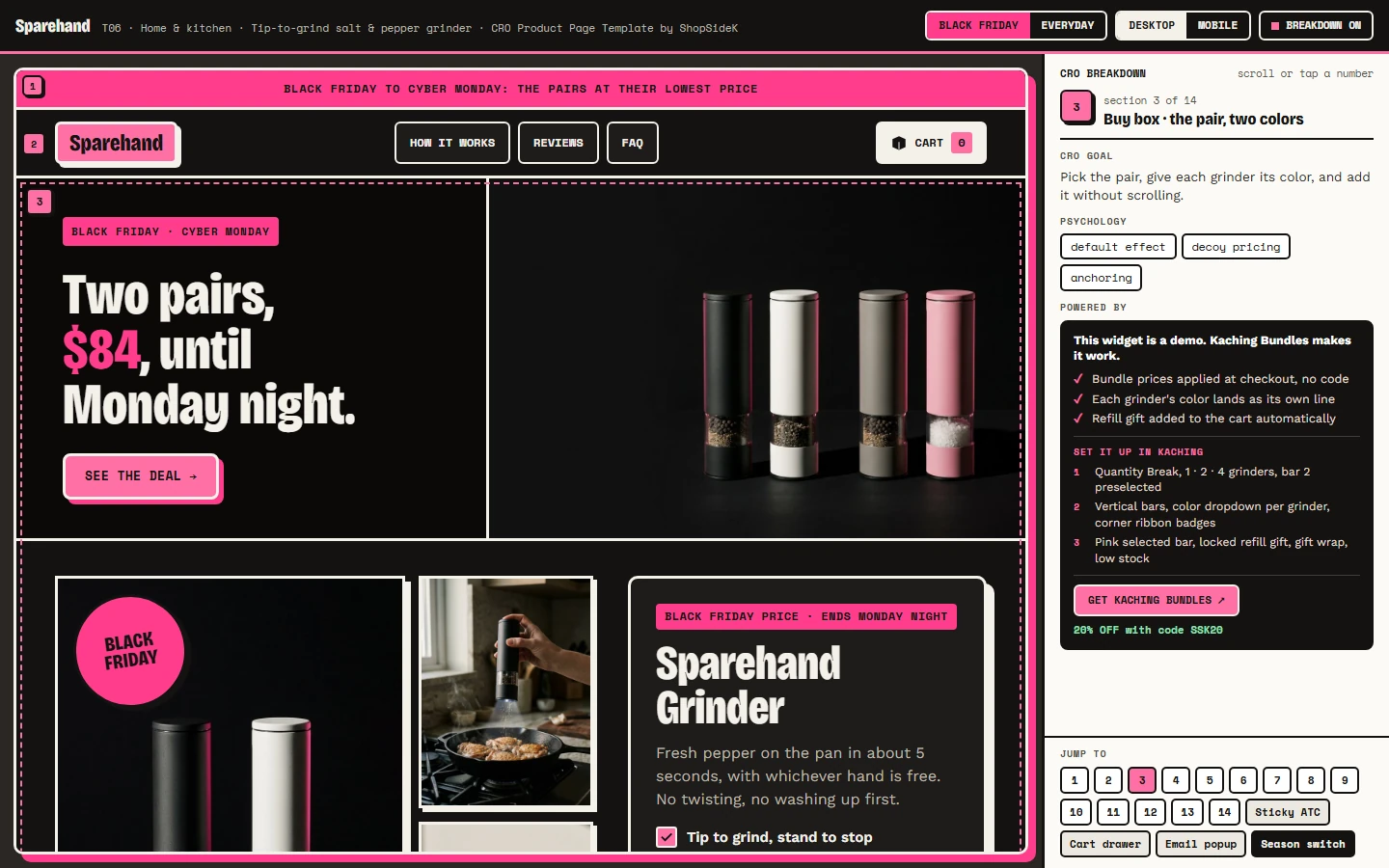
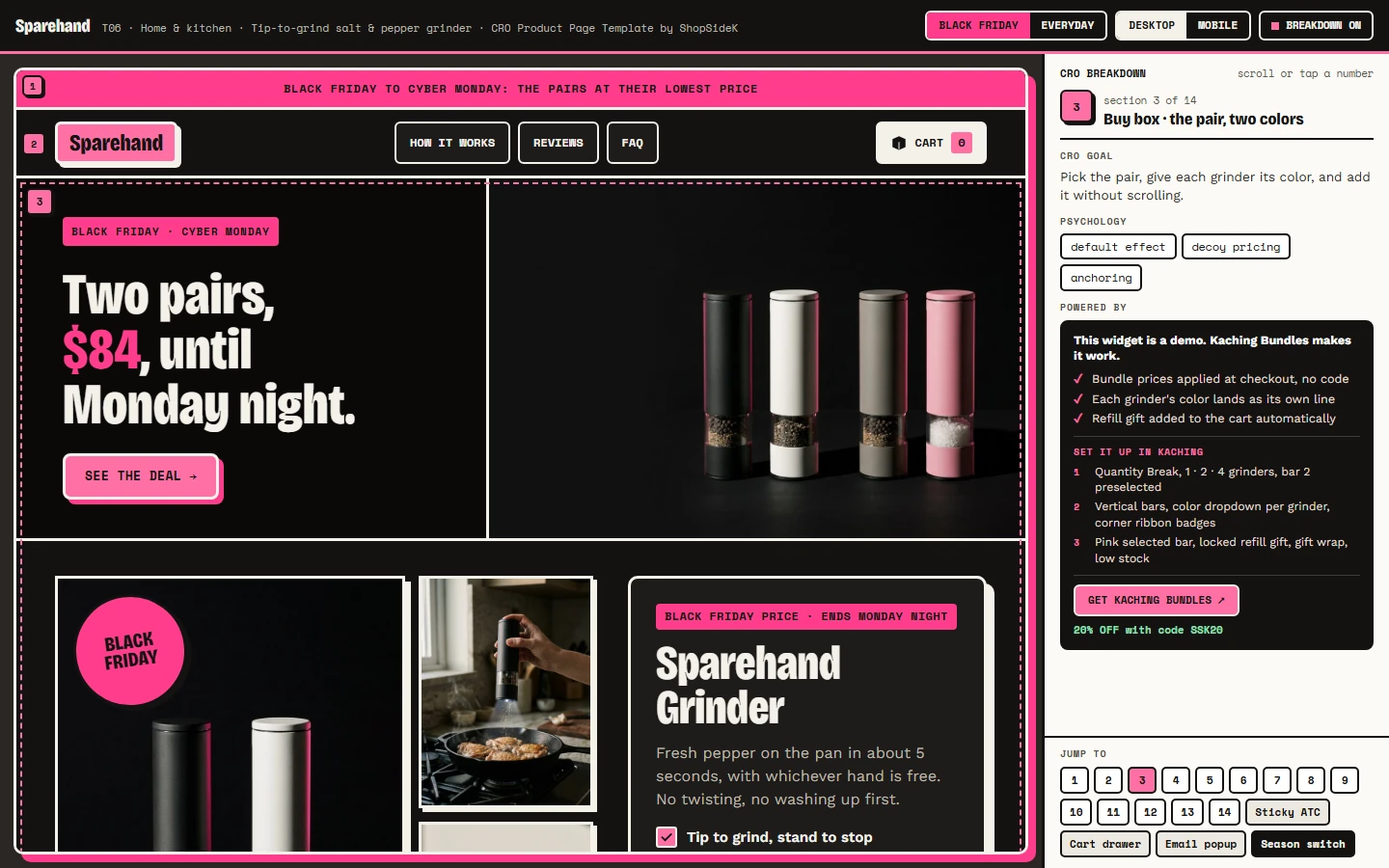
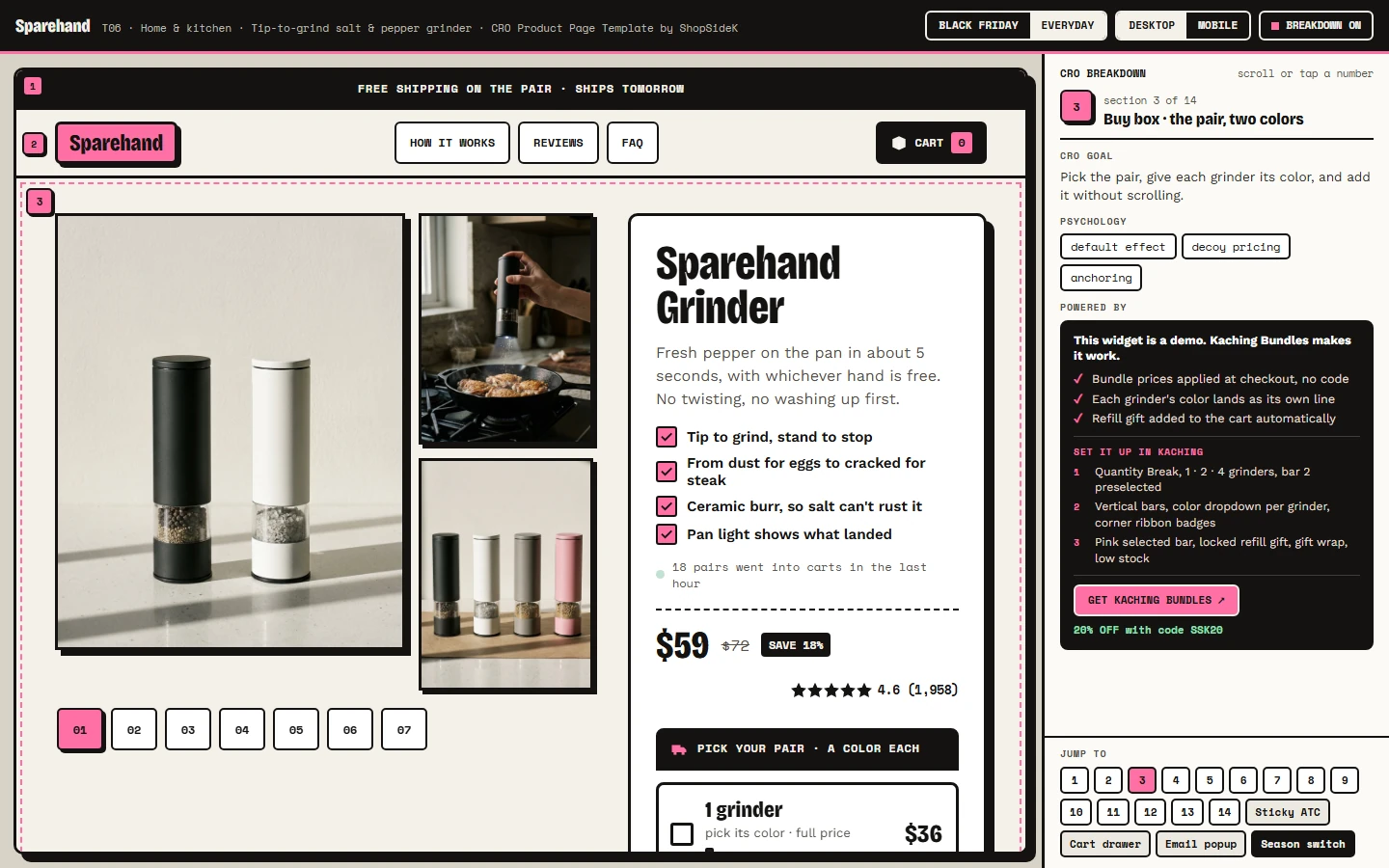
Sparehand sells a rechargeable grinder you tip to grind and stand up to stop. Salt and pepper come in twos, so the pair is the bundle that is already selected when the page loads. The demo has a Black Friday / Everyday switch in its toolbar, so you can flip between the two versions and see exactly what the sale changes.
What changes for Black Friday
- The skin, not the brand. The whole page turns dark (#141312), but the 3 px borders, hard shadows and condensed headlines stay, so it still looks like Sparehand.
- One hot pink, only on money. The pink (#FF3D8B) appears on the top bar, on “$84” in the banner and on a BLACK FRIDAY stamp on the first photo. There is no clipart and no red paint.
- A banner that sells the biggest bundle. “Two pairs, $84, until Monday night.” Its only button scrolls straight to the bundle bars.
- Three photos, not a new gallery. The first photo gets a dark, hard-lit version with the stamp, the banner gets a pink rim light, and one new gallery tab shows the pair in kraft gift boxes. Every other photo stays the same.
- The same Kaching deal, edited. Every bar drops ($36 → $29, $59 → $49, $99 → $84), the single grinder included, so every option reads as on sale.
- A bigger gift on top. Two pairs unlock a free refill trio (pepper, salt and cumin, $20 value) instead of the everyday duo ($14 value).
- No percent on top of the sale. The email popup offers free gift wrap instead of its usual 10% off.
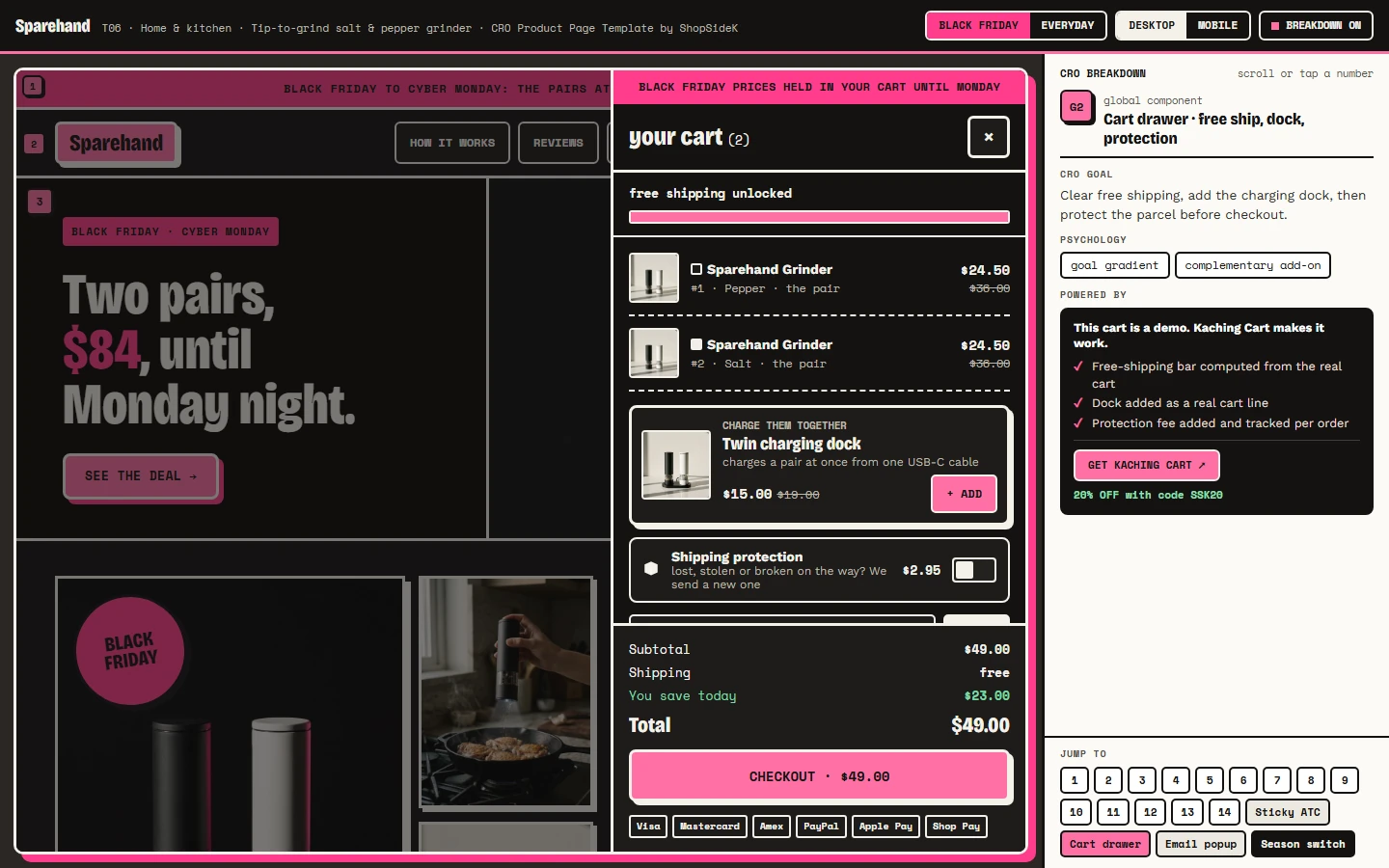
- A calm cart. The cart drawer’s top line reads “Black Friday prices held in your cart until Monday” instead of running a second countdown.
The price ladder: everyday vs Black Friday
| Bundle bar | Everyday price | Black Friday price | Crossed-out price on sale | Per grinder on sale |
|---|---|---|---|---|
| 1 grinder | $36 | $29 | $36 | $29 |
| The pair (preselected) | $59 | $49 | $72 | $24.50 |
| Two pairs | $99 + free refill duo | $84 + free refill trio | $144 | $21 |
The crossed-out price is always the quantity × the everyday single price of $36, which is the number Kaching computes. Flip the demo back to Everyday and the pair’s $72 stays exactly where it was. Only the sale price moves.
What Black Friday leaves alone
Below the bundle bars, nothing changes, on purpose. The body still has to sell a grinder to someone who already owns a pepper mill:
- Five rounds. A scored test against a twist mill. In the demo, one teaspoon takes about 5 seconds of tipping against 38 twists, and after six months of coarse salt the ceramic burr is unchanged while the steel one shows rust by week 9.
- Tin age. The shopper types the best-by date from their own tin of pre-ground pepper, and the page works out how long ago it was ground.
- Back of the stove. Grinder labels flip to show what a second pair can hold, such as cumin, which answers the banner’s open question: who needs two pairs?
- The guarantee. Two years on the motor, burr and battery, 60 days to return it used, and one button back to the pair.
The cart: from $49 to $64
Adding the pair opens the cart drawer, built with Kaching Cart, with one recommended add-on: a twin charging dock ($15) that charges both grinders. One tap takes the order from $49 to $64. The rule behind it is to upsell what completes the order, not whatever else is on the shelf.
One thing not to copy
The “back of the stove” section works only because the second pair holds different spices. If a second unit of your product would just repeat the first, leave that section out.
Rebuild the offer in Kaching
- A Quantity Break deal with bars of 1, 2 and 4 grinders, bar 2 preselected.
- Vertical bars, a color dropdown for each grinder, a corner ribbon badge.
- For Black Friday, edit the same deal’s prices and gift, then edit them back on the Tuesday after Cyber Monday.
For how to choose the bars and their discounts, see how to set profitable Shopify quantity breaks.
Example 2: Halfdark, a Cyber Monday page built on mix & match
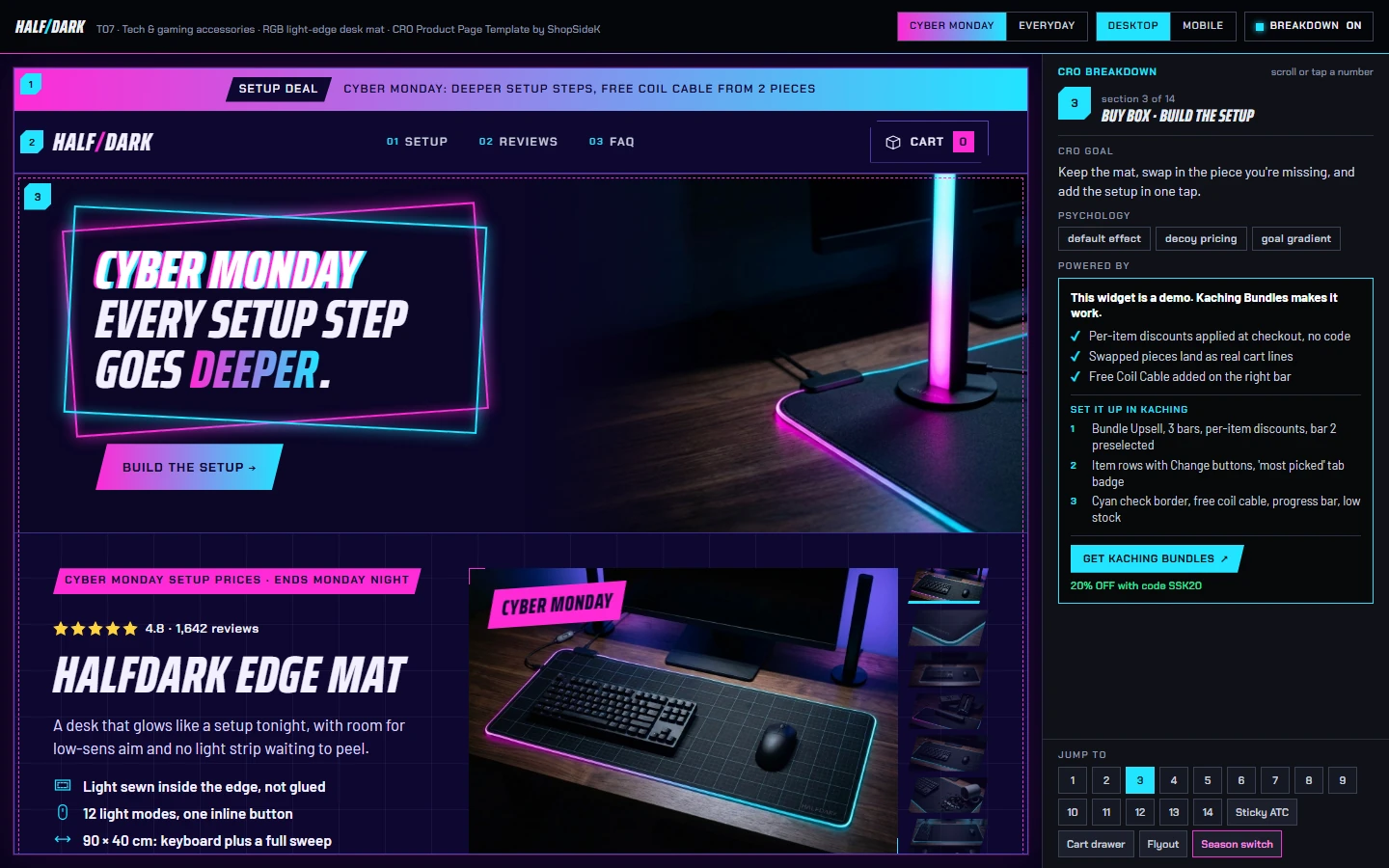
Halfdark sells a 90 × 40 cm desk mat with 12 light modes and one inline button. Instead of discounting one mat, the Cyber Monday version sells the whole corner of the desk: the mat plus light bars, a monitor light or a headset stand, with a discount on each item that grows with every piece.
What changes for Cyber Monday
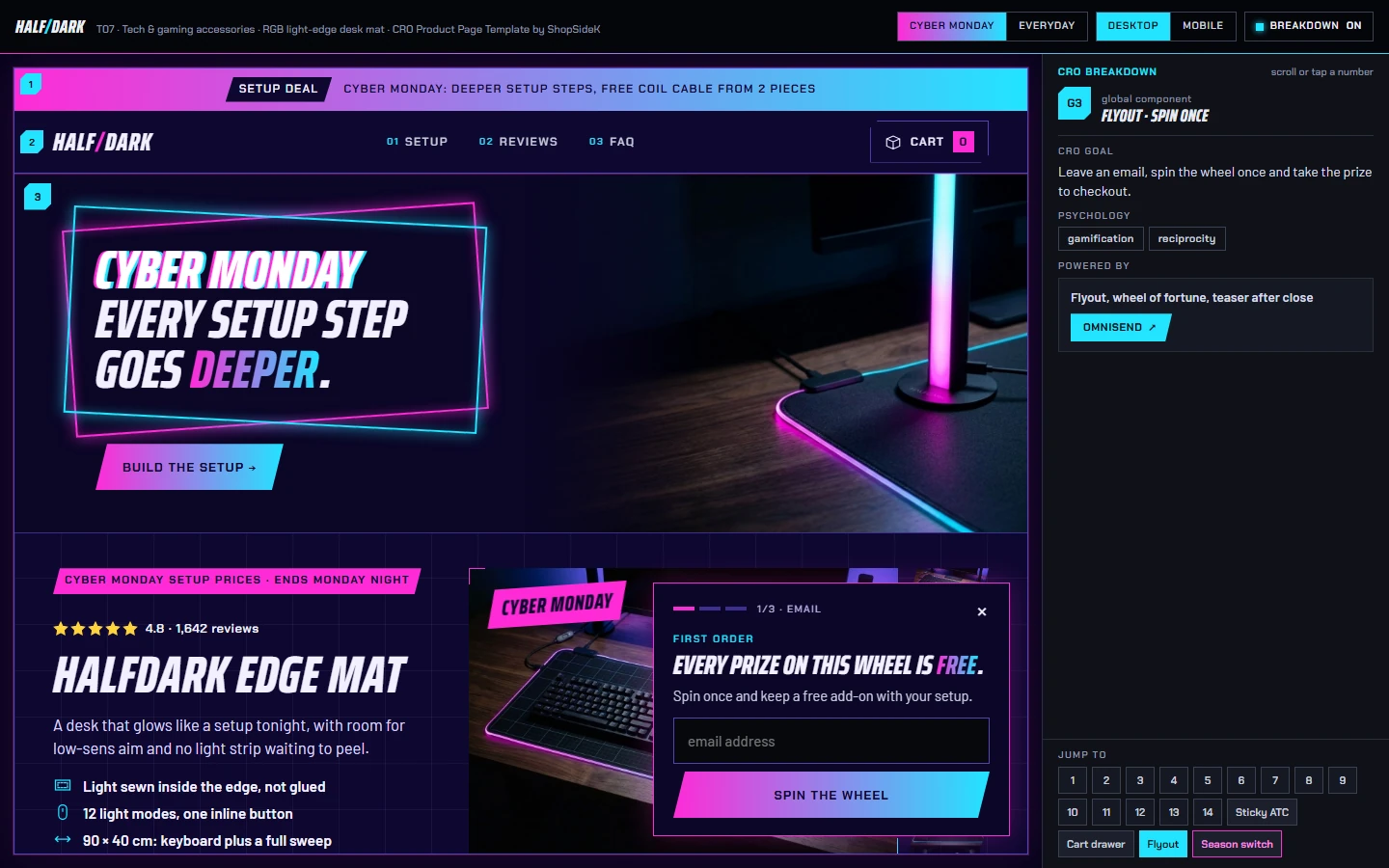
- Re-tint, don’t redecorate. The page’s own 17 color tokens shift into a neon night: an indigo background, and wherever the everyday page uses cyan, the sale version uses a magenta-to-cyan gradient (the top bar, the add-to-cart button, the timer). The cut corners, slanted type and corner brackets stay. The only additions are a double neon frame on the banner and a CYBER MONDAY tag.
- Every step goes deeper. The discount on each item moves from 0 / 15 / 25% to 10 / 25 / 35%. The banner reads “Cyber Monday: every setup step goes deeper.”
- A progress bar names the next step. A three-segment bar under the bundle bars always names the next sale step, for example “Add 1 more piece → 35% off each item.”
- The gift moves down a step. The free Coil Cable ($15 value) normally comes with bar 3. For Cyber Monday it comes with bars 2 and 3, so the preselected bundle already includes it.
- The spin wheel stops giving percents. The email popup’s wheel (Omnisend) offers only free items, a mouse bungee, a gift box, a cable kit or a wrist rest, with one line under it: “no extra % on sale prices.”
The price ladder: everyday vs Cyber Monday
| Bundle bar | Everyday price | Cyber Monday price | Crossed-out price |
|---|---|---|---|
| Just the mat | $45 (no discount) | $40.50 (10% off) | $45 |
| Mat + 1 piece (preselected) | $76.50 (15% off each item) | $67.50 (25% off each item) + free Coil Cable | $90 |
| Mat + 2 pieces | $96.75 (25% off each item) + free Coil Cable | $83.85 (35% off each item) + free Coil Cable | $129 |
Prices are shown with the default pieces: the Light Bars ($45), then the Monitor Light ($39). Each added piece has a Change button that swaps it for another setup piece, such as the Headset Stand ($35), and the crossed-out price is always the items’ own everyday total.
The body sells the evening, not the sale
- Loadout. Shoppers equip pieces on a drawn desk, like a loadout screen in a game, and one button loads that setup into the bundle widget.
- Press it. One inline button cycles the light modes, a long press dims them and a double press turns them off, which answers “another RGB app to install?”
- Room to swing. A calculator takes the shopper’s mouse DPI and in-game sensitivity and works out whether a 180-degree turn fits on the mat: 52 cm needed against 54 cm of mouse lane in the demo.
- 0:42 am. A group chat about a coffee spill shows the coating wiping clean, with the strip still lit.
The cart: open it on a win
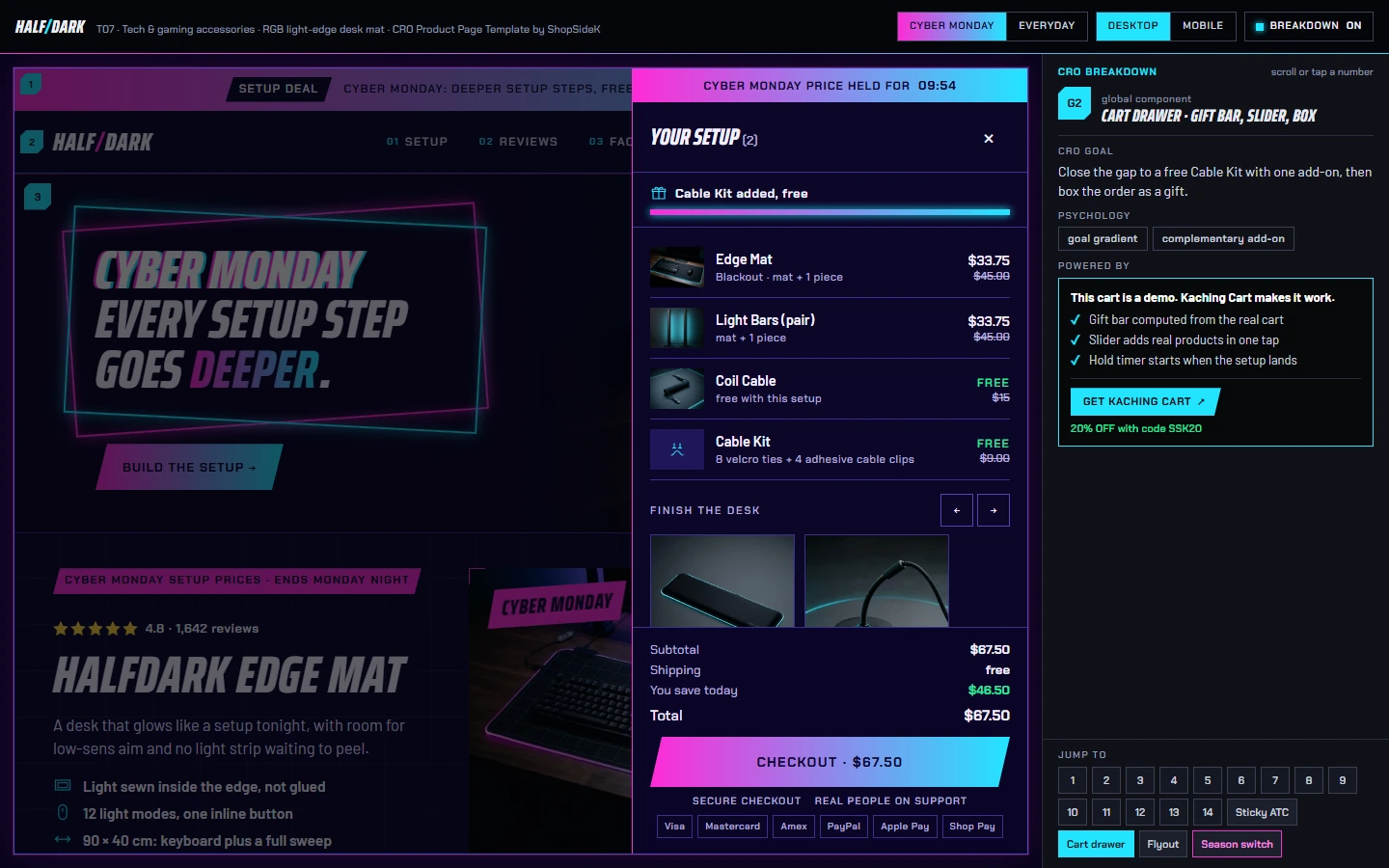
The cart drawer, built with Kaching Cart, has a free-gift bar that adds a Cable Kit from $65. The preselected Cyber Monday bundle is $67.50, so the first time the shopper opens the cart, the bar already reads “Cable Kit added, free.” One tap on a Wrist Rest ($19) takes the order from $67.50 to $86.50.
One thing not to copy
The DPI calculator works only because competitive players know their own DPI and sensitivity. If your buyers don’t know the numbers a tool asks for, leave the tool out: an input nobody can fill in is a dead end.
Rebuild the offer in Kaching
- A Bundle Upsell deal with three bars, the mat alone, the mat + 1 piece and the mat + 2 pieces, a discount on each item, bar 2 preselected.
- Item rows with a Change button, a progress bar under the bars, a “most picked” badge.
- For Cyber Monday, edit the same deal’s per-item discounts and move the free gift to bar 2, then edit both back afterwards.
For when a mix & match bundle beats a fixed one, see fixed vs mix and match bundles on Shopify.
The crossed-out price: what you can honestly strike on Black Friday
In sale week, the crossed-out price is the number shoppers trust least. Both examples follow one rule: the struck price is a price that was actually charged before the sale, and it stays the same when the sale ends. Here is how that rule lines up with US and EU pricing rules. This is general information, not legal advice.
- United States. The FTC’s Guides Against Deceptive Pricing treat a former-price comparison as fair when the former price is one the item was openly and actively offered at, in good faith, for a reasonably substantial period, and as deceptive when the “former” price was inflated so the reduction looks bigger (16 CFR 233.1).
- European Union. Any announced price reduction must show the prior price, defined as the lowest price the seller applied during at least the 30 days before the reduction (Article 6a, Directive 98/6/EC). On September 26, 2024, the EU Court of Justice ruled that a percentage or other claim of a price reduction must be calculated from that 30-day lowest price, not from the price charged just before the sale (CJEU press release on case C-330/23, Aldi Süd).
What that means for a bundle page:
- Strike everyday prices, never raised ones. Strike the quantity × the everyday unit price, or the sum of the items’ everyday prices, which is what Kaching computes. Don’t raise everyday prices in October to make November’s cut look larger.
- Check bundle bars twice if you sell in the EU. If your everyday pair already sold at $59, a regulator may treat $59, not 2 × $36, as the pair’s prior price. Safer options are to compare the sale price with the everyday bundle price, or to hide the crossed-out price on the deal bars. Kaching documents a short CSS rule that hides it (Kaching help: remove the compare-at price).
- Run the switch test. Flip your page back to everyday after the sale. If the struck numbers change, they were not the real prices.
How to set up a Black Friday bundle in Kaching
Both pages keep one Kaching deal per product and edit it for the sale, instead of publishing a second sale deal on top. That keeps one source of truth for the prices shoppers see on the bars and at checkout, and nothing extra to unpublish after the sale.
- Pick the deal type. Use a Quantity Break for more units of one product, and a Bundle Upsell for different products with a discount on each item (Kaching help: bundle types).
- Record the everyday numbers first. Screenshot every bar’s price, discount and gift before you edit anything. This is your crossed-out price record and the exact state you restore after Cyber Monday.
- Edit the bars for the sale. Lower every bar, the single unit included, and change the gift on the top bar or move it down a step. For why a gift can beat a deeper cut, see free gift vs discount on Shopify.
- Add one add-on that completes the order. A dock for two grinders or a wrist rest for a desk mat, not a random product (Kaching help: add an upsell to your deal bar).
- Stop old codes from stacking. Turn off percent-off popups for the week and set old discount codes so they don’t combine with sale prices. See how Shopify bundle discounts stack.
- Model the worst order. For both demos we priced the worst possible order: the deepest sale bar, the gift, free shipping and an old 10% code stacked on top. On the demos’ assumed costs, that order still kept about 50–52% gross margin, and about 55–56% when old codes can’t combine with sale prices. Your costs will differ, so run your own numbers in the Shopify discount break-even calculator.
- Edit everything back after Cyber Monday. Restore the prices, gifts and popup offer you recorded in step 2.
Black Friday product page checklist
- One accent color, used only on prices and deal elements.
- A banner that names a bundle, a price and the real end of the sale.
- A sale version of the first photo; the rest of the gallery unchanged.
- Every bundle bar on sale, the single unit included.
- Crossed-out prices that are real everyday prices (in the EU, the lowest price of the last 30 days).
- A gift that grows, or moves down a step, instead of an extra percent.
- A line under the bars that names the next step.
- A popup that offers a free item, not a percent that stacks on sale prices.
- One urgency cue at a time: if you add a sale timer, it replaces the low-stock line and counts to the sale’s real end.
- A cart that opens on a reward already earned, or on a calm “prices held until Monday” line.
- One cart add-on that completes the order.
- Everyday prices recorded, and a reminder to restore them after Cyber Monday.
FAQ
Should I make a separate Black Friday landing page or change my product pages?
Change the product pages first. Many shoppers from ads, emails and search land directly on a product page, so a deal that exists only on a landing page is invisible to them. A landing or collection page can list your deals; the product page has to sell one.
What should change on a product page for Black Friday?
The top of the page and the cart: the colors, a banner with the deal, the first photo, the bundle prices and gift, the popup offer and the cart’s top line. The sections that explain the product, the reviews and the guarantee stay as they are.
Should a Black Friday product page have a countdown timer?
Only one that counts to the sale’s real end, and only one urgency cue at a time. Sparehand replaces its low-stock line with a sale timer under the banner, and its cart shows a calm “prices held until Monday” line instead of a second countdown. The demo’s timer restarts at midnight so there is always a countdown on screen; on a live store, point it at the end of Cyber Monday.
How deep should Black Friday bundle discounts be?
Deep enough that every bar reads as on sale, after you check the worst case: the sale price, plus the gift, plus free shipping, plus any old code a shopper could stack. Sparehand’s sale bars save 19%, 32% and 42% against the crossed-out price, and Halfdark’s take 10%, 25% and 35% off each item. Growing the gift instead of the percent keeps the deepest bar from eating the margin. For more on discount depth, see how deep quantity break discounts should go.
What crossed-out price can I show on Black Friday?
In the US, a price you openly offered the product at, in good faith, for a reasonably substantial period before the sale. In the EU, the lowest price you applied in the 30 days before the reduction. In both, never raise prices before the sale to make the discount look bigger.
When should I set up my Black Friday product page?
At least two weeks before Black Friday, which falls on November 27, 2026 (Cyber Monday is November 30). That leaves time to test the bars, gifts and codes in a real checkout before the traffic arrives.
Can I use these templates on my store?
Both pages are free, interactive demos with a breakdown of every section and the Kaching settings behind the bundle widget. They are design references, not installable themes: you rebuild the offer in Kaching and the sections in your own theme.
More product page examples
Sparehand and Halfdark are two of the templates in the ShopSideK library of Shopify product page templates, each with a free CRO breakdown. For everyday pages in the same niches, browse the home & kitchen templates and the tech & gaming accessories templates.
Sources
- Shopify: merchants generate record-breaking $14.6 billion in Black Friday Cyber Monday sales (December 2, 2025)
- 16 CFR 233.1, Former price comparisons (eCFR)
- Directive 98/6/EC on price indication, consolidated text including Article 6a (EUR-Lex)
- Court of Justice of the EU, press release on case C-330/23, Aldi Süd (September 26, 2024)
- Kaching help: different bundle types
- Kaching help: add an upsell to your deal bar
- Kaching help: remove the compare-at price from a bundle deal