

You have a Shopify store generating consistent sales, and rising Meta ad costs are eating into your margins. You know TikTok Ads can deliver cheaper clicks and unlock a younger customer base. Yet, you hesitate before hitting publish. You worry about burning your ad spend on slow mobile traffic, losing conversion tracking to iOS privacy blocks, or waking up to an automated 24-hour ad account suspension.
Before you spend your first dollar on TikTok Ads, your store must clear 10 operational checkpoints across 4 core pillars: Store Readiness, Tracking Integrity, Compliance Shield, and Creative Budget Strategy. Passing this pre-flight audit ensures your product pages load fast, your checkout captures mobile buyers instantly, your data tracking captures every sale, and your ad account stays fully compliant.
My take is simple: never send paid TikTok traffic to an unverified Shopify store. Over 85% of early campaign failures and account bans do not come from bad ad creatives. They happen because of slow mobile landing pages, broken checkout friction, unverified tracking pixels, and missing footer legal disclosures that trigger automated compliance suspensions.
Why Running a Pre-Launch Checklist Protects Your Budget and Ad Account
TikTok Ads behave differently from Meta or Google Ads. TikTok users are mobile-only, fast-scrolling impulse shoppers. If your product page takes three seconds to load, they leave before seeing your offer. If your checkout requires typing out a long shipping address on a small screen, they abandon their cart.
Even worse, TikTok enforces strict automated trust-and-safety filters on new advertiser accounts. When you submit your first ad, automated bots crawl your Shopify landing page within minutes. If your store lacks standard legal disclosures, clear contact details, or matching product prices, the system flags and suspends your ad account before your campaign delivers a single impression.
Running a systematic 10-point pre-launch audit protects your capital in three ways:
- Eliminates Technical Waste: Ensures 100% of your paid traffic lands on fast, mobile-optimized pages that convert.
- Secures Data Attribution: Captures every purchase through server-side tracking so TikTok’s algorithm can optimize your ad delivery.
- Prevents Account Bans: Satisfies TikTok’s advertising policies before automated bots review your store.
This checklist is built specifically for growth-stage Shopify merchants ($15,000 to $80,000+ per month in revenue) testing TikTok Ads for the first time. If your store has validated product demand and at least $200 in testing budget, work through the four operational pillars below.
Pillar 1: Shopify Store & Mobile Checkout Readiness
Your ad creative gets the click, but your Shopify store makes the sale. Before sending paid traffic, verify that your mobile storefront removes every point of purchase friction.
Checkpoint 1: Mobile Page Speed (<2.5s Target)
TikTok traffic is 100% mobile. A desktop page that loads in 1.5 seconds might take 4 seconds on a mobile cellular connection. Research shows that every 1-second delay in mobile load time reduces ecommerce conversion rates by approximately 7%. If your product page takes longer than 2.5 seconds to render, you are paying for clicks that bounce before viewing your product.
Test your store’s primary product landing page using Google PageSpeed Insights. Look specifically at the Mobile performance tab.
- Pass Criteria: Mobile page load time under 2.5 seconds (or Largest Contentful Paint under 2.5s) with a mobile performance score of 65 or higher.
- How to Fix: Convert all hero images and product galleries to modern WebP formats. Remove unused Shopify apps and third-party tracking scripts that inject heavy JavaScript into your theme header.
Checkpoint 2: High-Converting 1-Click Mobile Checkout (Shop Pay & Accelerated Pay)
Mobile shoppers hate filling out checkout forms. Forcing a TikTok user to manually enter their name, physical address, and 16-digit credit card number creates friction that destroys impulse conversion rates.
Enabling accelerated mobile checkouts like Shop Pay, Apple Pay, and PayPal allows shoppers to complete their purchase with a single thumb tap using pre-saved shipping and billing details. Studies show that Shop Pay increases mobile checkout conversion rates by up to 50% compared to standard multi-step guest checkout.
- Pass Criteria: A visible 1-click accelerated checkout button (Shop Pay or Apple Pay) appears directly on your product page and in the mobile cart drawer.
- How to Fix: In your Shopify Admin, navigate to Settings > Payments. Ensure Shopify Payments is active and check the box to enable Shop Pay, Apple Pay, and Google Pay.
Checkpoint 3: Product Unit Economics & Gross Margin Sanity Check (≥60–70% Margin)
Paid customer acquisition requires healthy gross profit margins. During your initial testing phase, your customer acquisition cost (CAC) will fluctuate as the algorithm learns which audience segments convert. Selling products with thin margins leaves zero financial cushion to absorb that early testing cost.
Calculate your product’s unit economics using this formula:
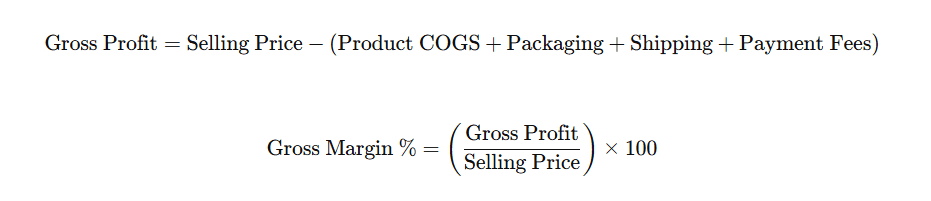
For example, if you sell a skincare set for $60 and your total cost of goods, packaging, shipping, and merchant fees equal $18, your gross profit is $42 (a 70% gross margin). That $42 profit gives you plenty of room to test ads profitably. Conversely, a $25 product with an $8 profit margin gives you almost no margin for testing error.
- Pass Criteria: Your target hero product has at least a 60–70% gross margin or generates at least $30 in gross profit per unit.
- How to Fix: Create product bundles or multi-packs to lift your Average Order Value (AOV), or select a higher-margin hero SKU for your initial TikTok campaigns. Calculate your store’s exact profit threshold with our Break-Even ROAS guide.
Early Launch Tip: If your unit economics are solid, you can further lower your testing risk by claiming promotional ad credits. Eligible new advertisers can claim up to $6,000 in spend-matched ad credits through the official partner link:
Pillar 2: Technical Tracking & TikTok Pixel Integrity
Accurate tracking is the engine of TikTok ad performance. Without reliable conversion data, the bidding algorithm cannot optimize toward users who actually buy.
Checkpoint 4: Official TikTok App & “Maximum” Data Sharing
Many Shopify merchants connect the official TikTok app but leave data sharing set to “Standard.” Standard data sharing relies solely on browser-side cookies. Due to iOS 14.5+ tracking restrictions, Safari cookie limits, and ad blockers, browser-only tracking loses 20% to 30% of your store’s conversion signals.
To capture accurate sales data, you must enable “Maximum” Data Sharing. This setting creates a hybrid tracking architecture:
- Browser Pixel: Captures immediate client-side interactions.
- Server-Side Events API (CAPI): Sends server-to-server conversion data directly from Shopify to TikTok, bypassing browser blockers.
- Advanced Matching: Uses cryptographic SHA-256 hashing to securely match customer signals (email and phone number) with TikTok user profiles.
- Pass Criteria: In your Shopify Admin, open the TikTok sales channel, go to Settings > Data Sharing, and confirm the level is set to “Maximum”.
- How to Fix: If set to Standard or Enhanced, select Maximum and save your changes. Need step-by-step help installing the app? Follow our complete Shopify TikTok Ads setup guide or reference the Shopify Help Center TikTok guide.
Checkpoint 5: Testing Standard Ecommerce Events in Events Manager
Before running ads, verify that all four critical ecommerce events fire cleanly without duplicates or missing values:
- ViewContent (Product Page View)
- AddToCart (Cart Button Click)
- InitiateCheckout (Checkout Started)
- Purchase (Order Complete)
Install the free TikTok Pixel Helper extension in Google Chrome. Visit your Shopify store on desktop, navigate to a product, add it to your cart, and place a test order (using a 100% discount code or Shopify test payment gateway).
- Pass Criteria: TikTok Pixel Helper shows a green checkmark for each event, with correct currency, value, and content_id parameters passed on the order confirmation page. Zero duplicate firing errors reported.
- How to Fix: If events fail to trigger, disconnect and reconnect your TikTok Ads Manager account inside the Shopify TikTok sales channel app.
Checkpoint 6: Clean UTM Tracking Architecture
Do not rely entirely on TikTok Ads Manager for reporting. Cross-verify your ad performance inside Shopify Analytics and Google Analytics 4 (GA4) by adding standardized UTM parameters to every ad destination URL.
Use this standardized UTM parameter formula:
utm_source=tiktok&utm_medium=cpc&utm_campaign={{campaign.name}}&utm_content={{ad.name}}- Pass Criteria: Every ad link uses clean, dynamic TikTok URL parameters that pass campaign and creative names directly into your analytics platform.
- How to Fix: Apply the standard UTM string to the URL Tracking / Destination URL field when building your ad creatives in TikTok Ads Manager.
Pillar 3: Account Compliance & Anti-Suspension Shield
The single most frustrating issue for new Shopify advertisers is having their ad account suspended within 24 to 72 hours of registration. In almost every case, this ban is triggered by an automated bot audit flagging missing store disclosures.
Checkpoint 7: Mandatory Shopify Footer Legal Pages & Contact Transparency
TikTok’s official advertising policies require all commercial websites to provide clear legal disclosures and transparent merchant contact information. If an automated review bot crawls your store and cannot locate these four policies in your website footer, your account will be flagged for “Suspicious Business Practices.”
┌────────────────────────────────────────────────────────────────────────┐
│               THE ANTI-SUSPENSION COMPLIANCE SHIELD                    │
│     (4 Mandatory Legal Disclosures Required in Your Shopify Footer)    │
├────────────────────────────────────────────────────────────────────────┤
│ 1. Privacy Policy: Explains data collection, cookies, and user rights. │
│ 2. Refund & Return Policy: Clear timeframes (e.g., 30-day returns),    │
│    eligibility rules, return shipping costs, and refund methods.       │
│ 3. Terms of Service: Standard operating terms and governing law.       │
│ 4. Business Contact Details: Working customer support email AND a      │
│    verifiable physical business address (not just a generic form).     │
└────────────────────────────────────────────────────────────────────────┘
- Pass Criteria: Direct, functional footer links on every page pointing to your Privacy Policy, Refund Policy, Terms of Service, and a Contact Us page displaying a real business address and support email.
- How to Fix: Go to Shopify Admin > Settings > Policies. Generate standard templates, customize them with your actual business details, and link them to your store’s footer navigation menu under Online Store > Navigation. Review the official TikTok Account Review Checklist for full policy specifications.
Checkpoint 8: Ad Creative & Destination Landing Page Consistency
TikTok penalizes and rejects ads that use “bait-and-switch” tactics. What you show in your video creative must match what the shopper sees on your product landing page.
- Pricing & Discounts: If your ad mentions “Get 20% Off,” the product page must show that discount or auto-apply the coupon code at checkout.
- Product Claims: Product features shown in the ad must match the descriptions and specifications listed on your product page.
- Inventory & Availability: Never run ads to sold-out products or landing pages with broken layout elements.
- Pass Criteria: Product name, imagery, pricing, discounts, and benefits presented in your video ad match the destination landing page 100%.
- How to Fix: Create dedicated landing pages for specific ad promotions or update your product page copy to align with your ad script.
Pillar 4: Creative Assets & Budget Testing Strategy
Even a technically perfect store will fail if your video creatives do not match the style and layout of the TikTok platform.
Checkpoint 9: Platform-Native UGC Creatives & UI Safe Zones
Do not run polished, television-style brand commercials on TikTok. TikTok users respond to user-generated content (UGC), founder stories, product demonstrations, and unboxing videos that feel native to their organic feed.
Prepare 3 to 5 distinct video creative variations before launching your first campaign. Testing multiple angles (e.g., Problem/Solution, Demonstration, Unboxing, Testimonial) allows TikTok’s algorithm to find winning combinations.
The 3-Second Hook Rule
According to data from the TikTok Creative Center, over 65% of total brand recall occurs within the first 3 seconds of a video. Use visual pattern interrupts, on-screen text questions, or immediate product action in the first 3 seconds to stop users from scrolling past.
Respecting TikTok UI Safe Zones
TikTok overlays interface elements on top of your video: username and caption text on the bottom, profile and engagement icons on the right, and device status bars at the top. Placing key text or product demonstrations in these areas ruins readability and lowers click-through rates.
┌────────────────────────────────────────────────────────────────────────┐
│                   TIKTOK AD CREATIVE UI SAFE ZONES                     │
│                        (9:16 Vertical Video)                           │
├────────────────────────────────────────────────────────────────────────┤
│ ┌────────────────────────────────────────────────────────────────────┐ │
│ │ ✖ EXCLUSION ZONE: TOP 10% (Status Bar & Search Icon Area)          │ │
│ ├──────────────────────────────────────────────────┬─────────────────┤ │
│ │                                                  │ ✖ EXCLUSION     │ │
│ │                 ✔ SAFE ZONE                      │   ZONE:         │ │
│ │                                                  │   RIGHT 10%     │ │
│ │    Keep all key hooks, product shots, captions,  │   (Profile,     │ │
│ │    and discount stickers inside this central     │   Like, Comment,│ │
│ │    safe rectangle.                               │   Share Icons)  │ │
│ │                                                  │                 │ │
│ ├──────────────────────────────────────────────────┴─────────────────┤ │
│ │ ✖ EXCLUSION ZONE: BOTTOM 20% (Account Name, Caption, Sound Title)  │ │
│ └────────────────────────────────────────────────────────────────────┘ │
└────────────────────────────────────────────────────────────────────────┘
- Pass Criteria: 3 to 5 vertical (9:16, 1080×1920) native UGC videos ready, each featuring a strong 3-second hook and keeping all captions and discount text inside the central safe zone.
- How to Fix: Re-edit your video text overlays in CapCut or your video editor to shift captions toward the center-screen safe area.
Checkpoint 10: Testing Budget Allocation & Ad Credit Claiming
Do not launch TikTok Ads expecting profitability on a $5-per-day budget. The algorithm requires sufficient data to exit the learning phase.
Allocate an initial $200 to $500 testing budget ($20 to $50 per day over a 10 to 14-day testing window). This budget is enough to test 3 to 5 creative variations across broad targeting groups and identify your winning video angle.
You can effectively double your testing runway by claiming official promotional ad credits. When you create your new advertiser account through the ShopSideK partner link, eligible new accounts receive up to $6,000 in spend-matched ad credits. Explore all spend tiers and terms in our TikTok Ad Credit for Shopify guide.
- Pass Criteria: A dedicated $200–$500 testing budget is allocated, and your ad account is registered via the official partner link to lock in promotional credit matching.
- How to Fix: Register your new TikTok Ads Manager account via the approved link before publishing your first ad group.
Testing Budget Action: Set up your account and lock in your credit match before launching your first campaign:
The 10-Point Pre-Launch Verification Scorecard
Before turning on paid traffic, grade your Shopify store against the master pre-flight scorecard below.
| # | Checkpoint | Focus Pillar | Exact Verification Test | Pass Criteria | Action If Failed |
|---|---|---|---|---|---|
| 1 | Mobile Load Speed | Store Readiness | Test mobile URL on Google PageSpeed Insights | Mobile load time < 2.5s; Performance score ≥ 65 | Compress hero images to WebP, remove uninstalled app scripts |
| 2 | Accelerated Checkout | Store Readiness | Inspect mobile product page and cart drawer | Shop Pay, Apple Pay, or PayPal 1-click active | Enable Shop Pay in Shopify Admin > Settings > Payments |
| 3 | Product Unit Economics | Store Readiness | Calculate COGS, shipping, and payment fees | Gross margin ≥ 60–70% or gross profit ≥ $30/unit | Bundle products to increase AOV or choose higher-margin SKU |
| 4 | Maximum Data Sharing | Tracking Integrity | Open Shopify Admin > TikTok Sales Channel | Data Sharing tier set to “Maximum” (Browser + CAPI) | Toggle from Standard/Enhanced to Maximum in app settings |
| 5 | Pixel & Event Test | Tracking Integrity | Run TikTok Pixel Helper extension on test order | ViewContent, AddToCart, Purchase fire without duplicates | Re-authenticate TikTok Sales Channel and verify event triggers |
| 6 | Standardized UTMs | Tracking Integrity | Inspect ad destination URL tracking parameters | Formula: utm_source=tiktok&utm_medium=cpc&utm_campaign={{campaign.name}} | Apply standard UTM template to all ad destination links |
| 7 | Mandatory Legal Links | Compliance Shield | Audit store footer navigation links | Working links to Privacy, Terms, Returns, Physical Address | Add Shopify default legal templates via Settings > Policies |
| 8 | Ad-to-Page Consistency | Compliance Shield | Compare ad copy and pricing with product page | Exact product name, pricing, discounts, and claims match 100% | Align landing page discount codes and claims with ad copy |
| 9 | UGC Video Safe Zones | Creative Strategy | Check video specs (9:16 vertical, 1080p, audio) | 3–5 UGC angles; text avoids top 10%, right 10%, bottom 20% | Re-edit captions and text overlays into central safe zone |
| 10 | Testing Budget & Credit | Budget Strategy | Verify testing runway and account registration | $200–$500 testing budget ready + Partner Link registered | Register via partner link to claim up to $6,000 credit match |
Pass/Fail Action Rubric
Calculate your total score out of 10:
- 9–10 Points: GREEN LIGHT (Ready to Launch)
Your store, tracking, compliance, and creative assets are in top shape. Register your account via the partner link, claim your matched ad credits, and publish your initial $200–$500 test campaign. - 7–8 Points: YELLOW LIGHT (Minor Fixes Required)
You have minor issues (such as missing a physical address in your footer or text overflowing into UI exclusion zones). Spend 1 to 2 hours fixing these specific gaps before spending money. - Under 7 Points: RED LIGHT (Do Not Spend Yet)
Your store has major baseline deficiencies—such as slow load speeds, unconfigured tracking, or sub-50% gross margins. Do not run ads until these core issues are resolved.
Running Example: How “Velox Eyewear” Audited Their Store and Scaled Profitably
To see this pre-flight audit in action, consider Velox Eyewear, a Shopify DTC brand selling polarized sunglasses and blue-light glasses ($68 Average Order Value, 72% gross margin, $38,000 per month in revenue).
The founder, Alex, wanted to launch TikTok Ads to lower customer acquisition costs. Instead of rushing to publish ads, Alex completed the ShopSideK 10-Point Pre-Launch Checklist:
- Pillar 1 (Store Readiness): Alex ran Google PageSpeed Insights; mobile page speed clocked in at 2.1 seconds (PASS). Shop Pay was already active (PASS). Gross margin was 72% with $48.96 gross profit per pair (PASS).
- Pillar 2 (Tracking Integrity): Alex opened the Shopify TikTok sales channel app and discovered Data Sharing was set to “Standard.” He immediately upgraded it to “Maximum” to turn on server-side Events API. He installed the TikTok Pixel Helper and placed a test order, verifying that ViewContent, AddToCart, InitiateCheckout, and Purchase fired cleanly (PASS).
- Pillar 3 (Compliance Shield): Alex audited his footer navigation. His Privacy Policy and Refund Policy were active, but his footer lacked a physical business address and customer support email. He added his business registration address and support email to protect against automated 24-hour account bans (PASS).
- Pillar 4 (Creative & Budget): Alex prepared 4 UGC-style unboxing and demonstration videos. When checking the UI Safe Zone template, he noticed his “20% Off” discount sticker sat in the bottom-right corner where TikTok’s Share button appears. He moved the sticker to the center of the screen (PASS).
The Result: Velox Eyewear achieved a 10/10 Scorecard Pass. Alex registered his ad account through the ShopSideK partner link, claimed his ad credit match, and deployed a $300 test campaign over 14 days.
The campaign generated 21 purchases at a $21.50 CAC ($3.16 ROAS). Because Alex registered via the partner link, TikTok issued a $300 ad credit match, providing Velox Eyewear with $600 in total ad spend to scale their winning video creative.
FAQs About TikTok Ads Readiness
What is the single most common reason new TikTok ad accounts get suspended?
Over 90% of automated 24-to-72-hour account suspensions on new Shopify stores stem from missing footer legal disclosures. When you submit your first ad, TikTok’s automated bots crawl your landing page looking for a Privacy Policy, Terms of Service, Refund/Return Policy, and a physical business address with customer support contact information. If any of these pages are missing or broken, the account is flagged.
Can I run TikTok ads if my store only has a browser pixel installed?
You can technically run ads, but you will lose 20% to 30% of your conversion tracking data due to iOS 14.5+ restrictions and mobile browser ad blockers. Setting Data Sharing to “Maximum” inside the Shopify TikTok app activates server-side Events API (CAPI), ensuring accurate attribution and better algorithmic bidding.
How much budget do I need to test TikTok ads for the first time?
We recommend a testing runway of $200 to $500 ($20 to $50 per day over 10 to 14 days). This budget gives the algorithm enough data to test 3 to 5 creative variations and find converting audiences. Claiming a new advertiser partner credit match doubles your ad buying power during this initial testing phase.
Do I need to show my face in TikTok ad creatives to get sales?
No. While founder-led and creator-led videos perform well, effective TikTok ad formats include voiceover product demonstrations, aesthetic unboxing clips, before-and-after transformations, and ASMR packaging videos. The most critical factor is capturing attention within the first 3 seconds and keeping text inside UI safe zones.
Final Verdict: Launch Your TikTok Ads With Matched Ad Credit
Launching TikTok Ads without completing a pre-flight audit is the fastest way to waste ad spend and risk account suspensions. Taking one hour to verify your mobile speed, enable Shop Pay, configure Maximum Data Sharing, and add required footer policies sets your store up for scalable, profitable customer acquisition.
Follow this 3-step transition to launch your campaigns:
- Claim Your Partner Ad Credit: Register your new TikTok Ads Manager account through the approved partner link to qualify for up to $6,000 in spend-matched promotional ad credits.
- Connect the Shopify TikTok App: Set Data Sharing to “Maximum” to activate server-side Events API tracking.
- Publish Your First Campaign: Deploy your initial 3 to 5 UGC video creatives with a $200–$500 testing budget. Once your checklist is complete, follow our first TikTok ad campaign walkthrough to publish your ads.
Ready to launch? Claim your promotional credit match and start testing today:




