

You have steady sales, your baskets vary, and you want shoppers to add one more item before they pay. A Shopify cart upsell does that: an add-on shown in the cart drawer that changes with what’s already in it. Offer the refill, part or accessory of the product in the cart, or, if your baskets are mixed, one inexpensive item that suits most orders. Price it well under your typical order, start at full price or a small discount, and set one rule per main product so the offer follows the cart. Then judge it by contribution profit per cart, not by upsell revenue.
What does a cart upsell do, and what does free Shopify give you?
A cart upsell is an extra product offered inside the cart or cart drawer, chosen from what the shopper has already added, so it reaches people who are about to check out. That also sets its limit: it reaches only shoppers who open the cart. A shopper who clicks an unbranded Buy it now button skips the cart and goes straight to checkout.
Free Shopify gets you part of the way. The Search & Discovery app lets you set complementary products, “products often bought in addition to a selected product”, and builds related products, which are similar ones. Complementary products show as a block on your product pages, and only in compatible themes; Shopify’s help page doesn’t describe a cart display. So an offer that sits in the cart drawer and changes with its contents comes from your theme or an app.
Kaching CartDrawer (it shows as Kaching Cart in your admin) can read those same Search & Discovery recommendations and show them in the cart, or you can pick the add-ons yourself, rule by rule. If you haven’t settled on the cart as the place for your first offer, bundle vs upsell: product page, cart or after checkout compares the three placements and works out what one lost order costs.
What should you upsell in the Shopify cart?
Upsell the item that completes what’s already in the cart: the refill, part or accessory of the main product. When baskets have no clear pair, use one low-cost item that suits most orders. Start with the first row that matches your store:
| What’s in the cart | What to show | The rule that does it |
|---|---|---|
| A product that runs out or needs a companion (a razor, a coffee machine, a water bottle) | its refill, part or accessory | condition Product is any of the main product |
| Products from one category | one add-on that suits the whole category | condition Collection |
| Mixed baskets, no clear pair | one inexpensive item most orders could use, or Shopify’s related products | no condition, or AI Recommendation set to Related |
| A total just under your free-shipping threshold | an item priced to close the gap | condition Cart value |
| A gift order or fragile items | gift wrap or shipping protection as a toggle | the upsell toggle |
| The add-on itself | nothing | Hide upsell if product in cart already |
Every setting in the last column except the toggle is in Kaching Cart’s Product upsell module, and the setup steps are below; gift wrap or shipping protection is a separate upsell toggle module. Add a second row only once the first has a few weeks of data.
The first row is where most stores have their best pair, and your own orders show it. Export your orders and count which products appear together; how to choose products to bundle walks through that count. If Shopify’s related products have to fill the slot instead, they lean on purchase history, which needs previous sales of the product; without it, Shopify falls back on product descriptions (English storefronts only) or related collections, which are looser matches.
The free-shipping row only works once the threshold is right: it should sit above your typical order and be checked against your margin, and setting a free shipping threshold from your orders covers how. A gift that’s added to the cart by itself when the order qualifies is a different offer, covered in free gift with purchase on Shopify.
How many add-ons should the cart show, and at what price?
Show one to three add-ons, priced well under your typical order. Kaching Cart allows up to 25 products in one rule, but a drawer is small, especially on a phone, and every extra card sits between the shopper and the checkout button.
Two habits keep the offer sharp:
- One rule per main product, not one rule for the whole store. A rule for the coffee machine shows filters; a rule for the mug shows a second mug. A store-wide list of bestsellers shows both shoppers the same thing.
- A price the shopper doesn’t have to think about. The add-on is a decision made in a few seconds on the way to checkout. If it costs as much as the main product, it’s a second purchase, and that belongs on the product page as a bundle, not in the drawer.
Should you discount a cart upsell?
Discount a cart upsell only if the discount brings enough extra takers to pay for itself, and on a low-priced add-on it needs a lot of them. The numbers below are an example; replace each one with your own.
The example add-on sells for $16.00. It costs $4.80, packing it adds $0.40, and it fits in the same parcel at the same shipping rate, so shipping doesn’t change. Payment fees are an assumed 2.9% of the add-on’s price, with no second fixed fee because it’s part of the same order. Contribution profit per add-on is the price minus those costs (how that measure is built is explained in does a bundle raise profit or only AOV):
| Add-on price | Payment fee | Contribution per add-on | Takers needed to match 6 at full price |
|---|---|---|---|
| $16.00, full price | $0.46 | $10.34 | 6.00 |
| $14.40, 10% off | $0.42 | $8.78 | 7.07 |
| $12.80, 20% off | $0.37 | $7.23 | 8.58 |
Each row: price − $4.80 − $0.40 − fee. Fees are rounded to cents (16.00 × 2.9% = 0.464 → $0.46). At full price, 6 takers per 100 carts earn 6 × $10.34 = $62.04. To earn the same, 10% off needs $62.04 ÷ $8.78 = 7.07 takers, which is 17.8% more, and 20% off needs $62.04 ÷ $7.23 = 8.58 takers, 43.0% more.
Whether a discount wins depends entirely on how many extra shoppers it brings, and only a test shows that. The 6 takers per 100 carts is an assumption here: if your real number is lower, the extra takers a discount needs are fewer in count but the same in percentage, so the hurdle doesn’t get easier. One more cost to watch: if the add-on lifts a cart over your free-shipping threshold, the shipping you pay on that order belongs in the sum.
I’d launch at full price, or at a small discount if you want the Saved % badge to show, and test a deeper one against it before keeping it. To try your own numbers, use the Discount Break-Even Calculator. How a cart discount meets discount codes is covered in Shopify bundle discount stacking.
How to set up a Shopify cart upsell in Kaching Cart
On my development store, I went through Kaching Cart’s setup guide and editor, product upsell included. The labels below were read from the app in November 2026 and can change as it’s updated.
1. Create the cart. On the app’s home page, the Quick Setup Guide starts with Create the cart drawer; click Create cart. The editor opens with a switch at the top that reads Cart is disabled: that’s the one that turns the drawer on, so leave it off until you’re ready.
2. Turn off other cart drawers. Kaching tells you to make sure no other cart drawer app is enabled, because more than one can cause conflicts. If another app already runs your drawer, turn it off in your theme’s app embeds so only Kaching Cart is enabled.
3. Add an upsell rule. In the editor, open Product upsell and turn on its switch. Under Upsell rules, click Add new upsell rule. Give it a Rule name (internal use), then under Display conditions click Add condition and choose what triggers it: Cart value, Product, Collection, Variant, Purchase type, Customer tag, Customer or Market. Conditions can be joined with OR and AND. Under Upsell products, click Add products or collections and pick the add-on. Each product gets a price setting, Discounted % (e.g. 10% off), and the field filled in 10 when a product was added, so type your own number. To launch at full price, open the price menu next to it and check which options your version offers; the percentage option is the one shown here. Click Confirm.
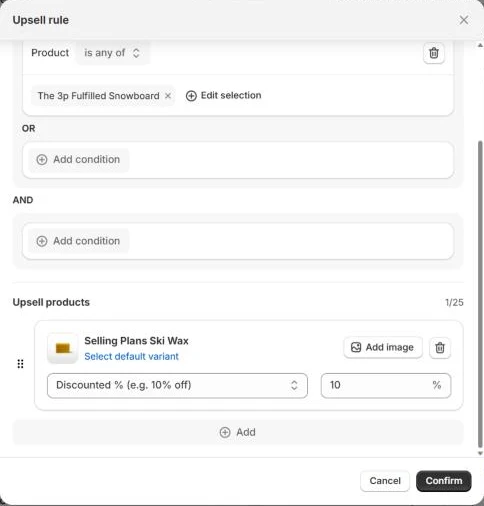
Kaching Cart admin, November 2026
4. Or let Shopify pick the add-on. The same list holds an AI Recommendation rule with a Recommendation algorithm. Related lets Shopify choose from order history and shopper behavior; Complementary uses the pairs you set yourself in Search & Discovery, and shows an upsell only for products you’ve set up there. On a catalog with few sales per product, rules written by hand are safer than the related picks.
5. Keep the offer clean. Leave Hide upsell if product in cart already ticked, so the add-on disappears once the shopper takes it. Show “Saved %” badge shows the discount on the card.
6. Save and switch it on. Save the cart, then back on the home page use Enable Kaching Cart store widget. and click Activate: it opens your theme editor, where you enable the Kaching Cart app embed and save. The drawer doesn’t appear on your live store until that app embed is active. Then go back to the editor and turn on the switch at the top, the one that read Cart is disabled, and save again: the embed and that switch are two separate steps, and the drawer needs both.
Before you install, read my Kaching Cart Upsell review for what the app does well and where it falls short.
Why isn’t my cart upsell showing?
A cart upsell usually doesn’t show because the module is off or unsaved, the add-on is already in the cart, or the product isn’t available to that shopper. Check these in order:
- The module is off or the change isn’t saved. The Product upsell switch has to be on and the cart saved.
- The drawer isn’t live. The Kaching Cart app embed has to be active in your theme.
- The cart itself is switched off. The switch at the top of the cart editor has to be on.
- The add-on is already in the cart. With Hide upsell if product in cart already on, that’s by design.
- The product isn’t sold in the shopper’s market. If you use Shopify Markets, the add-on has to be included in the market you’re testing from.
- The product was deleted or archived. It won’t show.
- The product is out of stock. The card may still appear, but the add button is hidden.
- Complementary mode, and no pair set for this product. Only products you’ve configured in Search & Discovery get an upsell.
- The gift wrap or shipping protection toggle is missing. It relies on a “Shipping Protection” product the app creates; if that product was deleted or changed in your Shopify admin, the toggle may stop working.
And if the shopper clicked Buy it now, they never saw the cart at all.
What to watch after launch
Three numbers, compared with the weeks before the upsell went live:
- The share of carts that reach checkout. If it drops, the drawer is doing too much. Remove cards before you change the offer.
- How many carts take the add-on. That’s the number the discount table above runs on.
- Contribution profit per cart, not upsell revenue. A deeper discount always sells more add-ons; the table shows how many more it needs.
For a cleaner answer than before-and-after, Kaching Cart has a Create A/B test button at the top of the editor. How to A/B test a bundle offer covers how long to run it and how to pick the winner by profit per visitor.
If you also run an offer after checkout, I wouldn’t put the same product in both places at two different discounts: a shopper who saw it at full price in the cart and at 15% off after paying has learned to wait. What to put on that page is in Shopify post-purchase upsell, and running a bundle, a cart offer and a post-purchase offer together is in running several Shopify offers together.
Your next step
This week: pull your last 90 days of orders, take your five best sellers, and write down the one product each is most often bought with. Set one rule for the top pair, at full price, with Hide upsell if product in cart already on, and give it a few weeks before you add the next rule or a discount. If you’re not sure the cart is the right first offer for your store, the free AOV & Bundle Audit tells you which offer fits.
Kaching CartDrawer has a 14-day free trial, and its plans step up by orders per month, from $9.99 for 99 orders a month (as of November 2026). It has to be the only cart drawer app on your store, and it can’t reach shoppers who skip the cart with Buy it now.
(Use code SSK20 for 20% OFF)

