Profit Margin Calculator

Optimize your pricing strategy. Accurately calculate your Net Profit per sale and visualize your cost distribution instantly.

Cost Breakdown

?
$
?
%
?
$
?
$

Profit Overview

Net Profit / Sale
$0.00
Selling Price
$0.00
Gross Margin
0.00%
OpEx Impact
0.00%
Net Margin
0.00%
Cost Distribution Total Cost: $0.00
Product: 0%
Ads: 0%
Ship: 0%
Net Profit: 0%

The Ultimate Shopify Profit Margin Calculator & Growth Guide

Launching a Shopify store is exciting, but true success comes from knowing your numbers. Beyond beautiful product photos and a clever brand name, your profit margin is the single most critical metric for survival and growth. It dictates your pricing strategy, marketing budget, and ultimately, your store’s long-term health.

To get started, you need a clear picture of your profitability. Our free Shopify profit margin calculator is the first step. It’s designed to help you accurately calculate your net profit per sale and visualize your cost distribution instantly, turning complex calculations into a clear action plan.

Use our calculator to find your profit margin, then see how easy it is to manage your finances with a free trial of Shopify.

If you want to see the numbers in action, I’ve recorded a video tutorial on how to use ultimate Shopify profit margin calculator and growth guide.

How to Use Shopify Profit Margin Calculator: A Step-by-Step Guide

Our calculator is more than just a tool; it’s a diagnostic for your business. By understanding each input and output, you can move from simply calculating your profit to actively improving it. Here’s how to get the most out of it.

Part 1: Enter Your Costs in the “Cost Breakdown” Section

This first section is where you input all the variable costs associated with a single sale. Accuracy here is key to getting a true picture of your profitability.

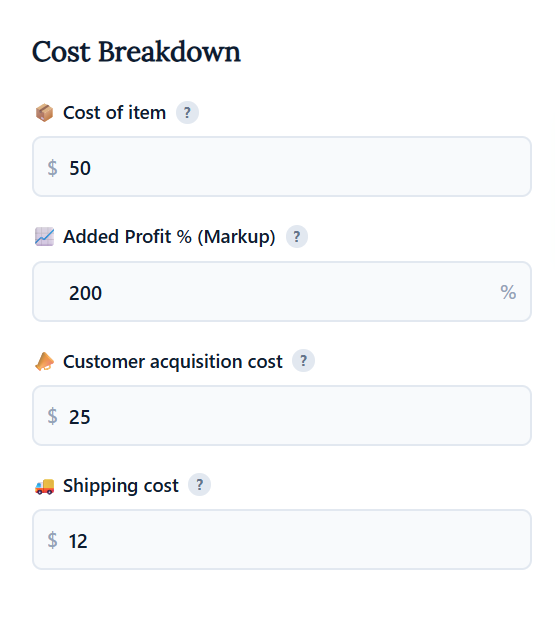
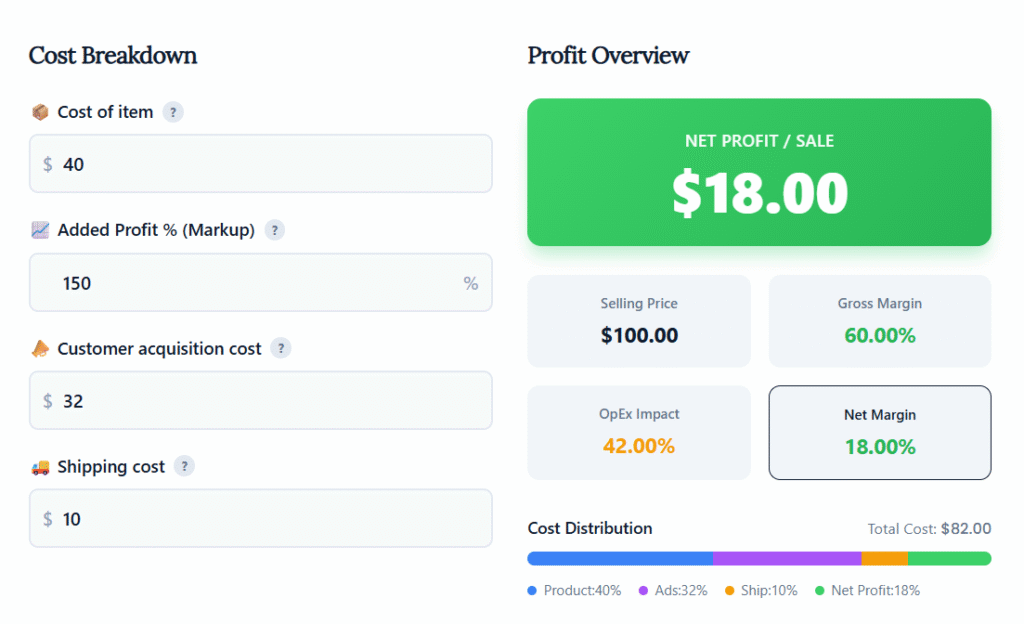
  • Cost of item: This is your Cost of Goods Sold (COGS). Enter the amount you pay your supplier for one unit of the product. If you manufacture the product yourself, include all raw material costs.
  • Added Profit % (Markup): This is how you set your selling price. A 100% markup means you are doubling the item’s cost to determine the final price. The calculator uses this percentage to automatically generate your Selling Price.
  • Customer acquisition cost (CAC): This is your average marketing spend to acquire one customer. To find it, divide your total ad spend by the number of sales from that campaign. For example, if you spend $100 on ads to get 10 sales, your CAC is $10 per sale.
  • Shipping cost: Include the total cost to ship the item to your customer. Don’t forget to factor in the price of boxes, mailers, tape, and any other packaging materials.

shopify profit margin calculator cost breakdown

Part 2: Understand Your “Profit Overview”

Once you’ve entered your costs, the calculator instantly generates your “Profit Overview.” This section tells the financial story of each sale.

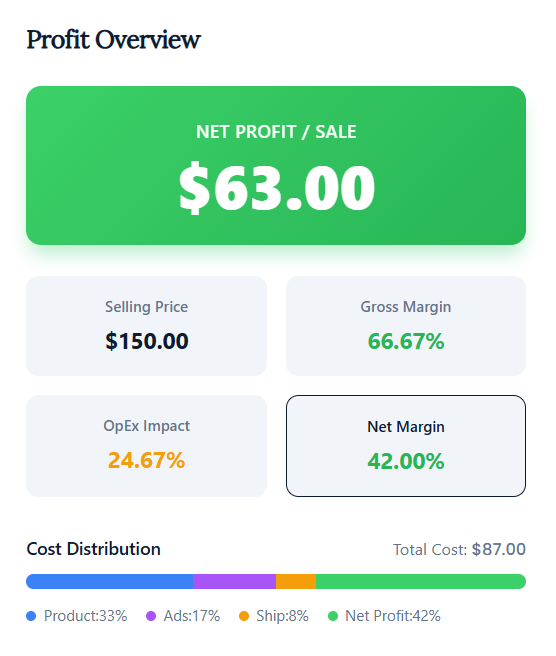
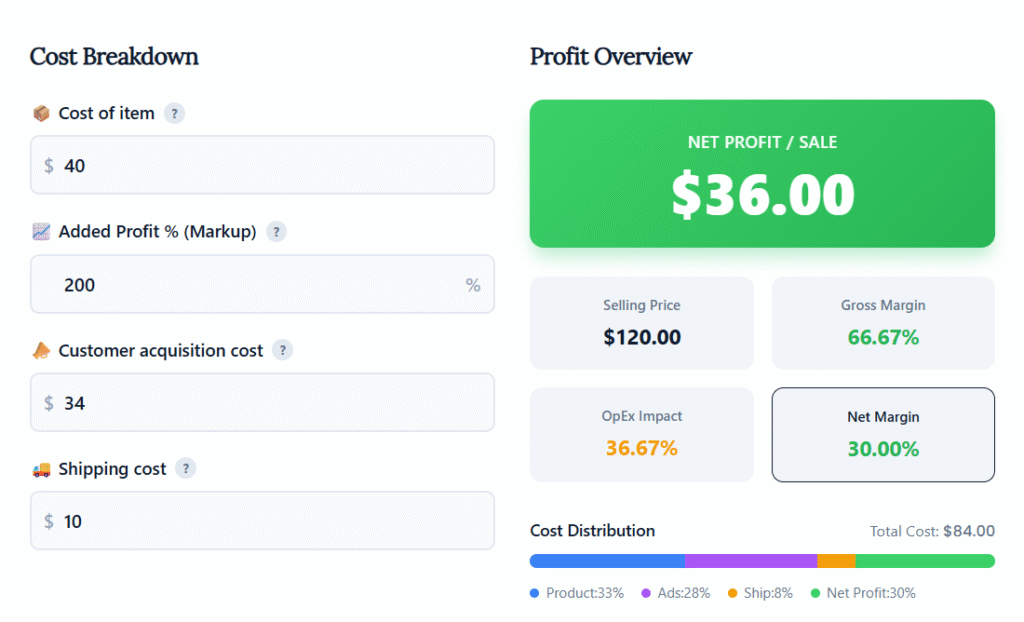
  • Selling Price & Gross Margin: First, the tool calculates your final Selling Price based on your markup. It then shows your Gross Margin—the profit you make before subtracting operational expenses like advertising and shipping. This is your profit on the product itself.
  • OpEx Impact: This metric is your competitive edge. “OpEx Impact” shows you exactly what percentage of the selling price is consumed by your operational expenses (CAC and shipping). A high number here is a red flag that these costs are eating away at your potential profit.
  • Net Profit / Sale & Net Margin: To me, these are your most important numbers. Net Profit / Sale is the actual cash you earn from a single transaction. Net Margin shows that profit as a percentage of the selling price. This is the ultimate metric to track for your store’s financial health.

shopify profit margin calculator profit overview

Part 3: Visualize Where Your Money Goes with “Cost Distribution”

Finally, the “Cost Distribution” chart gives you an instant visual breakdown of your revenue. This pie chart helps you see the biggest drains on your income at a glance.

Is your product cost too high compared to everything else? Are your shipping costs or ad spend taking up too much of the final sale price? This visualization helps you spot problems and opportunities immediately, so you know exactly where to focus your optimization efforts.

Beyond One Sale: How to Calculate Your Monthly Break-Even Point

Knowing your profit on a single sale is the first step. The next is understanding how that number scales across your entire business. This is where you connect per-product profitability to your overall monthly goals and determine your break-even point—the moment your store starts making real money.

Using Your “Net Profit / Sale” for Business Planning

The Net Profit / Sale figure from the calculator is the key to understanding your business’s viability. Think of it as the contribution each sale makes toward paying for your fixed monthly operating costs—the expenses you have to pay whether you make one sale or one hundred. Once those fixed costs are covered, this amount becomes your actual take-home profit.

The Break-Even Formula: How Many Sales Do You Need?

To find out how many sales you need to make each month just to cover your costs, you can use a simple break-even formula. This calculation tells you the minimum number of units you must sell to avoid losing money.

Monthly Break-Even Point (in units) = Total Monthly Fixed Costs / Net Profit per Sale

A Practical Example: From a Single Sale to Monthly Profit

Let’s put this formula into action with a clear, step-by-step example.

First, imagine our calculator shows your Net Profit / Sale is $63.00.

Next, list your total fixed monthly costs. These are the recurring platform and software fees you pay each month. For a detailed analysis of what to expect, our complete budget breakdown covers the real Shopify website cost.

Don’t forget common expenses beyond just your Shopify plan:

  • Shopify Plan: $39/month
  • App Subscriptions: $50/month (e.g., for email marketing, reviews, or loyalty apps)
  • Other Software: $20/month (e.g., accounting or design tools)
  • Total Fixed Costs: $109/month

Now, you can calculate your break-even point:

$109 (Fixed Costs) / $63.00 (Net Profit per Sale) = 1.73

This means you need to sell at least 2 units per month just to cover your fixed costs. Every sale after the second one is pure profit, directly contributing to your business’s growth.


What Your Net Margin Means (And Your Action Plan)

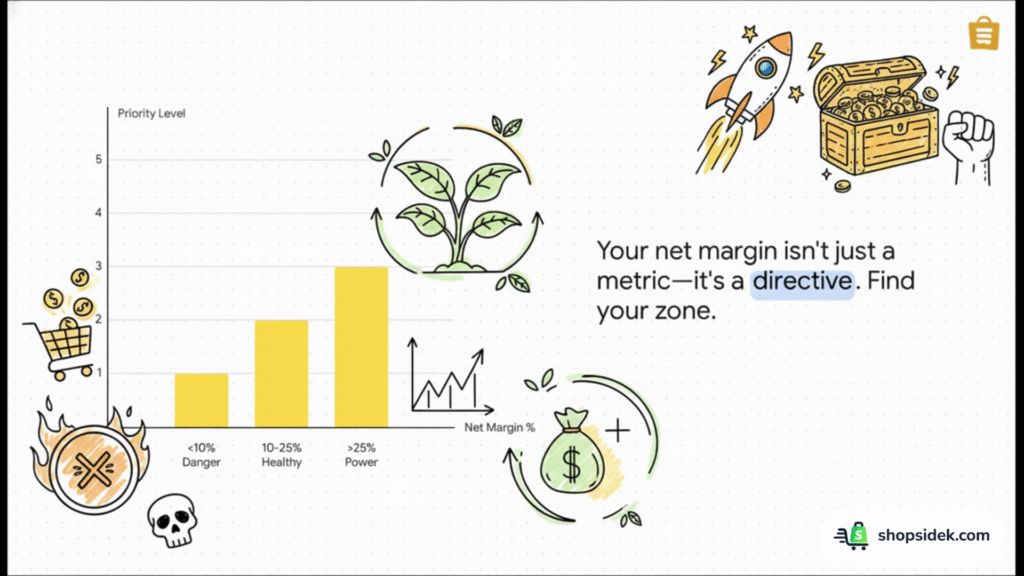
The number from our Shopify profit margin calculator isn’t just a metric—it’s a directive. Your net margin tells you what to do next. Find your range below and start following your tailored action plan.

Below 10% (The Danger Zone): Your Immediate Fix-It Plan

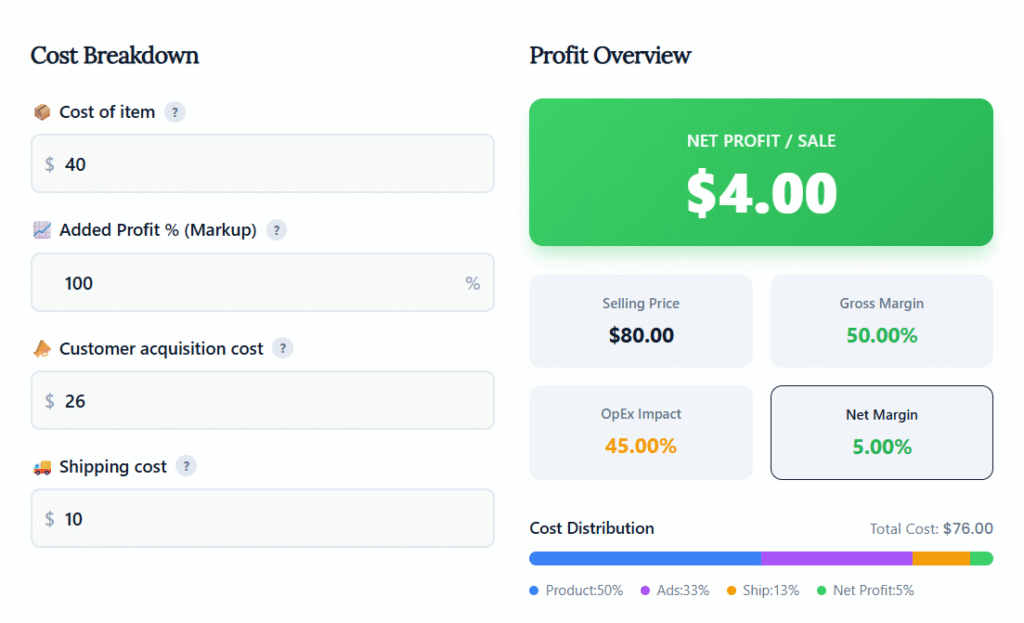
A net margin under 10% is a critical alert. While it might be acceptable for very high-volume businesses. For most Shopify stores, it’s unsustainable and leaves no room for error or reinvestment. Your immediate priority is to reduce your costs.

Start by looking at your “OpEx Impact” in the calculator. If it’s high, focus on optimizing your ad spend and finding more efficient shipping solutions. Next, revisit your Cost of item; contact your suppliers to negotiate better rates or explore sourcing alternatives. A small reduction in your core costs can have a massive impact on your margin.

10% – 25% (The Healthy Zone): How to Optimize for Growth

Congratulations—you’ve built a solid financial foundation. A net margin in this range means your business is healthy and ready to scale profitably. I recommend your focus should shift from cutting costs to strategic growth.

Here are three steps to take:

  1. Increase Average Order Value (AOV): Use post-purchase upsells or create product bundles to encourage customers to spend more in a single transaction.
  2. Improve Conversion Rates: Make small, data-driven tweaks to your product pages and checkout process to turn more visitors into buyers.
  3. Optimize Ad Spend: Go beyond basic CAC and start tracking your Breakeven ROAS (Return On Ad Spend). This metric tells you the exact return you need from your ads to stay profitable.

Above 25% (The Power Zone): How to Protect and Scale Your Profits

A net margin over 25% is exceptional. You have a highly profitable product and a solid business model. Your goal now is to build a defensible brand that can protect your high margins and fuel long-term growth.

Focus on these three areas:

  1. Invest in Customer Retention: Use tools like Yotpo to build powerful loyalty and rewards programs. It’s far cheaper to retain a happy customer than to acquire a new one.
  2. Diversify Marketing Channels: Reduce your reliance on paid ads by exploring content marketing, SEO, or influencer partnerships to build more sustainable traffic sources.
  3. Build a Strong Brand: Your high margin gives you the resources to invest in branding, customer service, and a premium experience that justifies your pricing and insulates you from lower-cost competitors.

Expert Advice: Avoid These 3 Common Shopify Profitability Mistakes

In my experience helping hundreds of merchants navigate their finances, I’ve seen a few costly mistakes pop up time and again.

To confirm my observations and provide an even deeper insight, I reached out to Daniel Carter, an ecommerce CPA who has helped over 100 Shopify stores scale profitably. I asked him about the most common errors he sees.

His top warning? “The biggest mistake I see is merchants ignoring the ‘reverse’ costs,” Carter says. “Forgetting to factor in the cost of processing returns and replacing damaged goods can silently erase your profits. A 20% margin can become 5% without you even realizing it.”

Beyond returns, Carter highlights three critical mistakes that new store owners make:

  1. Ignoring the full cost of shipping. The postage price is just the beginning. True shipping costs include boxes, mailers, tape, labels, and protective filler. These small items add up, and failing to account for them in your pricing can erode your margin on every single order.
  2. Underestimating app subscription creep. That brilliant reviews app for $15/month? The helpful upsell app for $20/month? Individually, they seem insignificant. But together, these subscriptions can create hundreds of dollars in fixed monthly costs, dramatically raising your break-even point.
  3. Pricing based on markup instead of a target net margin. Many sellers simply double their product cost (a 100% markup) and call it a day. Profitable stores work backward. They decide on a target net profit margin (e.g., 20%) and use that to calculate the final selling price after all variable costs—including ads and shipping—are accounted for. This profit-first approach ensures your pricing strategy is built for growth from day one.

What’s a Good Net Margin? (2026 Benchmarks for Shopify Sellers)

One of the most common questions new store owners ask is, “Is my profit margin any good?” Personally, I think the answer always depends on your industry.

A tech retailer selling high-volume, low-margin products will have a very different financial profile than a boutique selling high-margin, low-volume handmade goods.

While your specific numbers will vary, you can use industry benchmarks as a helpful guide to set realistic goals. The table below shows the typical gross margin ranges for popular ecommerce sectors. This is your profit before deducting costs like marketing and shipping.

Industry Average Gross Margin Range
Digital Products 70% – 90%
Beauty and Cosmetics 50% – 60%+
Fashion and Apparel 30% – 50%
Home Goods 25% – 45%
Electronics 10% – 20%

So, where does that leave your net margin?

After you subtract your operational costs—like advertising, shipping, app fees, and transaction fees—your net margin will be lower. According to experts in the Shopify community, a healthy net profit margin for most ecommerce stores is between 10% and 20%.

If your gross margin is within your industry’s average range but your net margin is below 10%, it’s a clear sign that your operational expenses are too high and need to be optimized.

Start Building Your Profitable Business on Shopify Today

Understanding your profit margin is not a one-time task—it’s the foundation of your ongoing growth strategy. Every pricing decision you make, every marketing campaign you launch, and every cost you cut should be guided by this critical number. A clear view of your profitability is what separates struggling stores from successful ones.

Now that you know your numbers, it’s time to put them to work. The Shopify free trial is the perfect risk-free environment to test your pricing and build your store. To make the most of that crucial starting period, you can follow our 90-day plan to launch a profitable store from day one.

Shopify provides all the integrated tools you need to control your costs, optimize your pricing, and scale your business with confidence.

🚀 Start Your Free Shopify Trial and Build a Profitable Store

Note: I’m a Shopify Media Partner, which means I might earn a small commission if you sign up through my link. It doesn’t cost you anything extra and helps keep this blog running.

What is the difference between Markup and Margin?

How do I calculate the average profit margin for my entire Shopify store?

When should I consider using a paid profit tracking app?

How can I improve my profit margin if I can't lower my product costs?

How do taxes affect my final net profit?